
導入
The Fender Mustang LTX50 is a versatile 50-watt modeling combo amplifier designed for guitarists seeking a wide range of authentic Fender tones and modern features. Equipped with a 12-inch Celestion G12P-80 speaker, it delivers dynamic sound suitable for practice, rehearsal, and performance. This amplifier offers 25 amp models and 25 effects, covering various musical styles from clean to high-gain. Its intuitive color display, onboard tuner, and 100 user preset slots provide easy customization and quick access to your preferred sounds. The Mustang LTX50 also features Bluetooth audio streaming for playing along with tracks and USB-C connectivity for direct recording and monitoring.
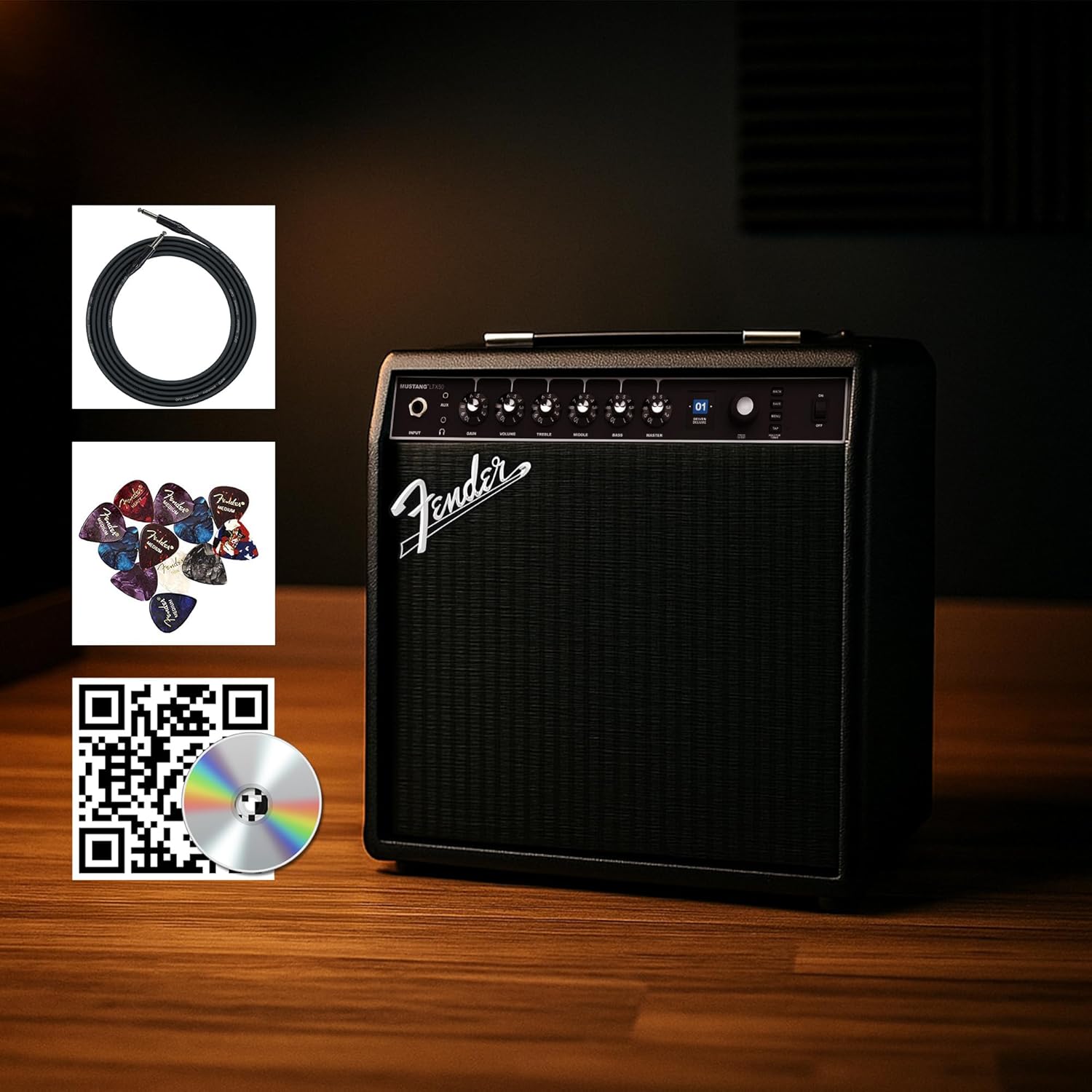
Figure 1: Fender Mustang LTX50 Guitar Combo Amp付属品付きのライフファイアー。
設定
1. 開梱と初期検査
- 慎重に取り外します amp充電器とすべての付属品をパッケージから取り出します。
- 検査する amplifier for any signs of damage that may have occurred during shipping.
- Confirm all included items are present: Mustang LTX50 amplifier, power cord, instrument cable, 12-pack guitar picks, and instructional DVD.
2. 電源の接続
- 確実に amp充電器の電源スイッチがオフの位置になっています。
- Connect the included power cord to the AC input on the rear panel of the amplifier。
- 電源コードのもう一方の端を接地されたコンセントに差し込みます。
3. ギターを接続する
- Use the included instrument cable to connect your guitar to the 入力 フロントパネルのジャック amplifier。
4. 基本的なコントロールview
Familiarize yourself with the front panel controls before powering on the amplifier。
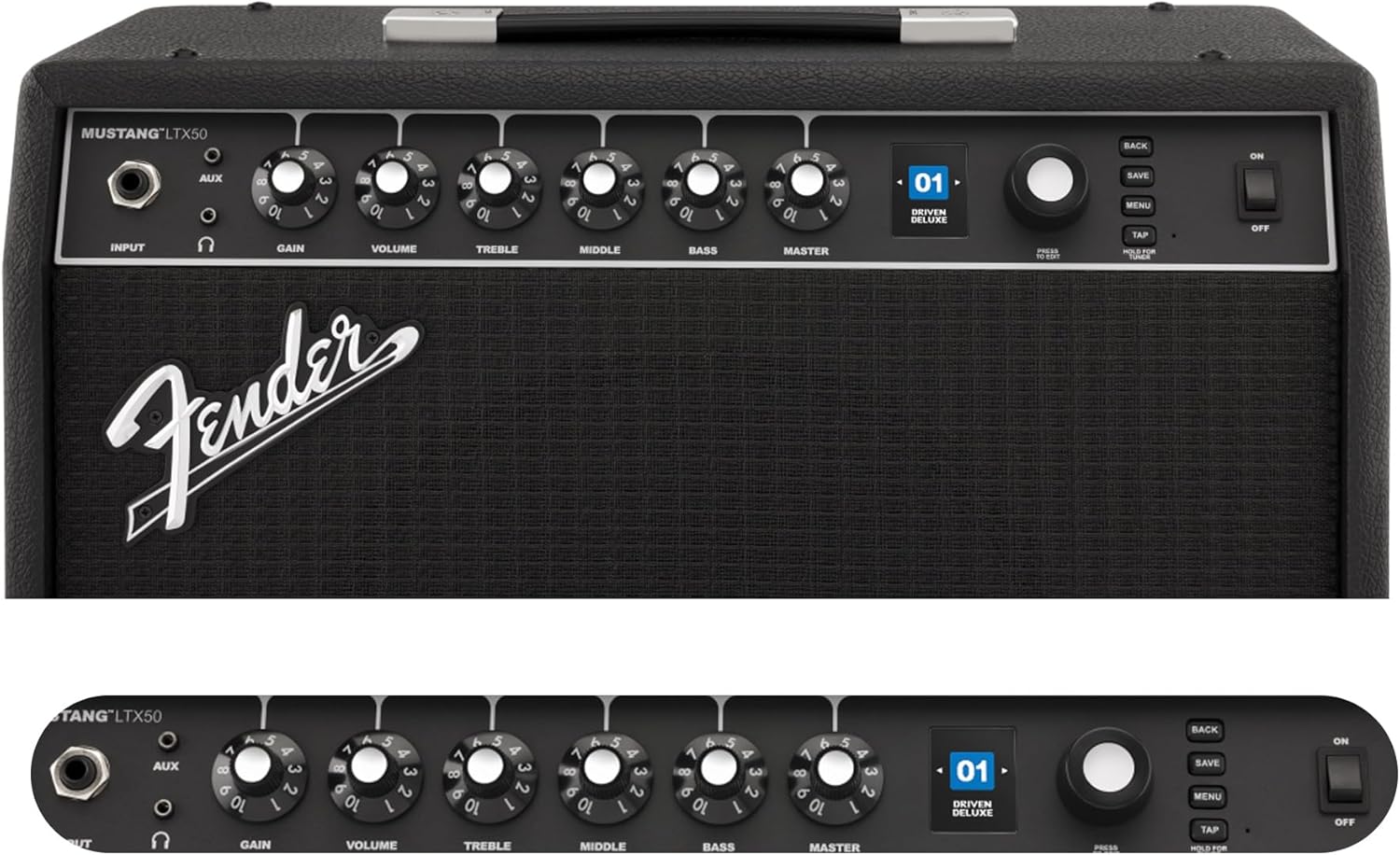
Figure 2: Front Panel Controls of the Mustang LTX50.
操作手順
1.電源のオン/オフ
- To power on, ensure all volume controls are set to minimum, then flip the 力 オンの位置に切り替えます。
- 電源を切るには、 力 OFFの位置に切り替えます。
2. プリセットのナビゲーション
- 使用 エンコーダー knob (large rotary knob) to scroll through the 100 available presets (70 factory, 30 user).
- を押す エンコーダー knob to select a preset.
- The color LCD displays the current preset number and name.
3. 調整 Amp モデルと効果
- を押す メニュー アクセスするためのボタン amplifier の設定。
- Navigate through options like AMP, STOMP, MOD, DELAY, REVERB using the エンコーダー.
- Select an option and use the エンコーダー to choose different amp models or effects.
- Adjust parameters for each effect using the smaller control knobs (GAIN, VOLUME, TREBLE, MIDDLE, BASS, MASTER) or by selecting parameters on the display.
- プレス 保存 to store your customized preset.
4. Using the Built-in Tuner
- を押し続けます タップ button to activate the chromatic tuner.
- Play a single note on your guitar; the display will show the note and indicate if it is sharp, flat, or in tune.
- Press any button or play for a few seconds to exit tuner mode.
5. Fender Tone 3.0 App Control
- Download the Fender Tone 3.0 app from your device's app store (iOS/Android).
- モバイルデバイスで Bluetooth を有効にします。
- 上の ampライファイアー、 メニュー button, navigate to "Bluetooth," and select "Pair."
- Select "Mustang LTX50" from your device's Bluetooth settings to connect.
- Use the app to wirelessly create, edit, save, and share presets, and to manage your ampライファイア設定。
6. Playing Along with Audio (Bluetooth)
- Once paired via Bluetooth, you can stream audio from your mobile device directly to the amplifier。
- Adjust the volume of the streamed audio from your mobile device.
- Alternatively, connect an external audio source to the AUX IN jack on the front panel using a 3.5mm stereo cable.
7. Recording via USB-C
- Connect a USB-C cable from the amplifier's USB-C port to your computer (Mac or PC).
- の amplifier functions as a bidirectional audio interface, allowing direct recording and monitoring.
- Refer to your Digital Audio Workstation (DAW) software's manual for specific setup instructions.
メンテナンス
1. 清掃
- 切断する amplifier from power before cleaning.
- 柔らかく乾いた布を使用して、外部の表面を拭いてください。
- 頑固な汚れには、軽くamp 中性洗剤を含ませた布で拭いた後、乾いた布で拭いてください。
- 研磨剤入りの洗剤、溶剤、ワックスは仕上げを傷める可能性があるため、使用しないでください。
2. ストレージ
- 保存する amp直射日光や極端な温度を避け、涼しく乾燥した場所に保管してください。
- 湿度の高い場所での保管は避けてください。
- If storing for extended periods, cover the ampほこりから守るためのライファイア。
3. Safety Warnings (Proposition 65)
本製品には、カリフォルニア州においてがん、先天性欠損症、その他の生殖機能障害を引き起こすことが知られている化学物質が含まれている可能性があります。詳細については、 www.p65warnings.ca.gov.
トラブルシューティング
音が出ない
- 確実に amplifier is powered on and the power cord is securely connected.
- Check that your guitar is properly connected to the 入力 ジャック。
- 確認する マスター volume and individual preset volume controls are not set to zero.
- Test with a different instrument cable and guitar to rule out faulty equipment.
- If using headphones, ensure they are fully plugged into the headphone jack and that the main speaker is not muted.
歪んだノイズや不要なノイズ
- ギターのボリュームとトーンのコントロールを確認してください。
- 減らす 得 の設定 amplifier。
- Ensure your instrument cable is not damaged or poorly shielded.
- 電気干渉を排除するために、別の電源コンセントを試してください。
- If using high-gain amp models, some distortion is inherent. Adjust settings accordingly.
Bluetooth接続の問題
- Ensure Bluetooth is enabled on both your mobile device and the amplifier。
- 必ず amplifier is in pairing mode (refer to "Fender Tone 3.0 App Control" section).
- モバイルデバイスを amplifier。
- デバイスのペアリングを解除して再度ペアリングしてみてください。
- 両方を再起動します amplifier とモバイル デバイス。
Amplifier Not Responding
- 電源を入れ直します amplifier by turning it off, waiting 10 seconds, and turning it back on.
- If the issue persists, a factory reset may be necessary. Consult the Fender support website for instructions on performing a factory reset for the Mustang LTX50.
仕様
| モデル名 | MUSTANG LTX50 |
| モデル番号 | 2311700000 |
| ブランド | フェンダー |
| Ampリファイアタイプ | デジタルモデリング |
| 出力 | 50ワット |
| スピーカー | 1 x 12" Celestion G12P-80 |
| Amp モデル | 25 |
| 効果 | 25 (distortion, overdrive, compression, modulation, reverb, delay, octave, etc.) |
| プリセット | 70 factory + 100 user slots |
| 画面 | Color LCD with onboard chromatic tuner |
| 接続性 | Bluetooth audio, USB-C bidirectional audio |
| 出力 | XLR line out, Headphone out |
| アプリサポート | Fender Tone 3.0 app (iOS/Android) |
| エンクロージャ材質 | 金属 |
| 商品の寸法(奥行き x 幅 x 高さ) | 奥行き22.3インチ x 幅19.9インチ x 高さ12.3インチ |
| アイテム重量 | 26.4 ポンド |
| 欧州連合 | 840262259088 |

Figure 3: Rear Panel Connections of the Mustang LTX50.
保証情報
The Fender Mustang LTX50 Guitar Combo Ampライフファイアーは 2年間の限定保証. This warranty covers defects in materials and workmanship under normal use. For full terms and conditions, please refer to the warranty documentation included with your product or visit the official Fender webサイト。
サポート
For further assistance, technical support, or service inquiries regarding your Fender Mustang LTX50 amplifier, please visit the official Fender support webサイト:
You may also find additional resources, FAQs, and software updates on the Fender webサイト。