
VANBAR DC509
VANBAR DC509 4K Digital Inner Mirror Drive Recorder User Manual
Model: DC509 | Brand: VANBAR
1. はじめに
ご購入ありがとうございますasing the VANBAR DC509 4K Digital Inner Mirror Drive Recorder. This manual provides detailed instructions for installation, operation, and maintenance to ensure optimal performance and longevity of your device. Please read this manual thoroughly before use and keep it for future reference.
2 製品の特徴
- 純正ミラー交換設計: Replaces your vehicle's original rearview mirror for a seamless, integrated look and eliminates shaking during driving.
- 4KウルトラHD録画: 鮮明で詳細な映像を撮影tage with a high-resolution IMX415 sensor.
- Split Camera System: Front and rear cameras are separate, allowing flexible positioning for optimal viewing angles and preventing obstruction of the driver's view.
- 自動明るさ調整: Equipped with a light sensor to automatically adjust screen brightness for clear visibility in various lighting conditions, day or night.
- HDR/WDRテクノロジー: Enhances image quality in high-contrast environments, reducing overexposure and underexposure.
- 内蔵GPS: 運転ルート、速度、位置データを記録します。
- 駐車監視: Provides 24-hour surveillance with impact detection and time-lapse recording, featuring battery protection.
- Electromagnetic Interference (EMI) Countermeasures: Designed to minimize interference with other vehicle electronics.
- LED Signal Light Compatible: Ensures proper recording of LED traffic signals.
- Anti-Glare Film & Anti-Dazzle Glass: Reduces reflections and glare for improved visibility.
- 防水リアカメラ: 屋外使用に耐える耐久性のあるデザイン。
3. パッケージ内容
すべての品物が揃っていて良好な状態であることを確認してください。
- VANBAR DC509 Digital Inner Mirror Unit
- Front Camera (Split Type)
- リアカメラ
- Dedicated Mount (Type 1, compatible with 90%+ Japanese car models)
- Power Cable with Built-in GPS Antenna
- リアカメラケーブル
- Parking Monitoring Power Cable (with battery protection)
- 64GBmicroSDカード
- 反射防止フィルム
- ユーザーマニュアル(このドキュメント)
Note: If a different mount is required for your specific car model, please contact VANBAR customer support.
4. セットアップとインストール
4.1. ミラーユニットの取り付け
- 車両のオリジナルのリアを慎重に取り外しますview mirror from its base.
- Align the dedicated mount with the mirror unit.
- Insert the screw from the mirror unit into the hole of the mounting bracket.
- Secure the mirror unit to the bracket using the provided fixing screw.
- Insert the screw into the bracket and fix it to the edge mount on your vehicle's windshield.

Image: Step-by-step guide for installing the main mirror unit.
The genuine mirror replacement design ensures a stable installation, eliminating vibrations during driving for clear recording.
4.2. フロントカメラの取り付け
- Attach the split front camera directly to the front windshield in an optimal position that does not obstruct your view.
- Adjust the camera angle as needed. The split design allows for flexible positioning.

Image: Illustrates the flexible installation of the split front camera, showing adjustable lens and stable image recording.
4.3. リアカメラの取り付け
- 防水リアカメラは、車両の後部、通常はナンバープレートの上またはリアウィンドウに取り付けます。
- Route the rear camera cable discreetly to the main mirror unit.
4.4. 配線と電源接続
- Connect the power cable (with built-in GPS antenna) to the mirror unit and route it to your vehicle's power source (e.g., cigarette lighter socket or fuse box).
- For parking monitoring, connect the dedicated parking monitoring power cable to the vehicle's fuse box (ACC, constant power, and ground). This cable includes battery protection to prevent discharge.
- Ensure all wiring is hidden for a clean installation and to prevent interference with driving.

Image: Comparison of traditional wiring vs. hidden wiring design for a neat setup.
4.5. MicroSDカードの挿入
- Insert the provided 64GB microSD card into the designated slot on the mirror unit. Ensure it is inserted correctly until it clicks into place.
5. 操作手順
5.1. 電源のオン/オフ
- 車のイグニッションをオンにすると、デバイスの電源が自動的にオンになり、録画が開始されます。
- イグニッションをオフにすると自動的に電源がオフになります。
5.2. 画面操作
- The 10-inch IPS touch screen allows for intuitive control.
- Swipe left or right to switch between front and rear camera views.
- Tap on the screen to access menu options and settings.
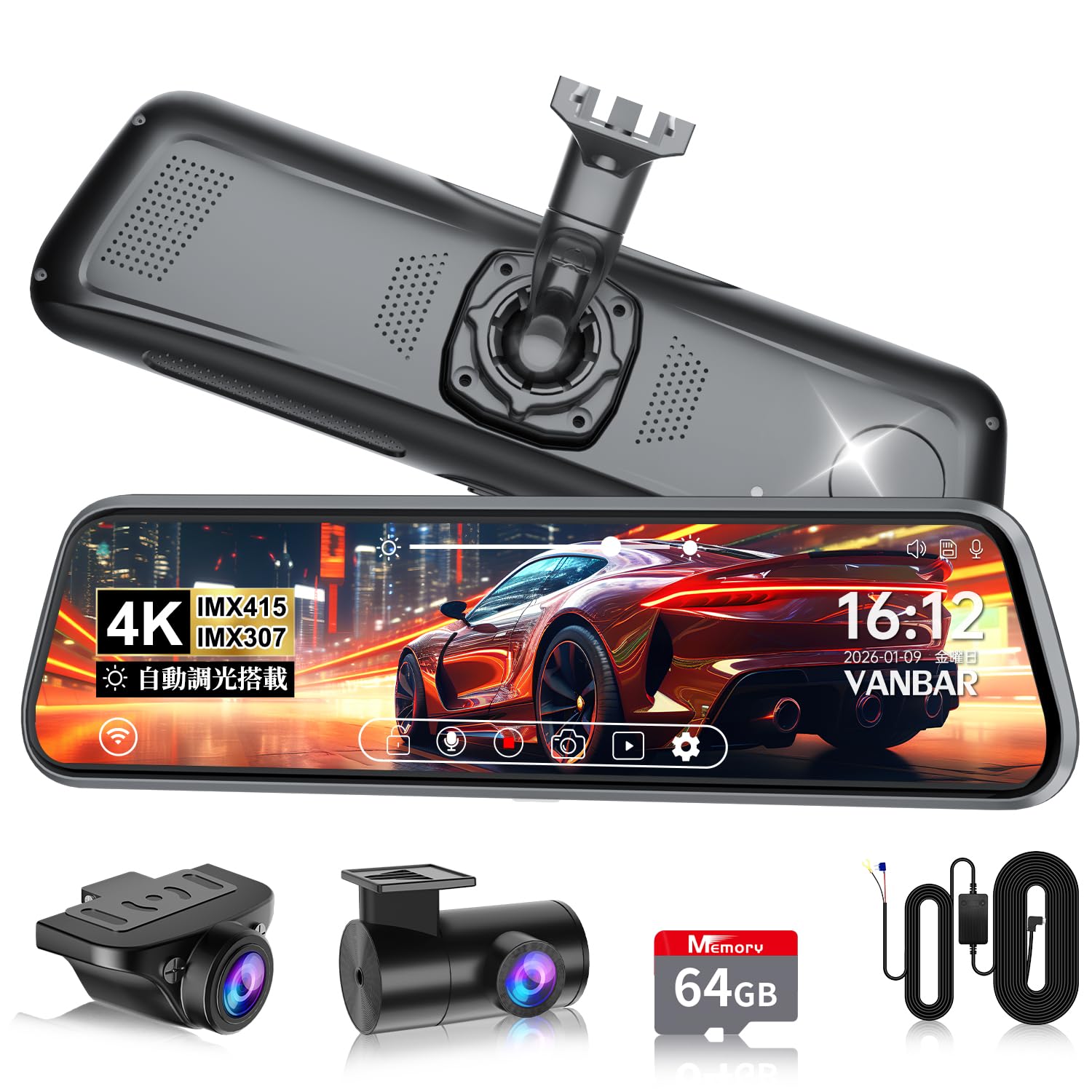
Image: The main display of the VANBAR DC509 showing the digital rearview ミラー機能。
5.3. 自動明るさ調整
- The built-in light sensor automatically adjusts the screen brightness based on ambient light conditions. No manual adjustment is typically needed.
- This feature ensures clear visibility during bright daylight and prevents glare in tunnels or at night.

Image: Demonstrates the automatic brightness adjustment feature of the display.
5.4. 録音モード
- ループ録音: デバイスは継続的に記録し、古いものを上書きします file■メモリーカードがいっぱいになったとき。
- Gセンサー(緊急録画): In case of a sudden impact or collision, the built-in 3-axis G-sensor detects the event and automatically locks the current recording file to prevent it from being overwritten. Sensitivity is 10-level adjustable.
- 駐車監視: When the vehicle is parked, the device can record impacts (impact detection) or use time-lapse recording for extended surveillance. The parking monitoring cable protects your car battery.

Image: Explains the 72-hour parking monitoring function with impact detection, time-lapse recording, and low voltage保護。
5.5. GPS機能
- The built-in GPS antenna records your vehicle's location, speed, and driving route.
- このデータは viewed using a dedicated player software on a computer, providing crucial evidence in case of an incident.

Image: Illustrates the GPS tracking feature, showing route and speed data on a map interface.
5.6. リバースアシスト
- When the vehicle is put into reverse gear, the screen automatically displays the rear camera view with adjustable guide lines to assist with parking.

Image: Shows the adjustable back guide lines feature for safe reversing.
6. メンテナンス
- レンズの掃除: Use a soft, lint-free cloth to gently wipe the camera lenses. Avoid using abrasive cleaners or solvents.
- 画面の掃除: Use a microfiber cloth specifically designed for electronic screens. Do not spray cleaning solutions directly onto the screen.
- MicroSDカードのメンテナンス: Regularly format the microSD card (at least once a month) through the device's settings to ensure optimal recording performance and prevent data corruption. Back up any important file■フォーマットする前。
- ファームウェアの更新: 公式VANBARをチェック website periodically for firmware updates. Keeping your device's firmware up-to-date can improve performance and add new features.
7。 トラブルシューティング
| 問題 | 考えられる原因 | 解決 |
|---|---|---|
| デバイスの電源が入りません。 | 電源が供給されていません。接続が緩んでいます。 | Check power cable connection. Ensure vehicle ignition is on. |
| 録画が停止またはフリーズします。 | MicroSD card error; card full; low-quality card. | Format the microSD card. Replace with a high-speed, reputable brand microSD card if issues persist. |
| 画像がぼやけているか不鮮明です。 | レンズが汚れており、レンズに保護フィルムが貼られたままです。 | Clean camera lenses. Remove any protective films. |
| GPS信号を取得できませんでした。 | Poor satellite reception; device not positioned correctly. | Ensure the GPS antenna (integrated into the power cable) has a clear view of the sky. Avoid metallic obstructions. |
| Interference with radio/other electronics. | 電磁妨害。 | The DC509 has EMI countermeasures. If interference occurs, try rerouting cables away from sensitive electronics or using ferrite cores. |
If you encounter problems not listed here or if solutions do not resolve the issue, please contact VANBAR customer support.
8. 仕様
| 特徴 | 詳細 |
|---|---|
| モデル番号 | DC509 |
| 画面サイズ | 10インチIPS |
| 画面の明るさ | 1200 cd/m² |
| フロントカメラセンサー | ソニー IMX415 |
| ビデオ解像度 | 4K (Front), Full HD (Rear) |
| レンズ口径 | F1.8 |
| View角度 | フロント170°、リア150° |
| GPS | 内蔵 |
| Gセンサー | 3-axis, 10-level adjustable |
| 駐車監視 | Impact Detection, Time-lapse, Battery Protection |
| ストレージ | Supports microSD card (64GB included) |
| 特集 | HDR/WDR, Automatic Brightness Adjustment, LED Signal Compatible, Electromagnetic Interference Countermeasures, Waterproof Rear Camera |
| 寸法 | 29.2 x 11 x 9.8 cm; 1.17 kg (Package Size) |
9. 保証とサポート
The VANBAR DC509 Digital Inner Mirror Drive Recorder comes with a 3年間保証 ご購入日から有効です。この保証は、通常の使用における製造上の欠陥および故障を対象としています。
For technical support, warranty claims, or inquiries regarding mount compatibility for your vehicle, please contact VANBAR customer support through the retailer where you purchased the product or visit the official VANBAR webサイト。
Please have your purchase receipt and product model number (DC509) ready when contacting support.