
1. はじめに
The Skyking WORKZONE 36TRMS Digital Clamp Meter is a portable, stable, and versatile instrument designed for accurate electrical measurements. Featuring a 6000-count LCD display, auto-ranging capabilities, and overload protection, this meter is suitable for a wide range of applications, from home electrical needs to professional use. It can measure AC/DC Voltage, AC/DC Current, Resistance, Capacitance, Frequency, Duty Cycle, Temperature, and includes Non-Contact AC Voltage (NCV) detection, diode, and continuity test functions.
2. 安全情報
電気試験機器を使用する際は、必ず安全上の注意事項を守ってください。安全上の注意事項を守らないと、感電、怪我、メーターや試験対象機器の損傷につながる可能性があります。
- 使用する前にメーターが良好な動作状態であることを確認してください。
- どの範囲でも最大入力値を超えないようにしてください。
- 安全メガネや絶縁手袋などの適切な個人用保護具 (PPE) を使用してください。
- Disconnect power to the circuit before making resistance, capacitance, or continuity measurements.
- Be cautious when working with live circuits. Avoid contact with bare conductors.
- メーターが破損しているように見える場合、または電池カバーがきちんと閉まっていない場合は、メーターを使用しないでください。
3. パッケージ内容
パッケージにすべてのアイテムが揃っていることを確認します。
- WORKZONE 36TRMS Digital Clamp メーター
- テストリード(赤と黒)
- 温度プローブ
- AAA Batteries (Pre-installed or separate)
- ユーザーマニュアル(このドキュメント)

This image displays the Skyking WORKZONE 36TRMS Digital Clamp Meter along with its included test leads (red and black) and a white temperature probe. The clamp meter itself is red and black, showing the rotary dial, LCD screen, and input jacks.
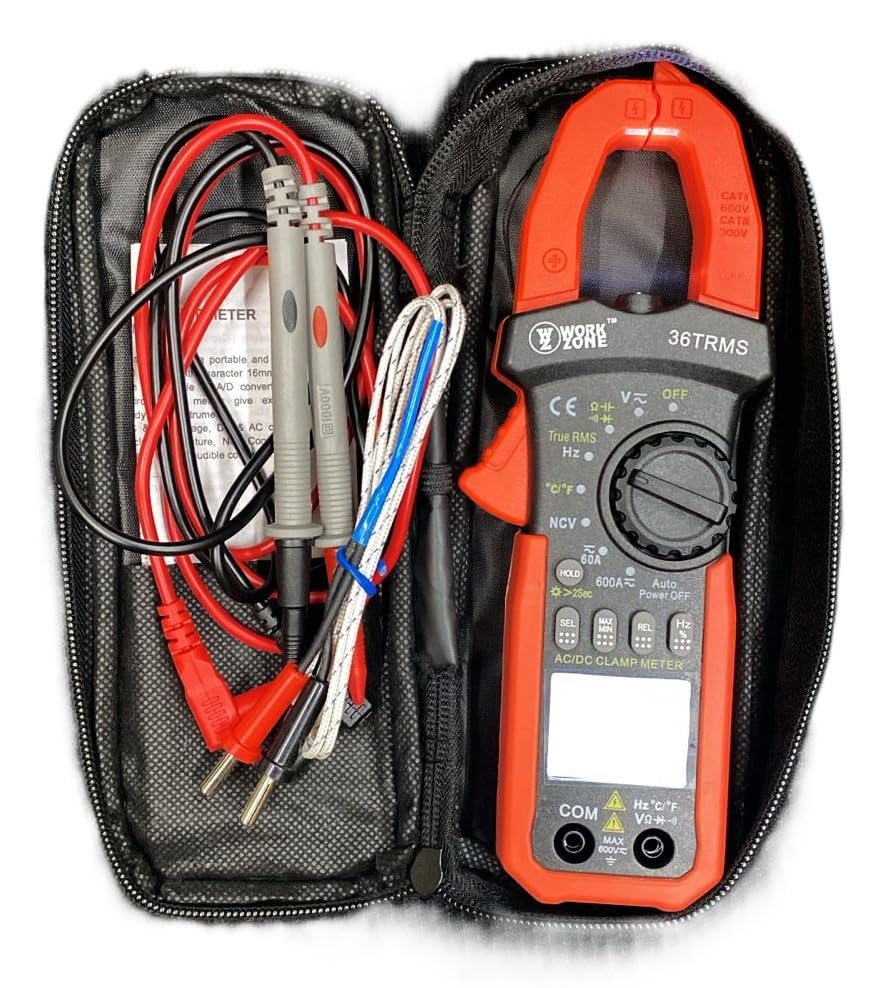
The Skyking WORKZONE 36TRMS Digital Clamp Meter, test leads, and temperature probe neatly organized within a black zippered carrying case. This illustrates how the product and its accessories are stored and transported.
4.製品オーバーview
The WORKZONE 36TRMS Digital Clamp Meter offers a range of features for comprehensive electrical testing:
- 6000 counts digit LCD monitor with 16mm character height.
- Auto-range and auto power-off function (after 15 minutes of inactivity).
- Clamp opening size: 26mm for non-invasive current measurement.
- DCボリュームを測定tage (600mV~600V) and AC Voltage (6V~600V).
- Measures DC Current (60A~600A) and AC Current (True RMS) (60A~600A).
- Measures Resistance (600Ω~60MΩ) and Capacitance (6nF~60mF).
- Measures Frequency (9.999Hz~9.999MHz) and Duty Cycle (0.1%~99.9%).
- Temperature measurement: -20~1000°C / -4~1832°F.
- 非接触AC巻tage (NCV) detection for safety.
- Diode and audible continuity test functions.
- 読み取り値を固定するデータ保持機能。
- Backlight for easy reading in dark environments.
- Relative measurement (REL) function for zeroing readings.

A detailed close-up of the Skyking WORKZONE 36TRMS Digital Clamp Meter. The image highlights the rotary switch with various measurement functions, the LCD display showing '0.000', function buttons (HOLD, SEL, MAX/MIN, REL, Hz), and the input jacks at the bottom.
5. セットアップ
5.1 バッテリーの取り付け
- The meter requires 2x 1.5V 'AAA' batteries.
- メーターの背面にある電池ボックスのカバーを見つけます。
- Open the cover, insert the batteries observing correct polarity (+ and - markings).
- 電池カバーをしっかりと閉じてください。
5.2 電源オン/オフ
- To power on the meter, rotate the rotary switch from the 'OFF' position to any desired measurement function.
- To power off, rotate the switch back to the 'OFF' position.
- The meter features an auto power-off function after approximately 15 minutes of inactivity to conserve battery life.
5.3 テストリードの接続
- 巻の場合tage, resistance, capacitance, frequency, duty cycle, diode, and continuity measurements, insert the red test lead into the 'VΩHz°C' input jack.
- 黒いテストリード線を「COM」入力ジャックに挿入します。
- Ensure test leads are fully inserted and securely connected.
6. 操作手順
6.1 DC / AC Voltag測定
- Rotate the rotary switch to 'V~' for AC VoltagDC Volの場合はeまたは「V-」tage.
- テスト リード線をテスト対象の回路またはコンポーネントに並列に接続します。
- 巻を読むtagLCDディスプレイのe値。
6.2 AC/DC電流測定(Clamp 顎)
- Rotate the rotary switch to '60A~' or '600A~' for AC Current, or '60A-' or '600A-' for DC Current.
- clを押すamp trigger to open the jaws and clamp 1本の導体を巻き付けます。導体がジョーの中央にあることを確認してください。
- LCDディスプレイで現在の値を読み取ります。
6.3抵抗測定
- Rotate the rotary switch to 'Ω'.
- 測定前に回路またはコンポーネントの電源が切れていることを確認してください。
- 測定するコンポーネントにテスト リード線を接続します。
- LCD ディスプレイで抵抗値を読み取ります。
6.4静電容量の測定
- Rotate the rotary switch to 'F'.
- メーターの損傷を防ぐため、テストの前にコンデンサが完全に放電されていることを確認してください。
- テストリード線をコンデンサ端子に接続します。
- LCD ディスプレイの静電容量値を読み取ります。
6.5 周波数/デューティサイクル測定
- Rotate the rotary switch to 'Hz'.
- テストリード線を信号源に接続します。
- Press the 'Hz' button to toggle between Frequency (Hz) and Duty Cycle (%) display.
6.6温度測定
- Rotate the rotary switch to '°C/°F'.
- Connect the temperature probe to the input jacks.
- Place the probe tip on the object whose temperature is to be measured.
- 「°C/°F」ボタンを押すと、摂氏と華氏の単位が切り替わります。
6.7ダイオードテスト
- Rotate the rotary switch to 'Diode/Continuity'.
- 赤いテストリードをダイオードのアノードに接続し、黒いテストリードをカソードに接続します。
- ディスプレイには前進ボリュームが表示されますtage drop. Reverse the leads; the display should show 'OL' for an open circuit.
6.8導通テスト
- Rotate the rotary switch to 'Diode/Continuity'.
- テスト リード線を回路またはコンポーネントに接続します。
- An audible buzzer will sound if continuity is detected (typically resistance below approximately 50Ω).
6.9非接触ACVoltage (NCV) 検出
- Rotate the rotary switch to 'NCV'.
- Bring the NCV sensor (located at the top of the clamp meter) close to an AC voltag電子ソース。
- AC電圧がオフの場合、メーターからビープ音が鳴り、NCVインジケーターライトが点滅します。tageが検出されました。
6.10データ保持機能
- Press the 'HOLD' button to freeze the current reading on the display. Press again to release the hold.
- Long press the 'HOLD' button to activate the backlight for improved visibility in low-light conditions.
6.11 相対測定(REL)
- In a measurement mode, press the 'REL' button to zero the current reading. Subsequent measurements will be displayed relative to this zero point.
- Press the 'REL' button again to exit relative mode.
7. メンテナンス
7.1 クリーニング
- メーターを拭くcasingを柔らかく、damp 布。
- Do not use abrasive cleaners, solvents, or harsh chemicals, as these may damage the casing またはディスプレイ。
7.2 電池の交換
- When the low battery indicator appears on the LCD, replace the batteries promptly to ensure accurate readings.
- セクション 5.1 に記載されているバッテリーの取り付け手順に従ってください。
- 使用済みバッテリーは、地域の規制に従って廃棄してください。
7.3 ストレージ
- When not in use for extended periods, store the meter in a cool, dry place.
- 直射日光、極端な温度、高湿度を避けてください。
- It is recommended to remove batteries if storing for a very long time to prevent leakage.
8。 トラブルシューティング
- 何も表示されない、またはかすかに表示される: Check battery installation. If the low battery indicator is on, replace the batteries.
- 間違った読み方: Ensure the correct function is selected for the measurement. Verify test lead connections are secure and in the correct input jacks. For resistance or capacitance, ensure the circuit is de-energized. For current, ensure only a single conductor is clamped within the jaws.
- 「OL」ディスプレイ: This indicates an over-range condition or an open circuit. If measuring resistance, it means the resistance is too high or the circuit is open. If measuring voltage or current, the value exceeds the selected range; switch to a higher range if available.
- 導通ビープ音なし: The resistance of the circuit or component is too high, or there is an open circuit.
9. 仕様
| パラメータ | 価値 |
|---|---|
| ブランド | Skyking |
| モデル番号 | Workzone 36 TRMS |
| 測定タイプ | デジタルClamp メーター |
| 画面 | 6000 counts digit LCD |
| Clamp 開口部サイズ | 26mm |
| DCVol。tage範囲 | 600mV~600V |
| ACVol。tage範囲 | 6V〜600V |
| DC電流範囲 | 60A〜600A |
| AC電流範囲(真の実効値) | 60A〜600A |
| 抵抗範囲 | 600Ω〜60MΩ |
| 静電容量範囲 | 6nF ~ 60mF |
| 周波数範囲 | 9.999Hz〜9.999MHz |
| デューティサイクル | 0.1%~99.9% |
| 温度範囲 | -20°C ~ 1000°C / -4°F ~ 1832°F |
| オーバーレンジ表示 | 「OL」 |
| 負極性表示 | Automatic "-" display |
| 低バッテリー表示 | はい |
| 自動電源オフ | 約15分 |
| 電源 | 2 x 1.5V "AAA" batteries |
| 動作温度 | 0°C ~ 40°C (relative humidity <85%) |
| 保管温度 | -10°C ~ 50°C (relative humidity <85%) |
| Guaranteed Precision Temp. | 23±5°C (relative humidity <70%) |
| 寸法(高さ×幅×奥行き) | 207 x 75 x 37 ミリメートル |
| 重さ | 約280g(バッテリーを含む) |
| 安全性評価 | CAT II 600V or CAT III 300V |
10.保証とサポート
For warranty information or technical support regarding your Skyking WORKZONE 36TRMS Digital Clamp Meter, please contact Skyking Instruments directly. Refer to your purchase documentation or the manufacturer's official website for specific warranty terms, conditions, and contact details.