
導入
This manual provides essential information for setting up, operating, and maintaining your TCL 32S5K 32-inch HD QLED Google Smart TV. Please read this manual thoroughly before using your television to ensure safe and optimal performance. Keep this manual for future reference.
安全情報
火災、感電、怪我のリスクを軽減するため、このテレビを使用する際は必ず基本的な安全上の注意事項に従ってください。テレビを雨や湿気にさらさないでください。テレビのカバーを開けないでください。asing; refer all servicing to qualified personnel. Ensure proper ventilation and avoid placing the TV near heat sources. Use only the power cord and accessories specified by the manufacturer.
パッケージ内容
パッケージにすべてのアイテムが揃っていることを確認します。
- TCL 32S5K 32-inch HD QLED Google Smart TV
- リモートコントロール
- 電源コード
- テレビスタンド(2個)とネジ
- クイックスタートガイド
- 保証書
設定
物理的なインストール
スタンドの設置: Place the TV screen-down on a soft, flat surface. Attach the two stand pieces to the designated slots on the bottom of the TV using the provided screws. Ensure the stand is securely fastened.
壁掛け: If wall-mounting, ensure you use a VESA-compatible wall mount (not included) and follow the wall mount manufacturer's instructions. Disconnect the power cord before mounting.
デバイスの接続
Connect your external devices to the appropriate ports on the TV. Refer to the image below for port locations and types.

Figure 1: Rear and Side Connectivity Ports. This image illustrates the various input and output ports available on the TCL 32S5K Smart TV, including USB 2.0, LAN, Antenna/Cable In, Digital Audio Out (Optical), HDMI 1, HDMI 2, and AV In adapter.
- HDMI Ports (1, 2): Blu-ray プレーヤー、ゲーム コンソール、ケーブル/衛星ボックス、その他の HDMI 対応デバイスを接続します。
- USB 2.0ポート: メディアを再生するには、USB ストレージ デバイスを接続します。
- LANポート: 有線インターネット接続用のイーサネット ケーブルを接続します。
- アンテナ/ケーブル入力: アンテナまたはケーブルテレビ信号を接続します。
- デジタルオーディオ出力(光): デジタル オーディオ用の外部オーディオ レシーバーまたはサウンドバーに接続します。
- AV入力アダプター: Use the provided adapter to connect older devices with composite video and stereo audio outputs.
初回電源オンとGoogle TVのセットアップ
After connecting all necessary cables, plug the power cord into an electrical outlet. Press the power button on the remote control or on the TV. Follow the on-screen instructions to complete the initial setup, which includes selecting your language, connecting to a Wi-Fi network, and signing in to your Google account to access Google TV features.
オペレーティング
リモートコントロール機能
The remote control allows you to navigate the Google TV interface, adjust volume, change channels, access apps, and control playback. Familiarize yourself with the button layout for easy operation.
Google TV インターフェース
Google TV organizes your favorite movies, shows, and live TV from across your apps and subscriptions. Use the remote to browse recommendations, search for content, and manage your watch list. Access the Google Play Store to download additional applications.
接続機能
- Wi-Fi: Connects your TV to your home wireless network for internet access and streaming.
- ブルートゥース: Pair Bluetooth-enabled devices such as headphones or game controllers for a personalized experience.
- Googlecast (Chromecast built-in): Cast content from your compatible mobile devices or computer directly to your TV screen.
画像と音声の設定
Your TCL 32S5K TV features QLED technology, Full HD resolution, HDR10 support, and Dolby Audio for an enhanced viewing and listening experience. Adjust picture modes (e.g., Standard, Vivid, Movie) and sound modes (e.g., Standard, Music, Movie) through the TV settings menu to suit your preferences.

Figure 2: Image Quality Features. This image highlights the key display technologies of the TCL 32S5K Smart TV, including QLED for vibrant colors, FHD (Full High Definition) for clear resolution, and HDR10 for enhanced contrast and brightness.
メンテナンス
テレビの掃除
清掃する前に必ずテレビの電源プラグを抜いてください。画面とキャビネットは柔らかく乾いた布で拭いてください。頑固な汚れには、軽く拭いてください。ampen the cloth with water or a mild, non-abrasive screen cleaner. Never spray cleaner directly onto the screen or allow liquids to enter the TV's openings.
ソフトウェアアップデート
Google TV はソフトウェアの自動アップデートを受信する場合があります。これらのアップデートを受信するには、テレビがインターネットに接続されていることを確認してください。アップデートにより、パフォーマンスが向上し、新しい機能が追加される可能性があります。テレビの設定メニューから手動でアップデートを確認することもできます。
トラブルシューティング
テレビで問題が発生した場合は、次の一般的な解決策を参照してください。
- 電源なし: 電源コードがテレビとコンセントの両方にしっかりと差し込まれているか確認してください。別のコンセントを試してください。
- No Picture/Poor Picture: Ensure all cables are correctly connected. Check the input source. Adjust picture settings. If using an antenna, check signal strength.
- No Sound/Poor Sound: Check volume levels and mute settings. Ensure external audio devices are properly connected and selected as the audio output.
- リモコンが動作しない: 電池を交換してください。リモコンとテレビの赤外線センサーの間に障害物がないことを確認してください。
- ネットワーク接続の問題: Restart your router and modem. Reconnect to the Wi-Fi network in the TV settings. For wired connections, ensure the Ethernet cable is properly connected.
- Google TV Slow/Unresponsive: Restart the TV by unplugging it for a few minutes and plugging it back in. Clear cache for problematic apps in settings.
問題が解決しない場合は、TCLサポートにお問い合わせください。 webサイトをご覧いただくか、カスタマーサービスにお問い合わせください。
仕様
Below are the technical specifications for the TCL 32S5K Smart TV:
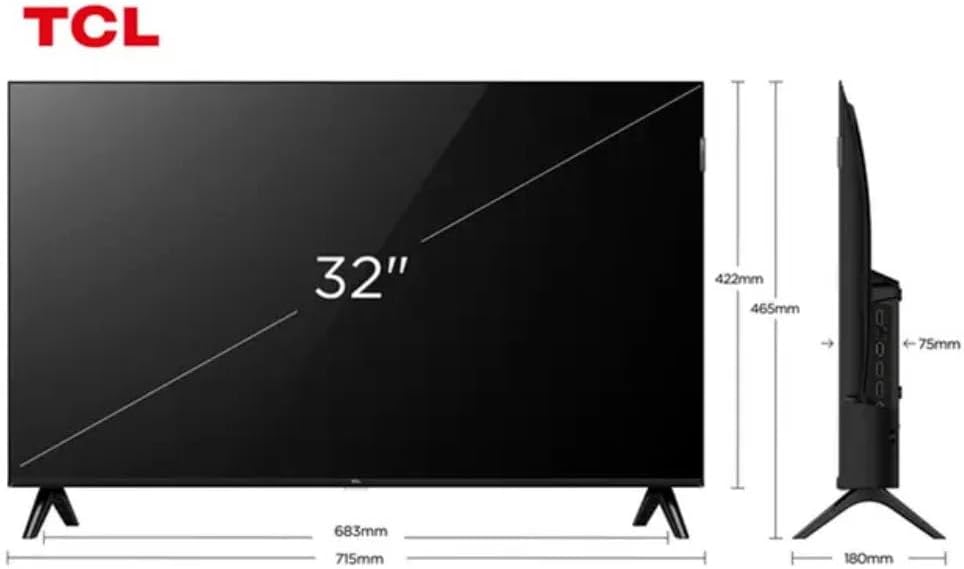
Figure 3: TV Dimensions. This image provides a detailed diagram of the TCL 32S5K Smart TV's physical dimensions, including screen size (32 inches), width (715mm), height (422mm without stand, 465mm with stand), and depth (75mm).
| 特徴 | 説明 |
|---|---|
| モデル名 | 32S5K |
| 画面サイズ | 32インチ |
| ディスプレイ技術 | クォリティLED |
| 解決 | 1080p(フルHD) |
| リフレッシュレート | 60Hz |
| 接続性 | Bluetooth、イーサネット、HDMI、USB、Wi-Fi |
| 合計HDMIポート | 2 |
| 特集 | Integrated Speaker, Google TV, Googlecast Integrated, HDR10, Dolby Audio |
| 製品寸法(奥行き×幅×高さ) | 7.6P x 71.6L x 42.3A centimeters (approx. 3 x 28.2 x 16.7 inches) |
| メーカー | TCL |
| 原産国 | ブラジル |
保証とサポート
保証情報
The TCL 32S5K Smart TV comes with a 1年間のメーカー保証. This warranty covers defects in materials and workmanship under normal use. Please retain your proof of purchase for warranty claims. For specific terms and conditions, refer to the warranty card included in your package or visit the official TCL webサイト。
カスタマーサポート
If you require technical assistance, have questions about your product, or need to initiate a warranty claim, please contact TCL customer support. You can typically find contact information on the TCL official webサイトまたは製品ドキュメントに記載されています。
Before contacting support, please have your TV model number (32S5K) and serial number ready, along with a detailed description of the issue.