
1. はじめにview
This manual provides essential information for setting up, operating, maintaining, and troubleshooting your HP 17-inch Business Laptop. This device is designed for productivity and features a 13th Generation Intel Core i5 processor, a 17.3-inch HD+ anti-glare display, a backlit keyboard with a numeric keypad, and a fingerprint reader for enhanced security. It comes pre-installed with Windows 11 Home.
主な機能は次のとおりです。
- プロセッサ: 13th Gen Intel Core i5-1334U 10-core processor for efficient multitasking.
- オペレーティング·システム: Windows 11 Home for a modern and secure computing experience.
- 画面: 17.3-inch HD+ (1366x768) anti-glare screen with micro-edge design.
- メモリとストレージ: Up to 64GB DDR4 RAM and up to 2TB NVMe M.2 SSD for fast performance and ampファイルストレージ。
- 接続性: USB 3.2 Gen 1 Type-C, USB 3.2 Gen 1 Type-A, HDMI 1.4, and a headphone/microphone combo jack.
- 安全: Integrated fingerprint reader.
- 利便性: Full-size backlit keyboard with numeric keypad and HP Fast Charge battery technology.
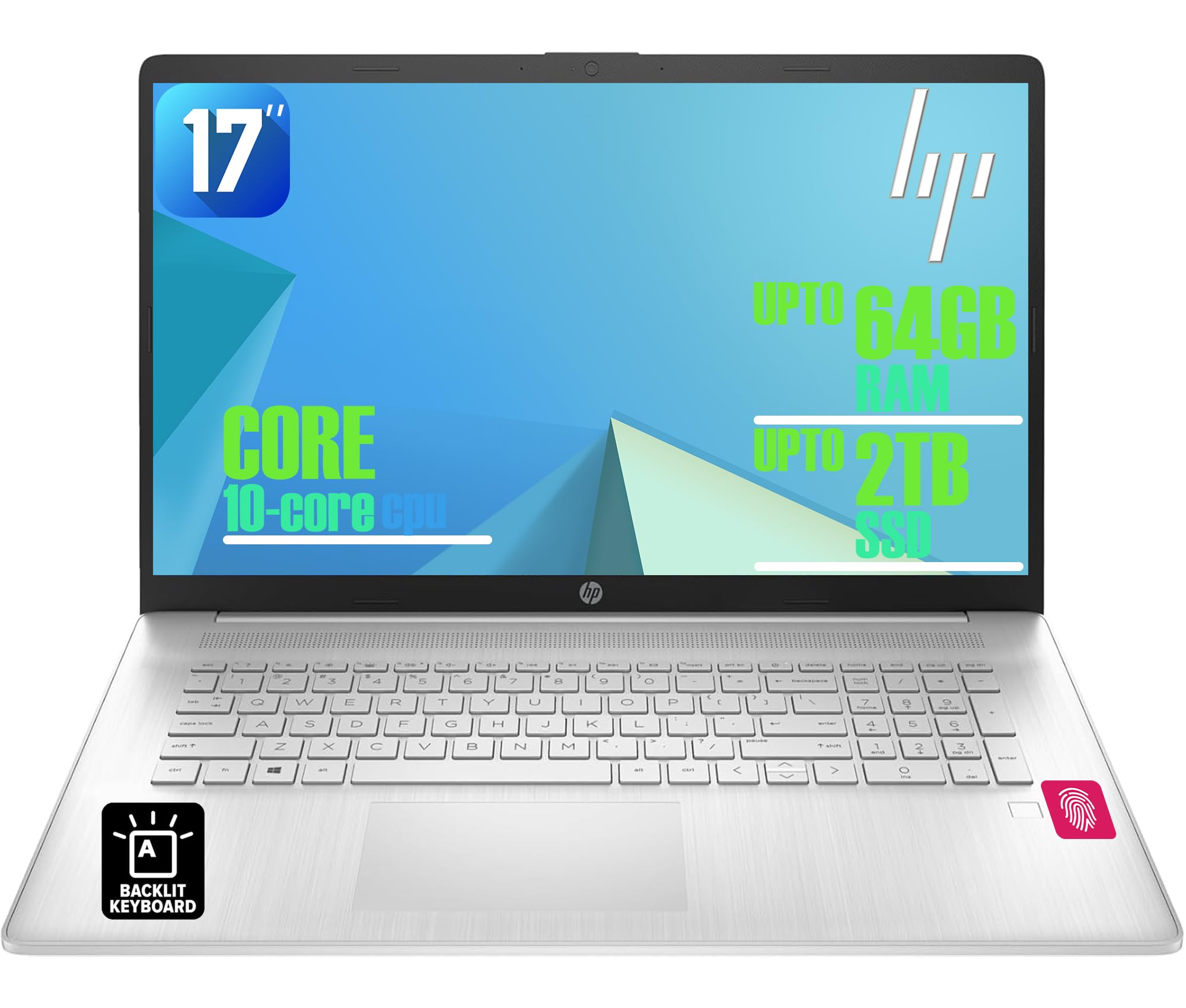
Figure 1: HP 17-inch Business Laptop (Silver)
2. セットアップ
2.1 開梱と初期検査
Carefully remove the laptop and all accessories from the packaging. Check for any visible damage. The package should include the HP 17-inch laptop, a power adapter, and documentation.
2.2電源への接続
- 電源アダプターをノートパソコンの側面にある AC スマートピン ポートに接続します。
- 電源アダプタを壁のコンセントに差し込みます。
- 初めて使用する前に、少なくとも 30 分間、またはバッテリー インジケーターが十分な充電量を示すまで、ラップトップを充電してください。
2.3 初期起動とWindowsのセットアップ
- ノートパソコンの蓋を開けて、通常はキーボード デッキの右上にある電源ボタンを押します。
- 画面の指示に従って、Windows 11 Home のセットアッププロセスを完了してください。これには、地域と言語の選択、Wi-Fi ネットワークへの接続、ユーザーアカウントの作成が含まれます。
2.4 周辺機器の接続
HP ラップトップには、外部デバイスを接続するためのさまざまなポートがあります。
- USB ポート: Use the USB 3.2 Gen 1 Type-C port or the two USB 3.2 Gen 1 Type-A ports for connecting external drives, mice, keyboards, or other USB accessories.
- HDMI: Connect an external monitor or projector using the HDMI 1.4 port.
- オーディオ: Plug headphones or an external microphone into the 3.5mm headphone/microphone combo jack.

図2:側面 view illustrating available ports (USB Type-C, USB Type-A, HDMI, Headphone/microphone combo, AC smart pin)
3. ノートパソコンの操作
3.1 電源管理
- 電源オン: 電源ボタンを押します。
- スリープモード: ふたを閉じるか、スタート メニューから [スリープ] を選択します。
- シャットダウン: スタートメニューから「シャットダウン」を選択します。
- 再起動: スタートメニューから「再起動」を選択します。
3.2 キーボードとタッチパッド
The laptop features a full-size backlit keyboard with a numeric keypad. Use the function keys (Fn) in combination with other keys for specific actions like adjusting screen brightness, volume, or toggling the keyboard backlight.
The integrated touchpad supports multi-touch gestures for navigation. Refer to Windows settings for customizing touchpad behavior.

Figure 3: Backlit keyboard with numeric keypad and integrated fingerprint reader
3.3 指紋リーダー
The integrated fingerprint reader allows for secure and quick login using Windows Hello. To set up, navigate to 設定 > アカウント > サインインオプション 指示に従って指紋を登録します。
3.4 ワイヤレス接続
- Wi-Fi: The laptop supports Realtek Wi-Fi 6 (2x2). To connect to a wireless network, click the Wi-Fi icon in the taskbar, select your desired network, and enter the password if required.
- ブルートゥース: Bluetooth 5.3 is integrated for connecting wireless accessories like headphones or mice. Enable Bluetooth from 設定 > Bluetoothとデバイス and pair your devices.
3.5 表示と Webカム
The 17.3-inch HD+ anti-glare display provides a clear viewing experience. The HP True Vision 720p HD webcam with dual microphones is suitable for video calls and online meetings.
3.6 HP クイックドロップ
HP QuickDrop allows for wireless file transfer between your laptop and mobile devices without needing cables. Install the HP QuickDrop app on both your laptop and mobile device and follow the in-app instructions to pair and transfer files.

Figure 4: HP QuickDrop for wireless file transfer between laptop and phone
4. メンテナンス
4.1 ノートパソコンの掃除
- 画面: 柔らかく糸くずの出ない布を軽く拭いてください。amp水またはスクリーンクリーナーで拭き取ってください。液体を画面に直接吹き付けないでください。
- キーボードとシャーシ: 柔らかく乾いた布を使用してください。頑固な汚れには、軽く湿らせた布で拭いてください。amp cloth can be used, ensuring no liquid enters the device. Compressed air can help remove debris from between keys.
4.2バッテリーケア
The laptop is equipped with a 41Wh Lithium-Ion Battery. To maximize battery lifespan:
- 極端な温度を避けてください。
- 定期的にバッテリーを完全に放電しないでください。
- Utilize HP Fast Charge, which can charge the battery from 0 to 50% in approximately 45 minutes.

Figure 5: Battery life indicator (Up to 8 hours wireless streaming)
4.3ソフトウェアアップデート
定期的にWindowsのアップデートを確認し、インストールして、システムに最新のセキュリティパッチとパフォーマンス改善が適用されていることを確認してください。 設定 > Windows Update 更新を管理します。
5。 トラブルシューティング
このセクションでは、HP ラップトップで発生する可能性のある一般的な問題について説明します。
5.1 電源の問題
- ノートパソコンが起動しない: 電源アダプターがノートパソコンと電源コンセントの両方にしっかりと接続されていることを確認してください。電源アダプターのインジケーターランプが点灯しているかどうかを確認してください。別のコンセントを試してください。
- バッテリーが充電されない: Verify the power adapter connection. Check battery health in Windows settings.
5.2 表示の問題
- 画面に画像が表示されない: ノートパソコンの電源が入っていることを確認してください。外部モニターが接続されている場合は、取り外すか、 Fn+F4 キー (または対応するディスプレイ切り替えキー)を押してディスプレイ出力を切り替えます。
- 画面を暗くする: ファンクションキーを使用して明るさを調整します(例: Fn + F2 / F3) or through Windows settings.
5.3 接続の問題
- Wi-Fi が接続されない: Windowsの設定でWi-Fiが有効になっていることを確認してください。ルーターとノートパソコンを再起動してください。ネットワークドライバーが更新されているか確認してください。
- Bluetoothデバイスがペアリングされない: Ensure Bluetooth is enabled on both the laptop and the device. Make sure the device is in pairing mode.
5.4 一般的なパフォーマンスの問題
- パフォーマンスが遅い: 不要なアプリケーションを閉じてください。マルウェアがないか確認してください。SSDに十分な空き容量があることを確認してください。
- システムがフリーズする: プレス Ctrl + Alt + Del to open Task Manager and end unresponsive tasks. If unresponsive, perform a hard shutdown by holding the power button for several seconds.
6. 仕様
The following table outlines the key technical specifications for the HP 17-inch Business Laptop (Model: HP laptop).
| 特徴 | 仕様 |
|---|---|
| ブランド | HP |
| モデル名 | HPノートパソコン |
| プロセッサ | 13th Gen Intel Core i5-1334U (10 Cores, up to 4.6 GHz) |
| オペレーティング·システム | Windows 11 ホーム |
| 画面 | 17.3-inch HD+ (1366x768) Anti-glare, 250 nits |
| グラフィックス | Intel Iris Xe グラフィックス(統合型) |
| RAMメモリ | 最大64GB DDR4 SDRAM 3200 MHz |
| ストレージ | Up to 2TB NVMe M.2 SSD |
| ワイヤレス接続 | Realtek Wi-Fi 6(2x2)、Bluetooth 5.3 |
| ポート | 1x USB 3.2 Gen 1 Type-C, 2x USB 3.2 Gen 1 Type-A, 1x HDMI 1.4, 1x Headphone/microphone combo jack |
| キーボード | フルサイズバックライトキーボード(テンキー付き) |
| 安全 | 指紋リーダー |
| カメラ | プライバシーシャッター付き720p HDカメラ |
| バッテリー | 41Wh Lithium-Ion (HP Fast Charge) |
| 寸法(長さ×幅×高さ) | 15.78インチ x 10.15インチ x 0.81インチ(約) |
| 重さ | 4.6ポンド(約) |
| 色 | ナチュラルシルバー |

Figure 6: Laptop dimensions (15.78" W x 10.15" D x 0.78" H) and weight (4.60 lbs)
7. 保証とサポート
7.1 メーカー保証
Your HP laptop is covered by a manufacturer's warranty. Please refer to the warranty documentation included with your product for specific terms, conditions, and duration. Keep your proof of purchase for warranty claims.
7.2 テクニカルサポート
技術サポート、ドライバーのダウンロード、その他のサポートについては、HPの公式サポートをご覧ください。 website. You will typically need your product's serial number or model number to access specific support resources.
オンラインサポート: https://support.hp.com