
導入
The ARCCTV Y2U3 Indoor Security Camera is designed to enhance your home's security and monitoring capabilities. Featuring advanced Wi-Fi 6 and dual-band (5GHz/2.4GHz) connectivity, it ensures stable and fast streaming. This camera offers 2.5K Quad HD resolution for clear visuals, two-way audio for communication, and intelligent motion detection with tracking. It also includes true-color night vision, automatic patrol cruise, and compatibility with Amazon Alexa for voice control.
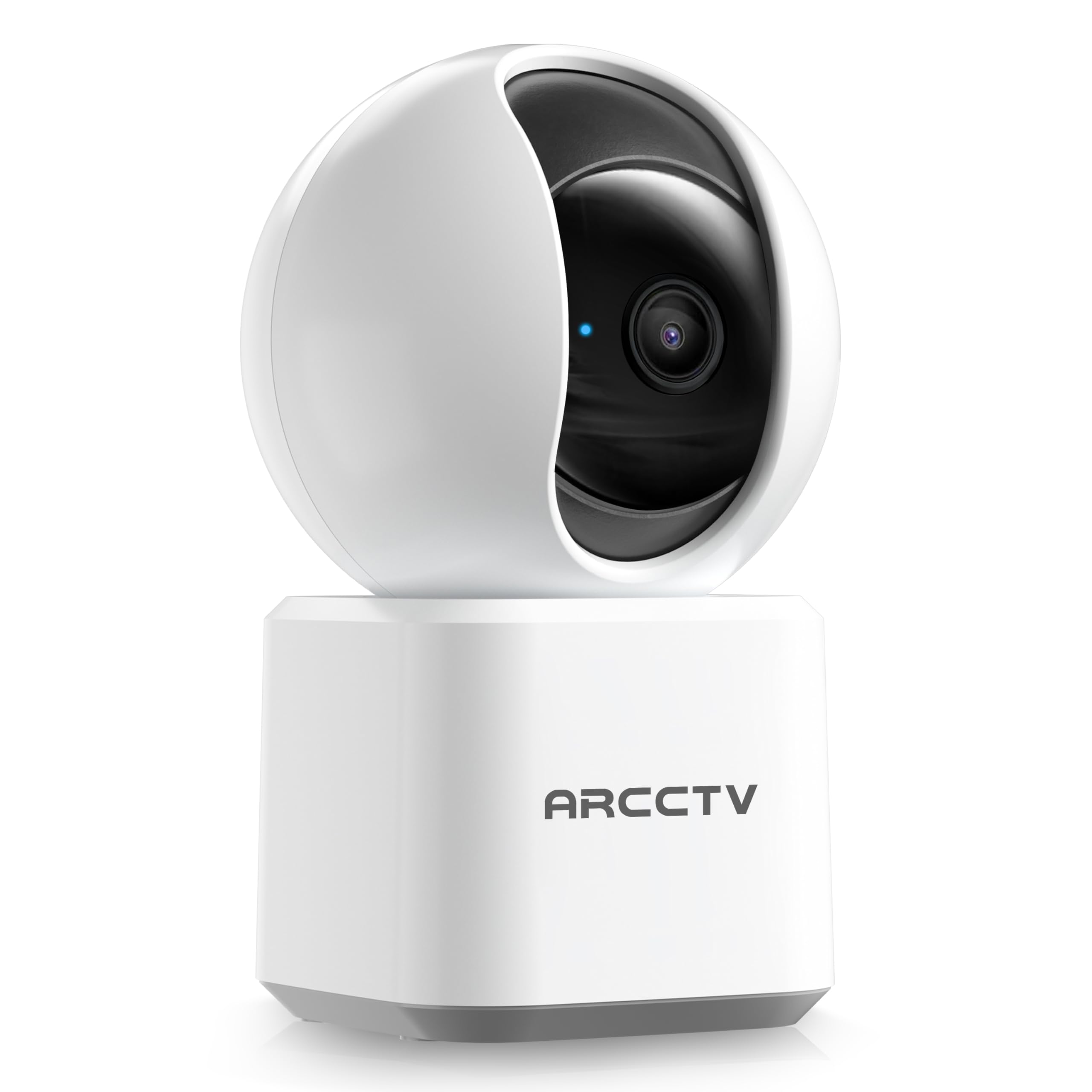
Image: The ARCCTV Y2U3 Indoor Security Camera.
箱の中身
Upon unboxing your ARCCTV Y2U3 camera, you should find the following components:
- ARCCTV Y2U3 Indoor Security Camera Body
- USB Power Adapter (for your region)
- USB-C電源ケーブル
- 取り付けブラケット
- 取り付けネジと壁アンカー
- クイックスタートガイド

Image: The ARCCTV Y2U3 camera and its included accessories laid out on a wooden surface.
Video: An unboxing video demonstrating the contents of the ARCCTV Y2U3 Indoor Security Camera package, including the camera, power adapter, USB-C cable, mounting bracket, screws, and quick start guide.
設定
- 電源オン: Connect the USB-C cable to the camera's port (located at the back of the base) and the USB power adapter. Plug the adapter into a power outlet. The camera will initiate a self-test and a blue indicator light will appear.
- アプリをダウンロード: Scan the QR code in the Quick Start Guide or search for the "ARCCTV Security" app on your smartphone's app store (available for Android and iOS).
- アカウント登録: アプリを開いて新しいアカウントを登録するか、すでにアカウントをお持ちの場合はログインしてください。
- デバイスを追加: Follow the in-app instructions to add your new camera. This typically involves selecting "Add Device," choosing your camera model, and scanning a QR code displayed on your phone with the camera's lens.
- Wi-Fi接続: Ensure your smartphone is connected to a 2.4GHz or 5GHz Wi-Fi network. The camera supports both bands. The app will guide you through connecting the camera to your home Wi-Fi.
- MicroSD カードの取り付け (オプション): If you plan to use local storage, gently rotate the camera lens upwards to reveal the microSD card slot. Insert a compatible microSD card (up to 256GB, not included) with the gold contacts facing down.
- 取り付け(オプション): If mounting the camera, use the provided mounting bracket, screws, and wall anchors. Secure the bracket to your desired location (wall or ceiling), then attach the camera to the bracket. Ensure the camera is within range of a power outlet.
ビデオ: 事前view of the ARCCTV Y2U3 camera setup process, demonstrating the initial power-on, app connection, and basic functionality like pan/tilt control and live view.
操作手順
ライブ View パン/チルトコントロール
Access the live feed through the ARCCTV Security app. Use the on-screen controls to remotely pan (355° horizontal) and tilt (90° vertical) the camera lens, providing a 360° panoramic view of your space. This allows you to monitor every corner of the room.

Image: The camera's pan and tilt capabilities are illustrated, showing its wide coverage range.
双方向オーディオ
Utilize the built-in microphone and speaker for real-time two-way communication. Speak through the app to interact with family members, pets, or deter intruders. The audio quality is designed for clear conversations.

Image: A visual representation of the two-way communication feature, allowing interaction with individuals near the camera.
動きの検出と追跡
The camera features intelligent motion detection that sends instant notifications to your smartphone when activity is detected. With Smart Motion Tracking, the camera's lens automatically follows moving subjects, ensuring continuous monitoring of important events. You can customize monitoring zones to focus on specific areas.

Image: The camera's precision motion detection capability, distinguishing between human and pet movements.

Image: Smart motion tracking in action, where the camera automatically adjusts to follow moving subjects.
ナイトビジョン
The camera is equipped with true-color night vision using an invisible light spectrum, allowing for clear monitoring in low-light conditions without disruptive red glows. The night vision range is up to 32 feet.

Image: A depiction of the camera's night vision capability, providing clear monochrome images in darkness.
ストレージオプション
The ARCCTV Y2U3 supports local storage via a microSD card (up to 256GB) for continuous recording. Additionally, encrypted cloud storage is available through a paid subscription, ensuring your data is secure even if the device is damaged.

Image: The camera highlighting its microSD card slot for local video storage.

Image: An illustration of encrypted cloud storage, emphasizing data security and accessibility.
Alexaの互換性
Integrate your ARCCTV Y2U3 camera with Amazon Alexa for convenient voice control. Use simple voice commands like "Alexa, show me the nursery" to view 互換性のある Alexa 対応デバイスでライブ フィードを視聴できます。
Image: A user interacting with the camera via Alexa voice commands, viewing the feed on a tablet.
メンテナンス
- クリーニング: Gently wipe the camera lens and body with a soft, dry cloth. Avoid using harsh chemicals or abrasive materials that could scratch the lens or surface.
- ファームウェアの更新: Regularly check the ARCCTV Security app for available firmware updates. Keeping your camera's firmware up-to-date ensures optimal performance, security, and access to new features.
- 電源サイクル: If the camera experiences connectivity issues or unusual behavior, try power cycling it by unplugging it from the power source for 10 seconds and then plugging it back in.
- MicroSD カード管理: microSDカードを使用している場合は、定期的にview and back up important recordings. Format the card within the app as needed to maintain performance and free up space.
トラブルシューティング
- カメラがオフライン:
- カメラの電源がオンになっていて、電源アダプターがしっかりと接続されているかどうかを確認してください。
- Wi-Fi ネットワークがアクティブであり、カメラがルーターの範囲内にあることを確認します。
- Wi-Fiルーターとカメラを再起動します。
- Ensure the camera is connected to a supported 2.4GHz or 5GHz Wi-Fi network.
- ビデオ品質が悪い:
- カメラのレンズがきれいで、ほこりや汚れがないことを確認してください。
- アプリでWi-Fiの信号強度を確認してください。信号が弱いと動画の画質に影響する可能性があります。
- Adjust the video resolution settings within the app to a lower quality if your network bandwidth is limited.
- 動き検出が機能しない:
- アプリ設定でモーション検出が有効になっていることを確認します。
- Adjust the motion detection sensitivity levels.
- カメラの視界を遮るものがないことを確認してください view in the monitored zones.
- 双方向オーディオの問題:
- アプリ内のマイクとスピーカーの音量設定を確認してください。
- Ensure there is no physical obstruction covering the microphone or speaker on the camera.
- 背景ノイズを最小限に抑えて、よりクリアなコミュニケーションを実現します。
- カメラのリセット: If issues persist, locate the reset button (usually near the microSD card slot, accessible by rotating the lens upwards) and press and hold it for several seconds until you hear a prompt or see the indicator light change. This will restore factory settings, and you will need to set up the camera again.
仕様
| 特徴 | 詳細 |
|---|---|
| モデル名 | Y2U3 |
| ブランド | ARCCTV |
| 接続技術 | ワイヤレス(Wi-Fi) |
| 無線通信技術 | Bluetooth, Wi-Fi (Dual-Band: 2.4GHz, 5GHz) |
| ビデオキャプチャ解像度 | 1440p(2.5KクアッドHD) |
| 実効静止画解像度 | 4 MP |
| 特集 | 2-Way Audio, PTZ Technology (Pan/Tilt/Zoom), Motion Tracking, Night Vision, Alexa Compatibility |
| View角度 | 360度(パン&チルト) |
| 暗視範囲 | 32フィート |
| 電源 | コード付き電気 (5 ボルト) |
| フラッシュメモリサポート最大サイズ | 256 GB (MicroSD card) |
| 商品の寸法(長さ x 幅 x 高さ) | 10 x 1.98 x 2.7インチ |
| アイテム重量 | 12.6オンス |
| 製品の推奨用途 | 屋内セキュリティ |
保証とサポート
For warranty information, technical support, or further assistance with your ARCCTV Y2U3 Indoor Security Camera, please refer to the official ARCCTV web販売店のウェブサイトをご覧いただくか、カスタマーサービスに直接お問い合わせください。詳細は通常、クイックスタートガイドまたは製品パッケージに記載されています。
You can also visit the ARCCTV Store on Amazon for product updates and additional resources: ARCCTV Store