
1. はじめに
The DNT Optics HS650 Hydra is a versatile multi-function thermal device designed for various applications. It can operate as a standalone thermal scope, a clip-on thermal attachment for existing optics, or a handheld thermal monocular. This manual provides essential information for the proper setup, operation, and maintenance of your HS650 Hydra device.
2.製品オーバーview
2.1 主な特徴
- 3-in-1の多用途性: Functions as a standalone scope, clip-on attachment, and handheld monocular.
- Elite Thermal Imaging: Features a 12 µm, ≤18 mK uncooled infrared sensor with a 640×512 resolution and 50mm objective lens.
- AI-Powered Image Super Resolution (ISR): Enhances image clarity and detail, especially at higher digital zoom levels.
- 頑丈な構造: IP67-rated for waterproof and dustproof protection, shock-resistant housing handles recoil up to .50BMG.
- DNT App Connectivity: Connects to your smartphone for live feed viewing, management, editing, and sharing of content.
2.2 パッケージ内容
パッケージにすべてのアイテムが含まれていることを確認します。
- HS650 Thermal Scope ×1
- PMS (Picatinny 0 MOA Short) Mount ×1
- Eye Cup ×1
- Flip Up Cover ×1
- 18650 Flat Top Battery ×2
- Battery Charger ×1
- USBケーブル×2
- ユーザーマニュアル ×1
- Lens Cleaning Cloth ×1
2.3 ビジュアルオーバーview


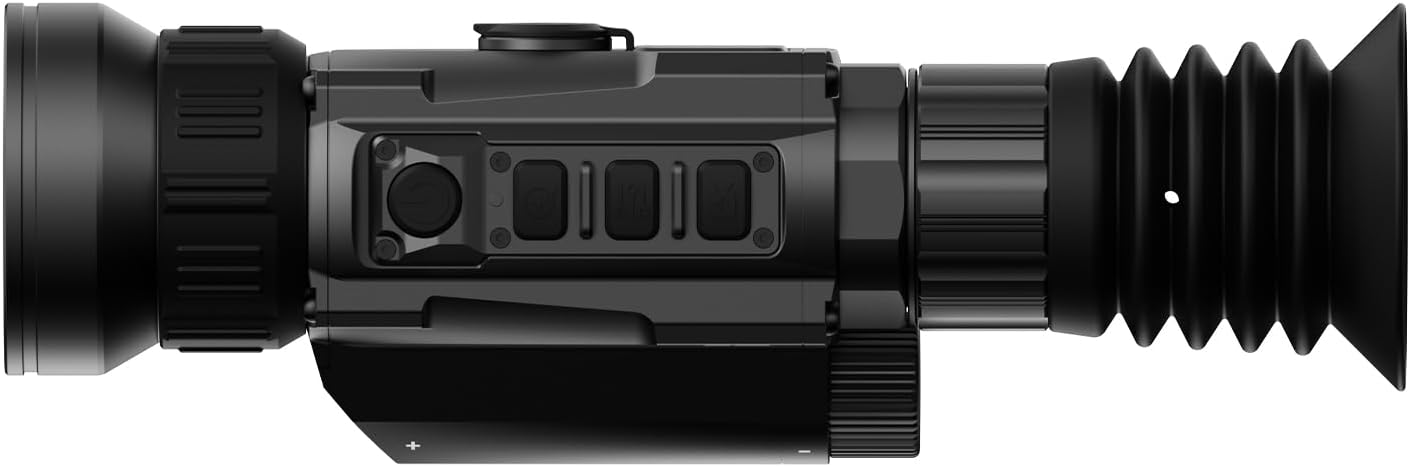


3. セットアップ
3.1 バッテリーの取り付け
- デバイスのバッテリー収納部を見つけます。
- Insert two 18650 Flat Top Batteries, ensuring correct polarity.
- 電池ケースをしっかりと閉じてください。
3.2取り付けオプション
The HS650 Hydra can be used in several configurations:
- Standalone Scope: Attach the provided PMS (Picatinny 0 MOA Short) mount to a compatible rail system. Ensure all screws are tightened to the recommended torque.
- クリップオン: Utilize an appropriate quick-detach mount (e.g., DNT QDM150 or QDS150, sold separately) to attach the device in front of your primary optic.
- Handheld Monocular: Use the device without any mounting for portable observation.
3.3 初回電源投入とアプリの接続
- 電源ボタンを押したままにして、デバイスの電源を入れます。
- Download the DNT App on your smartphone.
- Follow the in-app instructions to connect your HS650 Hydra to your smartphone for live viewing and feature control.
4. 操作手順
4.1 基本的な制御
Refer to the device's physical buttons for power, menu navigation, zoom, and recording functions. Detailed button assignments are available in the full user manual.
4.2 熱画像モード
The HS650 Hydra offers various thermal imaging modes to optimize viewing for different environments and preferences. These typically include:
- ナチュラル: Provides a balanced thermal view.
- Enhanced: Increases contrast for better detail recognition.
- ハイライト: Emphasizes hot spots for quick target identification.
4.3 Image Super Resolution (ISR)
The AI-Powered Image Super Resolution (ISR) feature enhances image detail, especially when using digital zoom. This feature can be toggled on or off via the device menu or connected app.
4.4デジタルズーム
The HS650 Hydra features a 2.5x base magnification with digital zoom capabilities up to 10x. Use the designated zoom buttons to adjust magnification levels.
4.5 反動作動ビデオ
The device supports Recoil Activated Video recording, which automatically captures footage when recoil is detected. This ensures important moments are recorded without manual intervention.
5. メンテナンス
5.1 クリーニング
- Use the provided lens cleaning cloth to gently wipe the objective and eyepiece lenses. Avoid abrasive materials.
- デバイス本体には、柔らかくてamp 汚れやゴミを取り除くための布。
5.2 環境保護
The HS650 Hydra is IP67-rated, meaning it is protected against dust ingress and can withstand immersion in water up to 1 meter for 30 minutes. While robust, avoid unnecessary exposure to extreme conditions.
5.3 ストレージ
本製品は、直射日光や極端な温度を避け、涼しく乾燥した場所に保管してください。長期間保管する場合は、電池を取り外してください。
6。 トラブルシューティング
If you encounter issues with your DNT Optics HS650 Hydra, consider the following:
- デバイスの電源が入らない: Check battery charge and ensure batteries are inserted with correct polarity.
- 画像品質が悪い: Ensure lenses are clean. Adjust focus and brightness settings. Verify ISR is enabled if desired.
- アプリの接続の問題: Ensure Bluetooth/Wi-Fi is enabled on your smartphone and the device. Restart both the device and the app.
- Mounting stability: Re-check all mounting screws for proper tightness.
For further assistance, please contact DNT Optics customer support.
7. 仕様
| ブランド | DNTオプティクス |
| モデル名 | HS650 |
| スタイル | 640-50 |
| 色 | 黒 |
| 製品寸法 | 長さ8.4インチ x 幅2.7インチ x 高さ2.2インチ |
| アイテム重量 | 1.02ポンド(16.3オンス) |
| 材料 | Metal or High-Quality Plastic |
| 対物レンズ径 | 68.58ミリメートル |
| 倍率最小 | 2.5倍 |
| 対応デバイス | ライフル、ショットガン、ハンドガン |
| 取り付けタイプ | PMS - Picatinny 0 MOA Short |
| ナイトビジョン | No (Thermal Imaging) |
| レチクルタイプ | デジタル |
8. 保証とサポート
For information regarding product warranty, returns, or technical support, please refer to the official DNT Optics website or contact their customer service directly. Contact details can typically be found on the manufacturer's packaging or webサイト。
You can visit the DNT Optics Store for more information: DNTオプティクスストア


