
1.製品オーバーview
The ienRon 8-Port 2.5G Ethernet Switch is an unmanaged network switch designed to provide high-speed connectivity for various applications, including home networks, small offices, gaming, and 4K video streaming. It features eight 2.5 Gigabit Ethernet ports and one 10 Gigabit SFP+ uplink port, offering flexible and robust network expansion.
This switch is built with a full-metal, fanless design for silent operation and efficient heat dissipation. It supports plug-and-play functionality, requiring no complex configuration.
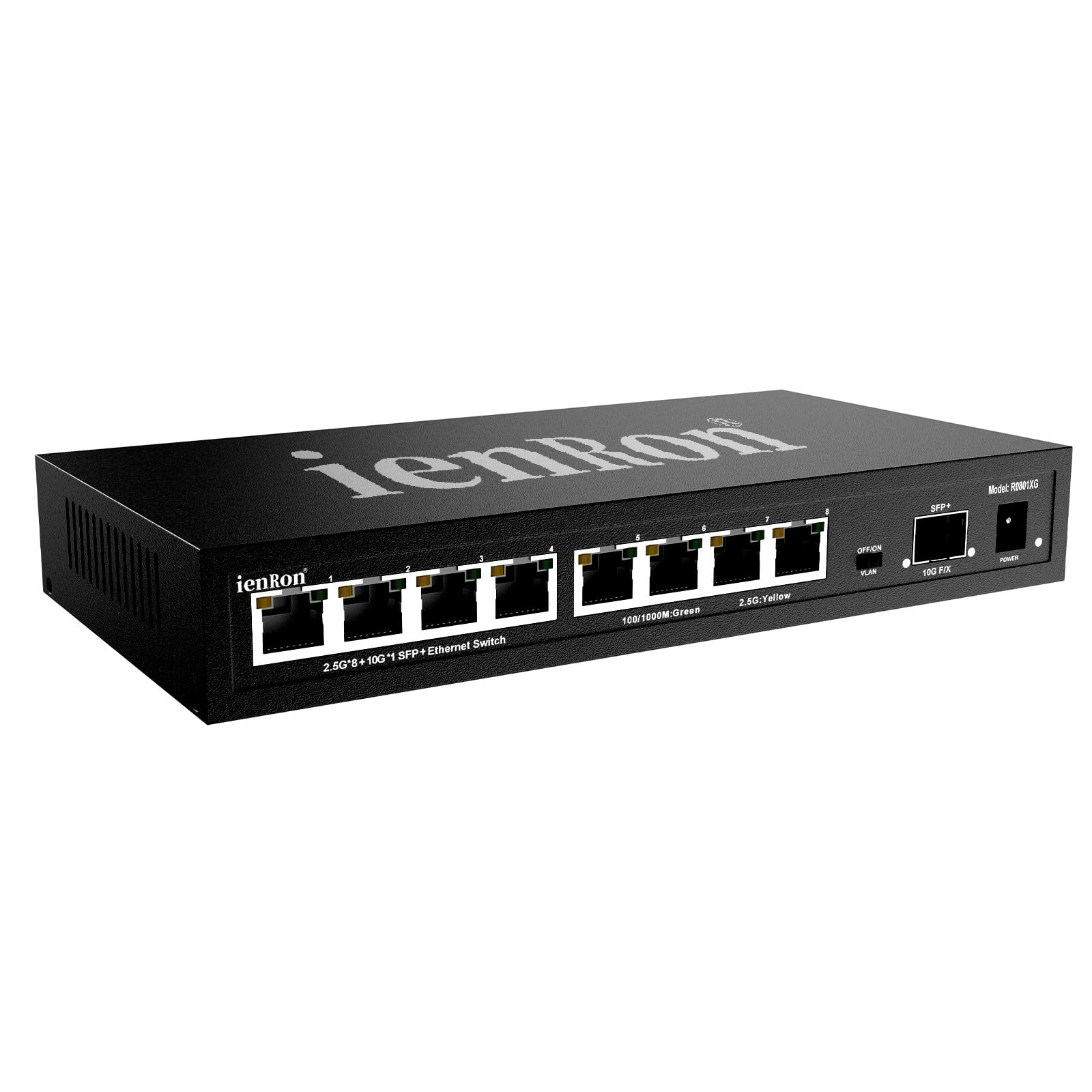
画像: 正面 view of the ienRon 8-Port 2.5G Ethernet Switch, showing the eight RJ45 ports and one SFP+ port.
2. 主な特徴
- 高速接続: Equipped with 8 auto-sensing 10/100/1000/2500Mbps RJ45 ports and 1 combo 1.25/2.5/5/10G SFP+ fiber uplink port for high-bandwidth applications.
- VLAN Isolation Mode: A one-touch toggle allows isolation of all RJ45 ports (ports 1-8), preventing broadcast storms and internal interference. In normal mode, all ports communicate freely.
- Durable and Silent Design: Features a full-metal, fanless housing for silent operation, excellent heat dissipation, and EMI resistance.
- 柔軟な設置: Supports both desktop placement and wall-mount installation for versatile deployment.
- 強化された保護: Includes 6KV lightning/surge protection on all ports to safeguard your network equipment.
- プラグ&プレイ: No software installation or configuration required. Supports auto MDI/MDI-X and flow control.
- 高性能: Delivers 60Gbps bandwidth and an 8K MAC address table for efficient data handling.

画像: 詳細 view of the switch ports, showing 8x 2.5Gbps ports with yellow (speed) and green (link/activity) indicators, and 1x 10Gbps SFP+ port with yellow (10G link) and green (link success) indicators. Also shows the Power input and VLAN switch.
3. パッケージ内容
パッケージにすべてのアイテムが含まれていることを確認します。
- ienRon 8-Port 2.5G Ethernet Switch (Model: R0801XG)
- Power Adapter (12V2A, AC 100–250V input)
- 取扱説明書

Image: Contents of the product package, including the ienRon switch, power adapter, and instruction manual, alongside a diagram showing the switch dimensions and wall-mount option.
4. セットアップ手順
The ienRon 8-Port 2.5G Ethernet Switch is designed for simple plug-and-play operation. Follow these steps to set up your switch:
- 電源接続: Connect the provided power adapter to the switch's power input port and then plug the adapter into a standard AC power outlet. The power LED on the switch will illuminate.
- デバイスを接続する: Use standard Ethernet cables (Cat5e/Cat6/Cat6a recommended for 2.5G speeds) to connect your network devices (e.g., computers, NAS, routers, game consoles, IP cameras) to any of the 8 RJ45 ports on the switch.
- SFP+ アップリンク(オプション): For high-speed backbone connections to a core network or server, insert a compatible 10G SFP+ module (not included) into the SFP+ port and connect it using an appropriate fiber optic or DAC cable.
- 接続を確認します: Once devices are connected, observe the LED indicators on the switch.
- RJ45ポート: A green LED indicates a successful link/activity. A yellow LED indicates the speed (e.g., 2.5G).
- SFP +ポート: A green LED indicates link success. A yellow LED indicates a 10G link.

Image: A visual representation of the ienRon 2.5G switch connected to multiple devices such as a laptop, NAS, game console, and printer, illustrating a typical setup.
5. 操作手順
The ienRon 8-Port 2.5G Ethernet Switch operates automatically once connected. It is an unmanaged switch, meaning it does not require software configuration for basic network functionality.
5.1. VLAN Isolation Mode
The switch features a physical toggle switch labeled "VLAN" to enable or disable port isolation:
- VLAN ON: When the VLAN switch is in the "ON" position, ports 1 through 8 are isolated from each other. This means devices connected to these ports cannot communicate directly with each other. They can, however, communicate with devices connected to the SFP+ uplink port (if configured) and potentially with a router connected to the SFP+ port for internet access. This mode is useful for preventing broadcast storms and enhancing network security by isolating client devices.
- VLAN OFF (Normal Mode): When the VLAN switch is in the "OFF" position, all RJ45 ports (1-8) can communicate normally with each other and with the SFP+ uplink port. This is the standard operating mode for most home and small office networks where devices need to share resources.

Image: Diagram showing how the VLAN switch isolates RJ45 ports 1-8 from each other when activated, enhancing network security and optimizing performance by preventing direct communication between client devices.
6. インストール
The ienRon 8-Port 2.5G Ethernet Switch offers flexible installation options:
6.1. デスクトップの配置
Simply place the switch on a flat, stable surface such as a desk or shelf. Ensure adequate ventilation around the device to prevent overheating, especially since it is fanless and relies on passive cooling.
6.2. 壁掛け設置
The switch can be mounted on a wall using the integrated mounting slots on the underside of the device. Follow these general steps:
- 取り付けポイントをマークする: Hold the switch against the wall at the desired location and mark the positions for the mounting screws through the keyhole slots.
- ネジを取り付ける: Drill pilot holes (if necessary) and insert screws into the marked positions, leaving a small gap between the screw head and the wall.
- マウントスイッチ: Align the keyhole slots on the switch with the screw heads and slide the switch downwards to secure it in place.
Image: Diagram illustrating the dimensions of the switch (8.26"L x 4.33"W x 1.29"H) and showing both desktop and wall-mounting options with a screw detail.
7. 仕様
| 特徴 | 詳細 |
|---|---|
| 製品寸法 | 長さ8.26インチ x 幅4.33インチ x 高さ1.29インチ (21cm x 11cm x 3.3cm) |
| アイテム重量 | 1.25ポンド(0.57kg) |
| 巻tage | 12ボルト |
| ケース素材 | 金属 |
| 最大消費電力 | 18ワット |
| 動作温度 | 摂氏55度まで |
| インターフェースタイプ | RJ45、SFP+ |
| データ転送速度 | 2.5 ギガビット/秒 (RJ45)、10 ギガビット/秒 (SFP+) |
| 現在の評価 | 1.5 Amps |
| ポート数 | 9 (8x 2.5Gb RJ45、1x 10Gb SFP+) |
| 対応デバイス | Gaming Console, NAS/NVR/PC, Printer, Router, AP, 4K Video devices |
8. トラブルシューティングとよくある質問
- Q1: How much faster is a 2.5G port than a regular gigabit (1G) port? What scenarios is it suitable for?
- A1: A 2.5G port (2500 Mbps) delivers 2.5 times the speed of standard Gigabit Ethernet. It is ideal for bandwidth-intensive tasks such as large file transfers, 4K/8K video streaming, and high-speed network storage access (NAS).
- Q2: What is the 10G SFP+ port used for? Can it connect to fiber optics?
- A2: The 10G SFP+ port serves as a high-speed uplink to connect to your core network devices, such as a router or server. It supports fiber optic transceivers or DAC cables, enabling flexible and ultra-fast backbone connections. This provides ample bandwidth headroom to meet future network demands.
- Q3: How is the heat dissipation and stability? Is it suitable for 24/7 operation?
- A3: With a fanless design and robust metal housing, the switch ensures efficient heat dissipation and reliable performance. It is built for continuous 24/7 operation and includes 6KV surge protection for enhanced durability.
- Q4: Is the switch easy to set up? Do I need to configure it?
- A4: Yes, it is completely plug-and-play. As an unmanaged switch, no configuration is required—just connect your devices with Ethernet cables, and it starts working immediately.
9. メンテナンス
The ienRon 8-Port 2.5G Ethernet Switch is designed for low maintenance. Follow these guidelines to ensure optimal performance and longevity:
- 清潔に保ちます: Regularly dust the switch and its ports with a soft, dry cloth. Avoid using liquid cleaners or solvents.
- 換気: 適切な熱放散を確保するために、スイッチ側面の通気孔が塞がれていないことを確認してください。
- 電源: Use only the original power adapter provided with the switch. If the power adapter fails, replace it with a compatible one with the correct voltage and current ratings (12V, 1.5A or 2A).
- 環境: Operate the switch within its specified temperature range (up to 55°C) and avoid excessively humid or dusty environments.
10. 保証とサポート
For warranty information and technical support, please refer to the documentation included with your purchase or contact ienRon customer service directly. Typically, warranty details are provided on the manufacturer's webサイトまたは製品を購入した小売店を通じて購入できます。
When contacting support, please have your product model number (2.5Gb Switch (8x 2.5Gb + 1x 10Gb SFP+)) and purchase details readily available.