
1. はじめに
Thank you for choosing the Rowenta Force Pro 500 Steam Generator Iron. This manual provides essential information for the safe and efficient use of your appliance. Please read all instructions carefully before first use and keep them for future reference.
2. 重要な安全上の注意事項
- 常にボリュームを確認してくださいtag機器に表示されているeは主電源の電圧に対応していますtage.
- アイロンの電源が入っているときや電源に接続されているときは、アイロンを放置しないでください。
- 本製品は、子供や身体、感覚、精神能力に障害のある人の手の届かないところに保管してください。
- アプライアンス、電源コードを浸したり、水やその他の液体を差し込んだりしないでください。
- 機器を落とした場合、目に見える損傷の兆候がある場合、または液漏れがある場合は、機器を操作しないでください。
- Always place the iron on a stable, flat, and heat-resistant surface.
- 水タンクに水を入れる前、掃除をする前に、またはメンテナンスを行う前に、機器の電源プラグをコンセントから抜いてください。
- 底板と蒸気は非常に高温になっており、火傷の原因となる可能性があります。取り扱いにはご注意ください。
3.製品コンポーネント
Familiarize yourself with the main parts of your Rowenta Force Pro 500 steam generator iron:
- 鉄ユニット: ソールプレート付きのハンドヘルド部分。
- 蒸気発生器ベース: Houses the water tank and control panel.
- 水タンク: 水を入れるための取り外し可能なタンク。
- コントロールパネル: Buttons for power, Eco mode, Max mode, and Anti-calc.
- スチームホース: アイロンユニットを蒸気発生器ベースに接続します。
- 計算コレクター: Removable part for collecting limescale.
- ロックシステム: Secures the iron unit to the base for transport and storage.
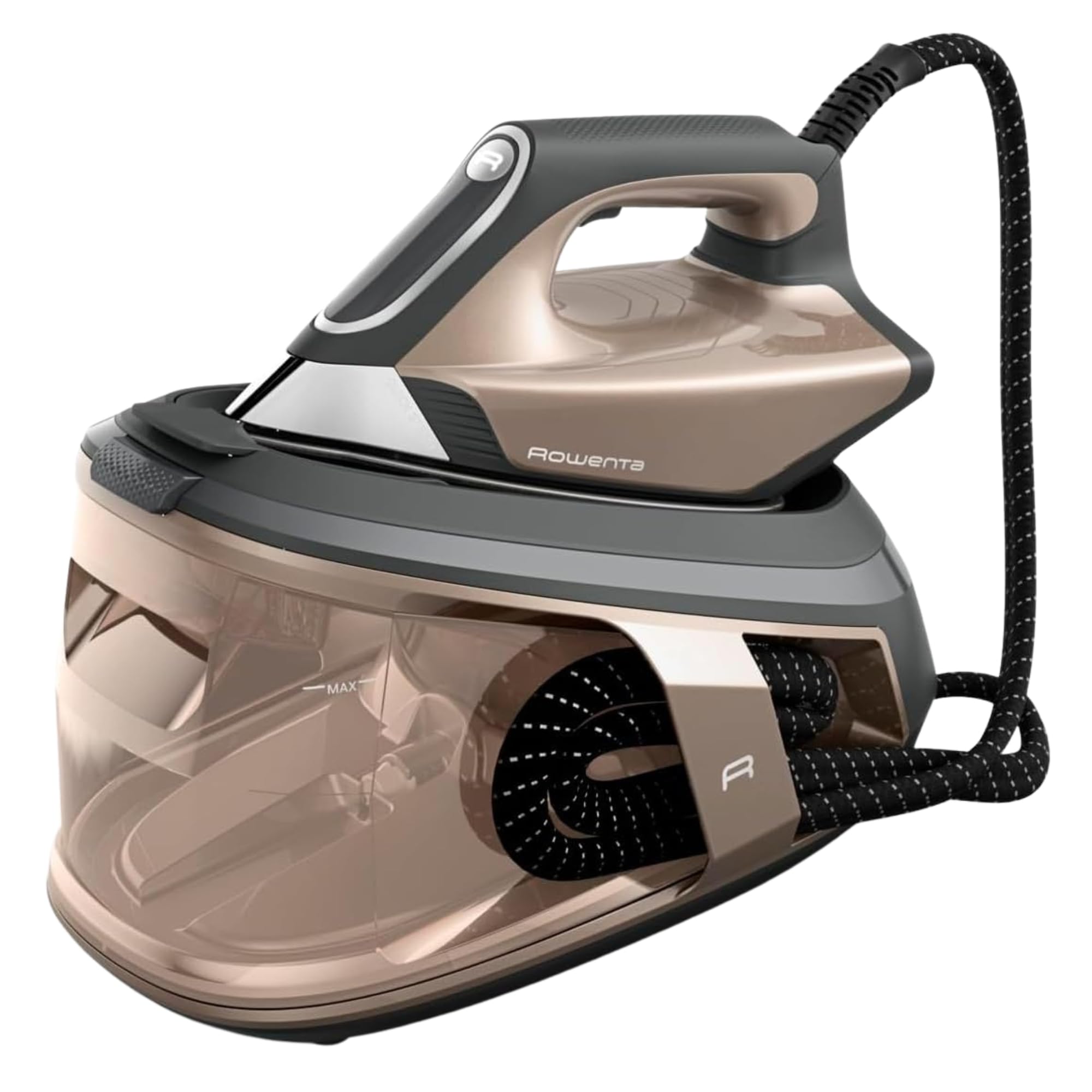
図1:以上view of the Rowenta Force Pro 500 Steam Generator Iron.

Figure 2: Illustration of the removable water tank.
4. セットアップと初回使用
- 開梱: すべての梱包材を慎重に取り除き、すべてのコンポーネントが揃っていることを確認します。
- ポジショニング: 蒸気発生器のベースを安定した平らな耐熱面に置きます。
- 水タンクへの給水:
- ベースから水タンクを取り外します。
- Fill the tank with tap water up to the 'MAX' level indicator. Do not use distilled or demineralized water exclusively, as it can affect steam performance.
- カチッと音がするまで、水タンクをベースにしっかりと差し込みます。
- 電源への接続: 電源コードをアース付きコンセントに差し込みます。
- 初めて使用する際の準備: Before ironing garments, allow the iron to heat up completely. Press the steam trigger a few times to prime the system and release any initial impurities.
5. 操作手順
5.1 電源投入と加熱
Press the power button on the control panel. The indicator light will flash while the appliance heats up. Once the light becomes steady, the iron is ready for use.
5.2 アイロンモードの選択
The Rowenta Force Pro 500 features two primary ironing modes:
- エコモード: For energy-efficient ironing of most fabrics. This mode saves up to 50% energy while still providing effective steam.
- マックスモード: For stubborn creases and thicker fabrics, providing maximum steam output (550 g/minute steam boost).
Select your desired mode directly from the control panel. The iron automatically adjusts the temperature, eliminating the need for manual temperature settings.

Figure 3: Eco mode for energy saving.

Figure 4: Control panel showing Eco and Max mode selection.
5.3 Steam Generation (Quicksteam Technology)
The Quicksteam technology provides instant steam on demand. Press the steam trigger located under the iron handle to activate continuous steam. For a powerful steam boost, press the trigger firmly.

Figure 5: Iron in use, demonstrating powerful steam output.

Figure 6: Visual representation of instant steam on demand.
5.4 Optimal Steam Distribution
The soleplate features 400 active micro-holes designed for maximum and even steam distribution, ensuring efficient wrinkle removal.

Figure 7: Close-up of the soleplate demonstrating steam distribution.
5.5 垂直蒸し
The powerful steam output allows for vertical steaming of hanging garments, curtains, and delicate fabrics. Hold the iron a few centimeters away from the fabric and press the steam trigger.
5.6 保管と輸送
After use, allow the iron to cool down completely. Secure the iron unit to the base using the locking system. The integrated cable management system allows for easy storage of the power cord and steam hose.
6. メンテナンスと清掃
6.1 スケール除去(Calc Collector)
The integrated Calc Collector ensures long-lasting steam performance by capturing limescale. Regularly clean the Calc Collector:
- 機器の電源プラグが抜かれ、完全に冷えていることを確認してください。
- Locate the Calc Collector on the steam generator base.
- コレクターをひねって引き抜きます。
- コレクターを流水で洗い流し、水垢の堆積物を除去します。
- Reinsert the clean Calc Collector firmly until it locks into place.
Figure 8: Location of the Calc Collector on the control panel.
6.2 ソールプレートのクリーニング
To maintain optimal glide and performance, clean the soleplate regularly:
- アイロンがプラグから抜かれ、冷えていることを確認してください。
- ソールプレートを広告で拭きますamp cloth. For stubborn marks, use a specialized soleplate cleaning stick (available separately) according to its instructions.
- Do not use abrasive cleaners or metallic scouring pads, as these can damage the soleplate.

図9:例ample of cleaning the iron's soleplate.
6.3 水タンクを空にする
It is recommended to empty the water tank after each use to prevent limescale buildup and ensure hygiene.
7。 トラブルシューティング
| 問題 | 考えられる原因 | 解決 |
|---|---|---|
| 蒸気は発生しません。 | 水タンクが空です。機器が加熱されていません。スチームトリガーが押されていません。 | Fill the water tank. Wait for the indicator light to become steady. Press the steam trigger. |
| Water droplets or brown stains appear on fabric. | Limescale buildup. Iron not hot enough. | Clean the Calc Collector. Allow the iron to heat up completely before use. |
| アイロンが熱くならない。 | プラグが差し込まれていません。電源ボタンが押されていません。 | 電源接続を確認してください。電源ボタンを押してください。 |
| 蒸気出力が減少しました。 | Limescale buildup. Water tank low. | Clean the Calc Collector. Refill the water tank. |
これらの解決策を試しても問題が解決しない場合は、カスタマー サポートにお問い合わせください。
8. 技術仕様
- モデル: VR9033F0
- プレッシャー: 7.5 バー
- スチームブースト: 最大550g/分
- 連続蒸気出力: Approx. 120-140 g/minute
- 電力(ワットtage): 2800ワット
- 水タンク容量: Approx. 1.5-1.8 Liters
- ソールプレート素材: ステンレス鋼
- 製品寸法(長さ x 幅 x 高さ): 38.5 x 29 x 34 cm
- 製品重量: 3.4キロ
- 巻tage: 220V
- 特別な機能: Quicksteam Technology, Eco Mode, Max Mode, Calc Collector.

図10: 製品の寸法。
9. 保証と顧客サポート
Rowenta is committed to product quality and durability. This product is designed for long-term use, with a focus on reparability.
- 修理可能性: Rowenta offers 15 years of reparability at a fair price, supported by a network of 6200 repair centers worldwide. This commitment aims to extend the product's lifespan and reduce waste.
- 顧客サービス: For any questions, technical assistance, or warranty claims, please refer to the official Rowenta webサイトをご覧いただくか、お近くのカスタマー サービス センターにお問い合わせください。
- オンラインリソース: 公式サイトをご覧ください ロウェンタブランドストア 追加の製品情報とサポートについては、こちらをご覧ください。