
1. はじめに
Thank you for choosing the OUKITEL P1500E PLUS Portable Power Station. This device is a high-capacity, versatile power solution designed to provide reliable electricity for various applications, including home backup, outdoor camping, travel, and emergency situations. With a robust 1536Wh LiFePO4 battery and an 1800W continuous AC output (3600W peak), it ensures your essential devices remain powered.
This manual provides important information regarding the safe operation, setup, maintenance, and troubleshooting of your P1500E PLUS. Please read it thoroughly before using the product to ensure optimal performance and safety.

Image: OUKITEL P1500E PLUS Portable Power Station in an outdoor setting, showcasing its compact design and portability.
2. 安全に関する注意事項
To ensure safe operation and prolong the lifespan of your OUKITEL P1500E PLUS, please adhere to the following safety guidelines:
- Do not disassemble, repair, or modify the unit. Incorrect assembly may lead to fire, explosion, or injury.
- Keep the device away from fire, heat sources, and direct sunlight to prevent overheating.
- Do not use or store the device in bathrooms or areas exposed to water or high humidity.
- 純正または認定されたケーブルとアクセサリのみを使用してください。
- デバイスを落としたり、衝撃を与えたり、強い振動を与えたりしないでください。
- お子様やペットの手の届かない場所に保管してください。
- The integrated LiFePO4 battery features a SuperSafe Battery Management System (BMS) that provides protection against short circuits, over-temperature, over-charge, and other potential hazards.
- 過熱を防ぐため、使用中および充電中は適切な換気を確保してください。
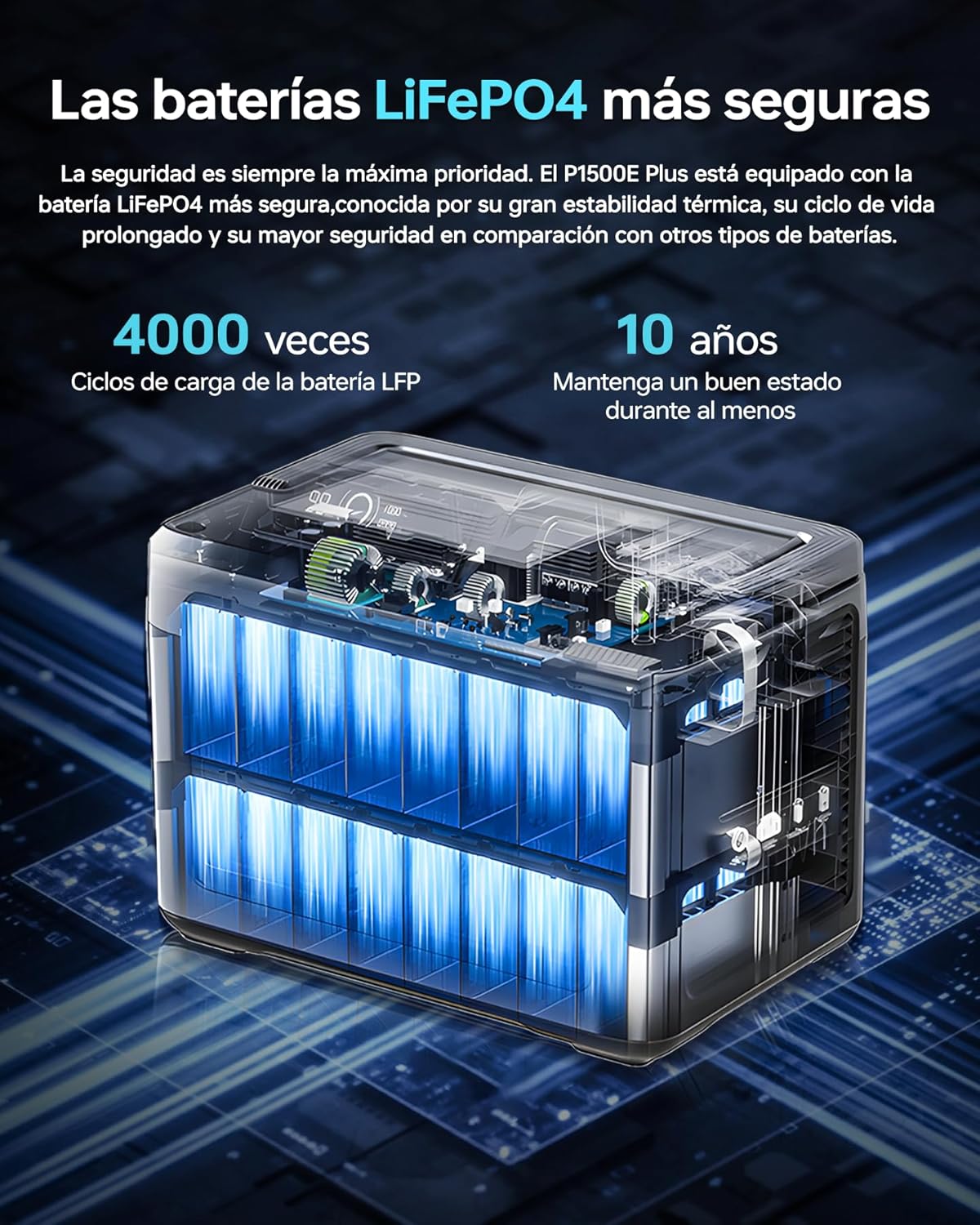
画像: 内部 view of the OUKITEL P1500E PLUS LiFePO4 battery cells, highlighting the safety and longevity of the battery technology. The text on the image indicates '4000 cycles' and '10 years' lifespan.
3. パッケージ内容
開梱後、パッケージの内容をご確認ください。不足品や破損品がございましたら、カスタマーサポートまでご連絡ください。
- 1 x OUKITEL P1500E PLUS Portable Power Station
- 2 x PV100 Foldable Solar Panels
- AC電源ケーブル x 1
- 1 x MC4 to XT60 Cable
- Bluetoothペアリングピン×1
- 保証カード x 1
- ユーザーマニュアル x 1

Image: Diagram showing the contents of the OUKITEL P1500E PLUS package, including the power station, AC charging cable, MC4-XT60 cable, and manual.
4.製品オーバーview
4.1. ポートとコントロール
The OUKITEL P1500E PLUS is equipped with a variety of output and input ports to accommodate diverse charging needs:
- AC Outputs (x4): 連続1800W、ピーク3600W。
- USB-A QC3.0 (x2): Quick Charge for compatible devices.
- USB Type-C PD20W (x1): Power Delivery for smaller devices.
- USB Type-C PD100W (x1): High-speed Power Delivery for laptops and larger devices.
- DC5521 Outputs (x2): For DC-powered appliances.
- Car Charging Port (x1): 12V/10A output.
- LEDライト: 照明用に統合されています。

画像: 詳細 view of the OUKITEL P1500E PLUS ports and controls, labeling AC outputs, USB ports, DC outputs, and the car charging port.
4.2. ディスプレイインターフェース
The clear digital display provides real-time information about the power station's status:
- 1. Discharge Remaining: Time remaining for discharge.
- 2. High Temperature Protection: Indicator for overheating.
- 3. Low Temperature Protection: Indicator for low temperature.
- 4. Fan Status: ファンの動作を示します。
- 5. Power Status: バッテリーの充電レベル。
- 6. UPS Mode: Indicates Uninterruptible Power Supply mode.
- 7. PV Charging Mode: Indicates solar charging.
- 8. Total Input Power: Current power input in watts.
- 9. Total Output Power: Current power output in watts.
- 10. Cigarette Lighter (12V) Output: Indicator for car port use.
- 11. DC (12V) Output: Indicator for DC output use.
- 12. サイレントモード: Indicator for quiet operation.
- 13. Fast Charging Mode: Indicator for rapid charging.
- 14. Slow Charging Mode: Indicator for slower, battery-preserving charging.
- 15.過負荷保護: Indicator for excessive load.
- 16. USB出力: Indicator for USB-A output use.
- 17. PD Output: Indicator for USB-C Power Delivery output use.
- 18. AC Output: Indicator for AC output use.
- 19. Frequency Switching: Allows switching between 50Hz/60Hz.
- 20. WiFi / Bluetooth: Connection status for app control.

Image: Diagram illustrating the OUKITEL P1500E PLUS display interface and its indicators, with numbered labels corresponding to their functions.
5. セットアップ
5.1. 初期充電
Before first use, fully charge the OUKITEL P1500E PLUS. Connect the AC power cable to the input port and plug it into a wall outlet. The display will show the charging status. It is recommended to fully charge the unit every 3 months if not in regular use.
5.2. ソーラーパネルの接続
To charge using solar power, connect the PV100 solar panels to the power station using the MC4 to XT60 cable. Ensure the solar panels are placed in direct sunlight for optimal charging efficiency. The display will indicate solar charging activity.
6. 操作手順
6.1. パワーステーションの充電
The P1500E PLUS offers flexible charging options:
- AC充電: Connect the AC cable to a wall outlet. Supports fast charging (Max 1200W) and slow charging (Max 500W). Fast charging can fully charge the unit in approximately 1 hour and 40 minutes.
- ソーラー充電: Connect solar panels via the MC4 to XT60 cable. The unit supports up to 500W solar input.
- 車の充電: Use a car charger (not included) to charge from your vehicle's 12V/24V outlet.

Image: OUKITEL P1500E PLUS charging via AC power from a wall outlet and simultaneously via foldable solar panels. The image indicates charging times for AC (1h 40m), Solar (3h 20m), Car (12h/6h), and combined AC+Solar (59 minutes).
6.2. Discharging (Using Outputs)
デバイスに電源を供給するには:
- Press the main power button to turn on the power station.
- Press the respective output button (AC, DC, USB) for the port you wish to use. The indicator light for that output will illuminate.
- デバイスを適切なポートに接続します。
- When finished, turn off the output ports and then the main power button.
6.3. UPS機能
The P1500E PLUS features an Uninterruptible Power Supply (UPS) function with a switchover time of less than 10 milliseconds. This ensures continuous operation for sensitive devices like PCs, servers, and freezers during sudden power outagesまたはvoltage drops, preventing data loss and downtime.

Image: OUKITEL P1500E PLUS providing UPS backup to a computer setup during a simulated power outage, demonstrating its ability to maintain power for critical devices. The text on the image highlights 'UPS without interruptions of 1800W <10ms'.
6.4.アプリ制御
Control your P1500E PLUS remotely via the dedicated mobile application. Use the Bluetooth pairing pin to connect your device. The app allows you to:
- バッテリーの状態と電力消費を監視します。
- Adjust discharge limits.
- Select charging speed (fast or slow).
- Turn outputs on/off.

Image: A user controlling the OUKITEL P1500E PLUS via a smartphone app in an outdoor setting, demonstrating the convenience of remote management. The text on the image indicates 'Smart control via application'.
7. メンテナンス
適切なメンテナンスにより、発電所の寿命とパフォーマンスが保証されます。
- ストレージ: Store the unit in a cool, dry place, away from direct sunlight and extreme temperatures. For long-term storage, charge the battery to 50-80% every 3 months.
- クリーニング: 本体の外装を清掃する際は、乾いた柔らかい布をご使用ください。研磨剤入りの洗剤や溶剤は使用しないでください。
- バッテリーのケア: Avoid fully discharging the battery frequently. While LiFePO4 batteries are robust, maintaining a charge between 20% and 80% can extend their overall lifespan.
- 換気: 過熱を防ぐために、通気口にほこりやごみが詰まっていないことを確認してください。
8。 トラブルシューティング
If you encounter issues with your OUKITEL P1500E PLUS, refer to the following common problems and solutions:
| 問題 | 考えられる原因 | 解決 |
|---|---|---|
| ユニットがオンにならない | バッテリーが完全に放電しています。電源ボタンが正しく押されていません。 | Charge the unit using AC power; Press and hold the power button for 3 seconds. |
| AC/DC/USBポートからの出力がない | Output port not activated; Overload protection triggered; Device not compatible. | Press the corresponding output button; Reduce the load; Check device power requirements. |
| 充電速度が遅い | Slow charging mode activated; Low solar input; High ambient temperature. | Switch to fast charging mode via app or unit settings; Ensure solar panels are in direct sunlight; Move to a cooler environment. |
| ディスプレイに過熱警告 | 過度の負荷、換気の悪さ、周囲温度の高さ。 | Reduce the connected load; Ensure ventilation openings are clear; Move to a cooler environment. |
If the problem persists, please contact OUKITEL customer support.
9. 仕様
| 特徴 | 仕様 |
|---|---|
| モデル番号 | P1500Eプラス |
| ブランド | ウキテル |
| 電池のタイプ | リン酸鉄リチウム |
| 容量 | 1536Wh (480000mAh) |
| AC出力 | 1800W(連続)、3600W(ピーク) |
| ACアウトレット | 4 |
| USB-A出力 | 2 x QC3.0 |
| USB-C出力 | 1 x PD20W, 1 x PD100W |
| DC出力 | 2 x DC5521, 1 x Car Charging Port (12V/10A) |
| AC入力(充電) | Max 1200W (Fast), Max 500W (Slow) |
| ソーラー入力 | 最大500W |
| UPS切り替え時間 | <10ミリ秒 |
| 寸法(長さ×幅×高さ) | 38.6 x 22.8 x 30.5 cm(15.2 x 9.0 x 12.0インチ) |
| 重さ | 約14.2kg(31.3ポンド) |
| 推奨用途 | 住宅、Camping、緊急 |
10. 保証とサポート
The OUKITEL P1500E PLUS Portable Power Station comes with a 2年間保証 ご購入日から有効です。この保証は、通常の使用における製造上の欠陥および仕上がりをカバーします。
以下のものは保証の対象外となります:
- 誤用、乱用、または不適切な操作によって生じた損傷。
- Damage caused by unauthorized disassembly, repair, or modification.
- Damage caused by natural disasters or external forces.
- 通常の消耗。
For warranty claims, technical support, or any questions regarding the use of your OUKITEL P1500E PLUS, please contact OUKITEL customer service. Please have your purchase receipt and product model number ready when contacting support.