
1. はじめに
Welcome to the OnePlus 15 user manual. This guide provides essential information for setting up, operating, maintaining, and troubleshooting your new smartphone. The OnePlus 15 is designed for high performance and extended battery life, featuring a Snapdragon 8 Elite Gen 5 processor, a 7300mAh battery, and a triple 50 MP camera system. Please read this manual thoroughly to ensure optimal use of your device.

図1: 前面 view of the OnePlus 15 smartphone.
2. 箱の中身
製品パッケージにすべてのアイテムが揃っていることを確認します。
- OnePlus 15 Smartphone (x1)
- 充電器(×1)
- USBデータケーブル(1本)
- SIM Ejector Tool (x1)
- クイックガイド(1冊)
- Safety Guide (x1)

Figure 2: Included items in the OnePlus 15 package.
3. セットアップ
3.1. SIMカードのインストール
The OnePlus 15 supports Dual-SIM functionality. To install your SIM card(s):
- デバイスの側面にある SIM カード トレイを見つけます。
- SIM イジェクタ ツールをトレイの横にある小さな穴に挿入し、トレイが飛び出すまでしっかりと押します。
- Nano-SIMカードを金色の接点を下にしてトレイに挿入します。正しく装着されていることを確認してください。
- SIM カード トレイを慎重に電話機に再度挿入します。

図3:側面 view of the OnePlus 15, highlighting the SIM card tray.
3.2. 初回電源投入とセットアップ
デバイスを初めて電源オンにするには:
- OnePlus ロゴが表示されるまで、電源ボタン (右側にあります) を押し続けます。
- 画面上の指示に従って、言語の選択、Wi-Fi 接続、Google アカウントのログイン、セキュリティ設定などの初期設定を完了します。
3.3. バッテリーの充電
The OnePlus 15 is equipped with a 7300mAh battery. To charge your device:
- 有線充電: Connect the provided USB Data Cable to the Type-C port on the bottom of the phone and the other end to the charger. Plug the charger into a power outlet.
- ワイヤレス充電: Place the phone on a compatible wireless charging pad. Ensure the phone is centered on the pad for efficient charging.
フル充電すると、約 68.7 時間の通話が可能です。

Figure 4: Illustration of the 7300mAh battery capacity.
4. デバイスの操作
4.1. ディスプレイ
The OnePlus 15 features a 6.78-inch AMOLED display with a 2772x1272 resolution and a 165 Hz refresh rate. This provides smooth visuals and vibrant colors. Adjust display settings such as brightness, color mode, and refresh rate in the device settings menu.
4.2. パフォーマンス
Powered by the Snapdragon 8 Elite Gen 5 processor and 16GB of RAM, the OnePlus 15 delivers fast and efficient performance for multitasking, gaming, and demanding applications. The Tri-Chip System, combining the Snapdragon 8 Elite Gen 5 with a dedicated Wi-Fi chip and CPU scheduler, optimizes for speed, connectivity, and power efficiency.
ビデオ1: 終了view of the OnePlus 15's performance capabilities and user experience.
4.3. カメラシステム
The device is equipped with a Triple 50 MP camera system, offering wide, ultra-wide, and telephoto lenses for versatile photography. The DetailMax Engine enhances photo quality in various lighting conditions, including day, night, and motion shots. Both front and rear cameras are available for capturing images and videos.

図5:背面 view of the OnePlus 15, showcasing the triple camera system.
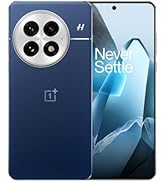
Figure 6: DetailMax Engine for stunning photos.
4.4. 接続性
The OnePlus 15 supports a range of connectivity options:
- 無線: Wi-Fi, Bluetooth, NFC, Infrared.
- 有線: USBタイプC。
- ナビゲーション: Dual-band GPS (L1+L5) and Galileo (E1+E5a).
- シム: Dual SIM support for managing multiple networks.
4.5. オペレーティングシステム
The device runs on Android 16 with OxygenOS 16, providing a fast and smooth user experience. Regular software updates will be provided to enhance features and security.
5. メンテナンス
5.1. 耐久性と保護
The OnePlus 15 is built with IP66/IP68/IP69 and IP19K ratings, offering resistance against dust and water. While designed to be durable, avoid exposing the device to extreme conditions or prolonged submersion in water.

Figure 7: OnePlus 15 demonstrating water resistance.
5.2. デバイスのクリーニング
Use a soft, lint-free cloth to clean the screen and body of your phone. Avoid using abrasive materials or harsh chemicals, which can damage the display or finish.
5.3. ソフトウェアの更新
Periodically check for software updates in the device settings. Keeping your software up-to-date ensures you have the latest features, security patches, and performance improvements.
6。 トラブルシューティング
This section addresses common issues you might encounter with your OnePlus 15.
6.1. デバイスの電源が入らない
- バッテリーが充電されていることを確認してください。携帯電話を充電器に接続し、数分間待ってから再度電源を入れてください。
- 強制的に再起動するには、電源ボタンを 10 ~ 15 秒以上押し続けます。
6.2. ネットワーク接続が悪い
- SIM カードが正しく挿入されているかどうかを確認してください。
- Verify that airplane mode is not enabled.
- デバイスを再起動します。
- If issues persist, contact your network provider.
6.3. アプリがクラッシュまたはフリーズする
- アプリを閉じて再度開きます。
- Clear the app's cache and data in device settings.
- アプリが最新バージョンに更新されていることを確認してください。
- If the issue is widespread, consider restarting the phone.
6.4. バッテリーの消耗が早い
- 画面の明るさと画面のタイムアウト時間を短縮します。
- 必要ない場合は、Wi-Fi、Bluetooth、GPS などの使用しない機能を無効にします。
- バックグラウンドで実行されている電力を大量に消費するアプリケーションを識別して閉じます。
- Check for recent software updates, as they often include battery optimizations.
7. 仕様
Detailed technical specifications for the OnePlus 15 (Model: CPH2749).
| 特徴 | 詳細 |
|---|---|
| モデル名 | ワンプラス15 |
| 商品型番 | CPH2749 |
| 製品寸法 | 6.36 x 3.02 x 0.32インチ |
| アイテム重量 | 1.28ポンド |
| オペレーティング·システム | アンドロイド16 |
| CPUモデル | スナップドラゴン 8 エリート 第5世代 |
| CPU速度 | 4.61GHz帯 |
| RAMメモリインストールサイズ | 16ギガバイト |
| メモリストレージ容量 | 512ギガバイト |
| 立ち画面表示サイズ | 6.78インチ |
| 解決 | 2772*1272 |
| リフレッシュレート | 165Hz |
| バッテリー容量 | 7300ミリamp 時間(7300mAh) |
| 電話通話時間 | 68.7時間 |
| 接続技術 | 赤外線、NFC、USB、Wi-Fi、Bluetooth |
| GPS | Dual band: GPS(L1+L5) Galileo(E1+E5a) |
| 特集 | デュアルSIM、ワイヤレス充電 |
| オーディオジャック | Type-C headphones: supported Type-C digital headphones & Type-C analog headphones |
| その他のカメラ機能 | Front, Rear (Triple 50 MP Camera System) |
| IP 定格 | IP66/IP68/IP69 and IP19K rated |
| 色 | Sand Storm |
8. 保証情報
Your OnePlus 15 device is covered by a limited manufacturer's warranty. Please refer to the included Safety Guide or visit the official OnePlus website for detailed warranty terms and conditions, including coverage duration and service procedures. Keep your proof of purchase for warranty claims.
9. サポート
For further assistance, technical support, or to access additional resources, please visit the official OnePlus support website or contact customer service. You can find contact details and FAQs on the OnePlus webサイト。
オンラインリソース: www.oneplus.com/support