
1. はじめに
Thank you for choosing the OTVOC DGBook 15.6-inch Laptop. This manual provides essential information for setting up, operating, maintaining, and troubleshooting your new device. Please read it thoroughly to ensure optimal performance and longevity of your laptop.
The OTVOC DGBook is designed for balanced performance, ideal for everyday tasks, studying, business, and entertainment. It features a 15.6-inch Full HD IPS display, an Intel Core m3-8100Y processor, 4GB RAM (upgradable), and a 128GB SSD (expandable up to 2TB).
2. 箱の中身
- OTVOC DGBook Laptop
- ユーザーマニュアル
- 充電器
ビデオの説明: This video demonstrates the unboxing process of the OTVOC DGBook laptop, showing the contents included in the package.
3. セットアップと初回使用
3.1初期電源オン
- Connect the charger to the laptop and a power outlet.
- ノートパソコンの蓋を開けます。
- キーボードにある電源ボタンを押します。
- Follow the on-screen instructions to complete the Windows 11 setup process. This includes selecting your region, connecting to Wi-Fi, and creating a user account.
ビデオの説明: This video provides a general introduction to the OTVOC DGBook, showcasing its features and initial boot-up process.
3.2 Reinstalling the Operating System
オペレーティング システムを再インストールする必要がある場合は、次の手順に従ってください。
- Power on the device and immediately press F7 repeatedly to enter the boot menu.
- 選択 セットアップに入る to access the BIOS settings.
- に移動 安全 tab using the arrow keys.
- 選択 セキュアブート and change it from 無効 に 有効.
- プレス ESC to return to the Security main page, then select 変更を保存して終了 to save settings and reboot.
- Before proceeding, connect the system installation USB drive.
- After reboot, press F7 multiple times to enter the boot menu.
- Select the second option (USB device) to boot from the installation drive.
- The system installation will begin. This process is estimated to take 8 minutes.
- When prompted, safely remove the USB drive. The laptop will automatically restart.
- The system will perform initial setup, estimated to take 6 minutes.
- After logging in, click OK on the System Preparation Tool window to exit Audit Mode. The laptop will restart into the Windows Out-of-Box Experience (OOBE).
ビデオの説明: This video guides you through the process of reinstalling the operating system on your OTVOC DGBook laptop, including BIOS settings and USB boot.
4.ハードウェアオーバーview
4.1 ポートと接続
The OTVOC DGBook offers a comprehensive suite of ports for all your connectivity needs:
- 2x USB 3.0 ポート
- 1x Multi-function Type-C port (for charging & data)
- HDMIポート x 1
- 1xTFカードスロット
- 1x DC-in port
- ヘッドフォンジャック x 1

画像の説明: 詳細な view of the OTVOC DGBook laptop's side profiles, highlighting the placement and types of available ports for external device connections.
4.2 キーボードとタッチパッド
The laptop features a full-size keyboard with a dedicated numeric keypad for efficient data entry. The spacious, precision touchpad ensures seamless navigation.

画像の説明: オーバーヘッド view of the OTVOC DGBook laptop, showcasing its full-size keyboard with a numeric keypad and a large, responsive touchpad for comfortable typing and navigation.
4.3 ディスプレイ
Experience clear visuals on the 15.6-inch FHD IPS screen with 1920x1080 resolution, offering wide view正確な角度と色彩を実現します。

画像の説明: The OTVOC DGBook laptop with its screen laid flat at 180 degrees, demonstrating its flexible hinge design suitable for sharing content or presentations.
4.4 Webプライバシーシャッター付カム
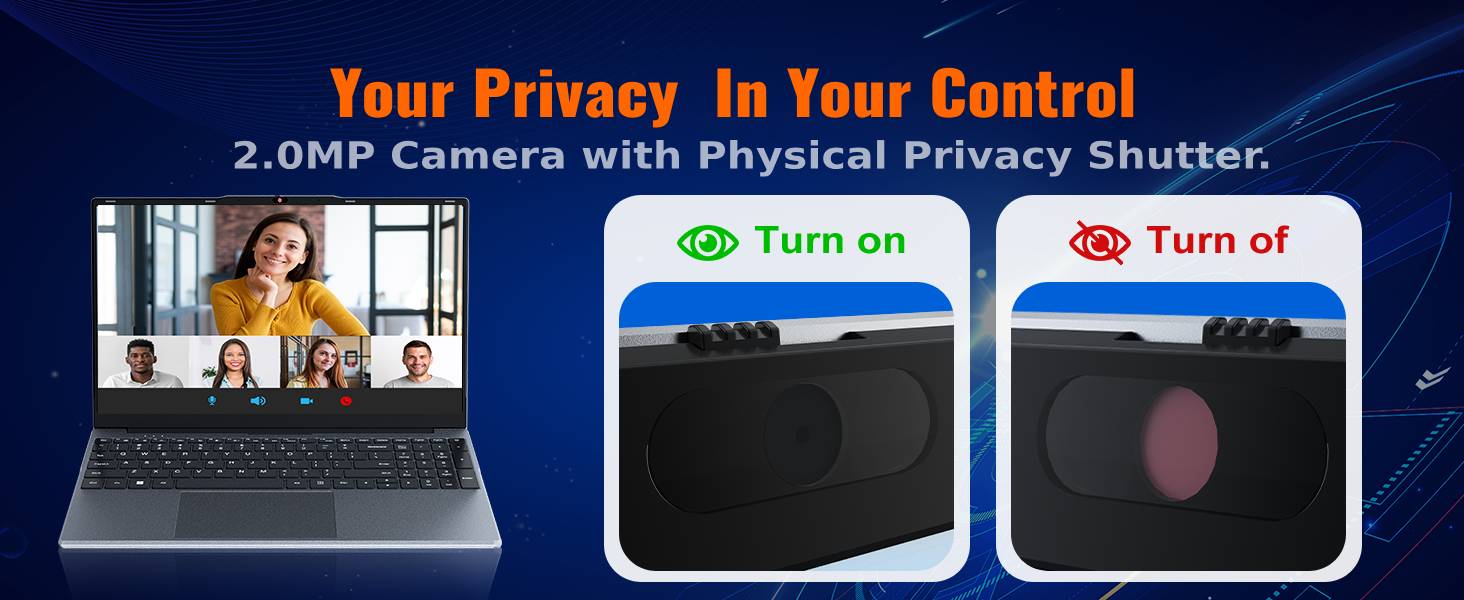
The integrated 2MP camera is suitable for video calls and online learning. A physical privacy slider is included to block the lens when not in use, ensuring your privacy.

画像の説明: クローズアップ view of the OTVOC DGBook laptop's 2MP webcam, illustrating the physical privacy shutter in both open and closed positions for enhanced user privacy.
5. アップグレードとメンテナンス
5.1 RAMのアップグレード
The laptop comes with one 4GB DDR3 RAM module installed and an additional empty slot. You can easily upgrade the RAM to boost performance by adding another module or replacing the existing one. The maximum supported RAM is 16GB.
ビデオの説明: This video demonstrates the steps to upgrade the RAM in your OTVOC DGBook laptop, showing how to access the memory slots and install new modules.

画像の説明: 内部の view of the OTVOC DGBook laptop's motherboard, highlighting the dual-channel SO-DIMM RAM slots and illustrating the process of upgrading memory modules.
5.2 SSDストレージ拡張
The laptop includes a 128GB SATA SSD. An easy-upgrade slot allows you to add a larger 2.5" SATA SSD, expanding your storage up to 2TB for all your fileとメディア。
ビデオの説明: This video demonstrates how to replace or upgrade the SSD in your OTVOC DGBook laptop, detailing the steps for accessing and installing a new solid-state drive.

画像の説明: An illustration of the OTVOC DGBook laptop's internal layout, highlighting the easy-upgrade SATA SSD bay and showing how to expand storage from 128GB up to 2TB.
5.3冷却システム
The laptop features an integrated cooling fan to maintain optimal performance and prevent overheating during demanding workloads, ensuring quiet operation.
画像の説明: An animated diagram illustrating the active cooling system of the OTVOC DGBook laptop, showing the internal fan and airflow designed to maintain sustained performance and prevent overheating.
6. 仕様
| 特徴 | 詳細 |
|---|---|
| 画面サイズ | 15.6インチ |
| 画面解像度 | 1920 x 1080ピクセル(FHD IPS) |
| プロセッサ | Intel Core m3-8100Y (Up to 3.4GHz) |
| ラム | 4GB DDR3(16GBまでアップグレード可能) |
| ストレージ | 128GB SATA SSD (Expandable up to 2TB) |
| グラフィックス | インテル UHD グラフィックス 615 (統合) |
| オペレーティング·システム | Windows 11 ホーム |
| 接続性 | 802.11a/b/g/n/ac Wireless, Bluetooth 5.0 |
| ポート | 2x USB 3.0, 1x Type-C, 1x HDMI, 1x TF Card, 1x DC-in, 1x Headphone Jack |
| Webカム | 2MP with Privacy Slider |
| バッテリー寿命 | Approx. 4 hours (38Wh) |
| 重さ | 1.57 kg (3.46 ポンド) |
| 寸法 | 14.08 x 9.03 x 0.76インチ |
7。 トラブルシューティング
7.1 よくある問題
- ノートパソコンの電源が入らない: Ensure the charger is securely connected and the power outlet is functional. Try a different outlet.
- パフォーマンスが遅い: Check for background applications, update drivers, or consider upgrading RAM/SSD.
- Wi-Fi 接続の問題: Restart your router and laptop. Check network settings and ensure Wi-Fi drivers are up to date.
- 画面表示の問題: Adjust brightness settings. If the issue persists, contact support.
For more detailed troubleshooting or issues not listed here, please refer to the support section below.
8. 保証とサポート
8.1 保証情報
Your OTVOC DGBook laptop comes with a 30日間返金保証 そして 1年間の交換保証 against manufacturing issues.
8.2 サポートへの連絡
For any questions, technical assistance, or warranty claims, please contact the seller through Amazon:
- へ移動 アマゾン アカウントにログインしてください。
- Click on the "Returns & Orders" section, located in the top right corner of the homepage.
- Find the order containing your OTVOC DGBook laptop, and click on the "Contact Seller" button next to it.
- Enter your inquiry details and click "Send" to submit your message.
Alternatively, you can click on the seller name below the "Add to Cart" button on the product page, then contact us via email by clicking "Ask a Question" in the top right corner.
We typically reply to customer messages within 12 hours, and no more than 24 hours.