
Aninerel ANJ-12KP-SP-WIFI
Aninerel ANJ-12KP-SP-WIFI 12000W Solar Hybrid Inverter User Manual
Model: ANJ-12KP-SP-WIFI
ブランド: アニネレル
1.製品オーバーview
The Aninerel ANJ-12KP-SP-WIFI is a 12000W solar hybrid inverter designed for both on-grid and off-grid solar power systems. It converts 48V DC power to 120V single-phase or 240V split-phase AC power, providing a continuous output of 12,000W and a peak output of 24,000W. This inverter features two built-in MPPT solar charging controllers, supporting up to 6,000W + 6,000W PV input with a maximum DC voltage of 500V and a maximum PV charging current of 220A. It is suitable for various applications including RVs, homes, cabins, and workshops.

画像1.1:正面 view of the Aninerel ANJ-12KP-SP-WIFI 12000W Solar Hybrid Inverter, showing the display screen and indicator lights.

Image 1.2: Diagram illustrating a typical single-phase hybrid inverter system setup, showing power flow from solar panels, grid, and battery to household loads.
2. 主な特徴
- ハイパワー出力: 12,000W continuous, 24,000W peak output, 48V DC to 120V/240V AC split-phase conversion.
- Dual MPPT Solar Charging: Two built-in MPPT controllers support up to 6,000W + 6,000W PV input with a maximum DC voltage of 500V and a maximum PV charging current of 220A.
- 並列機能: Supports parallel connection of up to 6 units for a maximum output power of 72kW. Can achieve 120V single-phase, 240V split-phase, or 208V three-phase output with appropriate configurations.
- Smart LCD Monitoring: Features an LCD screen and indicator LEDs for real-time monitoring of power input/output, battery status, and system alerts. Allows configuration of charging current, voltage thresholds, and priority modes.
- Flexible Charging & Output Modes: Four charging modes (Solar Only, AC Priority, Solar Priority, Hybrid Charging) and three output modes (Mains Priority, PV Priority, Inverter Output) for diverse scenarios.
- バッテリー互換性: Compatible with AGM, GEL, Lead-acid, Li-ion, and LiFePO4 48V batteries. Supports no-battery mode for direct solar-to-load applications.
- 堅牢な設計: IP65-rated enclosure for dustproof and durable operation in various environments. Features intelligent cooling with a variable speed fan.
- 包括的な保護: 過電圧に対する保護機能を内蔵tage、undervoltage, reverse polarity, and short circuits.
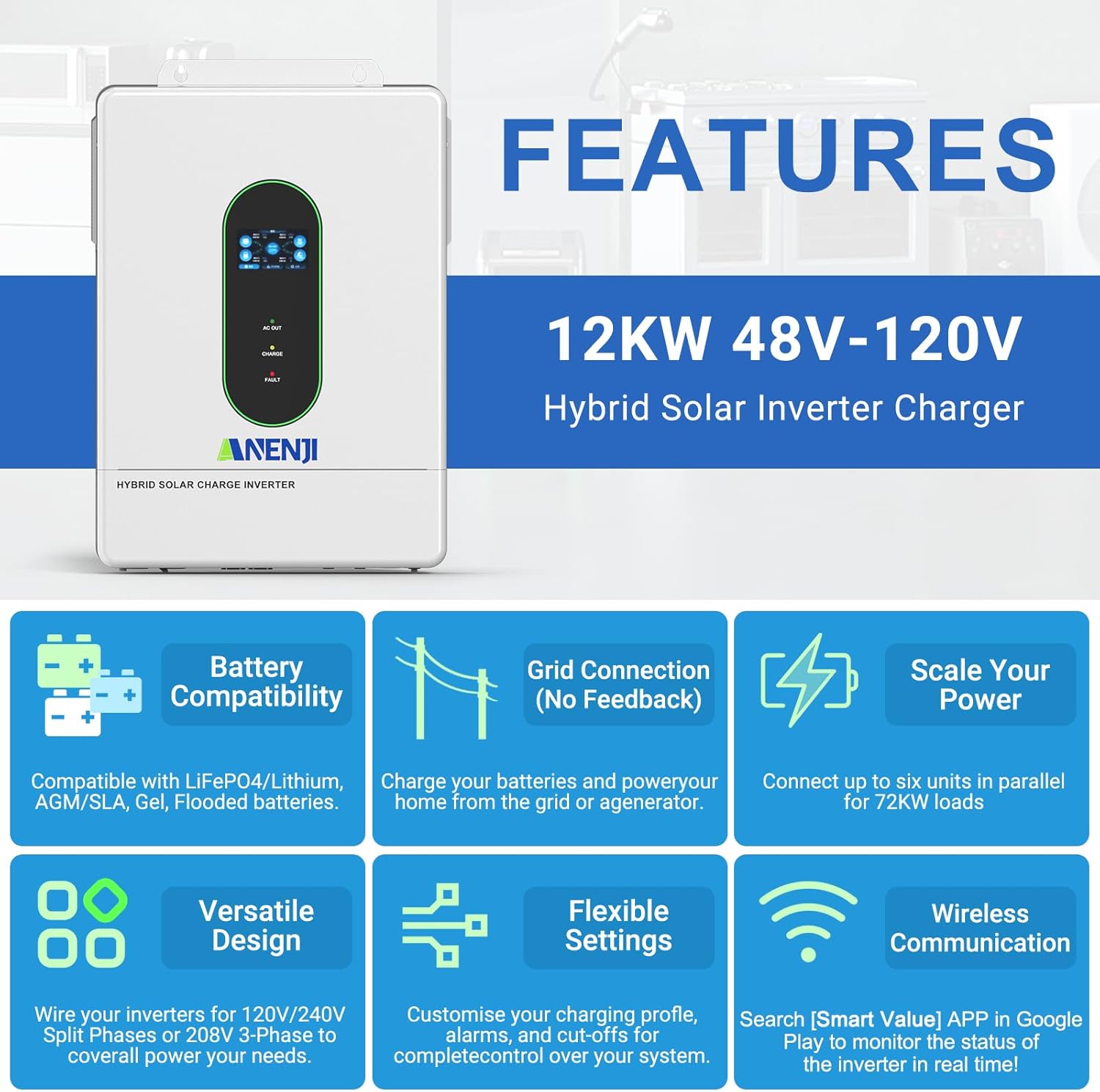
画像2.1: 以上view of key features including battery compatibility, grid connection, scalability, versatile design, flexible settings, and wireless communication.
3. 製品コンポーネントとアクセサリ
The following items are typically included with your Aninerel ANJ-12KP-SP-WIFI Hybrid Solar Inverter:
- Aninerel ANJ-12KP-SP-WIFI Hybrid Solar Inverter Unit
- 取扱説明書
- インストールツールキット
- Parallel Cable (x1)
- Anti-reverse current CT (x2)
- WiFi Module (x1)
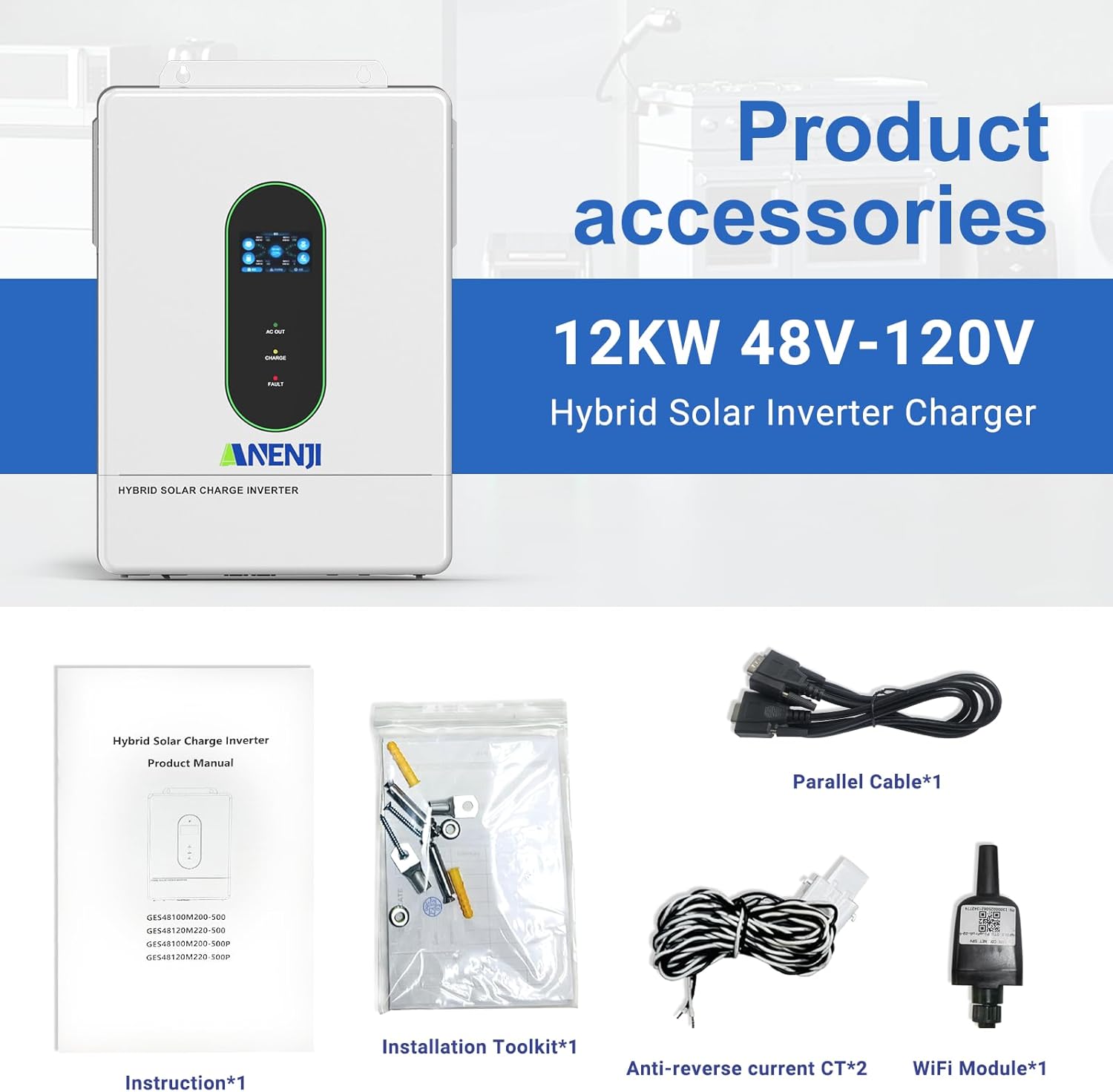
Image 3.1: Contents of the product package, including the inverter, manual, installation tools, cables, CTs, and WiFi module.
4. セットアップとインストール
4.1. 物理的な設置
Ensure the inverter is mounted in a well-ventilated area, protected from direct sunlight and moisture. The IP65 rating allows for indoor or semi-outdoor use. Refer to the included instruction manual for detailed mounting procedures and clearances.
4.2. Connection Ports Overview
Familiarize yourself with the various connection ports on the inverter. Proper connection is crucial for safe and efficient operation.

画像4.1: 詳細 view of the inverter's connection panel, labeling each port for display, pilot lamp, AC output, AC input, WiFi port, USB, communication ports (RS485-1, RS485-2/CAN), dry contact, CT sensing, ON/OFF switch, PV parameters, battery parameters, parallel communication, AC input breaker, and grounding screw hold.
- 表示画面
- パイロットlamp
- AC出力ポート
- AC入力ポート
- WiFi port (optional)
- USB通信ポート
- RS485-1 通信ポート
- RS485-2/CAN communication port
- ドライコンタクトポート
- CT sensing for self-consumption (optional)
- ON/OFFロッカースイッチ
- Photovoltaic (PV) parameters
- バッテリーパラメータ
- パラレル通信ポート(パラレルモジュールのみ)
- AC入力ブレーカー
- 接地ネジ留め
4.3. 電気接続
All electrical wiring should be performed by a qualified electrician in accordance with local electrical codes and regulations.
- PV 入力: Connect your solar panel arrays to the PV input terminals. The inverter supports dual MPPT inputs, each up to 6000W. Ensure the PV array voltage は指定された範囲内 (90 ~ 450VDC) です。
- バッテリー接続: Connect a 48V battery bank (AGM, GEL, Lead-acid, Li-ion, or LiFePO4) to the battery terminals. Observe correct polarity.
- AC入力(ユーティリティ/発電機): Connect the grid or a generator to the AC input port.
- AC出力: Connect your household loads to the AC output port. The inverter provides 120V (L1/N, L2/N) or 240V (L1/L2) split-phase output.
- 接地: Ensure the inverter is properly grounded using the grounding screw hold.

Image 4.2: Detailed wiring diagram showing connections for PV input, utility/generator input, battery, and inverter output to household loads.
4.4. 並列接続
The inverter supports parallel connection of up to 6 units to increase total power output and surge capacity. This allows for flexible configurations including single-phase, split-phase, or three-phase systems.

Image 4.3: Diagrams illustrating various parallel connection configurations for single-phase and split-phase systems, showing how multiple inverters can be combined.

Image 4.4: Illustration of maximum 6 parallel connections for 120V single-phase/240V split-phase residential systems, delivering up to 72kW of power.
4.5. WiFi Monitoring Setup
The inverter includes a WiFi module for real-time monitoring of its operating status via a mobile application. Install the WiFi module into the designated port. Download the "Smart Value" app from the Google Play Store or Apple App Store to configure and monitor your system.
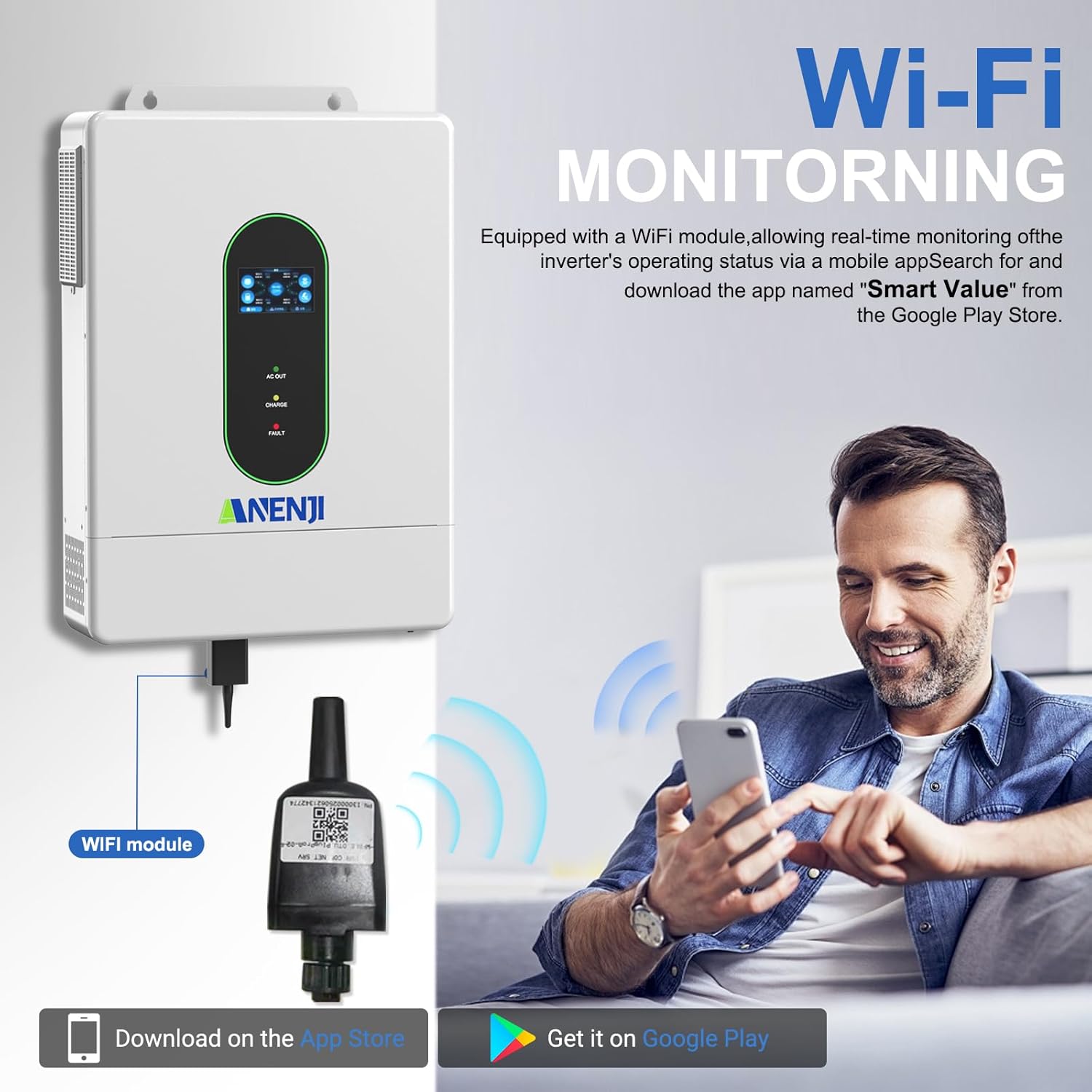
Image 4.5: Diagram showing the WiFi module connection to the inverter and a user monitoring the system via a smartphone app. The app "Smart Value" is available on Google Play and the App Store.
For detailed instructions on connecting the WiFi module and setting up the monitoring application, refer to the specific instructions provided with the WiFi module or contact customer support.
5. 操作手順
5.1. LCD Screen and Indicator LEDs
The inverter features an LCD screen and indicator LEDs to provide real-time status updates. The LCD allows for configuration of various system settings.
- AC出力LED: Indicates AC output status.
- 充電LED: バッテリーの充電状態を示します。
- 障害LED: Indicates system errors or faults.
Use the control buttons adjacent to the LCD screen to navigate menus and adjust settings such as charging current, voltage thresholds, and operational priority modes.
5.2. Charging Priority Modes
The inverter offers four charging modes to control how the battery bank is charged from different power sources:
- 太陽光の優先順位: The inverter prioritizes solar power for charging. AC input will only charge the battery when solar power is insufficient.
- 太陽光およびAC入力: The inverter charges the battery bank from both solar and AC power simultaneously.
- 太陽光発電のみ: The inverter charges the battery bank exclusively from available solar power.
- ハイブリッド充電: (Details typically configured via settings, balancing solar and AC based on battery level and load).
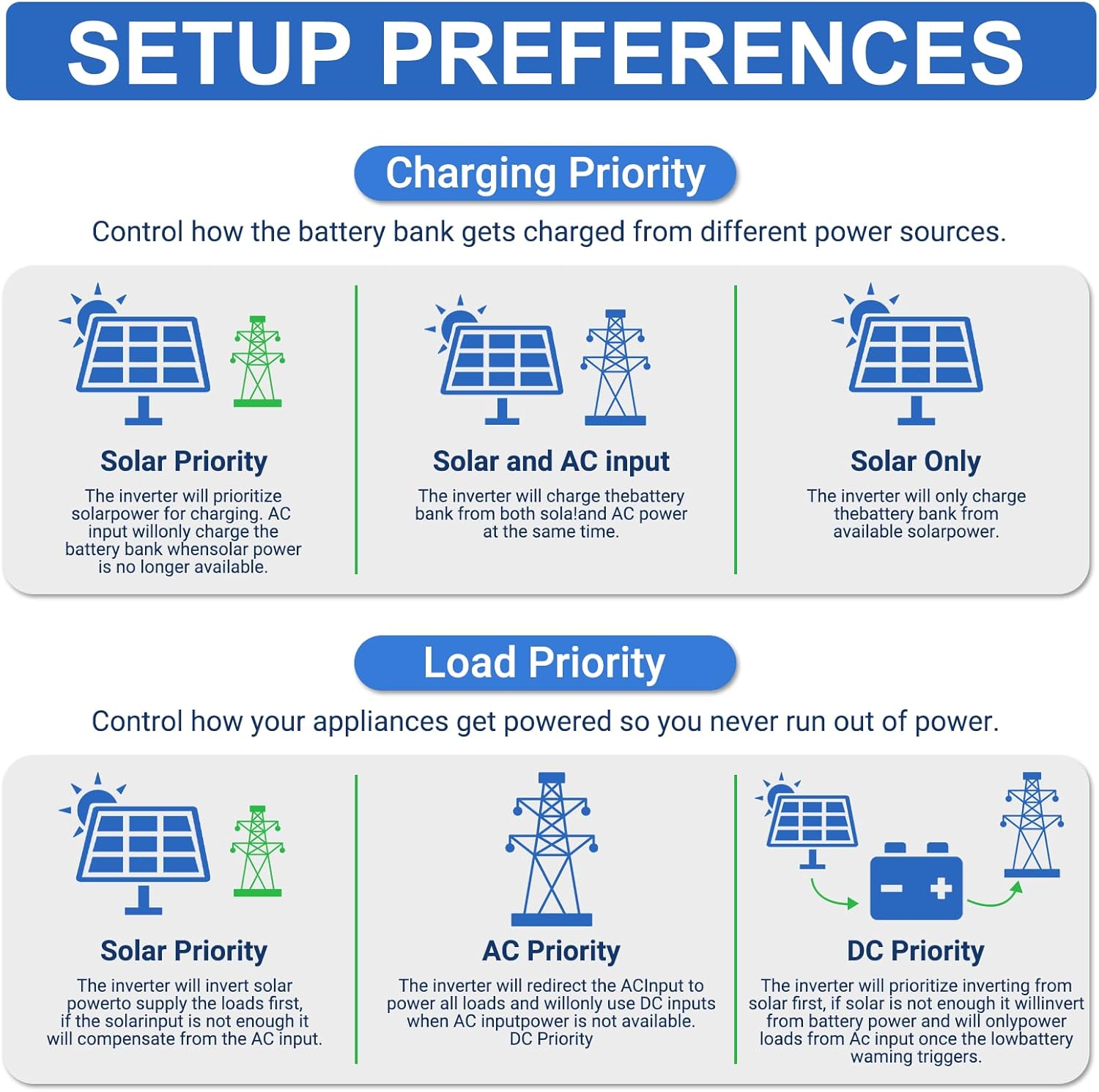
Image 5.1: Diagrams illustrating the different charging priority modes (Solar Priority, Solar and AC input, Solar Only) and load priority modes (Solar Priority, AC Priority, DC Priority).
5.3. 出力優先モード
The inverter provides three output modes to manage how appliances are powered:
- Mains Priority (AC Priority): The inverter will redirect AC input to power all loads. If AC input is not available, it will switch to inverter output from batteries/solar.
- PV Priority (Solar Priority): The inverter will use solar power to supply the load first. If solar power is insufficient, it will draw from AC input or batteries.
- Inverter Output (DC Priority): The inverter prioritizes drawing power from the battery. If the battery level is low, it will switch to AC input.
5.4. No-Battery Operation
The inverter supports operation without a connected battery bank for direct solar-to-load applications. In this mode, the inverter will directly power loads from solar PV input. Ensure proper configuration for this mode as per the detailed manual.
6. メンテナンス
Regular maintenance helps ensure the longevity and optimal performance of your inverter. Always disconnect all power sources before performing any maintenance.
- クリーニング: インバーターの外側は定期的に乾いた布で拭いてください。通気口に埃やゴミが詰まっていないことを確認してください。
- 接続: すべての電気接続部の締め付け具合と腐食の兆候がないか毎年点検してください。
- バッテリーの状態: If using a battery bank, monitor battery health and perform maintenance as recommended by the battery manufacturer.
- ファームウェアの更新: メーカーの website or app for any available firmware updates for the inverter or WiFi module.
7。 トラブルシューティング
This section provides general guidance for common issues. For detailed troubleshooting, refer to the complete instruction manual or contact technical support.
| 問題 | 考えられる原因 | 解決 |
|---|---|---|
| インバータがオンにならない | No DC input from battery/PV; AC input breaker tripped; ON/OFF switch off. | バッテリーの接続と容量を確認してくださいtage; ensure PV input is sufficient; reset AC input breaker; turn ON/OFF switch to ON. |
| AC出力なし | Overload; battery low; fault condition; output mode setting. | Reduce load; check battery charge; check fault codes on LCD; verify output mode settings. |
| バッテリーが充電されない | PV input insufficient; charging mode setting; battery fault. | Check solar panel connections and sunlight; verify charging mode (e.g., Solar Only); inspect battery health. |
| WiFiモニタリングが機能しない | WiFi module not installed correctly; network issues; app configuration. | Ensure WiFi module is securely connected; check local WiFi network; reconfigure app settings. |

Image 7.1: Diagram illustrating the various built-in protections of the inverter, including overcharge, overload, overcurrent, overvoltage、短絡、過熱、過回転、および電圧不足tage保護。
8. 仕様
Detailed technical specifications for the Aninerel ANJ-12KP-SP-WIFI Hybrid Solar Inverter.
| パラメータ | 価値 |
|---|---|
| モデル | ANJ-12KP-SP-WIFI |
| Rated Output Power | Split phase 12000VA/12000W (Single phase: 7200VA/7200W limited by wiring terminals) |
| 最大ピーク電力 | Split phase 18000VA, Single phase 18000VA |
| 定格出力Voltage | 120Vac (L1/N, L2/N)/240Vac (L1/L2) |
| モーターの負荷容量 | 6馬力 |
| 定格AC周波数 | 50Hz/60Hz |
| 並列容量 | 1~6台 |
| 出力巻tage波形 | 純正弦波 |
| 過負荷保護 | (102%<load<125%) +10% report error, turn off output after 5 minutes; (125%<load<150%) +10% report error, turn off output after 10 seconds; load>150% +10% report error, turn off output after 5 seconds. |
| 電池のタイプ | Lithium/Lead-acid batteries |
| 定格バッテリーVoltage | 51.2V (最小開始電圧)tage 44V) |
| Mains/Generator Input Range | (90Vac〜140Vac)±2% |
| 安全認証 | UL規格1741 |
| 最大。 MPPT充電電流 | 160A |
| Max. Mains/Generator Charging Current | 160A |
| Max. Hybrid Charge Current | 220A |
| うーん。 MPP トラッカーの数 | 2 |
| 最大。 PVアレイ電力 | 6000W×2 |
| 最大入力電流 | 22A×2 |
| 最大巻tag開回路のe | 500Vdc |
| MPPTVol。tage範囲 | 90Vdc〜500Vdc |
| Max. Bypass Phase Overload Current | 2P, 63A/63A (L1/L2) |
| MPPT 追跡効率 | 95% |
| Support Communication | WiFi Modules/RS485/CAN/USB/Dry contact |
| 寸法 | 24.39 x 17.72 x 5.19 インチ (61.95 x 45.01 x 13.18 cm) |
| 重さ | 62.9ポンド(28.53kg) |

Image 8.1: A table summarizing the detailed technical specifications of the ANJ-12000W-LVP-WIFI model.
9.サポートおよび連絡先情報
For technical assistance, warranty inquiries, or further information, please contact Aninerel customer support.
- メールアドレス: anenji168@outlook.com
- 電話: +86 188 0375 9233
- 営業時間: PDT: 9 AM - 6 PM

Image 9.1: Contact details for Aninerel customer support, including email, phone number, and operating hours.
Ask a question about this manual
Ask about setup, troubleshooting, compatibility, parts, safety, or missing instructions. Manuals+ will review the question and use this page’s manual context to help answer it.