
1. はじめに
Thank you for choosing the LOEWE Leo Wireless Headphones. These premium headphones are designed to deliver an exceptional audio experience with advanced features such as Hi-Res Audio, adaptive noise cancellation, and real-time voice translation. This manual provides essential information for setting up, operating, and maintaining your headphones to ensure optimal performance and longevity.
2. パッケージ内容
ご使用前に、パッケージにすべてのアイテムが揃っていることを確認してください。
- LOEWE Leo Wireless Headphones
- USB-C充電ケーブル
- AUX to USB-C Audio Cable
- レザーキャリングケース
- ハードキャリングケース
- Cable Pouch
- ユーザーマニュアル(このドキュメント)
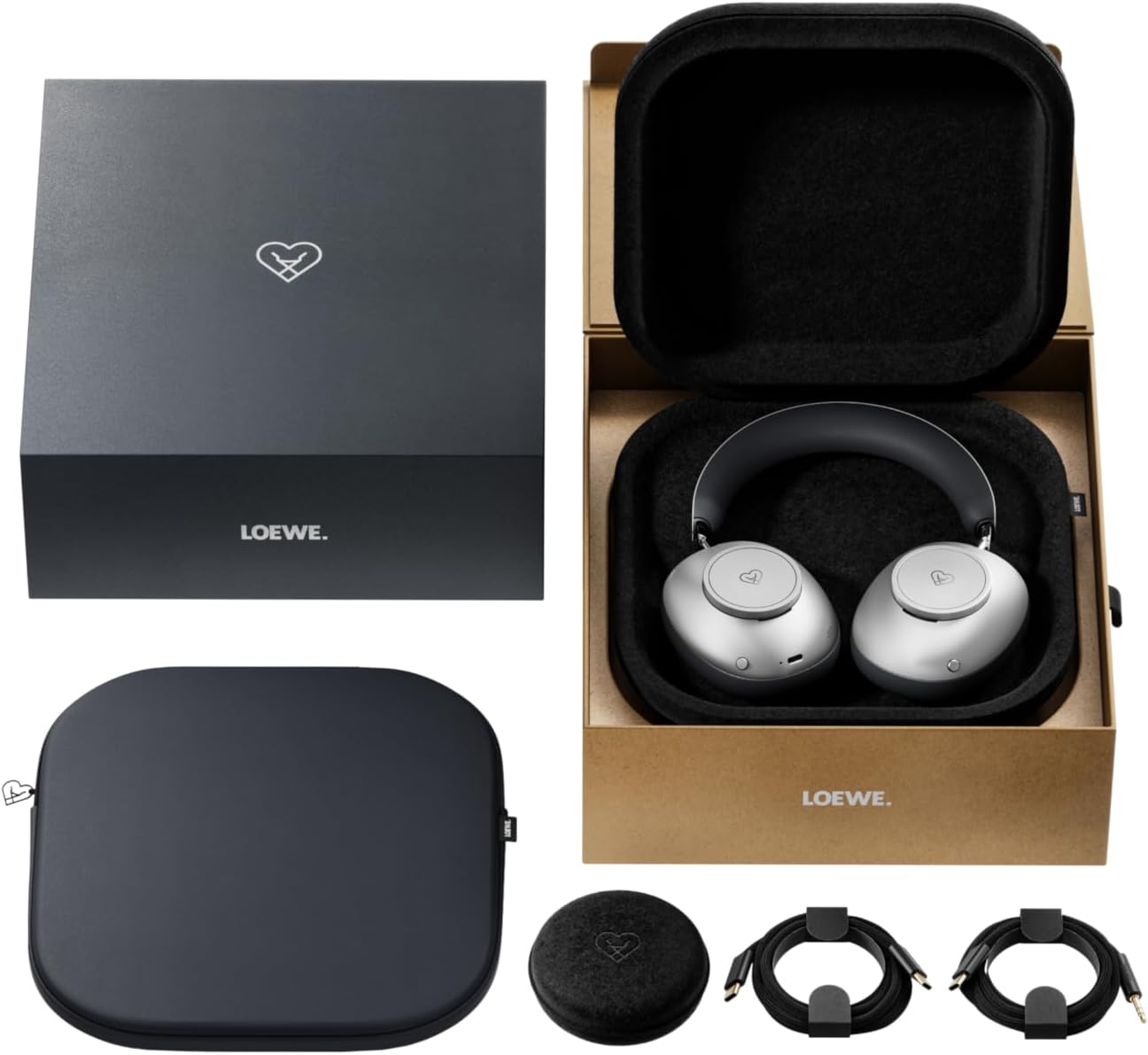
Image: The LOEWE Leo Wireless Headphones package contents, showing the headphones, USB-C cable, AUX cable, leather case, hard case, and cable pouch.
3.製品オーバーview
Familiarize yourself with the physical components and controls of your LOEWE Leo headphones.

画像: 正面 view of the LOEWE Leo Wireless Headphones, showcasinイヤーカップとヘッドバンド。
3.1. コントロールとポート
The headphones feature intuitive controls for easy operation:
- コントロールダイヤル: Two precision-crafted rotary wheels for volume adjustment and navigation.
- アクションボタン: Dedicated buttons for playback control, ANC modes, and voice translation activation.
- USB-Cポート: 充電および有線オーディオ接続用。
- 3.5mmジャック: For traditional wired audio connection.

画像: 詳細 view of the earcup, highlighting the control dial, USB-C port, and 3.5mm audio jack.
4. はじめに
4.1. ヘッドフォンを充電する
Before first use, fully charge your LOEWE Leo headphones. A full charge provides up to 65 hours of continuous playback.
- 付属のUSB-C充電ケーブルをヘッドフォンのUSB-Cポートに接続します。
- ケーブルのもう一方の端を互換性のある USB 電源アダプター (別売) またはコンピューターの USB ポートに接続します。
- ヘッドフォンのLEDインジケーターは充電状態を示します。通常、完全に充電されると消灯するか、色が変わります。
4.2. 電源のオン/オフ
- 電源を入れるには: LED インジケーターが点灯するまで、電源ボタンを約 3 秒間押し続けます。
- 電源を切るには: LED インジケーターが消えるまで、電源ボタンを約 3 秒間押し続けます。
4.3.Bluetoothペアリング
The LOEWE Leo headphones utilize Bluetooth Low Energy (BLE) for faster pairing and reduced power consumption.
- ヘッドフォンの電源がオフになっていることを確認してください。
- LED インジケーターが高速点滅してペアリング モードを示すまで、電源ボタンを約 5 秒間押し続けます。
- デバイス(スマートフォン、タブレット、コンピューター)で Bluetooth を有効にし、利用可能なデバイスを検索します。
- Select "LOEWE Leo" from the list of found devices.
- 接続すると、LED インジケーターの点滅が止まり、青色に点灯したままになります。
4.4.有線接続
For a wired audio experience, use the supplied AUX to USB-C cable.
- Connect the USB-C end of the AUX cable to the headphones.
- Connect the 3.5mm end of the AUX cable to your audio source's 3.5mm jack.
- ヘッドフォンは自動的に有線モードに切り替わります。
5. ヘッドフォンの操作
5.1. オーディオの再生と音量調節
Use the control dials and action buttons for managing your audio:
- 音量を上げる/下げる: Rotate the designated control dial.
- 再生/一時停止: Press the central action button once.
- 次のトラック: Double-press the central action button.
- 前のトラック: Triple-press the central action button.

Image: Close-up of the earcup's control dial, used for volume and navigation.
5.2. Adaptive Noise Cancellation (ANC)
The LOEWE Leo features advanced adaptive noise cancellation that continuously analyzes your environment and adjusts in real-time.
- ANC を有効/無効にする: Press the dedicated ANC button once.
- 透明モード: Press the ANC button twice to allow ambient sounds to pass through, enhancing situational awareness.

Image: Illustration of the adaptive noise cancellation feature, depicting sound wave management.
5.3. Real-time Voice Translation
Communicate across language barriers with the integrated real-time voice translation feature.
- Ensure your headphones are connected to a device with internet access and the LOEWE companion app installed.
- Activate the translation feature via the dedicated button or the companion app.
- Speak into the headphone's microphone. The translated audio will be played back in real-time.

Image: Earcup detail showing the microphone for voice input and the 'leo' icon, representing the real-time translation function.
5.4. Dolby Atmos and Spatial Audio
Experience immersive sound with Dolby Atmos and spatial audio support. This feature is automatically enabled when compatible content is played through a connected device that supports these audio technologies.
6. メンテナンスとケア
6.1. 清掃
- 柔らかく、乾いた、糸くずの出ない布でヘッドフォンを拭いてください。
- 研磨剤入りの洗剤、アルコール、化学溶剤は使用しないでください。
- Keep moisture away from openings.
6.2. バッテリーのお手入れ
- バッテリーを頻繁に完全に放電することは避けてください。
- Store the headphones in a cool, dry place when not in use for extended periods.
- The battery is user-replaceable, contributing to the product's longevity.
6.3. Modular Design
The LOEWE Leo headphones feature a durable modular design with replaceable components, such as ear cushions and headbands. This design allows for easy replacement of worn parts, extending the product's lifespan.

Image: The modular construction of the LOEWE Leo headphones, showing detachable earcups and headband for maintenance or replacement.
7。 トラブルシューティング
If you encounter issues with your LOEWE Leo headphones, refer to the following common solutions:
- 電源なし: ヘッドホンが完全に充電されていることを確認してください。USB-Cケーブルを使って電源に接続してください。
- 音が出ない:
- ヘッドフォンと接続されたデバイスの両方の音量レベルを確認します。
- Ensure the headphones are properly paired via Bluetooth or the AUX cable is securely connected.
- ヘッドフォンとオーディオソースデバイスの両方を再起動してみてください。
- Bluetoothの切断:
- ヘッドフォンがデバイスの Bluetooth 範囲内(通常は 10 メートル)にあることを確認します。
- デバイスの Bluetooth を無効にしてから再度有効にして、再度ペアリングを試みてください。
- Clear the LOEWE Leo from your device's Bluetooth history and pair again.
- ANCが効果的に機能しない:
- イヤーカップが耳にぴったりとフィットしていることを確認してください。必要に応じてフィット感を調整してください。
- Verify that ANC is activated.
- Voice Translation Issues:
- Check your device's internet connection.
- Ensure the LOEWE companion app is up-to-date and configured correctly.
- はっきりと適度なペースで話してください。
If problems persist, please contact LOEWE customer support.
8. 仕様
| 特徴 | 説明 |
|---|---|
| モデル名 | レオ |
| モデル番号 | 64641J10 |
| 接続技術 | ワイヤレス(Bluetooth)、有線 |
| 無線通信 | Bluetooth Low Energy(BLE) |
| サウンド機能 | Hi-Res Audio, Dolby Atmos, Spatial Audio |
| ノイズキャンセリング | Adaptive Noise Reduction (ANC) |
| 特集 | Real-time Voice Translation, Modular Design with Replaceable Components |
| バッテリー寿命 | 最大65時間(約) |
| コントロールタイプ | Button Control, Rotary Dials |
| 対応デバイス | Cellular Phone, Tablet, Computer, Laptop |
| 重さ | 3 Kilograms (product weight as listed, may include packaging) |
9. 保証とサポート
9.1. 製造元の保証
The LOEWE Leo Wireless Headphones come with a 2年間のメーカー保証この保証は、通常の使用状況における材料および製造上の欠陥を対象としています。保証請求の際は、購入証明書を保管してください。
For specific terms and conditions of the warranty, please refer to the warranty card included in your product packaging or visit the official LOEWE webサイト。
9.2. カスタマーサポート
For technical assistance, troubleshooting, or warranty inquiries, please contact LOEWE customer support through their official webサイトまたは製品ドキュメントに記載されている連絡先情報を参照してください。
オンラインリソース: Visit the official LOEWE webFAQ、ソフトウェアの更新、追加のサポート リソースについては、こちらのサイトをご覧ください。