
1. はじめに
The AJAZZ AK029 is a high-performance one-handed mechanical gaming keyboard designed for precision and speed. It features a compact 29-key layout, magnetic switches, an 8000Hz polling rate, and 0.01mm RT precision for an ultra-responsive gaming experience. This manual provides detailed instructions for setup, operation, maintenance, and troubleshooting.

Image: The AJAZZ AK029 one-handed gaming keyboard, showcasing its compact design and dimensions (155mm length, 122mm width, 33mm height).

画像: オーバーview of the AK029 gaming keyboard, highlighting its sleek design and gaming features.

Image: The AK029 keyboard being used in various scenarios, including gaming, video editing, and 3D modeling, demonstrating its versatility.
2. セットアップ
パッケージ内容
- AJAZZ AK029 Keyboard Body
- USB-Cケーブル(1.6m)
- キーキャッププーラー
- スペアスイッチ
- 取り外し可能なキャリーストラップ
- ユーザーマニュアル

Image: The complete package contents of the AJAZZ AK029, including the keyboard, USB-C cable, keycap puller, spare switches, and user manual.
キーボードの接続
- 付属のケーブルの USB-C 端子をキーボードの USB-C ポートに接続します。
- USB ケーブルのもう一方の端をコンピューター (Windows または Mac) の使用可能な USB ポートに接続します。
- キーボードはオペレーティング システムによって自動的に認識されます。
3. 操作手順
主な機能とレイアウト
The AK029 features a 29-key layout optimized for gaming and productivity. Many keys have secondary functions accessible via the Fn 鍵。
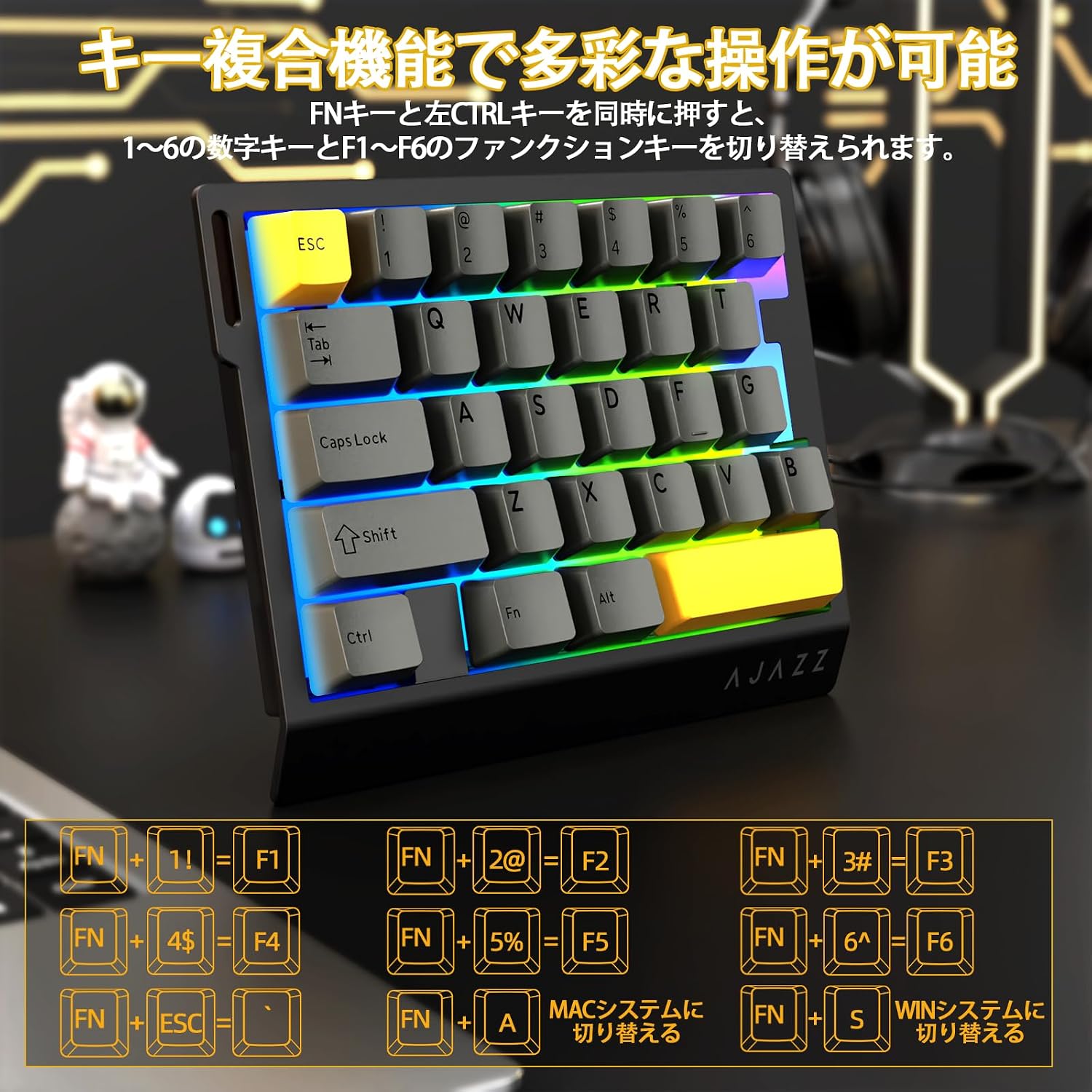
Image: Diagram illustrating the various FN key combinations for accessing secondary functions, such as F1-F6, tilde, and system switching.
- FN + 1-6: Switches between number keys (1-6) and function keys (F1-F6). Default is number keys.
- FN + Esc: チルダ (~)
- FN+A: Switches to Mac mode.
- FN+S: Switches to Windows mode.
Note: When using Mac mode on a Windows PC, the Windows key and Alt key functions may be reversed.
RGB照明モード
The keyboard features vibrant RGB backlighting with multiple customizable effects.

Image: The keyboard displaying its colorful RGB backlight, which can be customized with various effects.
- FN +タブ: Cycles through 20 different RGB lighting modes.
- FN+G: Increases backlight brightness (5 levels). Backlight flashes 3 times at maximum brightness.
- FN+F: Decreases backlight brightness (5 levels). Backlight flashes 3 times at minimum brightness.
- FN+V: Changes the direction of the lighting effect.
- FN+B: Changes the backlight color.
- FN+T: Increases the speed of the lighting effect (5 levels). Backlight flashes 3 times at maximum speed.
- FN+R: Decreases the speed of the lighting effect (5 levels). Backlight flashes 3 times at minimum speed.
- FN+C: Toggles side light mode (Streaming RGB constant light - Rainbow Breath - Off). Default is Streaming.
- FN+X: Toggles backlight on/off (side lights remain on).
- FN + Space (long press 3-5 seconds): Resets lighting settings to factory defaults. Keyboard lights flash 3 times.
インジケーターLamps
- CapsLockインジケーター: Pressing the Caps Lock key illuminates a white LED (uppercase input ON). Pressing it again turns off the LED (lowercase input).
- システムインジケータ: The main key area lights flash 3 times to indicate successful system switching.
Web ドライバーのカスタマイズ
The dedicated driver software allows for extensive customization of key functions, macros, and RGB lighting effects. This enables true personalization to match individual playstyles and preferences.

画像: スクリーンショット web driver interface, showing options for custom keys, lighting effects, macro management, and performance settings.
ドライバ Webサイト: https://ajazz.driveall.cn/#/
4. メンテナンス
クリーニング
- キーボードの表面を拭くときは、柔らかく乾いた布を使用してください。
- キーキャップ間のほこりには、圧縮空気を使用してください。
- 強力な化学薬品や研磨材の使用は避けてください。
ホットスワップ可能なスイッチの交換
The AK029 supports hot-swappable magnetic switches, allowing for easy replacement and customization.

画像: クローズアップ view of the hot-swappable magnetic switches, showing the mechanism and keycap removal tool.
- キーキャップ プーラーを使用して、必要なキーキャップを慎重に取り外します。
- Use the switch puller to firmly grip the top and bottom tabs of the switch.
- Pull the switch straight upwards to remove it from the keyboard.
- Align the pins of the new switch with the holes on the keyboard.
- Gently push the new switch vertically until it clicks into place.
5。 トラブルシューティング
キーボードが応答しない
- USB-C ケーブルがキーボードとコンピューターの両方にしっかりと接続されていることを確認します。
- キーボードをコンピューターの別の USB ポートに接続してみてください。
- コンピュータ固有の問題を排除するために、別のコンピュータでキーボードをテストします。
- コンピュータを再起動します。
RGB Backlight Not Working or Incorrect
- Ensure the backlight is not turned off (FN + X).
- Adjust brightness using FN + G (increase) and FN + F (decrease).
- Cycle through lighting modes using FN + Tab.
- Perform a factory reset for lighting settings by long-pressing FN + Space for 3-5 seconds.
Key Input Issues or Inaccurate Response
- Ensure the correct system mode (Windows/Mac) is selected using FN + A or FN + S.
- If a specific key is not responding, try replacing its switch using the hot-swap procedure.
- Update the keyboard firmware using the dedicated web ドライバーソフトウェア。
- Check for any physical obstructions under the keycap or switch.
6. 仕様
| 特徴 | 説明 |
|---|---|
| ブランド | A.JAZZ |
| モデル | AK029 |
| 接続性 | USB-C有線 |
| キーレイアウト | 29 Keys (One-Handed) |
| スイッチタイプ | Magnetic Switches (Hot-Swappable) |
| ポーリングレート | 8000Hz |
| レイテンシー | 0.125msの超低遅延 |
| RTプレシジョン | 0.01mm (0.03mm detection increments) |
| スキャンレート | 130K |
| バックライト | RGB (20 lighting modes) |
| キーロールオーバー | フルNキーロールオーバー |
| プレート材質 | アルミニウム合金 |
| サウンドDamp強化 | 5-Layer Structure (PO sandwich cotton, IXPE switch pad, PET sound sheet, EPDM cotton, silicone gel) |
| 人間工学 | Ergonomic design with stepped curved keycaps and wrist rest |
| 対応OS | ウィンドウズ、MAC |
| 寸法 | 155mm (長さ) x 122mm (幅) x 33mm (高さ) |
| 重さ | 約300g |
| ケーブル長さ | 1.6メートル |

Image: Detailed basic specifications of the AK029 keyboard, including brand, model, connectivity, dimensions, and lighting.

画像: 分解図 view of the keyboard's internal structure, highlighting the 5-layer sound dampening system and aluminum alloy plate for enhanced stability and acoustics.

Image: Illustration of the ergonomic design of the AK029, featuring stepped keycaps and a wrist rest for comfortable long-term use.
7. 保証とサポート
保証情報
The AJAZZ AK029 keyboard comes with a 1-year manufacturer's warranty from the date of purchase. This warranty covers defects in materials and workmanship under normal use.
カスタマーサポート
For technical assistance, warranty claims, or any other inquiries, please contact AJAZZ customer support through their official web製品を購入したサイトまたは小売店。
正式 Webサイト: https://ajazz.driveall.cn/#/