
導入
The Peplink MAX BR1 Pro 5G (HW3) is a rugged, enterprise-grade 5G router designed to provide high-speed, reliable internet connectivity in various environments. Featuring an X65 5G modem, Wi-Fi 6, and advanced networking capabilities like SpeedFusion, this device ensures consistent performance for business-critical applications, vehicles, and remote sites. This manual provides essential information for setting up, operating, and maintaining your router.
パッケージ内容
以下にリストされているすべてのアイテムがパッケージに含まれていることを確認してください。
- 1x BR1 Pro 5G (HW3) Router
- LTE/5Gアンテナ×4
- デュアルバンドWi-Fiアンテナ×2
- 1x GPS Active Antenna
- 1x 12V 2A 4 Pin DC Power Supply

製品終了view
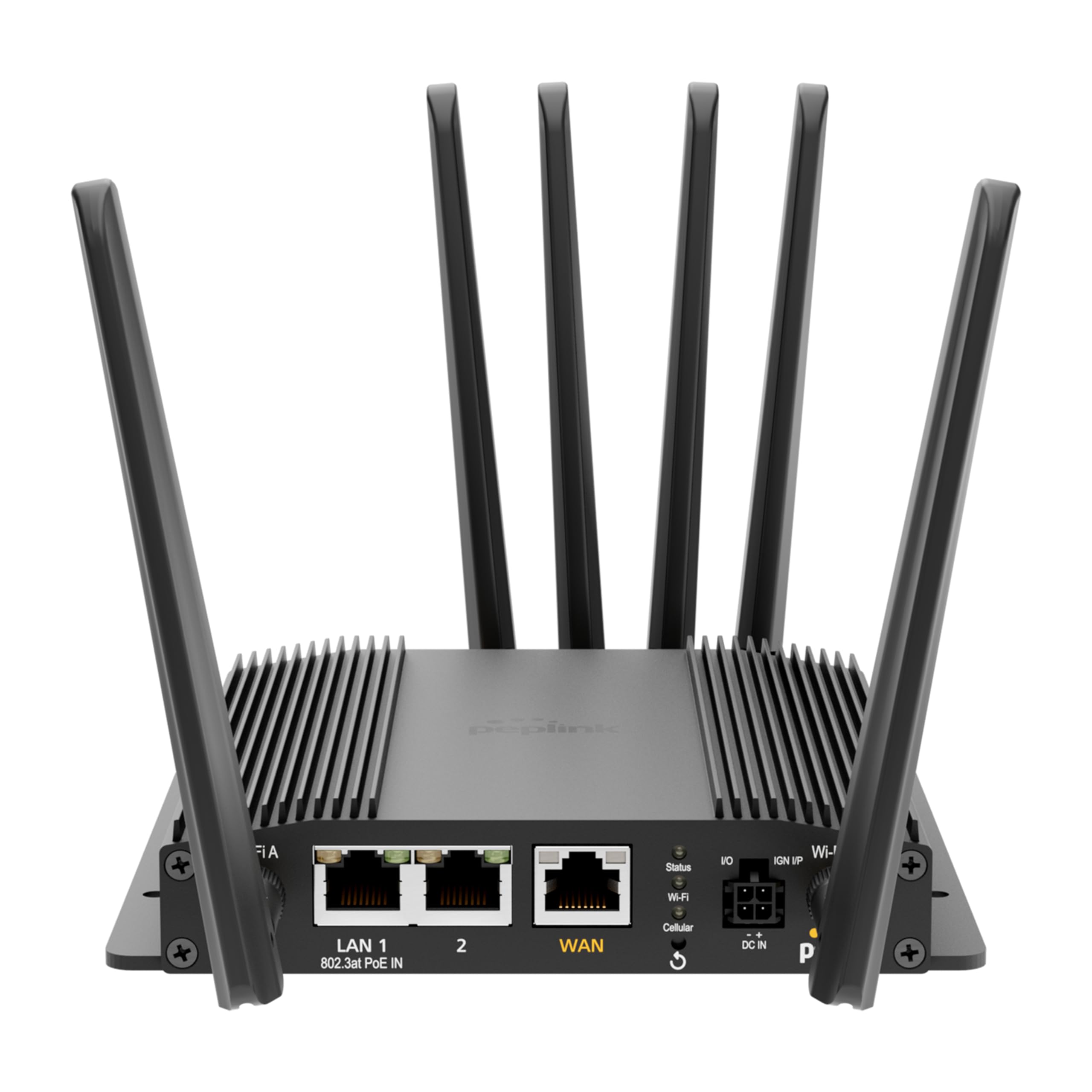
The Peplink MAX BR1 Pro 5G (HW3) features a robust design with multiple connectivity options and indicators.
フロントパネル

- LAN 1 (802.3at PoE IN): Gigabit Ethernet port with Power over Ethernet input capability.
- LAN 2: ギガビットイーサネットポート。
- WAN: Gigabit Ethernet port for primary internet connection.
- Wi-Fi Antenna A & B: Connectors for dual-band Wi-Fi antennas.
- ステータスLED: デバイスの動作ステータスを示します。
- Wi-Fi LED: Wi-Fi アクティビティを示します。
- Cellular LED: Indicates cellular signal strength and connection status.
- I/O & IGN I/P: Input/Output and Ignition Input ports for specialized applications.
- DC IN: 電源入力ポート。
背面パネル
- Cellular A, B, C, D: Connectors for LTE/5G cellular antennas.
- GPS: Connector for the GPS active antenna.
- Cellular SIM: Redundant SIM slots for 5G/LTE connectivity.
設定
1. SIMカードのインストール
- ルーターの電源がオフになっていることを確認します。
- Locate the Cellular SIM slots on the rear panel.
- Insert your activated Nano-SIM cards into the designated slots until they click into place. The router supports redundant SIM slots for failover.
2.アンテナ接続
- Connect the 4 LTE/5G antennas to the Cellular A, B, C, and D ports on the rear panel.
- Attach the 2 Dual Band Wi-Fi antennas to the Wi-Fi Antenna A and B ports on the front panel.
- Connect the GPS Active Antenna to the GPS port on the rear panel.
- すべてのアンテナ接続がしっかりと締められていることを確認します。
3. 電源接続
- Connect the 12V 2A 4 Pin DC Power Supply to the DC IN port on the front panel.
- Alternatively, if using Power over Ethernet, connect an 802.3at PoE-compliant power source to the LAN 1 port.
4. 初期設定
- Power on the router. Wait for the Status LED to indicate readiness.
- Connect a computer to one of the LAN ports or connect to the default Wi-Fi network (SSID and password usually found on a label on the device).
- 開く web ブラウザを開き、ルーターのデフォルトのIPアドレス(例: http://192.168.50.1).
- Follow the on-screen wizard to set up your administrative password, time zone, and initial WAN connections.
操作手順
ネットワーク接続
- 5G/LTE Cellular: The router automatically detects and connects to available 5G or LTE networks via the installed SIM cards. It supports major US carriers (AT&T, Verizon, T-Mobile, FirstNet) and global bands.
- Wi-Fi 6: The built-in Wi-Fi 6 (802.11ax) supports 2x2 MU-MIMO technology, operating in both Wi-Fi WAN and/or AP Mode for fast wireless connections.
- イーサネットWAN: Connect a wired internet source to the WAN port for primary or backup connectivity.
高度な機能
- SpeedFusion: Utilize Peplink's SpeedFusion bonding and Hot Failover technologies to ensure unbreakable connections and maintain uptime for critical applications.
- GPS & Fleet Ready: Integrated GPS with InControl 2 provides real-time location tracking and remote management capabilities, ideal for mobile deployments.
- エッジインテリジェンス: Run lightweight applications and diagnostics directly on the router, leveraging its Docker support and 8GB storage.
- PoE-in Power: Supports Power over Ethernet input for flexible deployment in locations with limited power outlets.

メンテナンス
ファームウェアの更新
ルーターのファームウェアアップデートを定期的に確認し、インストールしてください。 web administration interface. Firmware updates provide new features, security enhancements, and bug fixes. Refer to the Peplink official web最新のファームウェアと更新手順については、こちらのサイトをご覧ください。
クリーニング
Use a soft, dry cloth to clean the exterior of the router. Avoid using liquid cleaners or aerosols, which may damage the device. Ensure ventilation slots are clear of dust and debris to prevent overheating.
トラブルシューティング
If you encounter issues with your Peplink MAX BR1 Pro 5G (HW3) router, consider the following:
- インターネット接続なし: Check the Cellular LED for signal strength. Ensure SIM cards are properly inserted and activated. Verify WAN cable connection if using Ethernet.
- 低速: Check cellular signal strength. Ensure antennas are correctly positioned. Consider network congestion or data plan limits.
- Wi-Fiの問題: Verify Wi-Fi antennas are connected. Check Wi-Fi LED. Ensure devices are within range and connected to the correct SSID.
- 電力の問題: Ensure the power adapter is securely connected or PoE is active on LAN 1.
- 工場出荷時設定へのリセット: If problems persist, a factory reset may resolve configuration issues. Refer to the device's web interface or the official Peplink documentation for instructions on performing a factory reset.
仕様
| 特徴 | 詳細 |
|---|---|
| ブランド | ペップリンク |
| モデル名 | MAX BR1 Pro 5G (HW3) |
| 接続技術 | 5G、イーサネット、Wi-Fi |
| 無線通信規格 | 802.11ax (Wi-Fi 6) |
| 周波数帯域クラス | デュアルバンド |
| データ転送速度 | 1 Gigabits Per Second (LAN), up to 4.1 Gbps (5G downlink) |
| 最大アップストリームデータ転送速度 | 900メガビット/秒 |
| ポート数 | 3 (LAN 1, LAN 2, WAN) |
| PoE入力 | 802.3at PoE IN on LAN 1 |
| SIMスロット | Redundant Cellular SIM slots |
| GPS | Integrated GPS with Active Antenna support |
| エッジコンピューティング | Docker support, 8GB storage |
| セキュリティプロトコル | WPA2-Enterprise, WPA2-PSK, WPA3 |
| アイテム重量 | 0.43キログラム |
| 商品の寸法(長さ x 幅 x 高さ) | 長さ5.78インチ x 幅5.68インチ x 高さ1.15インチ |
保証とサポート
The Peplink MAX BR1 Pro 5G (HW3) comes with a 1 Year PrimeCare Warranty. For detailed warranty terms, technical support, and additional resources, please visit the official Peplink web公式サイトをご覧いただくか、カスタマーサービスまでお問い合わせください。保証請求のために購入時のレシートを保管してください。
For further assistance, refer to the comprehensive documentation available on the Peplink Official Webサイト.