
ベースス E20
Baseus E20 完全ワイヤレスイヤホン ユーザーマニュアル
モデル: E20
1. はじめに
Thank you for choosing the Baseus E20 True Wireless Earbuds. These earbuds are designed to provide a high-quality audio experience with powerful bass, clear calls, and reliable connectivity. This manual will guide you through the setup, operation, and maintenance of your new earbuds.
2. 箱の中身
- Baseus E20 True Wireless Earbuds (Left and Right)
- 充電ケース
- USB-C充電ケーブル
- ユーザーマニュアル

Image: Baseus E20 True Wireless Earbuds shown inside their charging case, highlighting key features like powerful bass, IPX5 water resistance, 33 hours listening time, and environmental noise cancellation.
3.製品オーバーview
3.1 イヤホンのコンポーネント
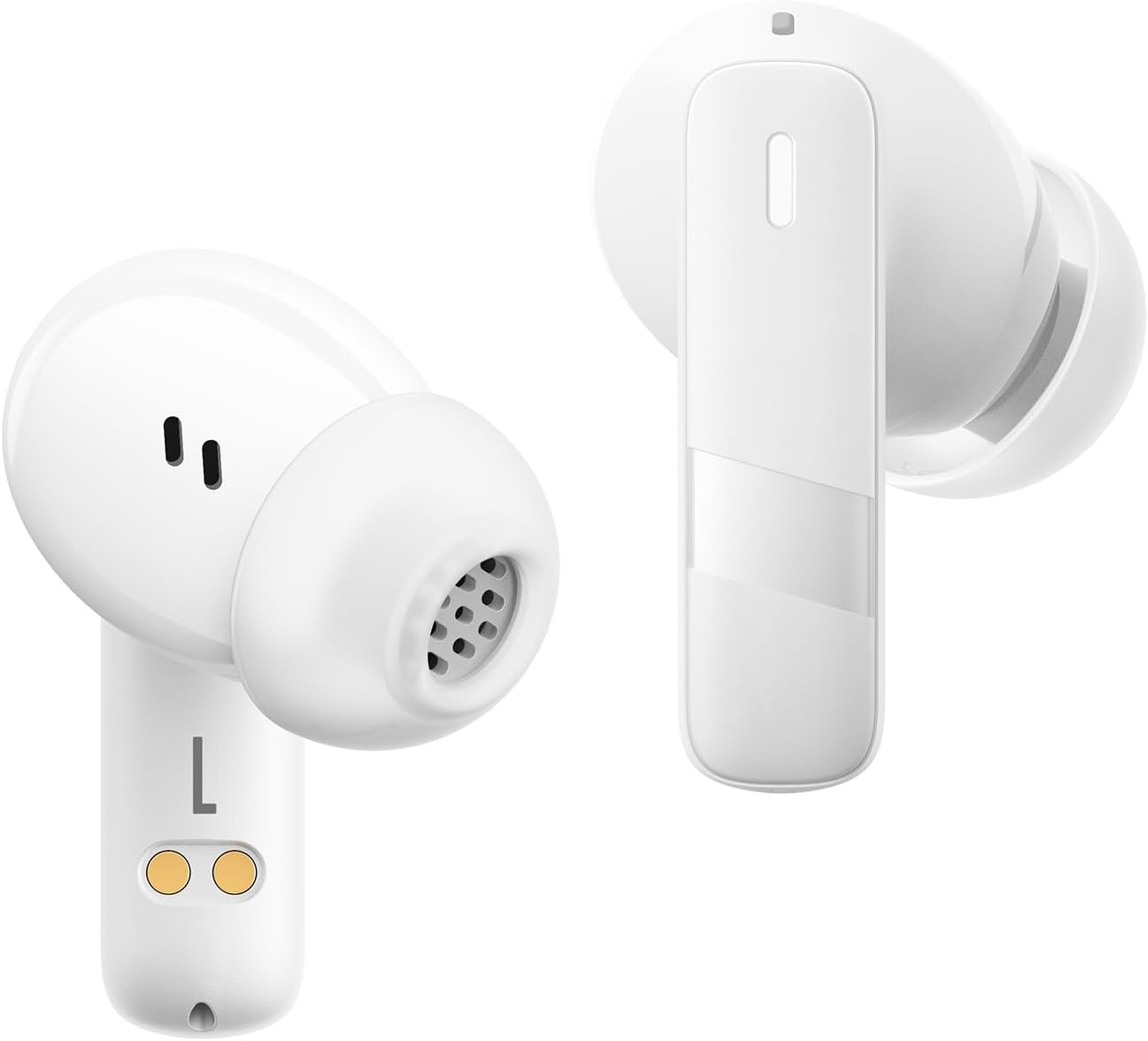
画像: クローズアップ view of the Baseus E20 True Wireless Earbuds, showing the ergonomic design, speaker grille, and charging contacts.
- タッチコントロールエリア: 再生、通話、モードを管理します。
- マイクロフォン: For calls and voice commands (2 ENC Mics).
- スピーカー: Delivers audio (12mm drivers).
- 充電接点: ケースに入れたイヤホンを充電します。
3.2充電ケース
- 充電ポート: ケースを充電するためのUSB-Cポート。
- インジケーターライト: 充電状態とバッテリーレベルを表示します。
4. セットアップ
4.1 イヤホンとケースの充電
初めて使用する前に、イヤホンと充電ケースを完全に充電してください。
- イヤホンを充電ケースに入れます。充電端子が揃っていることを確認してください。
- USB-C 充電ケーブルをケースの充電ポートと電源に接続します。
- The indicator light on the case will show the charging status. Once fully charged, the light will indicate completion or turn off.

Image: The Baseus E20 charging case is shown connected to a USB-C charging cable, illustrating the charging process and highlighting the 33-hour total listening time.
4.2Bluetoothペアリング
Pair your Baseus E20 earbuds with your device for the first time.
- 充電ケースを開けると、イヤホンは自動的にペアリングモードになり、インジケーターライトが点滅します。
- デバイス(スマートフォン、タブレット、ラップトップ)で Bluetooth を有効にします。
- 検索する 利用可能なBluetoothデバイスのリストで「Baseus E20」を選択し、接続します。
- 接続されると、イヤホンのインジケーター ライトが消灯するか点灯し、確認音が聞こえます。
注記: 最初のペアリング後、デバイスで Bluetooth が有効になっている場合、イヤホンはケースから取り出すと最後にペアリングしたデバイスに自動的に接続されます。

Image: A detailed diagram illustrating the Bluetooth 5.3 chip, emphasizing a more stable and efficient connection for the Baseus E20 earbuds.
5. 操作手順
The Baseus E20 earbuds feature intuitive touch controls. The following table outlines the common functions:

Image: A visual guide to the touch control areas on the Baseus E20 earbuds, detailing single, double, and triple tap functions for various operations.
| アクション | 関数 |
|---|---|
| ダブルタップ(LまたはR) | Answer/Hang up Call, Play/Pause Music |
| トリプルタップ(LまたはR) | 音声アシスタントを有効にする |
| 長押し(LまたはR) | Cycle Noise Cancellation Modes (Default > Normal > Transparency) |
| 長押し(LまたはR) | Cycle Spatial Audio Modes (Music Mode > Theater Mode > Normal) |
注記: Specific functions may vary slightly depending on your connected device and operating system.
5.1 通話管理
- 通話の応答/終了: どちらかのイヤホンをダブルタップします。
- 通話を拒否: どちらかのイヤフォンを2秒間押し続けます。

Image: An internal diagram of the Baseus E20 earbud highlighting the dual-mic Environmental Noise Cancellation (ENC) system for clear calls.
5.2音楽の再生
- 再生/一時停止: どちらかのイヤホンをダブルタップします。
5.3音声アシスタント
- 音声アシスタントを有効にする: どちらかのイヤホンを3回タップします。
5.4 騒音制御モード
The Baseus E20 earbuds offer different noise control modes:
- Noise Cancellation (Default): 周囲のノイズを低減し、臨場感あふれるリスニング体験を実現します。
- 通常モード: アクティブノイズコントロールなしの標準オーディオ再生。
- 透明モード: 音声を聞きながら周囲の音も聞くことができます。
モードを切り替えるには: どちらかのイヤホンを長押しします。
6. メンテナンス
6.1 クリーニング
- イヤホン、特にイヤーチップとスピーカーグリルを、柔らかく乾いた糸くずの出ない布で定期的に清掃してください。
- 充電の問題を防ぐために、イヤホンとケースの両方の充電接点が清潔で乾燥していることを確認してください。
- 研磨材、溶剤、または刺激の強い化学薬品は使用しないでください。
6.2 ストレージ
- 使用していないときは、イヤホンを保護し、充電を保つために充電ケースに保管してください。
- 極端な温度や湿度の高い場所での保管は避けてください。
6.3 防水性能(IPX5)
The Baseus E20 earbuds are IPX5 water-resistant, meaning they can withstand splashes and sweat. They are not designed for submersion in water or exposure to pressurized water jets. Ensure earbuds are dry before placing them back in the charging case to prevent damage.

Image: The Baseus E20 earbuds and charging case are depicted with water splashing around them, illustrating their IPX5 water-resistant capability for reliable performance in various conditions.
7。 トラブルシューティング
| 問題 | 考えられる解決策 |
|---|---|
| イヤホンがペアリングされない |
|
| XNUMXつのイヤフォンから音が出ない |
|
| 充電ケースが充電されない |
|
| 通話品質が悪い |
|
8. 仕様
| 特徴 | 詳細 |
|---|---|
| モデル名 | E20 |
| Bluetoothバージョン | 5.3 |
| ドライバーサイズ | 12mm |
| 総プレイ時間 | 最大33時間(充電ケース付き) |
| イヤホンの再生時間 | 最大6時間(1回の充電) |
| 耐水性 | IPX5 |
| マイク | 2 ENC Mics for Clear Calls |
| コントロールタイプ | タッチコントロール |
| 充電ポート | USB-C |
| アイテム重量 | 3.2オンス |
| 対応デバイス | 携帯電話、ノートパソコン、タブレット、Bluetoothオーディオ機能搭載デバイス(iOS、Android、Windows、Mac OS、Switch) |

Image: A cutaway diagram illustrating the 12mm PU diaphragm driver, emphasizing its role in producing strong and accurate ultra-low frequencies for powerful bass.
9.製品オーバーview ビデオ
ビデオ: 当局者がview of the Baseus E20 True Wireless Earbuds, demonstrating features such as touch controls, powerful bass, IPX5 water resistance, 33-hour battery life, ENC for clear calls, and Bluetooth 5.3 connectivity. The video shows the earbuds in various usage scenarios, including listening to music, making calls, and being used in different weather conditions.
10. 保証とサポート
Baseus products come with a standard manufacturer's warranty. For detailed warranty information, product support, or service inquiries, please refer to the warranty card included in your product packaging or visit the official Baseus webサイトでご確認ください。保証請求の際は購入証明として領収書を保管してください。
オンラインサポート: さらに詳しいサポートについては、 AmazonのBaseus公式ストア またはそのオフィシャル webサイト。
Ask a question about this manual
Ask about setup, troubleshooting, compatibility, parts, safety, or missing instructions. Manuals+ will review the question and use this page’s manual context to help answer it.