
1. はじめに
Welcome to the Genérico GT8 Drone User Manual. This guide provides essential information for the safe and effective operation, maintenance, and troubleshooting of your GT8 drone. Please read this manual thoroughly before operating the drone to ensure a safe and enjoyable flight experience.
2. 安全ガイドライン
Adherence to these safety guidelines is crucial for preventing accidents and ensuring the longevity of your drone.
- 飛行前チェック: Always inspect the drone, remote control, and battery for any damage before each flight.
- 飛行環境: 人、建物、木、電線から離れた、開けた場所で飛行してください。強風、雨、霧の中での飛行は避けてください。
- バッテリーの安全性: Use only approved chargers and batteries. Do not overcharge or puncture batteries. Discontinue use if batteries are damaged or swollen.
- プロペラの安全性: 回転するプロペラに手や顔を近づけないでください。飛行前にプロペラがしっかりと取り付けられていることを確認してください。
- プライバシーを尊重: カメラを使用する際はプライバシーに関する法律や規制に注意してください。
- 高度と距離: 最大飛行高度と距離に関する現地の規制を遵守してください。
- 緊急時の対応: Return-to-Home (RTH) 機能と緊急停止手順をよく理解しておいてください。
3. パッケージ内容
パッケージにすべてのアイテムが含まれていることを確認します。
- GT8 Drone
- 一体型スクリーン付きリモコン
- 1x Flight Battery (additional batteries available with Fly More kit)
- スペアプロペラ
- 充電ケーブル
- ユーザーマニュアル(このドキュメント)
- Optional Memory Card (may be included depending on package)
4.製品オーバーview
4.1 ドローンのコンポーネント

This image displays the Genérico GT8 drone in its unfolded state alongside its remote control. The drone features four propellers, a central body housing the camera and gimbal system, and landing gear. The remote control has a built-in screen for real-time FPV viewing。
- プロペラ: Provide lift and thrust.
- モーター: 安定した飛行を実現するブラシレスモーター。
- Camera with 3-Axis Gimbal: Captures 4K HD video and photos, stabilized for smooth footage.
- 障害物回避センサー: 障害物を検知して衝突を防止します。
- Flight Battery Compartment: Houses the removable flight battery.
- LEDインジケーター: Display drone status and battery level.
4.2 リモートコントロールコンポーネント

This image shows the Genérico GT8 drone in its folded, compact state next to the remote control. The remote control features dual joysticks, various control buttons, and a central integrated screen for FPV (First Person View) without needing a separate smartphone.
- コントロールスティック: 飛行方向と高度について。
- Integrated Screen: Displays real-time FPV feed and flight data.
- 電源ボタン: リモコンのオン/オフを切り替えます。
- 帰還ボタン(RTH): Initiates automatic return to takeoff point.
- 写真/ビデオボタン: 画像をキャプチャしたり、ビデオ録画を開始/停止します。
- Gimbal Control Dial: Adjusts camera tilt.
5. セットアップ
5.1 バッテリーの取り付けと充電
- Insert the flight battery into the drone's battery compartment until it clicks securely into place.
- Connect the charging cable to the battery and a suitable USB power adapter (not included).
- Charge the battery fully before first use. The LED indicators on the battery will show charging status.
- Charge the remote control using its dedicated charging port and cable.
5.2 プロペラの取り付け
Ensure propellers are installed correctly according to their markings (e.g., A and B) and the corresponding motor arms. Incorrect installation can lead to unstable flight.
- ドローンのアームを展開します。
- Match the propeller type (A or B) with the motor base.
- Press down and rotate the propeller in the direction indicated until it locks securely.
5.3 リモコンの準備
- リモコンが完全に充電されていることを確認してください。
- Press and hold the power button to turn on the remote control.
5.4 初期ペアリング
- ドローンを平らで水平な場所に置きます。
- ドローンの電源を入れます。
- リモコンの電源を入れます。
- Follow the on-screen instructions on the remote control to pair with the drone. This usually involves moving the control sticks in a specific pattern.
6. ドローンの操作
6.1 飛行前チェックリスト
- Drone battery fully charged and securely installed.
- Remote control fully charged.
- Propellers correctly installed and undamaged.
- Flight area clear of obstacles and people.
- GPS signal acquired (if applicable, for RTH and stable flight).
6.2 離陸と着陸
- 自動離陸: Press the dedicated auto-takeoff button on the remote control. The drone will ascend to a safe height and hover.
- 手動離陸: Push both control sticks outwards and downwards to arm the motors. Then, slowly push the left stick (throttle) upwards to ascend.
- 自動着陸: Press the dedicated auto-landing button. The drone will descend and land automatically.
- 手動着陸: Slowly pull the left stick (throttle) downwards to descend. Once landed, pull both sticks outwards and downwards to disarm the motors.
6.3 飛行制御
Use the control sticks on the remote control to maneuver the drone:
- 左スティック(スロットル/ヨー): 高度の場合は上/下、回転(ヨー)の場合は左/右。
- 右スティック(ピッチ/ロール): 上/下は前方/後方への動き(ピッチ)、左/右は横方向への動き(ロール)です。
6.4 Camera Operation (4K HD with 3-Axis Gimbal)
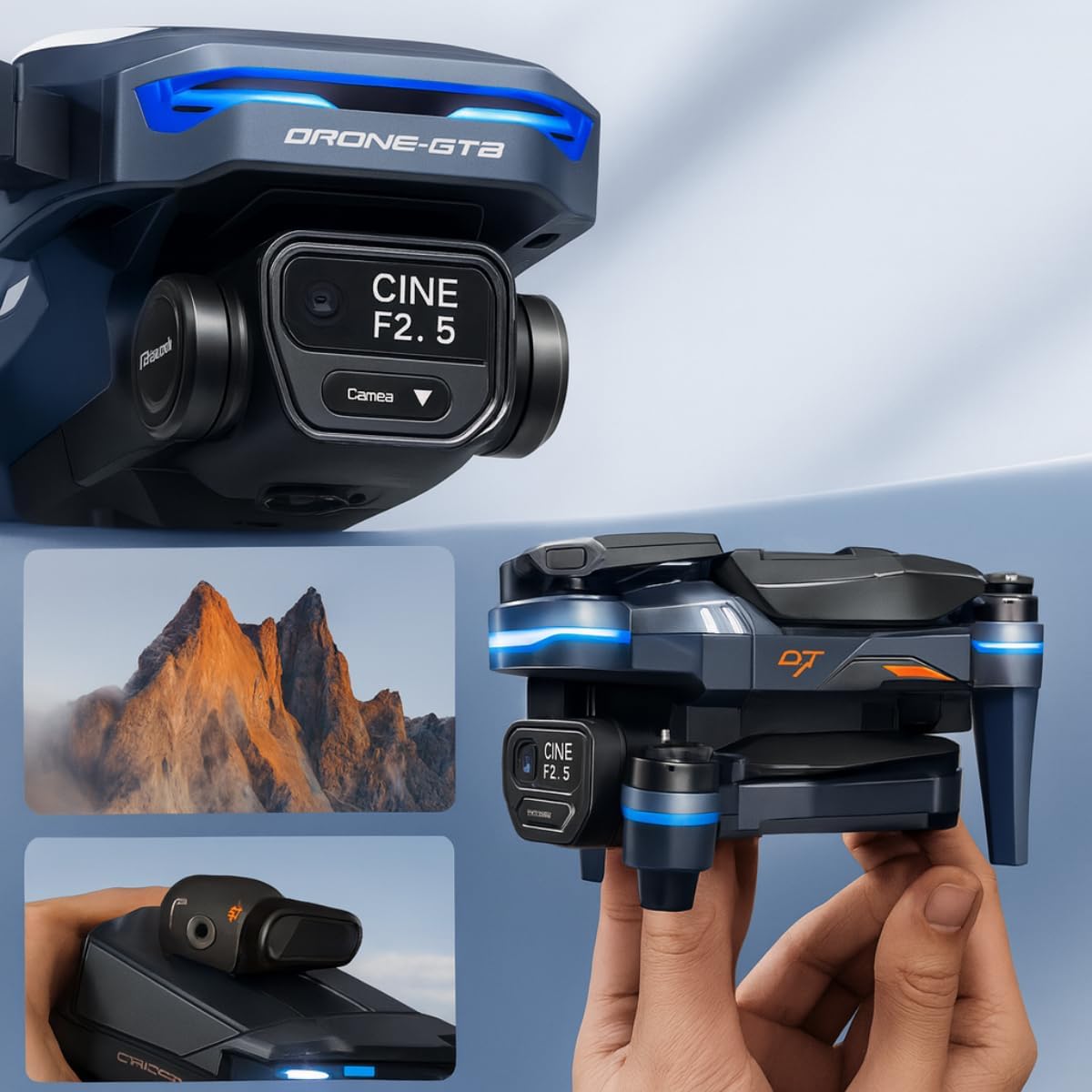
この画像はクローズアップです view of the Genérico GT8 drone's camera and 3-axis gimbal system, highlighting its cinematic capabilities. The camera is labeled 'CINE F2.5', indicating its aperture. Below, smaller images show the drone held in hand and a scenic mountain view, illustrating its portability and imaging potential.
- 写真/ビデオボタン: 一度押すと写真が撮影され、長押しするとビデオ録画が開始/停止します。
- Gimbal Control Dial: Use the dial on the remote control to adjust the camera's vertical angle (tilt) during flight for optimal framing.
- 4K HD解像度: The camera captures high-definition 4K footage, providing clear and detailed visuals.
- 3軸ジンバル: The gimbal stabilizes the camera, ensuring smooth and shake-free video even during drone movements.
6.5 インテリジェント飛行モード
The GT8 drone offers several intelligent flight modes for automated and creative filming:
- 私に従ってください: The drone automatically tracks and follows a designated subject (e.g., the remote control).
- 軌道: The drone flies in a circular path around a chosen point of interest, keeping it centered in the frame.
- ウェイポイント: Plan a flight path by setting multiple waypoints on the map, and the drone will fly the route autonomously.
- タイムラプス: Capture a series of photos over time to create a timelapse video.
- クイックショット: Pre-programmed flight patterns that capture short, cinematic video clips.
6.6 障害物の回避
The drone is equipped with obstacle avoidance sensors that help detect and bypass obstacles in its flight path, enhancing flight safety. Always remain vigilant and do not solely rely on these sensors.
6.7 Return-to-Home (RTH)
The RTH function allows the drone to automatically return to its takeoff point. This feature is activated by pressing the RTH button on the remote control or automatically when the battery is low or connection is lost. The RTH function relies on GPS/GLONASS signals for accurate positioning.
7. メンテナンス
7.1 クリーニング
- 使用後は毎回、ドローンとリモコンを柔らかく乾いた布で拭いてください。
- マイクロファイバークロスでカメラのレンズを優しく拭いてください。
- Remove any debris from the motors and propeller shafts.
7.2 ストレージ
- Store the drone and remote control in a cool, dry place, away from direct sunlight.
- 長期間保管する場合は、ドローンとリモコンから電池を取り外してください。
7.3バッテリーケア
- Charge batteries fully before storage if they will not be used for a long time.
- Do not store fully charged or completely depleted batteries for extended periods. Aim for approximately 50-60% charge for long-term storage.
7.4 プロペラの交換
If propellers are damaged, replace them immediately using the spare propellers provided or genuine replacements. Ensure correct propeller type (A or B) is installed on the corresponding motor.
8。 トラブルシューティング
一般的な問題とその解決策については、以下の表を参照してください。
| 問題 | 考えられる原因 | 解決 |
|---|---|---|
| ドローンの電源が入らない | バッテリー残量が少ないか充電されていない。バッテリーが正しく取り付けられていない。 | Charge the flight battery; Ensure battery is securely inserted. |
| リモコンの電源が入らない | Low or uncharged remote control battery. | リモコンを充電します。 |
| Drone fails to pair with remote control | Incorrect pairing procedure; Interference. | ペアリング手順を慎重に繰り返します。干渉の少ない場所に移動します。 |
| 不安定な飛行または漂流 | Propellers damaged or incorrectly installed; Calibration needed; Strong winds. | Replace damaged propellers, ensure correct installation; Perform IMU/compass calibration; Fly in calm conditions. |
| ビデオ/写真の品質が悪い | Dirty camera lens; Insufficient lighting; SD card issues; Gimbal not calibrated. | Clean lens; Fly in well-lit conditions; Check/format SD card; Calibrate gimbal. |
| Return-to-Home (RTH) not working accurately | Weak or no GPS/GLONASS signal at takeoff point; Compass interference. | Ensure strong GPS/GLONASS signal before takeoff; Calibrate compass in an open area. |
| Obstacle avoidance not functioning | Sensors obstructed or dirty; Flying too fast for sensors to react. | Clean sensors; Reduce flight speed in complex environments. |
9. 仕様
Key technical specifications for the Genérico GT8 Drone:
- ブランド: Genérico
- モデル: GT8
- 色: グレー
- 接続技術: Bluetooth (for certain functions, e.g., app connection)
- ドローンの重量: 500グラム
- 寸法(長さ×幅×高さ): 30 x 20 x 12 centimeters (unfolded)
- カメラ: 4K HD
- ジンバル: 3軸安定化
- 飛行時間: Up to 30 minutes (varies based on flight conditions and battery charge)
- ナビゲーション: GLONASS (for positioning and RTH)
- 安全機能: Obstacle Avoidance, Return-to-Home (RTH)
- インテリジェントモード: Follow, Orbit, Waypoints, Timelapse, QuickShots
10. 保証とサポート
For warranty information, please refer to the documentation provided at the time of purchase or contact your retailer. For technical support, assistance with operation, or spare parts, please contact Genérico customer service through the contact details provided on the product packaging or the official Genérico webサイト。