
1. はじめに
The Lemnoi S72 4G LTE Cellular Trail Camera is designed for outdoor surveillance, offering 2K 360° live view capabilities without requiring Wi-Fi. Powered by a solar panel and a high-capacity battery, it provides continuous monitoring for various outdoor environments. This manual provides essential information for setup, operation, and maintenance of your camera.
2. 箱の中身
パッケージにすべてのコンポーネントが含まれていることを確認します。
- Lemnoi S72 4G LTE Cellular Trail Camera
- ソーラーパネル(一体型)
- Built-in SIM Card (pre-installed)
- マイクロSDカード(32GB付属)
- 充電ケーブル
- Mounting Accessories (strap, screws, wall mount)

Figure 2.1: Package Contents. Includes the camera, solar panel, charging cable, SIM card, SD card, and mounting hardware.
3.セットアップガイド
3.1 初期充電
Before first use, fully charge the camera's internal battery using the provided charging cable. The solar panel will maintain the charge during operation, but an initial full charge is recommended.
3.2 SIMカードとSDカードの取り付け
The camera comes with a pre-installed SIM card and an included 32GB Micro SD card. Ensure both are properly seated in their respective slots. The SD card slot supports cards up to 128GB for extended storage.
3.3 アプリのダウンロードとアカウント作成
ダウンロード ユーボックス app from your smartphone's app store (available for iOS and Android). Follow the in-app instructions to create an account and add your camera. This app is essential for remote control, live view設定の作成と管理を行います。
3.4カメラの取り付け
Choose a location with good 4G LTE signal and direct sunlight exposure for the solar panel. Use the provided strap to secure the camera to a tree or the wall mount for other surfaces. Adjust the solar panel for optimal sun exposure throughout the day.

Figure 3.1: Camera mounted on a tree, demonstrating outdoor installation in an area with 4G LTE coverage.

Figure 3.2: Solar panel placement for continuous power, ideally positioned for maximum sunlight.
4. 操作手順
4.1 電源のオン/オフ
Locate the power button on the camera. Press and hold for a few seconds to power on or off. The camera will indicate its status via LED lights.
4.2 ライブ View とリモートコントロール
Open the UBox app on your smartphone. Select your camera from the device list to access the live video feed. From the app, you can:
- View リアルタイムフーtagどこからでも。
- Control 355° pan and 100° tilt for a comprehensive 360° panoramic view.
- Utilize 4x digital zoom to focus on specific areas.
- Engage two-way audio communication to listen or speak through the camera.
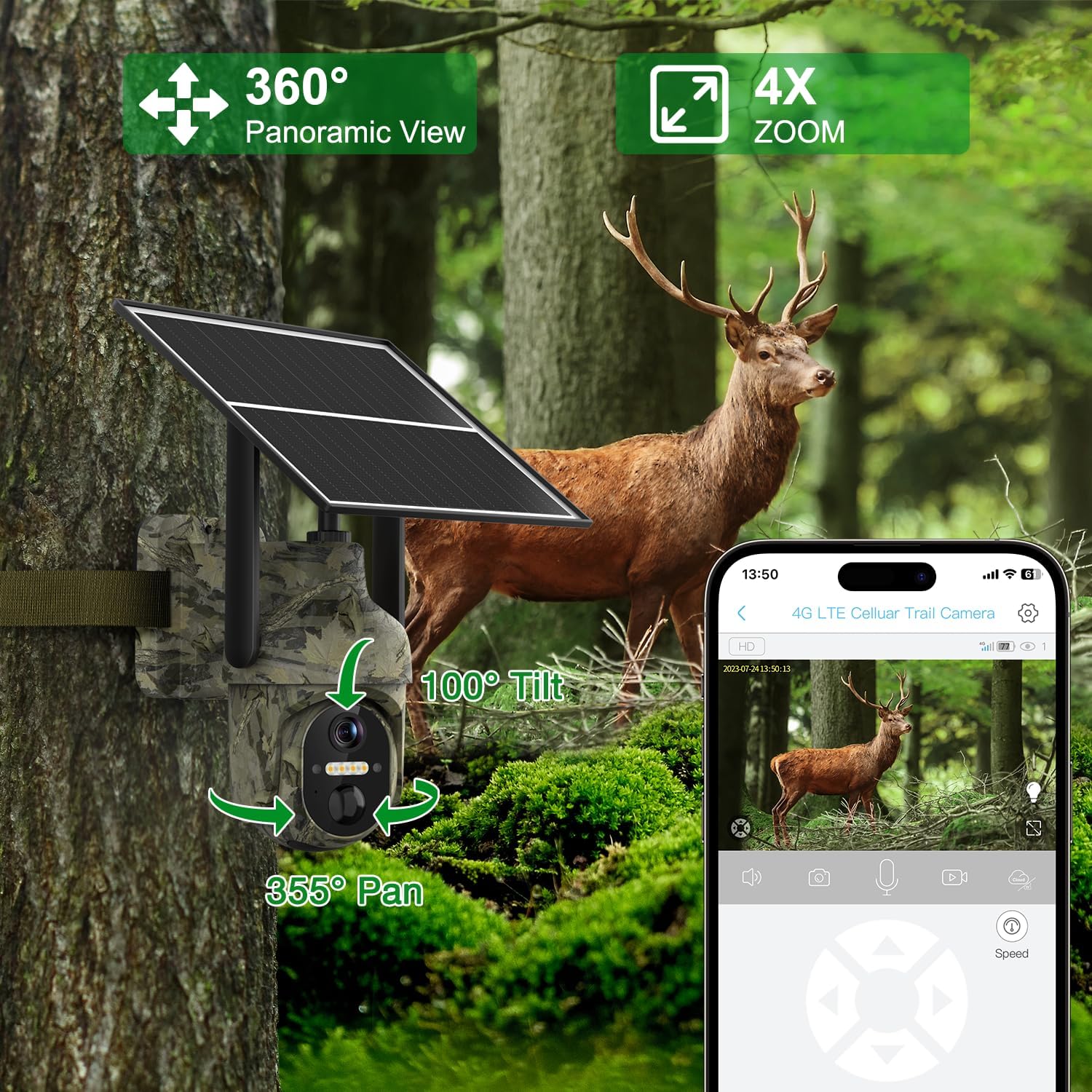
Figure 4.1: Remote control and live viewing via the UBox app, showing pan/tilt/zoom functionality.
4.3 動きの検出とアラート
The camera features a rapid 0.3-second trigger time for motion detection. When motion is detected, you will receive instant alerts directly on your mobile device. Recordings are stored on the included Micro SD card and can be optionally backed up to cloud storage (subscription may be required).

Figure 4.2: Instant motion alerts and detection, capturing activity quickly.
4.4 ナイトビジョンモード
The camera offers clear 2K HD resolution with two distinct night vision modes for optimal visibility in low-light conditions:
- 赤外線モード: Provides crisp black and white footage in complete darkness, ideal for discreet monitoring.
- スポットライトモード: Activates built-in spotlights to deliver vibrant full-color night vision, enhancing detail and identification.

Figure 4.3: Night vision capabilities, illustrating both infrared (black and white) and color spotlight modes.
5. 主な特徴
- 4G LTE接続: Operates independently without Wi-Fi, utilizing a built-in SIM card for reliable data transmission in remote areas.
- 太陽光発電: Features an integrated 6W solar panel and a high-capacity 10400mAh battery, ensuring continuous power and extended operation.
- 2K HDビデオ: Captures stunningly clear, high-resolution video footage for detailed monitoring.
- カラーナイトビジョン: Provides full-color video even in complete darkness, enhancing visibility and identification.
- 360°パノラマ View: Offers extensive coverage with 355° pan and 100° tilt capabilities, controllable via the app.
- IP66耐候性: Designed to withstand harsh outdoor conditions, including rain, snow, extreme temperatures, and dust.
- 双方向オーディオ: Allows for remote communication, enabling you to listen to the environment or speak through the camera.

Figure 5.1: IP66 Weatherproof design ensures reliable operation in diverse environmental conditions.
6. アプリケーション
The Lemnoi S72 is suitable for a wide range of outdoor monitoring needs due to its robust design and advanced features:
- Wildlife observation (as a game camera)
- Farm and ranch monitoring for livestock and property
- Construction site security and progress monitoring
- Remote property surveillance where Wi-Fi is unavailable
- Garden and home perimeter security
Video 6.1: Demonstrates various outdoor applications for the Lemnoi 4G LTE Cellular Trail Camera, including wildlife, livestock, construction, and home monitoring.
7. データプラン
The camera includes a pre-installed SIM card with 7 days of unlimited data to get you started. After this initial period, a subscription is required through the UBox app to continue cellular data services. Please note that each camera requires its own dedicated data plan subscription.

Figure 7.1: Cellular data plan options and supported carriers for continuous connectivity.
8. メンテナンス
- ソーラーパネル: Regularly clean the solar panel surface to ensure optimal charging efficiency. Dust, leaves, or snow can reduce its performance.
- レンズ: Keep the camera lens clean and free from dirt, smudges, or obstructions for clear image and video quality. Use a soft, clean cloth.
- ファームウェア: Check the UBox app periodically for available firmware updates. Installing updates ensures optimal performance, new features, and security enhancements.
- バッテリー: While solar-powered, ensure the camera receives adequate sunlight. If the camera is stored for long periods, fully charge the battery before redeployment to maximize its lifespan.
9。 トラブルシューティング
- カメラの電源が入らない:
- Ensure the internal battery is fully charged. Check the power button for proper engagement. If using an external power source, verify its connection.
- ライブはありません view or alerts:
- Verify 4G LTE signal strength in the camera's location via the app. Check your data plan subscription status in the UBox app. Ensure the camera is properly added and online in your app account.
- 画像/ビデオの品質が悪い:
- Clean the camera lens thoroughly. Ensure there are no physical obstructions in front of the camera. Check app settings for selected video resolution and night vision mode.
- ソーラーパネルが充電されない:
- Ensure the solar panel is positioned to receive direct and unobstructed sunlight for several hours daily. Clean any dirt or debris from the panel surface. Verify the connection cable between the solar panel and the camera is secure.
10. 仕様
| 特徴 | 詳細 |
|---|---|
| モデル番号 | S72 |
| 接続性 | 4G LTE Cellular (No Wi-Fi required) |
| 電源 | Solar Powered, Battery Powered (1 C battery included, 10400mAh capacity) |
| ビデオ解像度 | 2K HD |
| ナイトビジョン | Color Night Vision, Infrared Mode |
| パン/チルト | 355°パン、100°チルト |
| デジタルズーム | 4x |
| モーション検出 | 0.3-second trigger time |
| ストレージ | Micro SD Card (32GB included, supports up to 128GB), Cloud Storage |
| 耐候性評価 | IP66 |
| アプリの互換性 | UBox APP (Smartphone) |
| 寸法(長さ×幅×高さ) | 10.01 x 5 x 4.98インチ |
| アイテム重量 | 2.42ポンド |
11. 保証とサポート
For detailed warranty information, technical assistance, or customer support, please refer to the contact details provided with your product packaging. You may also visit the official Lemnoi website for FAQs and further support resources. Please retain your purchase receipt for any warranty claims.