
導入
This manual provides detailed instructions for the setup, operation, and maintenance of your LIGE EF19-A Smartwatch. This device features a 1.85-inch HD display, Bluetooth calling capabilities, extensive health monitoring, and over 100 sports modes. It is designed for durability with IP68 waterproofing and a robust build. Please read this manual thoroughly to ensure proper use and to maximize the functionality of your smartwatch.
1. セットアップ
1.1 パッケージ内容
- 1 x LIGE EF19-A Smartwatch
- 2 x Watch Straps (1 steel, 1 silicone)
- USB充電ケーブル x 1
- タイプC充電ケーブル x 1
- 1 x Strap Adjuster (Regulator)
- ユーザーマニュアル x 1
1.2 スマートウォッチの充電
初めて使用する前に、スマートウォッチを完全に充電してください。
- 磁気充電ケーブルをスマートウォッチの背面にある充電端子に接続します。
- Connect the other end of the charging cable (USB or Type-C) to a compatible power source (e.g., USB wall adapter, computer USB port, power bank, car charger).
- 時計のディスプレイに充電状況が表示されます。フル充電には通常約2時間かかります。

Image: The smartwatch connected to a charging cable, illustrating its 1000 mAh battery capacity and charging process.
A fully charged battery provides up to 7-15 days of normal use and up to 50 days in standby mode.
1.3 アプリのインストールとペアリング
To access all features, download the companion app on your smartphone. The smartwatch is compatible with Android 5.1 and higher, and iOS 9.0 and higher.
- Scan the QR code provided in the manual or on the watch packaging, or search for the app name (usually specified in the quick start guide) in your phone's app store (Google Play Store for Android, Apple App Store for iOS).
- アプリをインストールし、プロンプトが表示されたらアカウントを作成します。
- スマートフォンでBluetoothが有効になっていることを確認します。
- Open the app and follow the on-screen instructions to add your device. The app will search for your smartwatch.
- Select your smartwatch (e.g., "EF19-A" or similar Bluetooth name) from the list of available devices to pair.
- Confirm the pairing request on both your smartphone and smartwatch if a prompt appears.
1.4 Strap Installation/Adjustment
The smartwatch comes with two interchangeable straps: a steel strap and a silicone strap.
- ストラップを取り付けるには: Align the spring bar with the lug holes on the watch body and slide the pin into place.
- ストラップを取り外すには: Locate the small lever on the spring bar, pull it inwards, and gently detach the strap from the watch body.
- For the steel strap: Use the provided strap adjuster (regulator) to remove or add links for a comfortable fit. Refer to the specific instructions for the strap adjuster if needed.
2. 操作手順
2.1 基本的なナビゲーション
- タッチスクリーン: 左右または上下にスワイプしてメニューや機能を操作します。タップして選択します。
- サイドボタン: Typically, one button serves as a power on/off, back, or home button. Long press for power options, short press to return to the watch face or previous screen.
2.2 Bluetooth通話と通知
Once paired with your smartphone, the smartwatch allows you to manage calls and receive notifications.
- 通話の発信/受信: When a call comes in, the watch will display the caller ID. You can answer or reject calls directly from the watch. You can also dial numbers or select contacts from the watch interface.
- メッセージ通知: Receive notifications for SMS, Facebook, WhatsApp, Twitter, TikTok, and other apps directly on your watch. Swipe down from the watch face to view 最近の通知。

Image: The smartwatch showing an incoming call, message notifications, and the voice assistant interface.
2.3 健康状態のモニタリング
スマートウォッチはさまざまな健康指標を継続的に監視します。
- 心拍: Access the heart rate monitoring function to view 現在の心拍数と履歴データ。
- 血中酸素濃度(SpO2): 血中酸素濃度を測定します。
- 睡眠の質: The watch automatically tracks your sleep patterns, including deep sleep, light sleep, and wake times. View コンパニオン アプリで詳細な睡眠レポートを確認できます。
- ストレスレベル: 一日を通してストレスレベルを監視します。
- 呼吸トレーニング: Engage in guided breathing exercises to help manage stress.

Image: A user wearing the smartwatch, with the display showing real-time heart rate, blood oxygen saturation, and breathing exercise prompts.
注記: This device is not a medical device. Health monitoring data is for reference only and should not be used for medical diagnosis or treatment.
2.4種類のスポーツモード
The smartwatch supports over 100 sports modes for tracking your physical activity.
- Navigate to the "Workout" or "Sports" menu on your watch.
- Select your desired activity (e.g., running, cycling, swimming, hiking, yoga, badminton, basketball, golf).
- 時計は歩数、距離、消費カロリー、心拍数などの指標の追跡を開始します。
- End the workout by following the on-screen prompts. Detailed summaries are available on the watch and in the companion app.

Image: A person cycling while wearing the smartwatch, with the display showing steps, distance, calories, and heart rate for different sports activities.
2.5 トーチ機能
The smartwatch includes a built-in torch function for instant illumination.
- Access the torch function from the quick settings menu or app list.
- It offers different modes such as constant light, warning mode, and SOS mode.
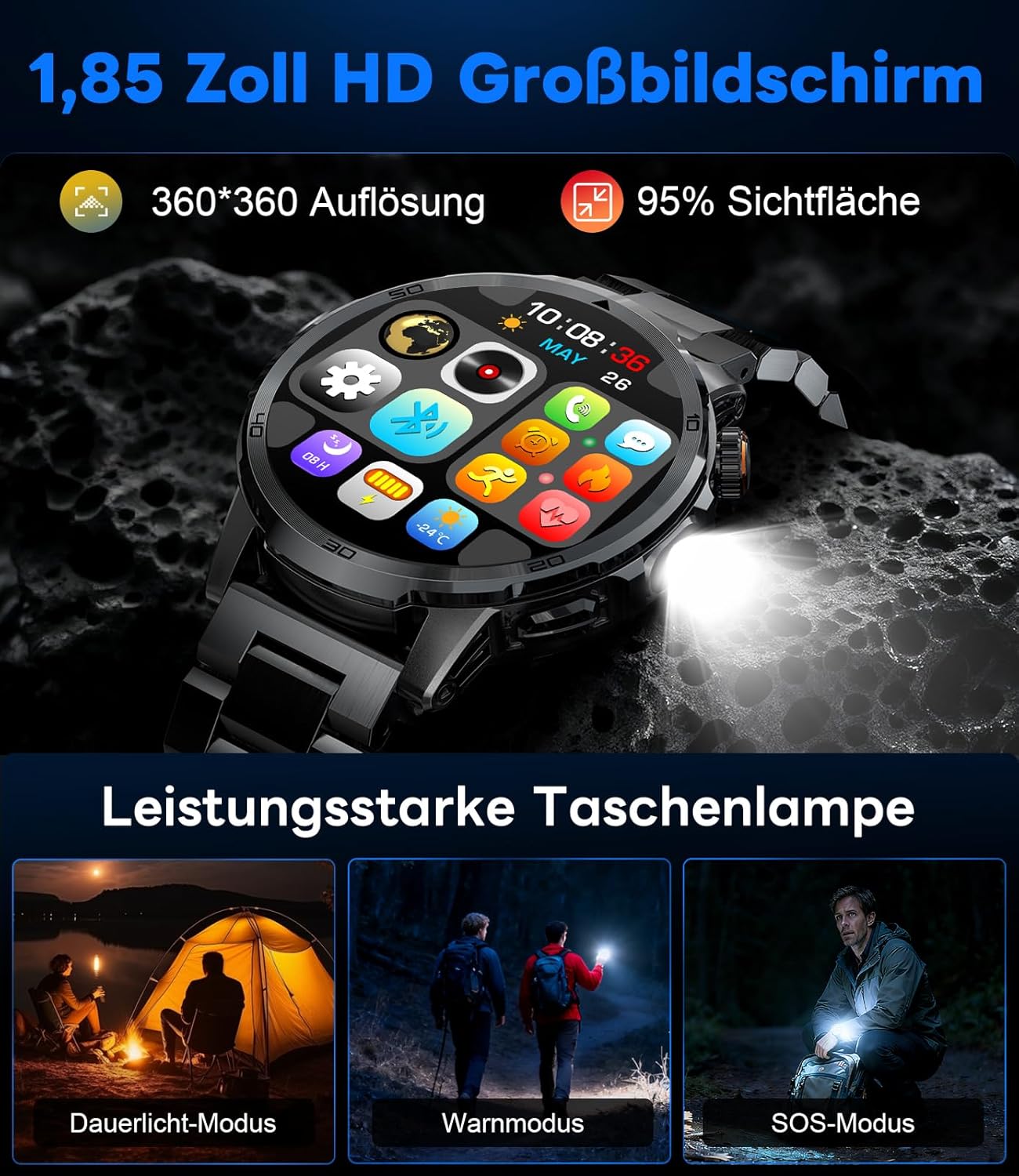
Image: The smartwatch displaying its 1.85-inch HD screen and demonstrating its powerful flashlight feature with different modes.
2.6 その他の機能
- 音声アシスタント: Activate the voice assistant to control your phone or get information (e.g., "What's the weather?").
- 音楽コントロール: スマートフォンの音楽再生(再生、一時停止、トラックのスキップ、音量調整)を時計から直接制御します。
- カメラコントロール: 時計をスマートフォンのカメラのリモートシャッターとして使用します。
- 天気予報: View 現在の気象状況と予報。
- アラームとタイマー: アラームを設定し、ストップウォッチ/タイマー機能を使用します。
- ドリンクリマインダー: 水を飲むためのリマインダーを設定します。
- ウォッチフェイス: Customize your watch face from over 100 options or upload your own photos via the app.

Image: The smartwatch interface displaying icons for music control, flashlight, camera control, weather, alarm, and drink reminders.

Image: A selection of diverse watch faces available for customization on the LIGE EF19-A Smartwatch.
3. メンテナンス
3.1 クリーニング
- Regularly clean your smartwatch and straps with a soft, dry, lint-free cloth.
- 必要に応じて、わずかに d を使用します。amp 布に中性洗剤をつけて拭き、乾かします。
- 時計の仕上げやシール部分を損傷する恐れがあるため、刺激の強い化学薬品、研磨剤入りの洗剤、溶剤の使用は避けてください。
- 充電する前に、充電接点が清潔で乾燥していることを確認してください。
3.2 耐水性(IP68)
The LIGE EF19-A Smartwatch is IP68 waterproof, meaning it is resistant to dust and can withstand immersion in water up to 1.5 meters for up to 30 minutes.
- It is suitable for daily use, such as hand washing, rain, and shallow water swimming.
- 蒸気がシール部分を貫通して損傷を引き起こす可能性があるため、お湯、サウナ、スチームルームでは時計を使用しないでください。
- 水中でボタンを押さないでください。
- After exposure to water, wipe the watch dry before charging or using.

Image: The smartwatch highlighting its robust military-grade design, including resistance to temperature extremes, shock, dust, and IP68 water resistance.
4。 トラブルシューティング
4.1 時計の電源が入らない
- 時計が完全に充電されていることを確認してください。充電器に少なくとも30分間接続してください。
- Try long-pressing the side button for 10-15 seconds to force a restart.
4.2 スマートフォンとペアリングできない
- スマートフォンで Bluetooth が有効になっていることを確認してください。
- スマートウォッチが Bluetooth 範囲内(通常 10 メートル)にあることを確認します。
- スマートフォンとスマートウォッチの両方を再起動します。
- Check if the app has the necessary permissions (location, Bluetooth, etc.).
- 以前にペアリングしたことがある場合は、携帯電話の Bluetooth 設定でデバイスを「忘れて」、アプリから再度ペアリングしてみてください。
4.3 不正確な健康データ
- 時計が手首にぴったりとフィットし、手首の骨から指 1 本分上の位置に装着されていることを確認します。
- 測定中は過度の動きを避けてください。
- 時計の裏側にあるセンサーを清掃してください。
- 環境要因や個人の生理機能が測定値に影響を及ぼす可能性があります。
4.4 通知が表示されない
- 時計がスマートフォンと正常にペアリングされていることを確認します。
- Check notification settings within the companion app to ensure desired apps are enabled for notifications.
- Ensure your phone's notification settings allow the companion app to display notifications.
- 携帯電話が「サイレント」モードになっていないことを確認してください。
5. 仕様
| 特徴 | 仕様 |
|---|---|
| モデル番号 | EF19-A |
| 画面 | 1.85-inch IPS HD Touch Screen, 360x360 pixels |
| バッテリー容量 | 1000mAhリチウムポリマー |
| バッテリー寿命(通常使用) | 7~15日 |
| バッテリー寿命(スタンバイ) | 最長50日間 |
| 充電時間 | 約2時間 |
| 接続性 | ブルートゥース5.2 |
| 耐水性 | (防水)IP68 |
| メモリストレージ容量 | 128MB |
| 対応デバイス | Android 5.1以降 / iOS 9.0以降のスマートフォン |
| 健康モニタリング | Heart Rate, Blood Oxygen, Sleep Quality, Stress Level |
| スポーツモード | 100+ (e.g., Running, Cycling, Swimming, Hiking, Yoga) |
| 追加機能 | Bluetooth Calls, Message Notifications, Torch, Voice Assistant, Music Control, Camera Control, Weather, Alarms, Timers, Drink Reminder, Customizable Watch Faces |
| GPS | スマートフォン経由 |
| 対象読者 | 男性 |
6. 保証情報
The LIGE EF19-A Smartwatch comes with a 2年間保証 ご購入日から有効です。この保証は、通常の使用における製造上の欠陥および故障を対象としています。
以下のものは保証の対象外となります:
- 不適切な使用、事故、乱用、怠慢、または不正な改造によって生じた損害。
- キズ、へこみ、外観上の損傷など、通常の消耗。
- Damage caused by exposure to extreme temperatures, liquids (beyond IP68 rating), or corrosive environments.
- Damage to accessories (straps, charging cables) unless defective upon receipt.
To claim warranty service, please retain your proof of purchase and contact customer support.
7. カスタマーサポート
If you encounter any issues or have questions regarding your LIGE EF19-A Smartwatch that are not covered in this manual, please contact our customer support team.
- Refer to the contact information provided on the product packaging or the official LIGE webサイト。
- When contacting support, please provide your product model number (EF19-A) and a detailed description of the issue.