
1. はじめに
The ThermoPro WiFi Hygrometer Thermometer provides accurate, real-time monitoring of temperature and humidity levels in your environment. This device connects to your smartphone via Wi-Fi and Bluetooth, allowing for remote tracking, data storage, and instant alerts. Designed for reliability and ease of use, it helps maintain optimal conditions for various applications.

Image 1.1: ThermoPro WiFi Hygrometer Thermometer and its companion app interface.
2. 箱の中身
- WiFi Hygrometer Thermometer
- 充電ケーブル
- 取扱説明書
3 製品の特徴
- Wireless Real-Time Tracking: Stable Wi-Fi and Bluetooth connectivity via the ThermoPro App for remote data monitoring. Requires a 2.4GHz Wi-Fi network.
- 高精度センサー: Equipped with an advanced NTC humidity sensor, providing ±0.5°F temperature and ±2% humidity accuracy with fast response.
- 2年間のデータ保存とエクスポート: Supports 24/7 data tracking and allows export of minute/hourly records for detailed analysis.
- 通知アラート: Set personalized thresholds for humidity and temperature to receive instant notifications when levels exceed limits.
- より長いバッテリー寿命: Features a rechargeable design for stable signal transmission and extended operation without frequent battery replacement.
- 多用途: Suitable for monitoring diverse locations such as bedrooms, offices, greenhouses, garages, RVs, crawl spaces, attics, and more.

画像3.1: 以上view of the Smart Thermo-Hygrometer's key features.

Image 3.2: Details on the device's temperature and humidity accuracy.
4. セットアップ
4.1 アプリのダウンロードとインストール
To begin using your ThermoPro WiFi Hygrometer Thermometer, download the 'ThermoPro Sensor' app from your device's app store (available on iOS and Android).
4.2 デバイスのペアリングとWi-Fi接続
- Open the 'ThermoPro Sensor' app and register for an account.
- スマートフォンでBluetoothが有効になっていることを確認します。
- In the app, tap the '+' icon to add a new device. The app will search for your ThermoPro sensor.
- Follow the on-screen instructions to connect your device to your 2.4GHz Wi-Fi network. This enables remote monitoring.
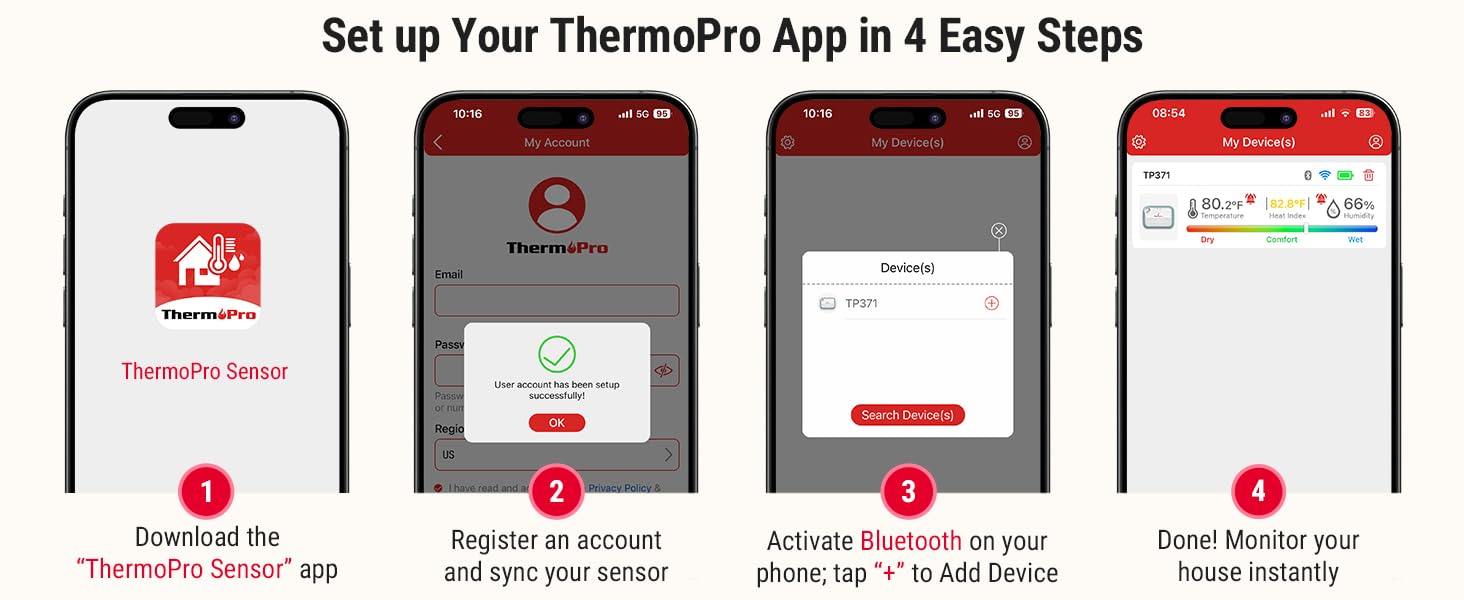
Image 4.1: Step-by-step guide for initial app setup and device connection.
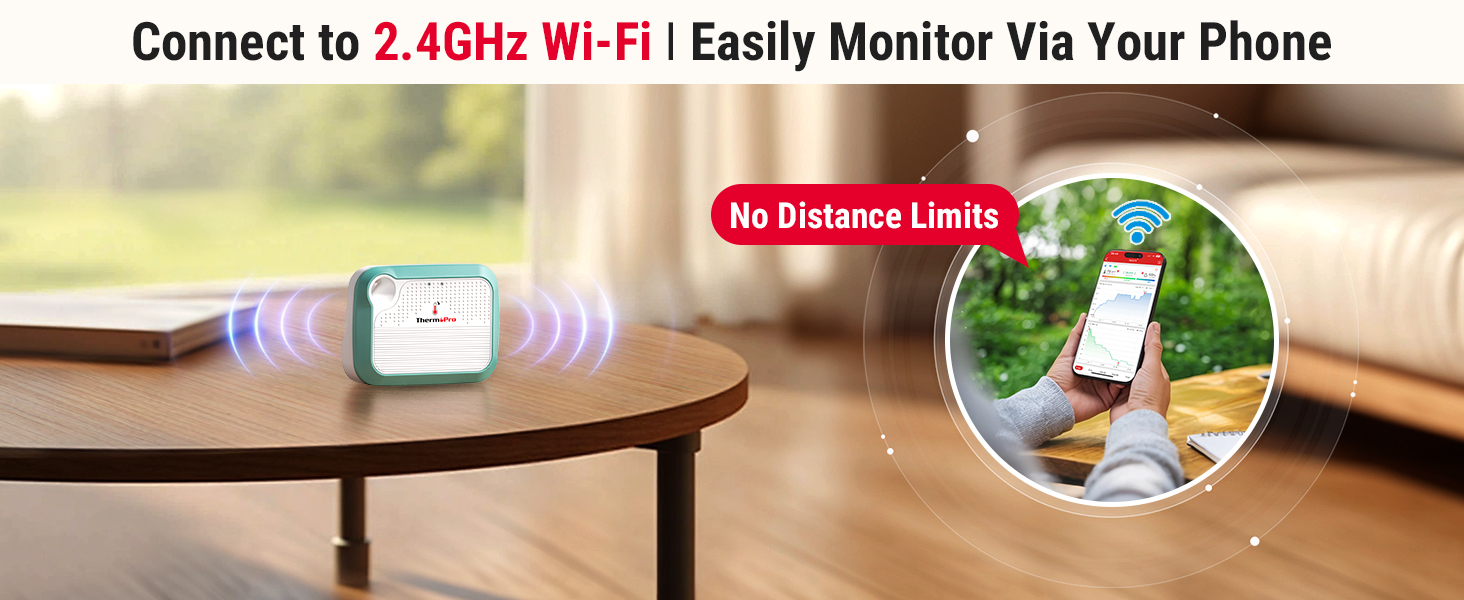
Image 4.2: Visual representation of seamless Wi-Fi connectivity.
5. 操作手順
5.1 App Interface and Real-Time Monitoring
Once connected, the ThermoPro app displays real-time temperature and humidity readings. You can view historical data, current conditions, and a comfort indicator (Dry, Comfort, Wet) based on humidity levels.

Image 5.1: Comfort indicator displayed on the ThermoPro app.
5.2 Setting Up Alerts
To set custom temperature and humidity thresholds:
- Navigate to the 'Alert Setting' section within the app.
- Define your desired minimum and maximum values for temperature and humidity.
- The app will send instant notifications to your smartphone if readings fall outside these set ranges.

図5.2: 例ample of an instant temperature alert notification.
5.3 データの保存とエクスポート
The device supports 24/7 data tracking, storing up to 2 years of minute/hourly records. You can access this historical data within the app and export it for further analysis.
5.4デバイス共有
The ThermoPro app allows you to share your device's monitoring data with family and friends. This feature enables multiple users to track environmental conditions from their own devices.

Image 5.3: Device sharing functionality within the ThermoPro app.
6. メンテナンス
6.1デバイスの充電
The ThermoPro WiFi Hygrometer Thermometer features a rechargeable battery. Connect the provided charging cable to the device and a suitable USB power source when the battery level is low. A full charge ensures extended operation.

Image 6.1: The rechargeable battery design provides longer operational life.
6.2 デバイスの配置
The device can be placed on a flat surface using its integrated stand or hung using the included lanyard. Choose a location that provides accurate readings of the ambient environment, away from direct sunlight, heat sources, or drafts.
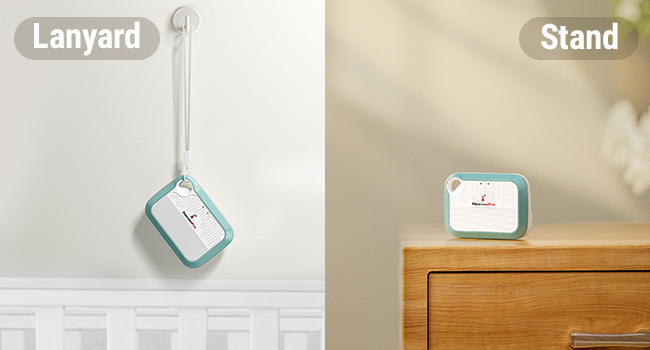
Image 6.2: Versatile placement options using the lanyard or integrated stand.
7。 トラブルシューティング
- デバイスがアプリに接続していません: Ensure Bluetooth is enabled on your phone and the device is within range. For Wi-Fi connection, verify your network is 2.4GHz and the password is correct. Try restarting both the device and your phone.
- 不正確な読み取り: Ensure the device is placed in a location free from direct heat sources, cold drafts, or high humidity areas (e.g., directly above a humidifier). Allow the device to stabilize for at least 30 minutes after placement.
- アプリがデータを更新しない: Check your internet connection. If using Wi-Fi, ensure the device is connected to your home network. If using Bluetooth, ensure your phone is close to the device.
- バッテリーの消耗が早い: Ensure the device is fully charged. Frequent disconnections and reconnections to Wi-Fi can consume more power.
8. 仕様
| 仕様 | 詳細 |
|---|---|
| モデル | B0DQ19WXBZ |
| ブランド | ThermoPro |
| 温度精度 | ±0.5°F |
| 温度範囲 | -22°F ~ 140°F |
| 湿度精度 | ±2% 相対湿度 |
| 湿度範囲 | 10% RH ~ 99% RH |
| 電池のタイプ | 充電式非標準バッテリー(付属) |
| 接続性 | Wi-Fi(2.4GHz)、Bluetooth |
| データストレージ | 最長2年 |
| パッケージ寸法 | 4.29 x 3.9 x 1.14インチ |
| 重さ | 4.16オンス |
9. 保証とサポート
ThermoPro products are designed for quality and reliability. For warranty information, technical support, or any questions regarding your ThermoPro WiFi Hygrometer Thermometer, please visit the official ThermoPro website or contact their customer service directly. Contact details are typically found on the product packaging or the ThermoPro webサイト。
10. 安全情報
- デバイスを極端な温度や直射日光に長時間さらさないでください。
- Avoid placing the device in areas with high moisture or direct water contact.
- お子様の手の届かない場所に保管してください。
- デバイスを分解または改造しないでください。保証が無効になります。
- 付属の充電ケーブルまたは認定された同等品のみを使用してください。


