
導入
ご購入ありがとうございますasing the AFEXOA DY29Z Night Light Bluetooth Speaker Alarm Clock. This versatile device combines a Bluetooth speaker, night light, alarm clock, sound machine, and MP3 player into one compact unit. This manual provides detailed instructions for setup, operation, and maintenance to ensure optimal performance and user satisfaction.

Figure 1: AFEXOA DY29Z device highlighting its 5-in-1 functionality.
安全情報
- デバイスを水や過度の湿気にさらさないでください。
- 極端な温度や直射日光を避けてください。
- ご自身でデバイスを分解したり修理したりしないでください。サポートが必要な場合はカスタマー サポートにお問い合わせください。
- お子様やペットの手の届かない場所に保管してください。
- 充電には付属の充電ケーブルまたは認定された Type-C ケーブルのみを使用してください。
パッケージ内容
パッケージに以下の項目が含まれているか確認してください。
- AFEXOA DY29Z Night Light Bluetooth Speaker Alarm Clock
- Type-CUSB充電ケーブル
- ユーザーマニュアル
製品終了view
フロントパネルコントロール
The front panel features an LED display for time and status, along with several control buttons:
- タイマーボタン: Short press to pause, long press for standby (turns off sound and light).
- Bluetoothオン/オフボタン: Activates or deactivates Bluetooth mode.
- 前のトラック / 音量ダウンボタン: 短く押すと前のトラックに移動し、長く押すと音量が下がります。
- 次のトラック / 音量アップボタン: 短く押すと次のトラックに移動し、長く押すと音量が上がります。
- Natural Sound & Lullaby Button: Cycles through built-in soothing sounds.
Rear Ports and Switches
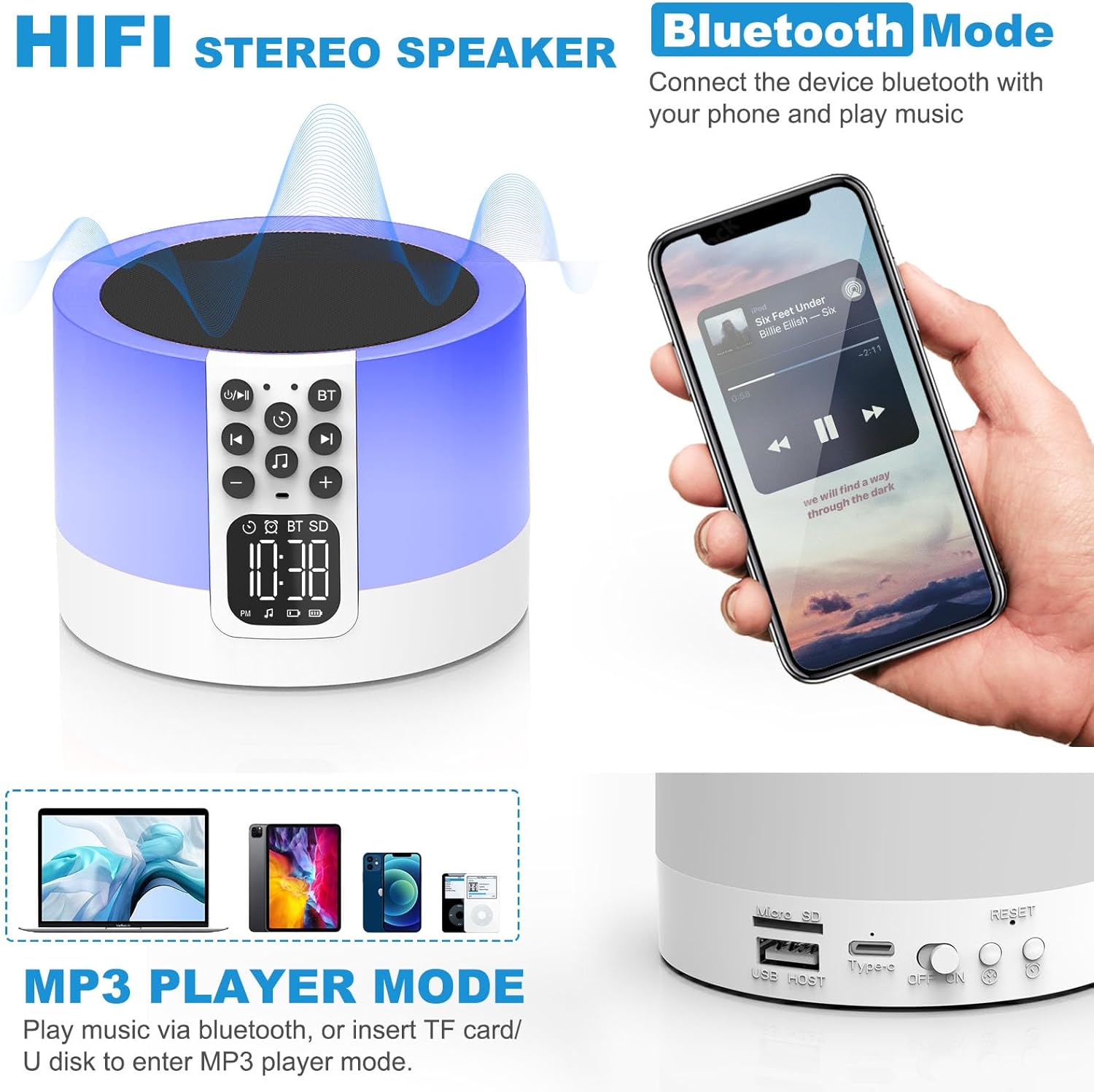
Figure 2: AFEXOA DY29Z showing Bluetooth connectivity and rear ports.
- マイクロSD/TFカードスロット: MP3を再生するには fileメモリカードから。
- USBホストポート: MP3を再生するには file■USBフラッシュドライブから。
- Type-C電源ポート: デバイスの充電用。
- オン/オフスイッチ: デバイスの主電源スイッチ。
- リセットボタン: Small button to reset the device (requires a pin).
- Time Setup Button: Short press for 12h/24h mode, long press for time setup.
- Alarm Setup Button: For setting the alarm.
設定
1. デバイスの充電
Before first use, fully charge the device. Connect the provided Type-C USB cable to the Type-C power port on the back of the device and plug the other end into a USB power adapter (not included), computer, or power bank.

図 3: USB 経由でデバイスを充電します。
2.時間を設定する
- Turn on the device using the On/Off switch on the back.
- Long press the 'Time Setup' button on the back until the hour digits flash.
- Use the 'Previous Track / Volume Down' and 'Next Track / Volume Up' buttons on the front to adjust the hour.
- Press the 'Time Setup' button again to switch to minute adjustment. Adjust minutes using the volume buttons.
- Press the 'Time Setup' button a third time to confirm and exit time setting.
- Short press the 'Time Setup' button to toggle between 12-hour and 24-hour display formats.
操作手順
1. 電源のオン/オフ
Slide the 'On/Off' switch on the back of the device to turn it on or off.
2. Bluetoothスピーカーモード
- デバイスの電源をオンにします。
- Press the 'Bluetooth On/Off' button on the front panel. The device will enter pairing mode, indicated by a flashing Bluetooth icon on the display.
- On your smartphone or other Bluetooth-enabled device, search for 'DY29Z' in the Bluetooth settings and select it to pair.
- ペアリングすると、デバイスからのオーディオをスピーカーから再生できるようになります。
- Use the 'Previous Track / Volume Down' and 'Next Track / Volume Up' buttons to control playback and volume.
3. ナイトライト機能
The device features a sensitive touch top mesh for light control.

Figure 4: Adjusting warm white light brightness via touch control.
- 温白色光: Tap the top mesh to cycle through 3 levels of warm white brightness (low, medium, high). Tap again to turn off.
- Multicolor Light: Long press the top mesh and then release to activate the ambient light mode, which cycles through various colors.
- Fixed Color Light: While in multicolor cycling mode, long press the top mesh again and release to fix the current color. Repeat to cycle through other fixed colors.

Figure 5: Various multicolor night light options.
4. 目覚まし時計機能
Set and manage alarms with customizable tones.

Figure 6: Digital alarm clock with wake-up light.
- アラームの設定: Long press the 'Alarm Setup' button on the back until the alarm hour digits flash. Adjust the hour using the volume buttons. Press 'Alarm Setup' again to set minutes, then press again to confirm.
- Custom Alarm Tone: Insert a USB Flash Drive or Micro SD Card with your favorite MP3 music. The device will automatically use this as the alarm tone.
- スヌーズ機能: When the alarm sounds, tap the top mesh to activate snooze. The alarm will sound again after 9 minutes. This can be repeated indefinitely.
- アラームの停止: Press any button (except the top mesh for snooze) to stop the alarm for the day.
5. Sound Machine Function
The device offers 30 built-in soothing sounds to aid sleep and relaxation.
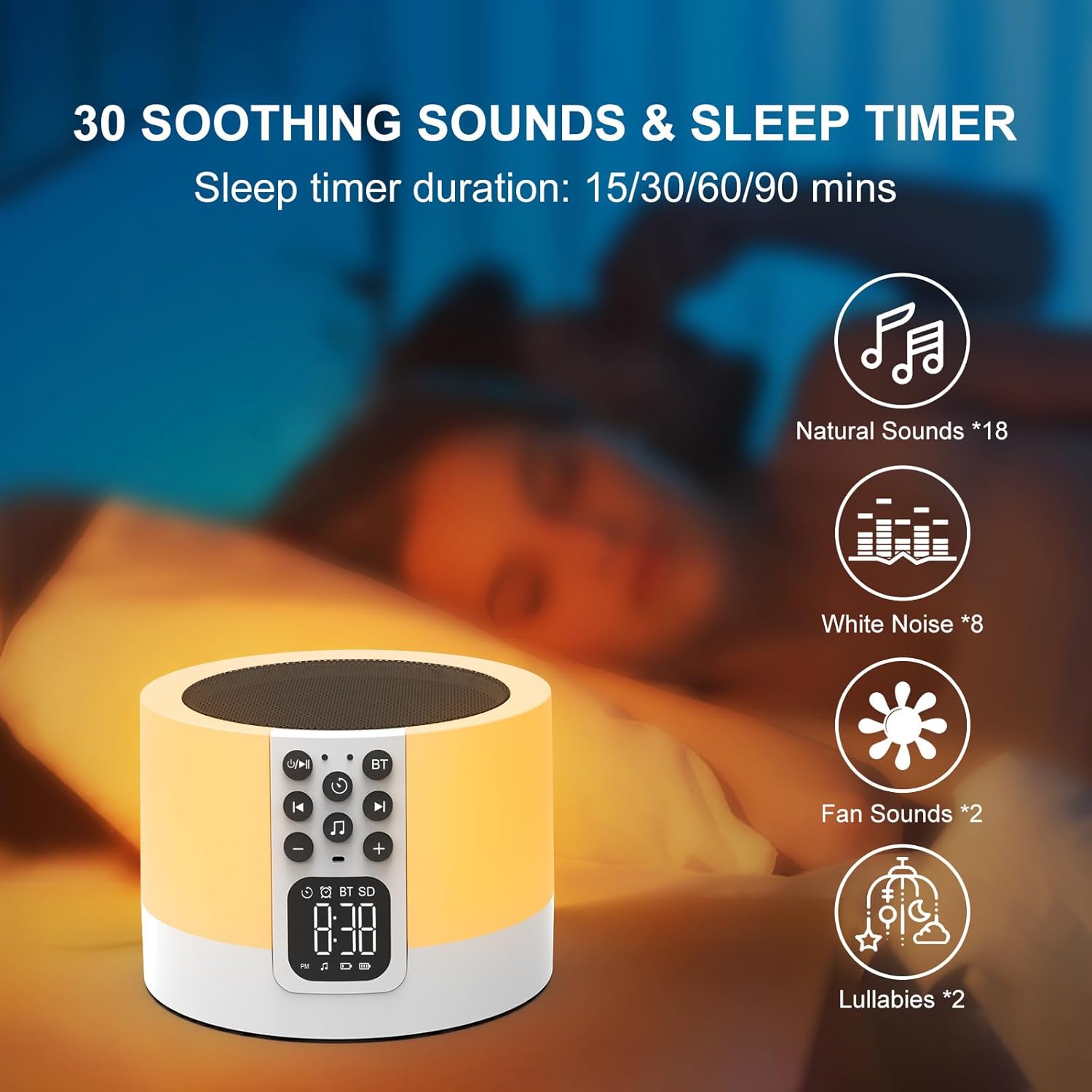
Figure 7: Soothing sounds and sleep timer options.
- Press the 'Natural Sound & Lullaby' button on the front panel to cycle through the 30 available sounds (including white noise, fan noise, pink noise, nature sounds, and lullabies).
- 目覚まし時計: To set a sleep timer, short press the 'Timer' button repeatedly to select 15, 30, 60, or 90 minutes. The device will automatically turn off after the selected duration.
6. MP3プレーヤーモード
Play your own music directly from a USB flash drive or Micro SD card.

Figure 8: Using USB flash drives and Micro SD cards for MP3 playback.
- Insert a USB flash drive into the USB HOST port or a Micro SD card into the Micro SD/TF card slot on the back of the device.
- The device will automatically detect the storage and begin playing MP3 files.
- Use the 'Previous Track / Volume Down' and 'Next Track / Volume Up' buttons to navigate tracks and adjust volume.
7. ハンズフリー通話
When connected via Bluetooth to a smartphone, the device can be used for hands-free calls.
- 電話がかかってくると、デバイスが鳴ります。
- Press the 'Timer' button (which also functions as Play/Pause) to answer an incoming call.
- Press the 'Timer' button again to end the call.
メンテナンス
- 柔らかく乾いた布でデバイスを拭いてください。研磨剤入りの洗剤や溶剤は使用しないでください。
- すべてのポートにほこりやごみがないことを確認してください。
- 長期間使用しない場合は、デバイスを涼しく乾燥した場所に保管してください。
トラブルシューティング
| 問題 | 考えられる原因 | 解決 |
|---|---|---|
| デバイスの電源が入りません。 | 電池が消耗しています。電源スイッチがオフになっています。 | Charge the device fully. Ensure the On/Off switch is in the 'On' position. |
| Bluetooth経由で接続できません。 | Bluetooth not enabled on device or phone. Device is already paired with another unit. | Ensure Bluetooth is active on both devices. Disconnect from other devices. Restart pairing process. |
| スピーカーから音が出ません。 | Volume is too low. Device is paused. Incorrect mode selected. | Increase volume. Press the 'Timer' button to unpause. Ensure correct mode (Bluetooth, MP3, Sound Machine) is active. |
| 夜間照明が機能しません。 | Device is off or in standby. | Ensure the device is powered on. Tap the top mesh to activate the light. |
| アラームは鳴りません。 | Alarm not set correctly. Volume too low. | Verify alarm time and activation. Increase device volume. |
仕様
| 特徴 | 詳細 |
|---|---|
| ブランド | アフェソア |
| モデル番号 | DY29Z |
| 接続技術 | ブルートゥース、USB |
| オーディオ出力モード | ステレオ |
| 材料 | アクリロニトリルブタジエンスチレン(ABS) |
| スピーカータイプ | ポータブルBluetoothスピーカー |
| 追加機能 | Alarm, Illuminated, Mood Light, Noise Machine, Timer |
| 制御方法 | 触る |
| 電源 | 電池駆動 |
| 電池の数 | 1 リチウムイオン (付属) |
| 対応デバイス | ノートパソコン、MP3プレーヤー、スマートフォン、タブレット |
保証とサポート
This product comes with a limited warranty. For detailed warranty information or technical support, please refer to the product packaging or contact AFEXOA customer service. Keep your purchase receipt for warranty claims.