
導入
This manual provides essential information for the setup, operation, maintenance, and troubleshooting of your AWOW Mini PC, Model BA7. Please read these instructions carefully before using the device.

画像: 上view of the AWOW BA7 Mini PC, highlighting its compact design and key features.
パッケージ内容
パッケージにすべてのアイテムが揃っていることを確認します。
- AWOW BA7 Mini PC
- 電源アダプター
- 取り付けネジ
- VESAマウントブラケット
- HDMIケーブル
- ユーザーマニュアル(このドキュメント)

Image: Illustration of the AWOW BA7 Mini PC and its included accessories: power adapter, screws, VESA mount, HDMI cable, and user manual.
セットアップ手順
- 周辺機器を接続します。 キーボード、マウス、モニターをミニ PC の適切なポートに接続します。
画像: 正面 view of the Mini PC showing the Power Button, Type-C port, USB 3.2 ports, and 3.5mm Audio Jack.

画像: 背面 view of the Mini PC showing the DC IN, DP1.2, HDMI2.0, USB 2.0 ports, and RJ45 LAN port.
- 電源接続: 電源アダプタをミニ PC の DC IN ポートに接続し、アダプタを電源コンセントに差し込みます。
- 電源オン: ミニPCの前面にある電源ボタンを押します。システムが起動します。
- 初期設定: 画面の指示に従って、言語、地域、ネットワーク接続、ユーザー アカウントの作成などの Windows 11 Pro の初期セットアップを完了します。
- ネットワーク接続:
- 有線: Connect an Ethernet cable to the RJ45 LAN port for a stable wired connection.
- 無線: During Windows setup or via Windows settings, connect to your Wi-Fi network using the built-in WiFi 6.
操作手順
基本操作
- 電源オン/オフ: Press the power button to turn on the PC. To shut down, use the Windows Start menu options (Shut down, Restart, Sleep). A short press on the power button can put the PC to sleep. A long press (approx. 5 seconds) will force a shutdown.
- 表示出力: The Mini PC supports up to three 4K displays simultaneously via DP, HDMI, and USB-C. Connect your monitors and configure display settings in Windows.

Image: A user working with a triple monitor setup, demonstrating the Mini PC's multi-display capability.
- USB接続: Utilize the USB 2.0 and USB 3.0 ports for connecting external devices such as external hard drives, USB flash drives, printers, and other peripherals. The Type-C port also supports data transfer and display output.
- オーディオ: ヘッドフォンまたはスピーカーを 3.5mm オーディオ ジャックに接続します。
高度な使用法
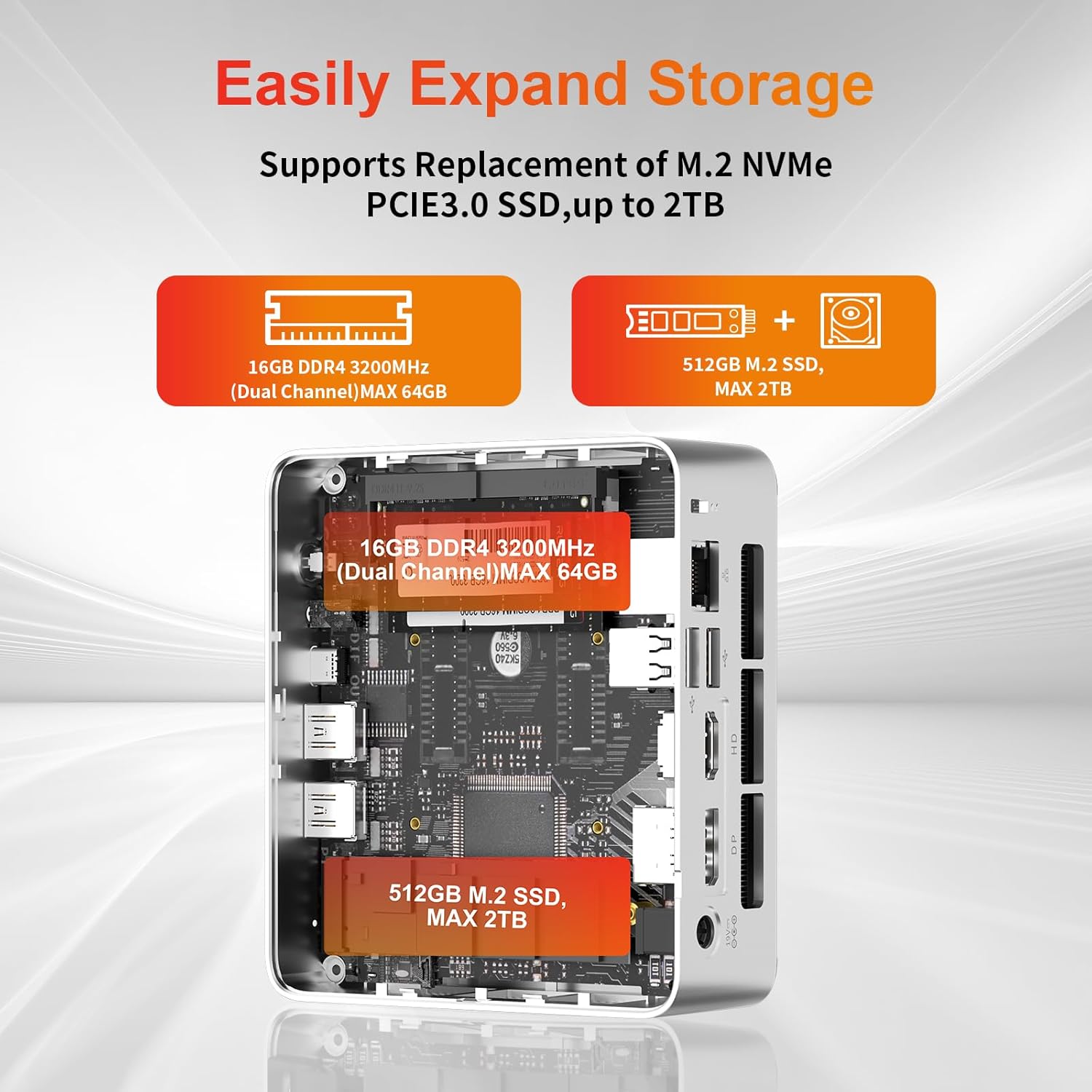
- ストレージの拡張: The Mini PC supports replacement of the M.2 NVMe PCIe 3.0 SSD up to 2TB. It also supports memory expansion up to 64GB DDR4.

Image: Diagram illustrating the internal components and options for expanding storage (M.2 SSD up to 2TB) and RAM (DDR4 up to 64GB).
- VESA 取り付け: Use the included VESA mount bracket to attach the Mini PC to the back of a compatible monitor or to a wall mount, saving desk space.
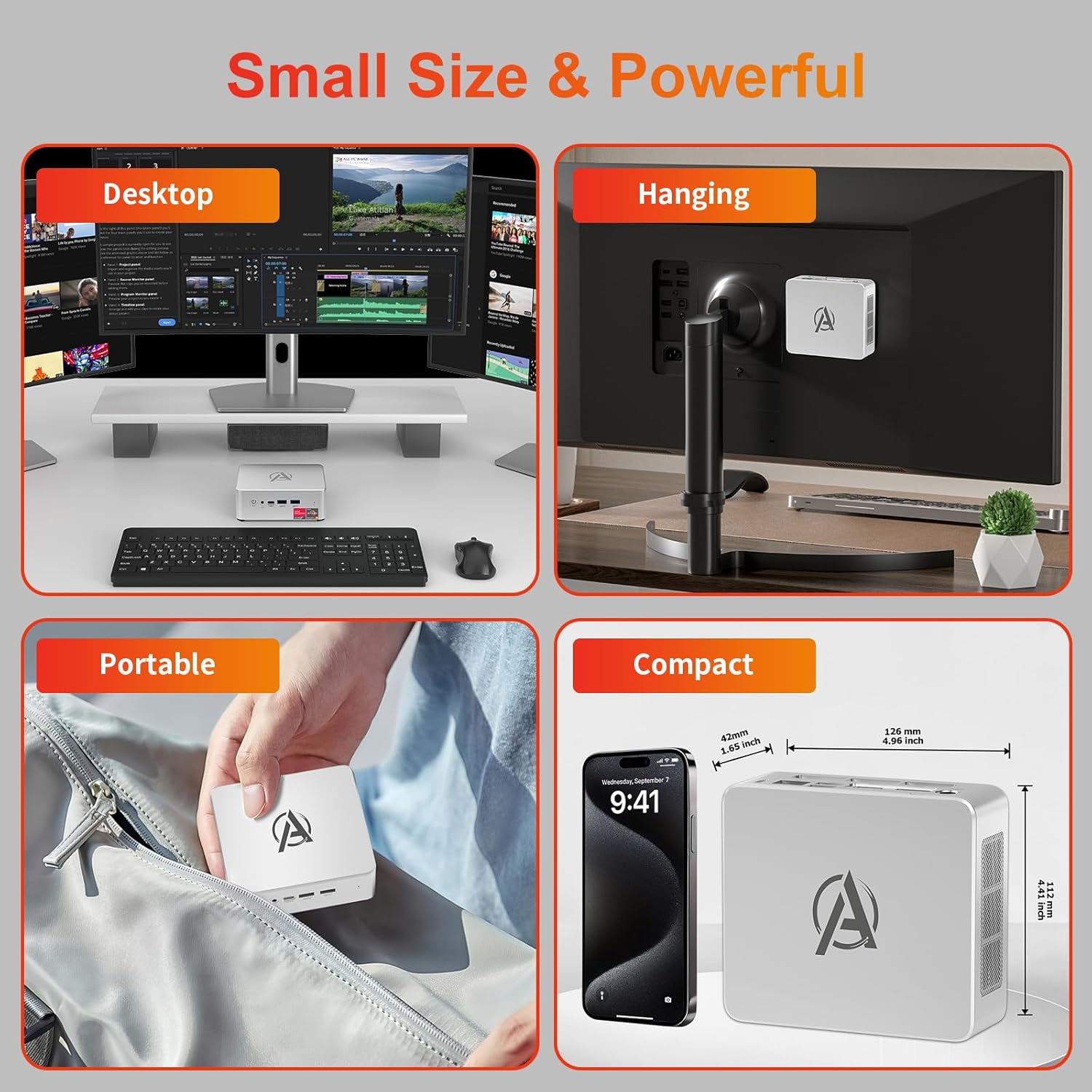
Image: Various usage scenarios for the Mini PC, including desktop, VESA-mounted behind a monitor, portable, and compact size comparison.
メンテナンス
- クリーニング: Use a soft, dry cloth to clean the exterior of the Mini PC. Do not use liquid cleaners or aerosols. Ensure ventilation openings are free from dust.
- ソフトウェアアップデート: 最適なパフォーマンスとセキュリティを確保するために、Windows の更新プログラムとドライバーの更新プログラムを定期的に確認してインストールしてください。
- 熱管理: Ensure the Mini PC is placed in a well-ventilated area. Avoid blocking the air vents. The intelligent cooling system is designed for low noise and efficient heat dissipation.

Image: Diagram illustrating the internal cooling fan and heat sink, showing airflow for efficient heat dissipation.
- ストレージ管理: 不要なものを定期的に掃除する files and applications to maintain system performance.
トラブルシューティング
- 電源なし:
- 電源アダプタがミニ PC と電源コンセントの両方にしっかりと接続されているかどうかを確認します。
- 電源コンセントが機能していることを確認してください。
- 別の電源コンセントを試してください。
- 表示なし:
- Verify that the HDMI/DP/USB-C cable is securely connected to both the Mini PC and the monitor.
- モニターの電源がオンになっており、正しい入力ソースに設定されていることを確認します。
- 可能であれば、別のディスプレイ ケーブルまたはモニターを試してください。
- パフォーマンスが遅い:
- バックグラウンドで実行されている不要なアプリケーションを閉じます。
- 保留中の Windows 更新プログラムまたはドライバー更新プログラムを確認してインストールします。
- SSD に十分な空き容量があることを確認してください。
- タスク マネージャーで CPU と RAM の使用状況を監視し、リソースを大量に消費するプロセスを特定します。
- ネットワーク接続の問題:
- For wired connections, ensure the Ethernet cable is properly connected and the router is working.
- For Wi-Fi, check if the Wi-Fi adapter is enabled and connected to the correct network. Restart your router/modem.
- システムがフリーズ/クラッシュする:
- ミニ PC を再起動します。
- システムが過熱していないことを確認します(換気をチェックします)。
- Run a system diagnostic or check Windows Event Viewer for error messages.
仕様
| モデル | AWOW BA7 Mini PC |
| プロセッサ | AMD Ryzen 5 7430U(6コア、12スレッド、最大4.3GHz) |
| グラフィックス | 統合型AMD Radeonグラフィックス |
| ラム | 16GB DDR4(最大64GBまで拡張可能) |
| ストレージ | 512GB PCIe 3.0 M.2 SSD (Expandable up to 2TB) |
| オペレーティング·システム | ウィンドウズ11プロ |
| ビデオ出力 | DP1.2 (4K@60Hz), HDMI2.0 (4K@60Hz), USB-C (4K@60Hz) - Supports Triple Display |
| 接続性 | WiFi 6, Bluetooth 5.2, 1000Mbps RJ45 LAN |
| ポート | 2x USB 3.2, 2x USB 2.0, 1x Type-C (Full Function), 1x DP1.2, 1x HDMI2.0, 1x RJ45 LAN, 1x 3.5mm Audio Jack, 1x DC IN |
| 寸法 | 126mm x 112mm x 42mm(約4.96 x 4.41 x 1.65インチ) |
| 重さ | 398g(本体のみ) Image: The Mini PC with its dimensions (126mm x 112mm x 42mm) and weight (398g) labeled. |
保証とサポート
AWOW は自社製品に対して包括的なサポートを提供します。
- 保証: This product includes a 12-month service period from the date of purchase, covering manufacturing defects.
- テクニカルサポート: Lifetime technical support is available for all AWOW products.
- 接触: For technical assistance, warranty claims, or any product-related inquiries, please visit the official AWOW webサイトにアクセスするか、カスタマーサービスにお問い合わせください。

Image: AWOW brand message emphasizing fulfillment, lifetime technical support, and 12-month service.