
xTool IF2 2.0
xTool SafetyPro IF2 2.0 Hyper Flow Inline Duct Fan User Manual
Model: MXA-K013-001
1. 安全情報
Please read all safety instructions carefully before operating the xTool SafetyPro IF2 2.0. Failure to follow these instructions may result in electric shock, fire, or serious injury.
- 電気安全: Ensure the power supply matches the fan's requirements. Do not operate with damaged cords or plugs.
- 換気: Always ensure proper ventilation when using the fan, especially when connected to a laser engraver. Exhaust fumes must be directed outdoors or into an appropriate filtration system.
- 水への露出: The main unit is not waterproof. While the fan components are washable, ensure the main electrical connections and motor housing remain dry.
- 子供とペット: デバイスを子供やペットの手の届かない場所に保管してください。
- メンテナンス: メンテナンスや清掃を行う前に電源を切ってください。
2.製品オーバーview
The xTool SafetyPro IF2 2.0 is a high-performance inline duct fan designed for efficient smoke and fume extraction, particularly for laser cutting and engraving applications. It features dual high-speed fans and intelligent control for optimal performance.
2.1 主な特徴
- Unmatched Smoke Extraction Efficiency: Two ultra-speed 14,000 RPM fans generate 135 CFM airflow with up to 1300 Pa pressure.
- コンパクトなデザイン: Integrated smart EC motor design in a compact 5-inch body.
- Auto-Sync Control: Wirelessly connects with xTool laser engravers for hands-free operation and intelligent power/airflow adjustment.
- メンテナンスが簡単: IP55 rated for easy disassembly and cleaning of fan components.
- 静かな動作: Built-in sound-absorbing cotton reduces operating noise.
- 柔軟な設置: Retractable 2.3-meter durable PP tube.
2.2 コンポーネント
- SafetyPro IF2 2.0 Unit
- Bluetoothドングル
- 六角キー
- パイプコネクタ1
- パイプコネクタ2
- パイプclamp
- Ribbed plastic anchors (8x)
- ネジ(8x)
- 壁掛け金具
- Smoke exhaust pipe (2.3m)
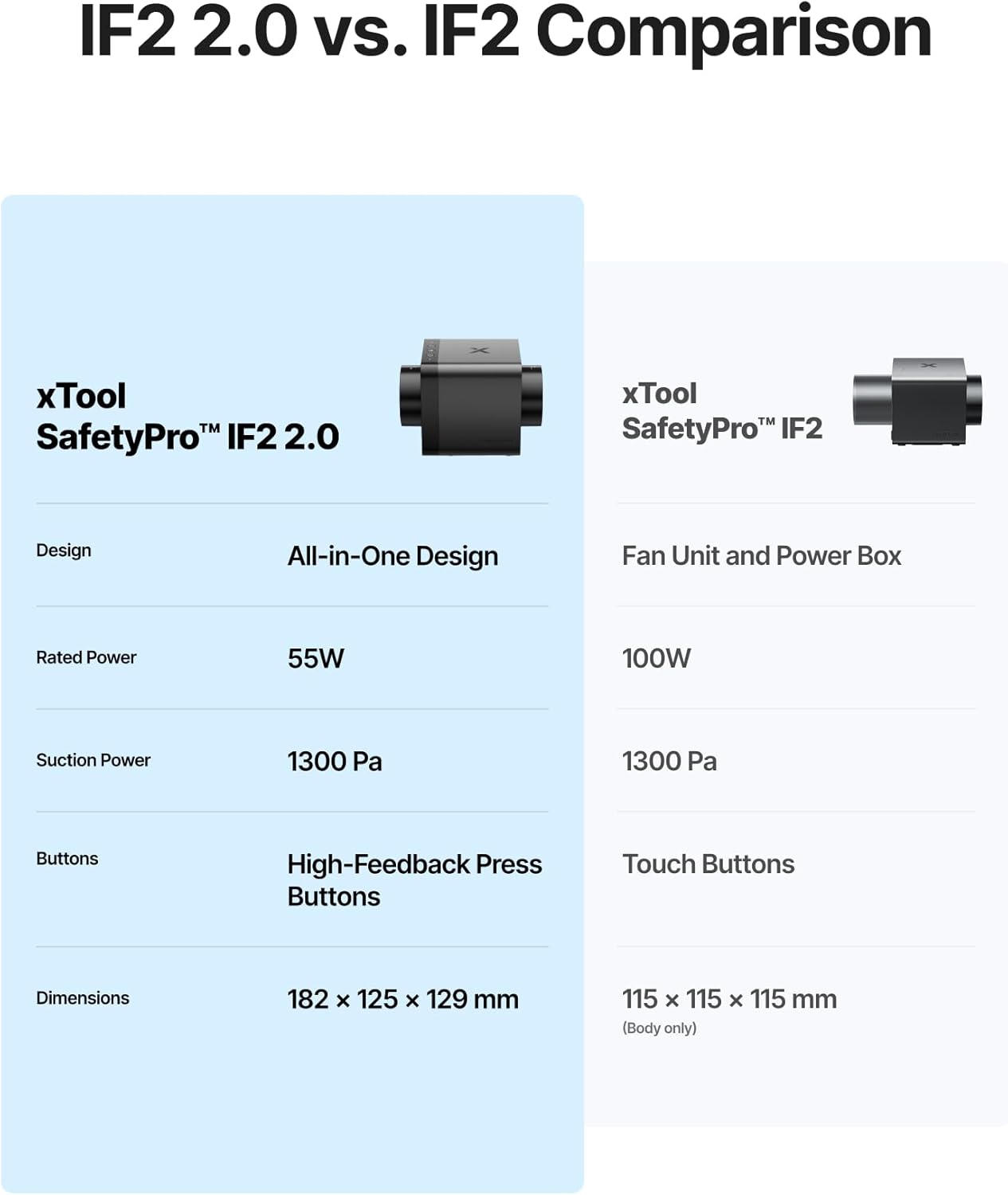
Image: The xTool SafetyPro IF2 2.0 main unit, showcasinコンパクトなデザイン。

Image: The xTool SafetyPro IF2 2.0 connected to its flexible smoke exhaust pipe.
3. セットアップとインストール
Follow these steps to properly set up your xTool SafetyPro IF2 2.0.
3.1 ファンの取り付け
- Choose a suitable location near your laser engraver, ensuring access to an exhaust point (window, vent, or filtration system).
- Use the provided wall-mounting fixture, screws, and ribbed plastic anchors to securely attach the fan to a wall. Alternatively, the compact design allows for placement on a stable surface.
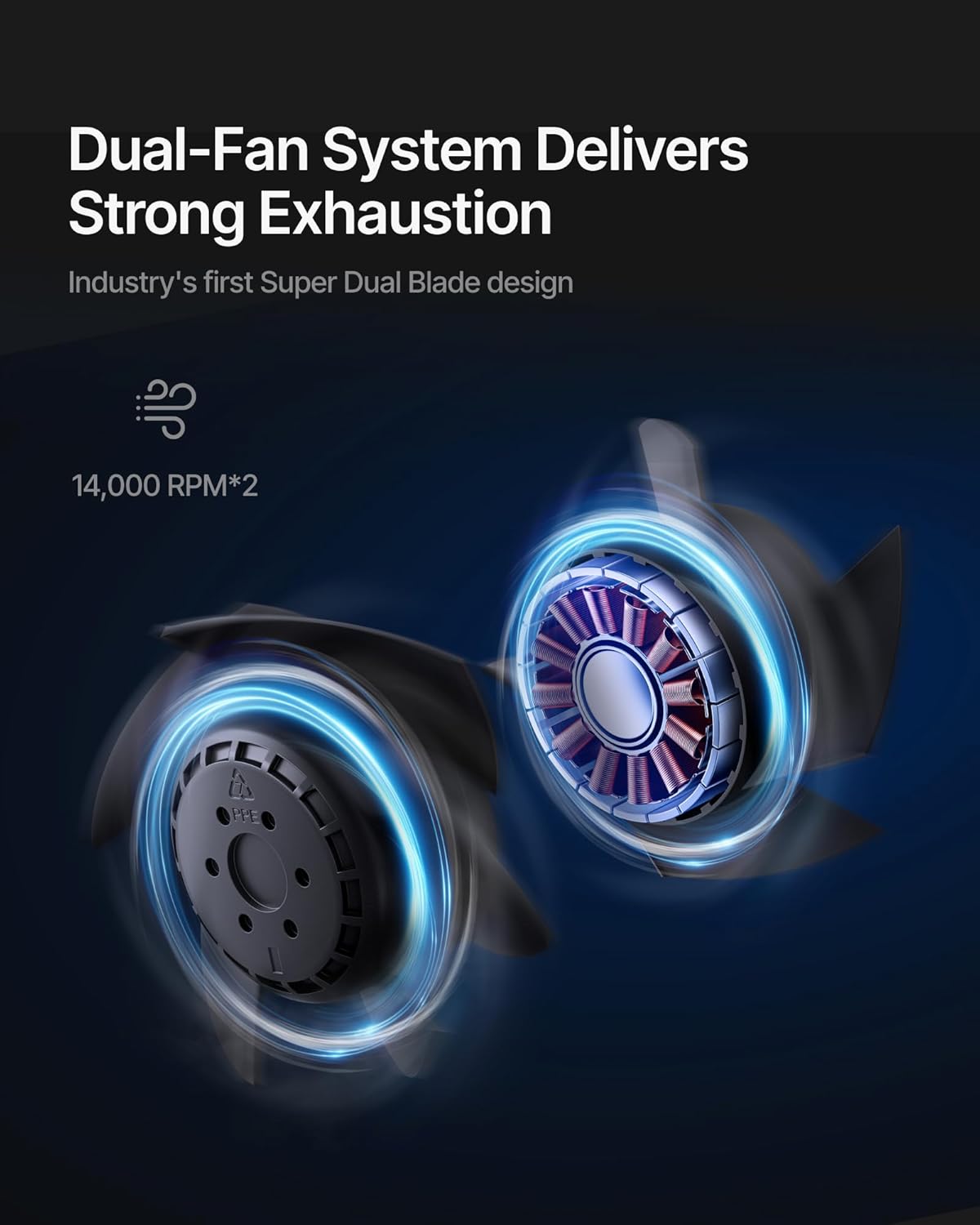
Image: The xTool SafetyPro IF2 2.0 installed using the wall-mounting fixture, with the exhaust pipe connected.
3.2 Connecting the Exhaust Pipe
- Attach one end of the smoke exhaust pipe to the fan unit using the appropriate pipe connector and pipe clamp.
- Connect the other end of the smoke exhaust pipe to your laser engraver's exhaust port or direct it to a safe outdoor venting location. Ensure all connections are secure to prevent smoke leakage.

Image: Illustration of the easy detachable pipe connection for simplified maintenance and the washable fan components.
3.3 電源と接続
- Plug the power adapter into the fan unit and then into a suitable power outlet.
- Insert the Bluetooth dongle into your xTool laser engraver (if applicable) to enable auto-sync functionality.
4. 操作
The xTool SafetyPro IF2 2.0 is designed for seamless integration and efficient operation.
4.1 Auto-Sync Control
- When connected to a compatible xTool laser engraver via Bluetooth, the IF2 2.0 will automatically turn on/off with the laser engraver.
- The fan intelligently adjusts its power and airflow based on the material being processed, optimizing smoke extraction.
4.2 Manual Control and Quiet Mode
- The fan features high-feedback press buttons for manual control of power and fan speed.
- Activate Quiet Mode for operations that produce less smoke or when a lower noise level is desired.
4.3 Smart Connect via xTool Creative Space
- For enhanced control and monitoring, connect the IF2 2.0 through the xTool Creative Space software. This allows for fine-tuning settings and provides a comprehensive user experience.

Image: The xTool SafetyPro IF2 2.0 demonstrating intelligent control, connected to an xTool laser engraver and a laptop running xTool Creative Space software.
5. メンテナンス
Regular maintenance ensures optimal performance and longevity of your SafetyPro IF2 2.0.
5.1 Cleaning the Fan Components
- The fan components are designed for easy disassembly and are washable.
- 清掃する前に必ず電源を切ってください。
- Carefully disassemble the fan unit as per the instructions in the full manual (not provided here).
- Rinse the fan blades and housing components with water. Ensure they are completely dry before reassembly.
- 重要: The exposed wires and main electrical unit are not waterproof. Do not submerge or expose these parts to water.
5.2 Exhaust Pipe Maintenance
- Periodically inspect the smoke exhaust pipe for any blockages, kinks, or damage.
- Clean the interior of the pipe if excessive residue builds up, which can reduce airflow efficiency.
6。 トラブルシューティング
If you encounter issues with your xTool SafetyPro IF2 2.0, refer to the following common solutions:
- ファンが作動しない: Check power connection, ensure the power outlet is functional, and verify the fan is properly connected to the laser engraver if using auto-sync.
- 弱い吸引: Inspect the exhaust pipe for blockages or kinks. Ensure all pipe connections are sealed. Clean fan components if they are dirty.
- 過度の騒音: Check for any foreign objects in the fan blades. Ensure the fan is securely mounted and not vibrating against other surfaces.
- Auto-Sync Not Working: Ensure the Bluetooth dongle is correctly inserted and your xTool laser engraver is compatible and properly configured in xTool Creative Space.
- 煙の漏れ: Verify all pipe connections are tight and sealed. Check the exhaust pipe for any tears or holes.
For persistent issues, please contact xTool customer support.
7. 仕様
| 特徴 | 詳細 |
|---|---|
| モデル番号 | MXA-K013-001 |
| ブランド | xツール |
| メーカー | メイクブロック株式会社 |
| アイテム重量 | 6.29ポンド |
| 製品寸法 | 7.19 x 4.92 x 4.92インチ |
| 色 | 黒 |
| 材料 | Acrylonitrile Butadiene Styrene, PC |
| ファン速度 | Up to 14,000 RPM (Dual Fans) |
| 気流 | 135 CFM |
| 静圧 | 最大1300Pa |
| 排気管の長さ | 2.3 meters (retractable) |
| 耐水性評価 | IP55 (for fan components, not main unit) |
| 電池が必要 | いいえ |
8. 保証とサポート
8.1 保証情報
For detailed warranty information, please refer to the official xTool web保証書または製品に付属の保証書をご覧ください。保証請求の際は購入証明書を保管してください。
8.2 カスタマーサポート
If you require assistance, have questions, or need technical support, please contact xTool through the following channels:
- メールサポート: For general inquiries and technical assistance.
- ライブチャット: 公式xToolで利用可能 website for real-time support.
- 電話サポート: Contact numbers may be available on the xTool webサイト。
- Facebookグループ: ピアサポートとアップデートのために、公式 xTool コミュニティに参加してください。

画像: 上view of xTool's multi-channel customer service options.
関連文書 - IF2 2.0
 |
XTOOL P3 クイックスタートガイド: セットアップ、操作、機能 XTOOL P3 レーザー彫刻機およびカッターの包括的なクイック スタート ガイド。セットアップ手順、部品の識別、準備手順、ソフトウェアの接続、インジケーターとコントロールの説明を詳しく説明します。 |
 |
XTOOL SafetyPro™ IF2 MXA-K012-001 クイックスタートガイド XTOOL SafetyPro™ IF2 (MXA-K012-001) のクイック スタート ガイド。XTOOL レーザー マシンによる煙と煙の除去を強化するためのセットアップ、接続、壁面取り付け、使用方法、インジケータの説明、メンテナンスについて詳しく説明しています。 |
 |
xTool SafetyPro™ IF2 クイックスタートガイド このガイドでは、設置、ワイヤレス構成、壁面取り付け、メンテナンスなど、xTool SafetyPro™ IF2 ヒューム抽出装置のセットアップ、接続、使用方法について説明します。 |
 |
XTOOL OS1 Automatic Shaker Oven Machine - Krótka instrukcja obsługi Przewodnik szybkiego startu dla maszyny XTOOL OS1 Automatic Shaker Oven Machine, zawierający instrukcje instalacji, konfiguracji i użytkowania, a także listę przedmiotów, często zadawane pytania i opis wskaźników. |
 |
ACiQ Mixed Flow Inline Duct Fan User Manual - Installation & Specifications Comprehensive user manual for the ACiQ Mixed Flow Inline Duct Fan. Includes product overview, detailed specifications, installation guide, maintenance instructions, and safety precautions for models AIMF-100 through AIMF-315. |
 |
xTool SafetyPro™ AP2 Max Air Purifier Quick Start Guide This guide provides instructions for assembling, using, and maintaining the xTool SafetyPro™ AP2 Max Air Purifier, designed to work with xTool laser machines. |
Ask a question about this manual
Ask about setup, troubleshooting, compatibility, parts, safety, or missing instructions. Manuals+ will review the question and use this page’s manual context to help answer it.