
1. はじめに
This manual provides detailed instructions for the proper use and maintenance of your BAOFENG UV-32 10W Ham Radio. The UV-32 is a multi-band two-way radio featuring 10W selectable power, GPS navigation, a 2.0-inch color display, and multiple programming options including wireless app connectivity. Please read this manual thoroughly before operating the device to ensure safe and efficient communication.
2. 安全情報
Observe the following safety precautions to prevent injury or damage to the radio:
- 爆発性雰囲気(可燃性ガス、粉塵粒子、金属粉末など)内で無線機を操作しないでください。
- アンテナが接続されていない状態では送信しないでください。
- Keep the antenna at least 2.5 cm (1 inch) away from your body when transmitting.
- BAOFENGが承認したバッテリーと充電器のみを使用してください。承認されていないアクセサリを使用すると、損傷や火災の原因となる可能性があります。
- 無線機を分解したり改造したりしないでください。修理は資格を持った技術者のみが行う必要があります。
- 直射日光や極端な温度に長時間さらされることは避けてください。
- Do not operate the radio while driving or performing other activities that require full attention.
3. パッケージ内容
パッケージにすべてのアイテムが含まれていることを確認します。
- 1 x BAOFENG UV-32 Radio
- 1mAhバッテリー×2500
- USB-C充電器 x 1
- デスクトップ充電ベース x 1
- 1 x Standard UV Antenna
- 1 x Long Airband Antenna
- 1のxヘッドセット
- ベルトクリップ1個
- 1 x Radio Case Holder

Image: The BAOFENG UV-32 radio shown with its complete set of accessories, including the battery, charger, antennas, headset, belt clip, and case holder.
4.製品オーバーview
Familiarize yourself with the main components of your UV-32 radio.

画像: 正面 view of the BAOFENG UV-32 radio, highlighting the 2.0-inch color display, alphanumeric keypad, and function buttons.
主要コンポーネント:
- アンテナコネクタ: For attaching the standard UV or airband antenna.
- パワー/ボリュームノブ: ラジオのオン/オフを切り替え、音量を調整します。
- 画面: 2.0-inch color screen showing frequency, channel, battery status, and other indicators.
- PTT ボタン: 送信用のプッシュ・ツー・トークボタン。
- Side Keys (P1, P2): カスタマイズ可能なファンクションキー。
- キーパッド: Alphanumeric input for frequencies, channels, and menu navigation.
- USB-C充電ポート: バッテリーを直接充電します。
- アクセサリージャック: For connecting the headset or programming cable.
5. セットアップ
5.1 バッテリーの取り付けと充電
- Align the 2500mAh Li-ion battery with the grooves on the back of the radio.
- カチッと音がするまでバッテリーを上方向にスライドさせます。
- To charge, connect the USB-C charger directly to the battery's USB-C port or place the radio with the battery attached into the desktop charging base.
- The charging indicator on the desktop base will show red during charging and green when fully charged.

Image: A close-up of the 2500mAh Li-ion battery for the UV-32, highlighting its integrated USB-C charging port.
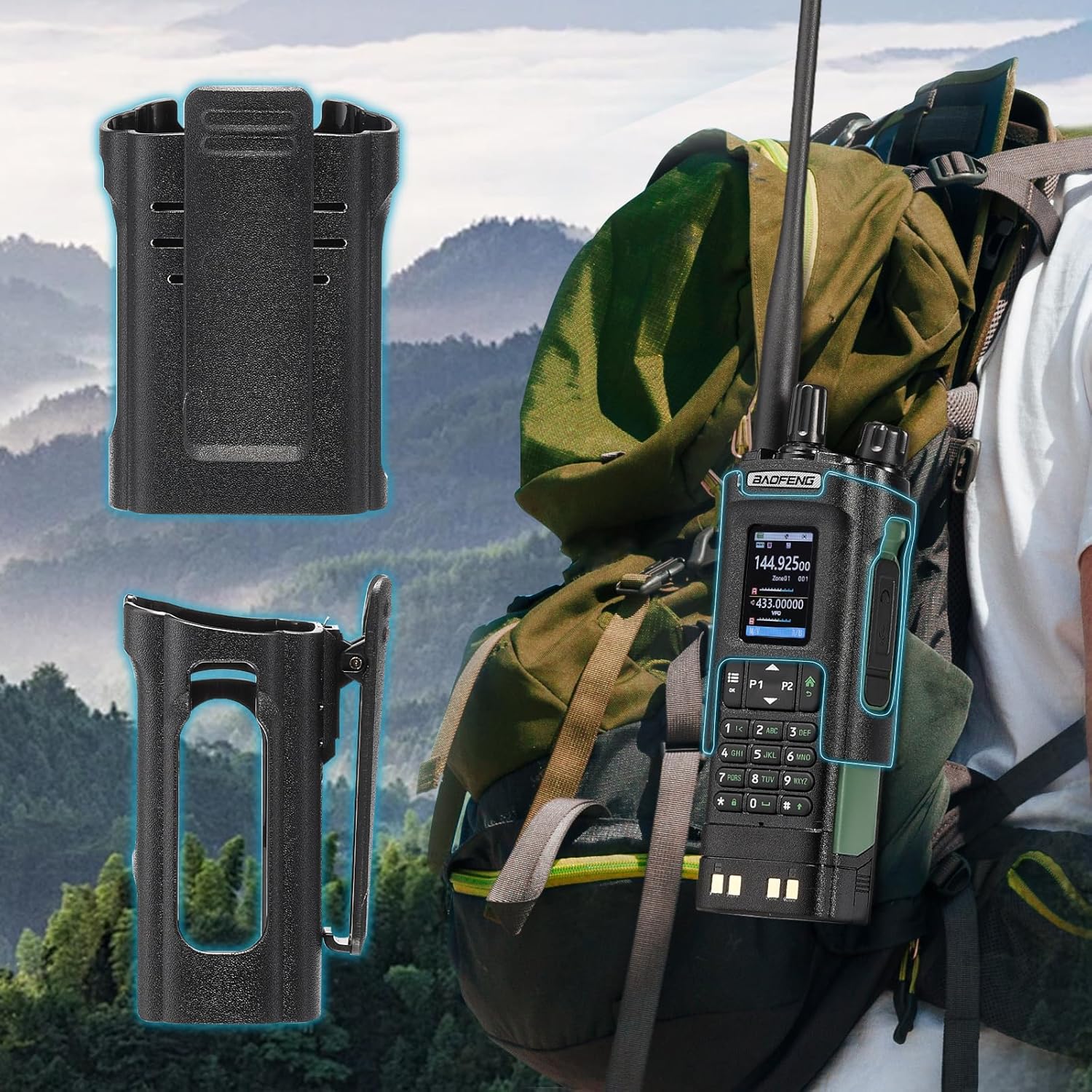
Image: The BAOFENG UV-32 radio demonstrating both direct USB-C charging and charging via its desktop cradle.
5.2 アンテナの設置
- Select the appropriate antenna: the standard UV antenna for general VHF/UHF use or the long airband antenna for enhanced aviation signal reception.
- 選択したアンテナを、無線機上部のアンテナコネクタに時計回りに回し、指でしっかりと締め付けます。締めすぎにご注意ください。

Image: The BAOFENG UV-32 radio illustrating the use of two different antennas: a standard antenna for UHF/VHF and a longer antenna specifically designed for airband reception.
5.3 ベルトクリップの取り付け
- ベルトクリップをラジオの背面にあるネジ穴に合わせます。
- 付属のネジを使用してベルトクリップを固定します。
- The radio case holder can be used to attach the radio to a backpack or belt for secure carrying.

Image: The BAOFENG UV-32 radio securely mounted to a backpack strap using its belt clip and an additional case holder, demonstrating portability.
6. ラジオの操作
6.1 電源のオン/オフと音量
電源/音量ノブを時計回りに回すとラジオの電源がオンになり、音量が上がります。反時計回りに回すと音量が下がり、ラジオの電源がオフになります。
6.2ディスプレイオーバーview
The 2.0-inch color display provides essential information:
- Frequency/Channel: Displays the current operating frequency or channel number.
- バッテリー残量: バッテリー残量を表示します。
- 信号強度: Shows the strength of received signals.
- モードインジケーター: Icons for various functions like GPS, Bluetooth, power level, etc.

Image: A close-up of the BAOFENG UV-32's 2-inch color display, showing detailed frequency, channel, and status information.
6.3 チャンネルモードと周波数モード
The radio operates in two primary modes:
- 周波数モード (VFO): Allows direct input of frequencies for scanning or temporary use.
- チャネルモード (MR): Uses pre-programmed channels for quick access to stored frequencies.
を押す メニュー button and navigate to the mode setting to switch between VFO and MR modes.
6.4 周波数の選択
- キーパッド: In Frequency Mode, directly enter the desired frequency using the numeric keypad.
- Quick Channel Knob: Rotate the top knob to quickly scroll through frequencies or channels.
- 上/下矢印: Use the arrow keys (P1/P2) to fine-tune frequencies or navigate channels.
6.5 送信と受信
- Ensure an antenna is properly connected.
- 希望する周波数またはチャンネルを選択します。
- 送信するには、 PTTT ラジオの側面にあるボタンを押してください。マイクに向かってはっきりと話してください。
- リリース PTTT ボタンを押すと送信が停止し、受信モードに戻ります。
- 電力レベル: The UV-32 offers High (H), Medium (M), and Low (L) power settings. Adjust this in the menu to balance range and battery life.
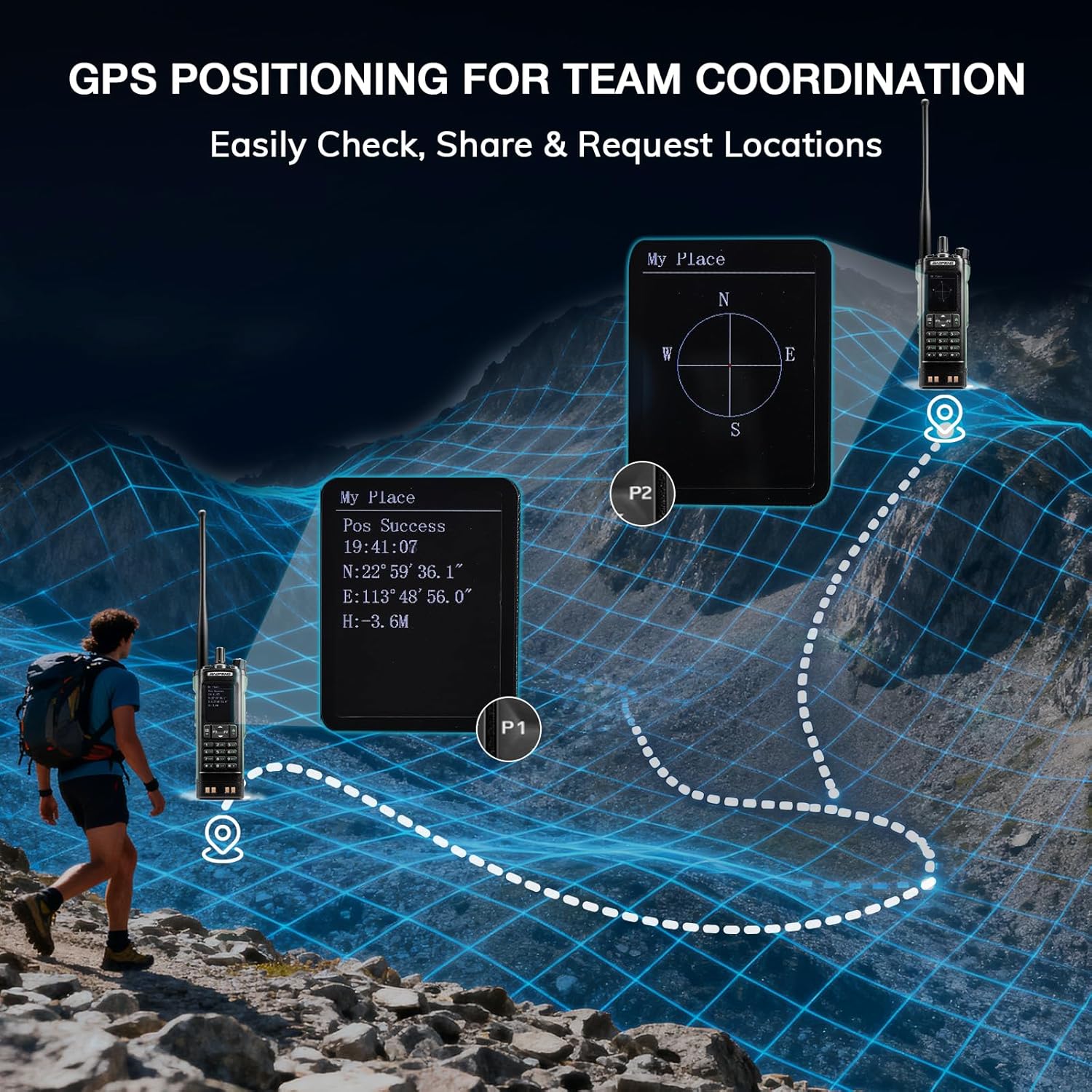
Image: The BAOFENG UV-32 radio's display showing different power output levels (High, Medium, Low) and an external SWR meter for measurement.
6.6 プログラミングオプション
The UV-32 offers several methods for programming frequencies and settings:
- ワイヤレスアプリプログラミング: Connect your radio to a smartphone (iOS/Android) via Bluetooth using the dedicated BT app for quick and wireless programming.
- CHIRPソフトウェア: For advanced or bulk programming, use CHIRP software on a PC. Select "UV-17ProGPS" as the radio model in CHIRP.
- キーパッドプログラミング: Basic programming can be done directly on the radio using the keypad and menu system.
- ワンキー周波数コピー: This feature allows for easy cloning of frequencies from another radio. Refer to the radio's on-screen prompts or full manual for specific steps.

Image: An illustration depicting the various programming methods available for the BAOFENG UV-32, including mobile app (Bluetooth), CPS software, CHIRP software, and direct keypad input.

Image: Two BAOFENG radios illustrating the one-key frequency copy function, allowing for quick and easy channel cloning between devices.
6.7GPSナビゲーション
The integrated GPS module provides real-time location data:
- ラジオのメニューから GPS 機能にアクセスします。
- View your current latitude, longitude, and altitude.
- The radio supports sharing your location or requesting coordinates from other team members for improved coordination.

Image: A visual representation of the BAOFENG UV-32's GPS functionality, showing how it displays coordinates and facilitates location sharing for team coordination in outdoor environments.
6.8 Enhanced Airband Reception
For clearer reception of aviation signals, utilize the dedicated AM antenna included with your UV-32. This specialized antenna is designed to provide more accurate and stable airband listening compared to standard UV dual-band antennas.
6.9 NOAA天気ラジオ
The UV-32 can receive NOAA weather alerts. Consult the radio's menu for instructions on how to scan for and select NOAA channels in your area.
6.10 カスタマイズ可能なサイドキー
The radio features four customizable side keys (P1, P2, and two others). These can be programmed via the menu or programming software to quickly access frequently used functions such as scan, monitor, or power level adjustment.

Image: A close-up of the BAOFENG UV-32's side, highlighting the customizable P1 and P2 function keys.
7. メンテナンス
7.1 ラジオの掃除
ラジオの表面を柔らかくて乾いた布で拭いてください。amp 布で拭いてください。刺激の強い化学薬品や研磨剤入りの洗剤は使用しないでください。使用前にすべてのポートが乾いていることを確認してください。
7.2バッテリーケア
- 最初に使用する前に、バッテリーを完全に充電してください。
- 過充電やバッテリーの完全放電を避けてください。
- 長期間使用しない場合は、バッテリーを涼しく乾燥した場所に保管してください。
7.3 ストレージ
When storing the radio for a long time, remove the battery and store it separately. Keep the radio in a dry, dust-free environment away from direct sunlight and extreme temperatures.
8。 トラブルシューティング
| 問題 | 考えられる原因 | 解決 |
|---|---|---|
| ラジオの電源が入らない | バッテリーが正しく取り付けられていないか、放電しています。 | バッテリーがしっかりと取り付けられていることを確認してください。バッテリーを完全に充電してください。 |
| 送信できません | Antenna not connected. Incorrect frequency/channel. Low power setting. | Attach antenna. Verify frequency/channel. Increase power level. |
| 受信/送信範囲が狭い | Obstructions. Low power setting. Incorrect antenna. | Move to an open area. Increase power. Ensure correct antenna is used and properly connected. |
| Programming errors with CHIRP/APP | Incorrect radio model selected. Connection issues. Outdated software/firmware. | Ensure "UV-17ProGPS" is selected in CHIRP. Re-establish Bluetooth connection. Update software/firmware if available. |
9. 仕様
| 特徴 | 詳細 |
|---|---|
| ブランド | バオフェン |
| モデル番号 | 紫外線32 |
| チャンネル数 | 1000 |
| 周波数範囲 | UHF、VHF |
| 出力 | Up to 10W (selectable High, Medium, Low) |
| 画面 | 2.0インチカラーディスプレイ |
| バッテリー | 2500mAh リチウムイオン(付属) |
| 充電 | USB-C, Desktop Charger Base |
| 特集 | Digital Display, Dual Band, USB-C Rechargeable, Wireless APP Programming, Wireless Channel Clone, GPS, NOAA Reception |
| 接続プロトコル | ブルートゥース |
| 製品寸法 | 奥行き1.2インチ x 幅2.2インチ x 高さ4インチ |
| 耐水性レベル | 耐水性はありません |
10. 保証とサポート
Your BAOFENG UV-32 radio comes with an 18ヶ月保証. BAOFENG also provides 生涯サポート この製品について。
For technical assistance, warranty claims, or further inquiries, please visit the official BAOFENG web公式サイトをご覧いただくか、カスタマーサポートに直接お問い合わせください。保証サービスを受けるには、購入証明としてレシートを保管してください。