
パーソンバー PSSW8
Parsonver PSSW8 スマートウォッチ ユーザーマニュアル - 内蔵GPS、Bluetooth通話、フィットネストラッカー
モデル: PSSW8
GPS内蔵、Bluetooth通話、フィットネストラッカー
1. はじめに
Thank you for choosing the Parsonver PSSW8 Smart Watch. This manual provides essential information for setting up, operating, and maintaining your device. The PSSW8 Smart Watch is designed to enhance your daily life with features such as built-in GPS, Bluetooth calling, comprehensive health monitoring, and a wide array of sports modes.

Figure 1: Parsonver PSSW8 Smart Watch (Black 43mm)
2. 安全情報
- 医療機器ではありません: This device is not intended for medical use and should not be used to diagnose or treat any medical condition. Consult a medical professional for any health concerns.
- 耐水性: The device is IP68 water- and dust-resistant, suitable for splashes, hand washing, and rain. It is not recommended for showering, swimming, or sauna use. Prolonged exposure to water may cause damage.
- バッテリーの安全性: Do not attempt to replace the battery yourself. Use only the provided charging cable. Avoid extreme temperatures.
- 窒息の危険: Keep the device and its accessories out of reach of small children.
- 安全運転: Avoid interacting with the device while driving to prevent distractions.
3. セットアップ
3.1. 開梱とパッケージ内容
Carefully unbox your Parsonver PSSW8 Smart Watch. The package should contain the following items:
- 1x Parsonver PSSW8 Smart Watch
- 充電ケーブル x 1
- ユーザーマニュアル x 1
- Additional interchangeable bands (color may vary)
ビデオ 1: 開梱と初期設定view of the Parsonver Smart Watch and its accessories.
3.2. Attaching/Changing Bands
The watch bands are designed for easy attachment and removal, allowing you to customize your watch's appearance. To remove a band, locate the small release button on the underside of the watch where the band connects. Push this button and slide the band out. To attach a new band, align it with the watch body and slide it in until it clicks securely into place.

Figure 2: Close-up of the watch band attachment mechanism.
3.3. スマートウォッチの充電
Connect the magnetic charging cable to the charging points on the back of the watch. The magnets will ensure proper alignment. Connect the USB end of the cable to a power source. A full charge typically takes about 2 hours and provides up to 7 days of typical use or 30 days of standby time.

図 3: 時計に接続された磁気充電ケーブル。
3.4. アプリのインストールとデバイスのペアリング
Download the companion app (InfoWear) from your smartphone's app store (compatible with Android 5.0+ and iOS 12.0+). Open the app and follow the on-screen instructions to pair your watch. This usually involves scanning a QR code displayed on the watch screen. Ensure Bluetooth is enabled on your phone.
Video 2: Demonstrates the pairing process between the smartwatch and the companion app.
3.5. Unit Settings and Watch Face Customization
Within the app, navigate to the settings to customize units (metric/imperial) for weight, length, and temperature. You can also browse over 100 watch faces in the "Watch Face Center" or create your own custom DIY watch face using your photos.

Figure 4: Watch Face Center in the companion app showing various customization options.
4. スマートウォッチの操作
4.1. ナビゲーションとインターフェース
The watch features a 1.27-inch 360x360 Ultra HD display with responsive touch controls. Swipe left/right to access quick widgets like activity data, heart rate, sleep, music control, and weather. Swipe down for quick settings (brightness, water lock, etc.). Press the side button to access the main app menu.
4.2. 健康モニタリング
The PSSW8 Smart Watch offers 24/7 wellness monitoring:
- 心拍: Tracks heart rate continuously with customizable alerts.
- 血中酸素濃度(SpO2): 血中酸素濃度を監視します。
- ストレスレベル: Provides insights into emotional fluctuations.
- 睡眠モニタリング: 深い睡眠、浅い睡眠、レム睡眠を分析しますtages。
- 女性の健康追跡: データ駆動型のサイクル管理をサポートします。

図5:以上view of 24-hour health monitoring features.
4.3. スポーツモードとアクティビティトラッキング
Choose from over 100 sports modes, including running, cycling, yoga, and strength training. The watch automatically detects workouts and records stats like heart rate, calories, distance, and pace. Built-in GPS accurately tracks routes without needing your phone.

Figure 6: Built-in GPS tracking for outdoor activities.
4.4. Bluetooth Calling and Smart Alerts
With dual Bluetooth support (BT 3.0 + BLE 5.3) and a premium microphone, you can make and answer calls directly from your wrist. Receive instant notifications for calls, texts, and popular apps like WhatsApp and Facebook. Quick call replies are available for Android users.

Figure 7: Bluetooth calling and smart notifications on the watch.
4.5. スマートライフアシスタント機能
The watch includes various assistant features:
- リマインダー: Drink water, move, take medication, wash hands.
- ツール: Weather updates, music control, remote camera trigger, alarms, timers, stopwatch, calculator, calendar, find my phone.
- ウェルネス: Guided breathing sessions.
- AI機能: AI Voice Assistant and AI Smart Watch Face generation.

図8:以上view 時計で利用できる追加のスマート機能。
4.6. IP68 Water and Dust Resistance
The watch is IP68 rated, meaning it is resistant to dust and can withstand immersion in water up to 1.5 meters for 30 minutes. It is suitable for daily use like hand washing, rain, and splashes. However, it is not recommended for showering, swimming, or sauna use.

Figure 9: The watch is IP68 waterproof, suitable for splashes but not prolonged water immersion.
5. メンテナンス
- クリーニング: Regularly wipe the watch screen and bands with a soft, dry cloth. If necessary, use a slightly damp 布と中性洗剤で拭き、よくすすいでから乾燥させてください。
- 充電: Always use the provided magnetic charging cable. Ensure the charging points are clean and dry before charging.
- ストレージ: 時計を使用しないときは、直射日光や極端な温度を避け、涼しく乾燥した場所に保管してください。
- ソフトウェアアップデート: Periodically check the companion app for available software updates to ensure optimal performance and access to new features.
6。 トラブルシューティング
- 時計の電源が入らない: 時計が完全に充電されていることを確認してください。充電器に接続し、数分間待ってから再度電源を入れてください。
- 接続の問題:
- スマートフォンでBluetoothが有効になっていることを確認します。
- 時計がスマートフォンの範囲内にあることを確認してください。
- スマートフォンと時計の両方を再起動します。
- コンパニオン アプリを使用してデバイスのペアリングを解除し、再度ペアリングします。
- Inaccurate Readings (Heart Rate, SpO2, etc.):
- 時計が手首にぴったりとフィットしていることを確認しますが、締めすぎないようにしてください。
- 時計の裏側にあるセンサー部分を清潔に保ってください。
- 測定中は動かないでください。
- 画面が反応しない/フリーズする: Try restarting the watch by pressing and holding the side button. If unresponsive, allow the battery to fully drain and then recharge. A factory reset option is available in the app settings.
7. 仕様
| 特徴 | 詳細 |
|---|---|
| モデル番号 | PSSW8 |
| 表示サイズ | 1.27インチ |
| ディスプレイ解像度 | 360x360ピクセル |
| 耐水性 | IP68 |
| バッテリー容量 | 270ミリamp 営業時間 |
| バッテリー寿命(標準) | 最長7日間 |
| 待機時間 | 最長30日間 |
| 充電時間 | 約2時間 |
| 接続性 | Bluetooth 5.3(BT 3.0 + BLE 5.3) |
| オペレーティング·システム | iOS 12.0以降/Android 5.0以降に対応 |
| GPS内蔵 | はい |
| アイテム重量 | 40グラム |
| 製品寸法 | 11.02 x 3.35 x 0.71インチ |
8. 保証とサポート
Your Parsonver PSSW8 Smart Watch comes with dedicated customer service. For any questions, technical support, or warranty claims, please contact our 24/7 customer service team. Refer to the product packaging or the official Parsonver web連絡先の詳細についてはサイト。
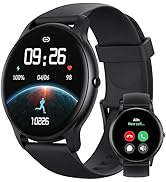
Figure 10: 24/7 Online Support available.