
1。 オーバーview
The Element 32-inch 720p HD Xumo Smart TV offers reliable performance and smart functionality in a compact design. Ideal for smaller spaces such as kitchens, dorm rooms, guest rooms, or offices, this television combines a clear HD display with a versatile smart platform and modern connectivity options.
Key features include a 720p resolution display, a 120Hz effective refresh rate for smooth motion, and the integrated Xumo OS for access to numerous streaming applications and free live channels. Connectivity is robust with multiple HDMI ports, USB, LAN, Bluetooth, and Apple AirPlay support. The TV also comes with a voice remote for convenient navigation.
2. 箱の中身
Upon unboxing your Element 32-inch Xumo Smart TV, please ensure all the following components are present:
- 32-inch Element Xumo TV
- Voice Remote + 2 AAA batteries
- TV Stand & Screws
- クイックスタートガイド

Image: The contents of the TV box, showing the 32-inch television, its remote control, two stand feet, and a bag of screws for assembly. Dimensions of the TV are also displayed.
3. セットアップ
3.1 テレビスタンドの取り付け
- 傷がつかないように、テレビ画面を下にして、柔らかくて清潔な表面に慎重に置いてください。
- 各スタンドの脚をテレビの底面にある対応するネジ穴に合わせます。
- Secure each stand foot using the provided screws. Ensure they are tightened firmly but do not overtighten.
- テレビを慎重に持ち上げて、安定した水平な面に置きます。
Alternatively, the TV supports VESA mounting for wall installation (wall mount hardware sold separately).
3.2電源接続
Connect the power cord to the TV's power input and then plug it into a standard electrical outlet. A pilot light on the TV will indicate that it is receiving power.
3.3 Initial Setup (Xumo OS)
初めて電源を入れると、テレビが初期設定の手順を案内します。これには以下の内容が含まれます。
- 言語の選択: お好みの言語を選択してください。
- ネットワーク接続: Connect the TV to your home Wi-Fi network or via an Ethernet cable.
- Xumo OS Account Setup: Follow on-screen prompts to set up or log in to your Xumo OS account. This is necessary to access smart features and apps.
- チャンネルスキャン: If connecting an antenna, the TV will scan for available channels.

Image: The Element 32-inch Xumo Smart TV is shown on a wooden TV stand, displaying its smart interface with various streaming app icons.
4. 接続
The Element Xumo Smart TV provides a variety of ports for connecting external devices:
- HDMIポート(3) Connect high-definition devices such as Blu-ray players, gaming consoles, or cable/satellite boxes. One HDMI port supports eARC (enhanced Audio Return Channel) for simplified audio connections to compatible soundbars or AV receivers.
- USBポート(1): USBストレージデバイスを接続する view 写真を撮ったり、音楽を再生したり、ビデオを視聴したりできます。
- LAN (イーサネット) ポート: 有線インターネット接続用。
- Audio Out (Optical) / Headphone Jack: 外部オーディオ システムまたはヘッドフォンを接続します。
- Composite Input / Analog Tuner: For connecting older devices or an antenna.
5. テレビの操作
5.1リモコン
The included voice remote allows for intuitive control of your TV. It features dedicated buttons for popular streaming services and a microphone for voice commands.
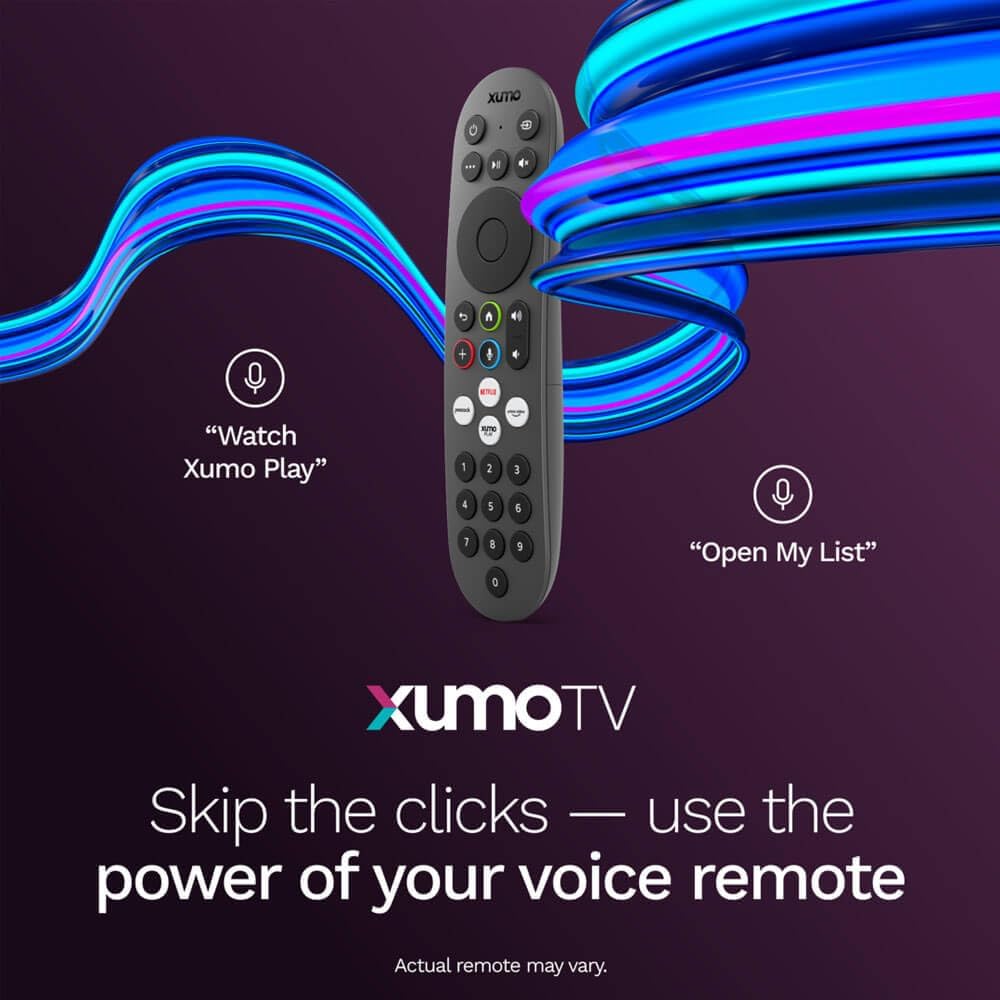
Image: A close-up of the Element Xumo Smart TV voice remote, highlighting its various buttons including a microphone for voice commands and quick access buttons for streaming services.
5.2 Smart Features & Streaming (Xumo OS)
The Xumo OS provides access to over 250 preloaded apps and more than 750 free live channels. You can:
- Search Content: Use the unified search function to find content across all your installed apps.
- 私のリスト: Curate your personal watchlist for easy access to your favorite shows and movies.
- Free On-Demand Libraries: Explore a wide selection of free on-demand content.
- 音声コントロール: Use the voice remote to navigate, search, and control your TV hands-free.

Image: The Xumo TV interface showing a selection of popular streaming applications and content recommendations.
5.3 画像とサウンドの設定
Your TV delivers a crisp 720p HD display with a 120Hz effective refresh rate, minimizing motion blur for clear visuals. Dolby Audio processing enhances the sound experience. You can adjust picture and sound settings via the TV's menu to suit your preferences.
- 画像モード: Select from various preset picture modes (e.g., Standard, Vivid, Movie, Sports) or customize settings like brightness, contrast, and color.
- サウンドモード: Choose from different sound modes (e.g., Standard, Music, Movie, Speech) or adjust bass and treble levels.
5.4 Apple AirPlay & Home Support
Seamlessly stream content or mirror your screen from your iPhone, iPad, or Mac directly to your Element TV using Apple AirPlay. With Apple Home support, you can integrate your TV into your Apple smart home ecosystem for convenient control.
6. メンテナンス
To ensure the longevity and optimal performance of your Element Xumo Smart TV, follow these maintenance guidelines:
- 画面の掃除: 柔らかく乾いた、糸くずの出ない布で画面を優しく拭いてください。頑固な汚れには、軽くamp布に水または画面専用の洗浄液を含ませます(画面に直接スプレーしないでください)。
- キャビネットのクリーニング: テレビキャビネットのお手入れには、柔らかく乾いた布をご使用ください。研磨剤入りの洗剤や溶剤の使用は避けてください。
- 換気: 過熱を防ぐため、テレビ背面の通気口が塞がれていないことを確認してください。
- 使用しないときは電源を切ります: 使用していないときはテレビの電源をオフにして、電力を節約し、テレビの寿命を延ばしてください。
7。 トラブルシューティング
If you encounter any issues with your Element Xumo Smart TV, refer to the following common troubleshooting tips:
- 電源なし: 電源コードがテレビとコンセントの両方にしっかりと差し込まれているか確認してください。コンセントが正常に機能していることを確認してください。
- 画像/音声なし: 正しい入力ソースが選択されていることを確認してください。すべてのケーブル接続(HDMI、アンテナなど)がしっかりと接続されていることを確認してください。
- リモコンが機能しない: リモコンの単4電池を交換してください。リモコンとテレビの赤外線センサーの間に障害物がないことを確認してください。
- ネットワーク接続の問題: Restart your Wi-Fi router. Check the TV's network settings to ensure it's connected to the correct network and the password is entered correctly.
- Smart App Problems: Try restarting the app. If the issue persists, clear the app's cache or reinstall it. Ensure your TV's software is up to date.
For persistent issues, please contact Element customer support.
8. 仕様
| 特徴 | 仕様 |
|---|---|
| モデル番号 | E300AE32C |
| 画面サイズ | 32インチ |
| ディスプレイ解像度 | 720p (1366x768) |
| リフレッシュレート | 60 Hz (120Hz Effective) |
| アスペクト比 | 1.78:1 |
| オペレーティング·システム | Xumo OS |
| 接続性 | 3x HDMI (1x eARC), 1x USB, LAN (Ethernet), Optical Audio Out, Headphone Jack, Composite Input, Wi-Fi, Bluetooth |
| 特集 | Bezel-Less Design, Built-In Speaker, Voice Remote, Apple AirPlay & Home Support |
| TV with Stand Dimensions (W x H x D) | 28.8インチ x 19.2インチ x 7.0インチ |
| TV without Stand Dimensions (W x H x D) | 28.8インチ x 17.0インチ x 2.7インチ |
| アイテム重量 | 8.8 ポンド |
9. 保証とサポート
The Element 32-inch 720p HD Xumo Smart TV comes standard with a 2年間のメーカー保証この保証は、通常の使用状況における材料および製造上の欠陥を対象としています。保証請求の際は、購入証明書を保管してください。
For technical support, warranty inquiries, or further assistance, please refer to the contact information provided in your Quick Start Guide or visit the official Element Electronics webサイト。