
1. はじめに
ご購入ありがとうございますasing the EasySMX X05PRO Wireless PC Game Controller. This manual provides detailed instructions on how to set up, operate, and maintain your controller. Please read this manual carefully before use to ensure optimal performance and a satisfying gaming experience.
製品オーバーview ビデオショーasing the EasySMX X05PRO controller's design and key features.
2.製品オーバーview
The EasySMX X05PRO is a versatile wireless game controller designed for a wide range of platforms including PC, Nintendo Switch, iOS, and Android devices. It features advanced technologies such as Hall effect joysticks and triggers, a 1000Hz polling rate, and customizable RGB lighting to enhance your gaming sessions.
パッケージ内容:
- EasySMX X05PRO Wireless Game Controller
- USB-C充電ケーブル
- 2.4G ワイヤレス レシーバー (USB ドングル)
- ユーザーマニュアル

An image displaying the EasySMX X05PRO controller with its main features such as wireless/wired connection, silent buttons, RGB lighting, 1000Hz polling rate, TURBO function, vibration adjustment, and 1000mAh battery.
3. セットアップと接続
The X05PRO controller supports multiple connection methods for various devices.
3.1. 2.4G Wireless Connection (for PC Windows)
- 2.4G ワイヤレス レシーバーを PC の使用可能な USB ポートに挿入します。
- を押し続けます 家 button on the controller until the indicator light flashes rapidly, indicating pairing mode.
- Once connected, the indicator light will become solid. The controller is now ready for use.
3.2. Bluetooth Connection (for Switch, iOS, Android)
- On your device (Switch, iOS, or Android), navigate to the Bluetooth settings and enable Bluetooth.
- On the EasySMX X05PRO controller, press and hold the Bluetoothペアリング button (refer to the diagram in Section 2 for button layout) until the indicator light flashes rapidly.
- Select "EasySMX X05PRO" from the list of available devices on your screen.
- ペアリングされると、コントローラーのインジケーター ライトが点灯します。
3.3. Wired Connection (for PC, Switch, and charging)
- Connect one end of the USB-C cable to the controller and the other end to your device (PC or Switch).
- The controller will automatically switch to wired mode. This mode also charges the controller.

An image illustrating the wireless connection capabilities of the EasySMX X05PRO controller, highlighting its compatibility with PC and other devices.
4. 主な特徴
4.1. サイレントボタン
The X05PRO features a redesigned full button structure with silicone dampers, ensuring ultra-quiet operation. This design is optimized for late-night gaming sessions, preventing disturbance to family, roommates, or neighbors.

詳細な view of the controller's buttons, illustrating the silicone damper mechanism for reduced noise during gameplay.
4.2. Dual-Stage ホール効果トリガー
Experience precise control with adjustable trigger locks, allowing for short (3mm) or long (9mm) stroke distances. The 2+2 built-in rumble motors provide realistic haptic feedback for immersive racing and FPS experiences.
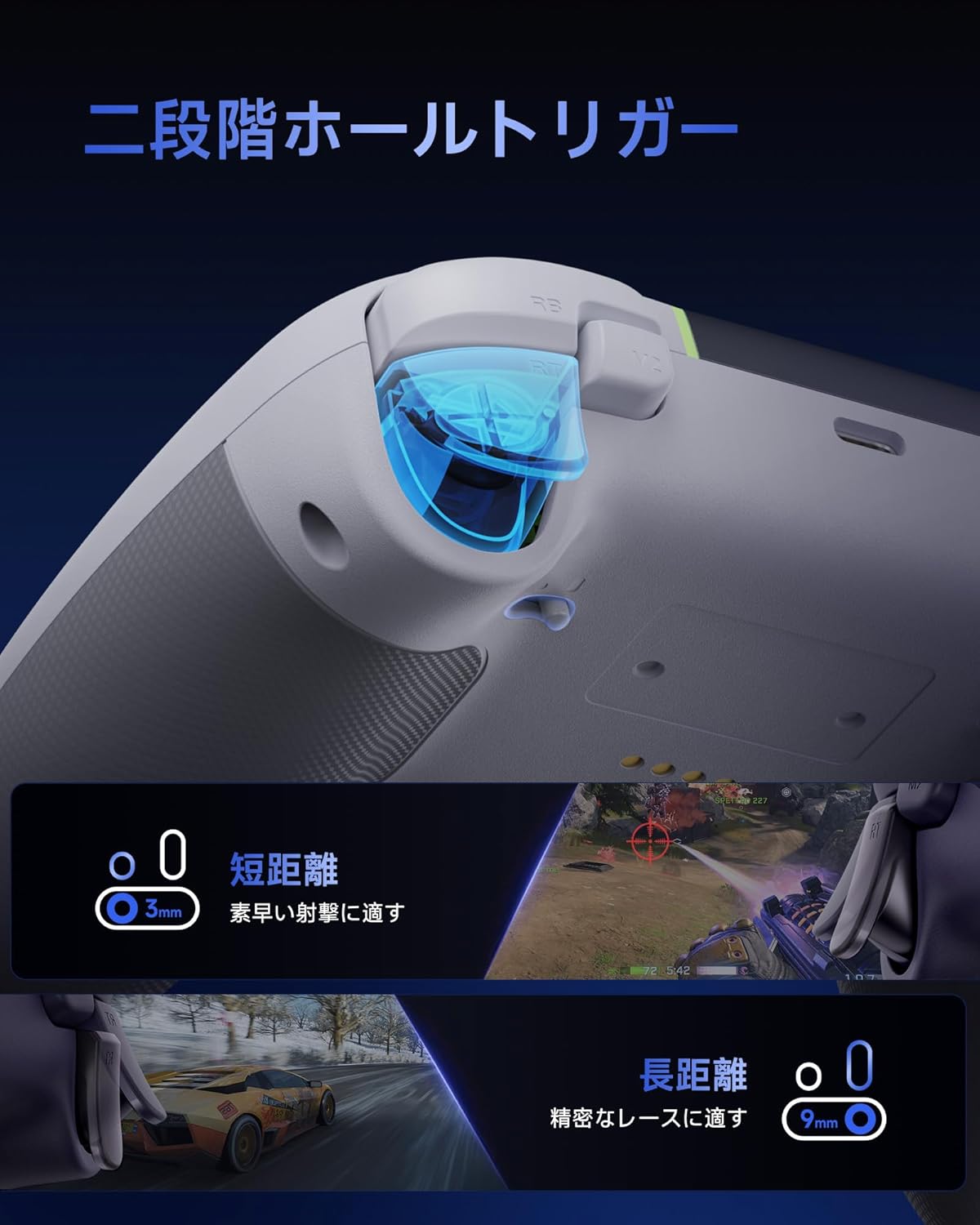
An image demonstrating the dual-stage Hall effect triggers, highlighting the short travel distance for quick shots and long travel for precise racing control.
4.3. Upgraded 8-Way D-Pad
The D-pad incorporates a dome switch and concave pivot structure, enabling smooth diagonal inputs and precise 8-way control. This design is particularly beneficial for fighting games and retro titles requiring accurate directional commands.

An exploded diagram showing the internal components of the upgraded 8-way D-pad, emphasizing its improved design for seamless and precise operation.
4.4. 4-Zone Vibration Feedback
The controller features a 2+2 motor structure that provides immersive 4-zone vibration feedback, enhancing tactile immersion during gameplay. Note: Trigger vibration requires in-game support and may only be available in certain titles.

An illustration of the controller's 4-zone vibration feedback system, depicting the internal motors and their effect on tactile immersion.
4.5. Dynamic RGB Backlight
Personalize your gaming experience with customizable RGB lighting effects. Choose from 7 color combinations and 5 diverse lighting modes (Brightness, Breathing, Colorful, Fade, Off) to match your style or mood.

画像ショーasing two controllers with different dynamic RGB lighting effects, illustrating the customizable illumination options.
4.6. Two Programmable Buttons
The controller includes two additional programmable buttons located on the top, designed to prevent accidental presses during intense gameplay, a common issue with traditional back paddles.

A view of the controller's top side, highlighting the two programmable buttons (M1 and M2) and their programming settings.
4.7. 1000Hz Polling Rate & Hall Effect Joysticks
Achieve virtually no input lag with a 1000Hz polling rate in both wired and 2.4G wireless modes. The high-precision 11-bit Hall effect sensors in the joysticks ensure drift-free accuracy and a long operational lifespan.

A diagram illustrating the 1000Hz polling rate and the internal mechanism of the Hall effect joystick, emphasizing drift-free high precision.
4.8. Ergonomic Grip & Long-Life Battery
The controller features a soft-touch silicone coating for a sweat-resistant, non-slip grip, ensuring comfort during extended gaming sessions. A built-in 1000mAh rechargeable battery provides prolonged playtime.

An image highlighting the ergonomic, skin-friendly grip texture and the 1000mAh battery capacity of the controller.
5. 操作
5.1. Changing RGB Lighting Modes
To cycle through the 5 RGB lighting modes (Brightness, Breathing, Colorful, Fade, Off) and 7 color combinations, refer to the detailed instructions in the full product manual or the manufacturer's website. Typically, a dedicated button or a combination of buttons is used for this function.
5.2. Programming Buttons (M1/M2)
The M1 and M2 buttons can be programmed to replicate other button inputs. To program:
- を押し続けます M button (usually located near the D-pad) and the desired programmable button (M1 or M2) simultaneously.
- The indicator light will flash, indicating programming mode.
- Press the button you wish to map (e.g., A, B, X, Y, LB, RB, LT, RT, L3, R3).
- Press the M button again to save the mapping. The indicator light will return to solid.
5.3. Adjusting Trigger Modes
デュアルStage triggers can be adjusted for different travel distances. Consult the full product manual for specific button combinations or switches to toggle between short (3mm) and long (9mm) trigger strokes, optimizing for quick actions or precise control.
6. コントローラーの充電
The EasySMX X05PRO controller is equipped with a built-in 1000mAh rechargeable Lithium-ion battery.
充電手順:
- USB-C充電ケーブルをコントローラーの充電ポートに接続します。
- Connect the other end of the USB-C cable to a USB power source (e.g., PC, USB wall adapter, power bank).
- The indicator light on the controller will show the charging status (e.g., breathing light, solid light when fully charged). Refer to the controller's LED indicators for specific charging status details.
- フル充電には通常約2〜3時間かかります。
7. 仕様
| 特徴 | 詳細 |
|---|---|
| モデル番号 | X05PRO |
| 電池のタイプ | リチウムイオン電池1個(付属) |
| バッテリー容量 | 1000mAh |
| 接続性 | 2.4Gワイヤレス、Bluetooth、有線(USB-C) |
| ポーリングレート | 1000Hz (Wired & 2.4G Wireless), 125Hz (Bluetooth) |
| トリガータイプ | デュアルStage ホール効果トリガー |
| ジョイスティックタイプ | Hall Effect Joysticks (11-bit precision) |
| Dパッド | Upgraded 8-Way D-Pad (Dome switch, concave pivot) |
| 振動 | 4-Zone Vibration Feedback (2+2 motors) |
| 点灯 | Dynamic RGB Backlight (7 colors, 5 modes) |
| プログラム可能なボタン | 2(M1、M2) |
| 寸法 | 17.9 x 14.7 x 7.4 cm |
| 重さ | 400グラム |
| 原産国 | 中国 |

Image showing the EasySMX X05PRO controller and its technical compliance certifications for the Japanese market.
8。 トラブルシューティング
8.1. コントローラーが接続されない
- バッテリーを確認してください: コントローラーが十分に充電されていることを確認してください。USB-Cケーブルで接続して充電してください。
- 修理: For wireless connections, try re-pairing the controller with your device. Follow the steps in Section 3.
- Check Receiver (2.4G): Ensure the 2.4G wireless receiver is securely plugged into a working USB port on your PC. Try a different USB port.
- Bluetooth干渉: If using Bluetooth, ensure no other devices are causing interference. Try disconnecting other Bluetooth devices.
- 有線接続: If wireless connection fails, try connecting the controller directly via USB-C cable to confirm functionality.
8.2. Input Lag or Unresponsive Buttons/Joysticks
- ポーリングレート: Ensure you are using 2.4G wireless or wired mode for the optimal 1000Hz polling rate. Bluetooth mode operates at 125Hz, which may feel less responsive in competitive gaming.
- 干渉: For 2.4G wireless, ensure the receiver is not obstructed and is close to the controller. Avoid areas with high electromagnetic interference.
- ファームウェアアップデート: EasySMXの公式をチェック webコントローラーに利用可能なファームウェア アップデートについては、サイトをご覧ください。
- 再校正: Some operating systems or game platforms allow for controller calibration. Refer to your device's settings for this option.
8.3. バイブレーションが機能しない
- ゲーム内サポート: プレイしているゲームが振動フィードバックをサポートしていることを確認します。
- ゲーム設定: ゲーム内の設定をチェックして、振動が有効になっていることを確認してください。
- ドライバーのインストール: For PC, ensure the correct drivers are installed.
9. メンテナンス
- クリーニング: コントローラーの清掃には、柔らかく乾いた布をご使用ください。刺激の強い化学薬品や研磨剤は使用しないでください。
- ストレージ: コントローラーは、直射日光や極端な温度を避け、涼しく乾燥した場所に保管してください。
- バッテリーのケア: バッテリーを頻繁に完全に放電することは避けてください。長期間使用しない場合でも、バッテリーの状態を維持するために、コントローラーを定期的に充電してください。
- ドロップを避ける: 内部コンポーネントを損傷する可能性のある落下や衝撃からコントローラーを保護します。
10. 安全情報
- Do not attempt to disassemble or modify the controller. This may void your warranty and cause damage.
- Keep the controller away from water, moisture, and high temperatures.
- バッテリーを火や極端な熱にさらさないでください。
- 製品とそのバッテリーは、地域の規制に従って責任を持って廃棄してください。
- この製品は玩具ではありません。小さなお子様の手の届かないところに保管してください。
11. 保証とサポート
EasySMX products come with a standard warranty. For specific warranty terms, duration, and to register your product, please visit the official EasySMX webサイトをご覧いただくか、カスタマー サポートにお問い合わせください。
If you encounter any issues not covered in this manual or require further assistance, please contact EasySMX customer support through their official webサイトまたは購入時に提供された連絡先情報を参照してください。
EasySMX公式 Webサイト: www.easysmx.com