
1. はじめに
Thank you for choosing the EasySMX X05PRO PC Controller. This manual provides detailed instructions for setting up, operating, and maintaining your controller. The X05PRO offers versatile connectivity options, advanced features, and multi-platform compatibility for an enhanced gaming experience.
2. パッケージ内容
- EasySMX X05PRO PC Controller
- 2.4Gワイヤレスレシーバー
- USB-C充電/データケーブル
- ユーザーマニュアル(このドキュメント)
3.製品レイアウト
Familiarize yourself with the buttons and components of your EasySMX X05PRO controller.
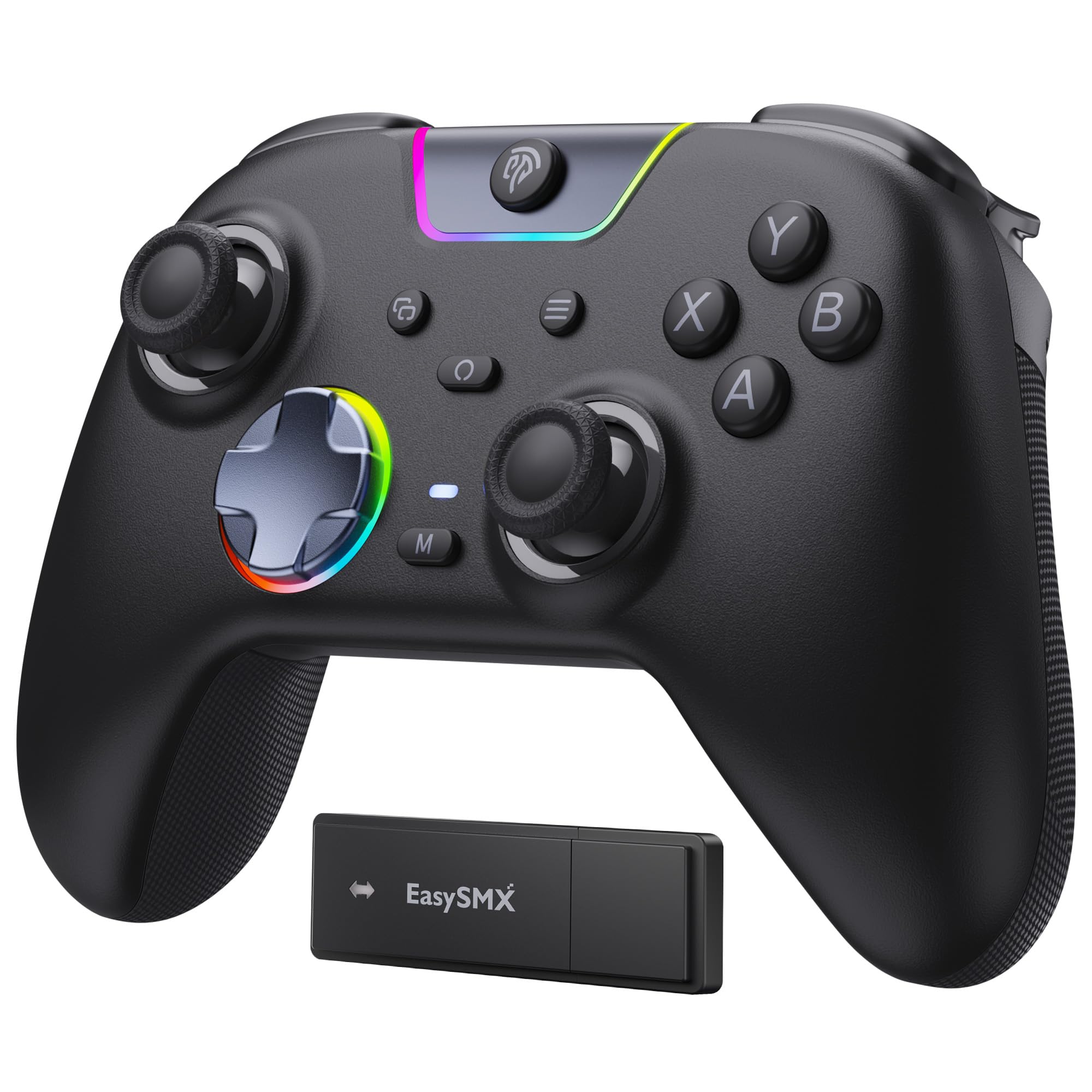
Figure 1: EasySMX X05PRO Controller Overview
- A/B/X/Y ボタン: 標準のアクション ボタン。
- 十字キー: 8-direction digital input.
- 左/右アナログスティック: 正確な動きとカメラ制御を実現します。
- LB/RB ボタン: 左と右のバンパーボタン。
- LT/RTトリガー: Left and Right Analog Triggers with two-stage 機能。
- ホームボタン: コントローラーの電源をオン/オフにし、システム メニューにアクセスします。
- スタート/選択ボタン: ゲーム固有の機能。
- M1/M2ボタン: Programmable buttons on the top of the controller.
- USB-Cポート: 有線接続と充電用。
- モードスイッチ: For selecting connection modes (if applicable).
4. セットアップと接続
4.1. 2.4G Wireless Connection (PC Windows)
- 2.4G ワイヤレス レシーバーを PC の使用可能な USB ポートに挿入します。
- Press and hold the HOME button on the controller until the indicator lights turn on, indicating it's powered on.
- The controller will automatically connect to the receiver. Once connected, the indicator light will stabilize.
4.2. Bluetooth Connection (Switch, Android, iOS)
- デバイスの Bluetooth が有効になっていることを確認してください。
- On the controller, press and hold the HOME button along with the appropriate mode button (refer to the controller's specific button combination for Bluetooth pairing, usually a small button near the USB port or a combination with HOME).
- インジケータ ライトが高速点滅し、ペアリング モードであることを示します。
- On your device, search for new Bluetooth devices and select "EasySMX X05PRO" (or similar) to pair.
- Once paired, the indicator light on the controller will stabilize.
4.3. Wired Connection (PC, Switch, Steam Deck)
- Connect the USB-C end of the cable to the controller and the USB-A end to your device (PC, Switch dock, Steam Deck).
- The controller will automatically be recognized by your device and switch to wired mode.
- This mode is ideal for competitive gaming due to minimal input lag and also allows charging while playing.

Figure 2: Multi-platform Connectivity
5. 操作手順
5.1. サイレントボタン
The X05PRO features a redesigned full-button structure with silicone dampers, providing ultra-quiet operation. This is ideal for late-night gaming sessions without disturbing others.

図3: サイレントボタンのデザイン
5.2. XNUMXつのStage ホールトリガー
The adjustable trigger locks allow you to switch between short (3mm) and long (9mm) trigger strokes. Short strokes are optimized for rapid firing in FPS games, while long strokes provide precise control for racing games.

図4: XNUMXつのStage ホールトリガー
5.3. Upgraded 8-Direction D-Pad
The D-pad features a dome switch and concave pivot design, enabling smooth diagonal inputs and precise 8-direction operation, ideal for fighting games and retro titles.

Figure 5: Upgraded 8-Direction D-Pad
5.4. Dynamic RGB Backlight
Customize your gaming experience with dynamic RGB lighting effects. The controller offers various lighting modes and 7 color combinations. Refer to the manual for detailed settings.

図6: ダイナミックRGB照明
5.5. プログラム可能なボタン(M1/M2)
The two additional customizable buttons (M1 and M2) located on the top of the controller are designed to prevent accidental presses during intense gameplay, a common issue with back paddles. These buttons can be programmed to various functions. Consult the full manual for programming instructions.

図7: プログラム可能なM1/M2ボタン
5.6. 1000Hz Polling Rate & Hall Effect Sticks
Experience virtually no input delay with a 1000Hz polling rate in both wired and 2.4G wireless modes. The high-precision 11-bit Hall effect sensors ensure drift-free accuracy and extended lifespan for the joysticks and triggers.

Figure 8: Hall Effect Technology and 1000Hz Polling Rate
5.7. 振動フィードバック
The controller features a 2+2 internal rumble motor system, providing realistic feedback for impacts, drifts, and collisions. Vibration intensity can be adjusted to your preference.

Figure 9: 4-Zone Vibration Feedback
5.8. ターボ機能
The controller supports a manual Turbo function for rapid, repeated button presses. This feature can be configured for specific action buttons (A/B/X/Y/LB/RB/LT/RT) and offers 3 speed levels.
5.9. 人間工学に基づいたグリップ
The soft-touch silicone coating provides a sweat-resistant, non-slip grip, ensuring comfort during extended gaming sessions.

Figure 10: Ergonomic Grip
6. 充電
The controller is equipped with a built-in 1000mAh rechargeable battery, ensuring long playtimes. To charge, connect the controller to a power source using the provided USB-C cable. Charging typically takes approximately 3 hours. An indicator light will show charging status (e.g., red for charging, green for fully charged).
7. 仕様
| 特徴 | 説明 |
|---|---|
| モデル番号 | X05PRO |
| 接続性 | 有線(USB-C)、2.4Gワイヤレス、Bluetooth |
| ポーリングレート | 1000Hz(有線および2.4G)、125Hz(Bluetooth) |
| バッテリー容量 | 1000mAhリチウムイオン |
| 充電時間 | 約3時間 |
| 振動 | 4-zone adjustable rumble motors |
| トリガー | 2つのtage Hall Effect Triggers (3mm/9mm) |
| ジョイスティック | ホール効果ジョイスティック |
| Dパッド | Upgraded 8-direction with dome switch and concave pivot |
| 点灯 | Dynamic RGB Backlight (customizable) |
| プログラム可能なボタン | M1、M2 |
| 寸法 | 18.1 x 14.4 x 7.4 cm |
| 重さ | 390グラム |
| サポートされているプラットフォーム | PC (Windows), Steam Deck, Switch, Android, iOS |
8. メンテナンス
- 乾いた柔らかい布で拭いてコントローラーを清潔に保ってください。
- コントローラーを極端な温度、湿度、直射日光にさらさないでください。
- コントローラーを分解しないでください。保証が無効になる可能性があります。
- 損傷を防ぐために、使用していないときはコントローラーを安全な場所に保管してください。
9。 トラブルシューティング
- コントローラーが接続されていません:
Ensure the controller is charged. For 2.4G, verify the receiver is properly inserted. For Bluetooth, ensure the device's Bluetooth is on and the controller is in pairing mode. Try restarting both the controller and the device. - ワイヤレスモードでの入力遅延:
Ensure there are no obstructions between the controller and the receiver/device. Move closer to the receiver/device. For critical gaming, consider using a wired connection. - ボタンまたはジョイスティックが反応しない:
Check if the controller is properly connected. If using wired, try a different USB port or cable. If the issue persists, perform a factory reset (refer to the full manual for specific instructions, usually a small reset button or button combination). - 振動が機能しない:
Ensure vibration is enabled in the game settings and on the controller. Some games may require specific in-game support for trigger vibration. - RGB ライトが機能しない/カスタマイズできない:
Refer to the full manual for specific button combinations to adjust RGB modes and colors. Ensure the controller is powered on. - D-Pad diagonal inputs are difficult:
The upgraded D-pad is designed for precision. Practice with the new design. If issues persist, ensure the controller firmware is up to date (check EasySMX support web地点)。
10. 保証とサポート
EasySMX products come with a standard warranty. For specific warranty terms, technical support, or any issues not covered in this manual, please contact EasySMX customer service or visit the official EasySMX website. Please have your product model (X05PRO) and purchase information ready when contacting support.

Figure 11: Technical Compliance Information