
導入
ご購入ありがとうございますasing the Anker Soundcore P31i True Wireless Earbuds. This manual provides detailed instructions on how to set up, operate, and maintain your earbuds to ensure optimal performance and longevity. Please read this manual carefully before use and retain it for future reference.
含まれるもの
Your Soundcore P31i package includes the following items:
- Soundcore P31i Earbuds (Left and Right)
- 充電ケース
- Ear Tips (XS, S, M, L - M size pre-installed)
- USB-C-USB-A充電ケーブル
- クイックスタートガイド
- 安全マニュアル
製品終了view
The Soundcore P31i earbuds are designed for comfort and high-quality audio. Each earbud features a touch control area and an indicator light. The charging case protects the earbuds and provides additional battery life.
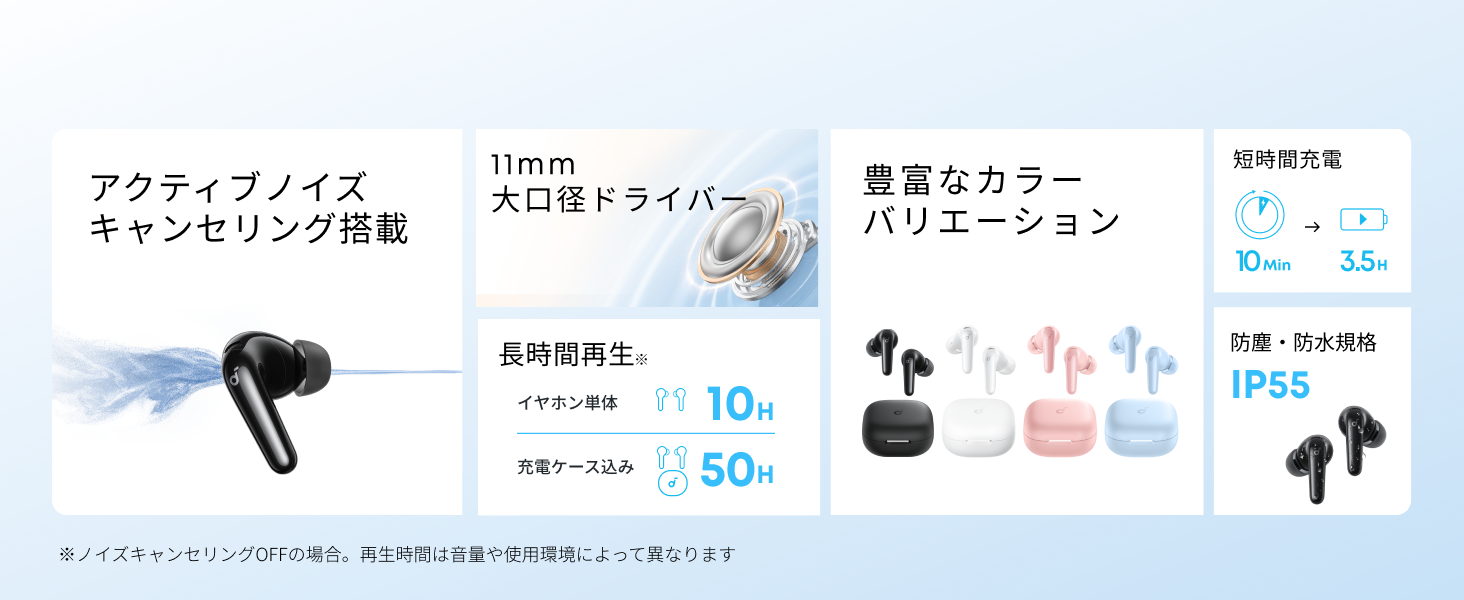
Diagram showing the Soundcore P31i earbuds and charging case with key components labeled.
イヤホン: Each earbud is equipped with an 11mm dynamic driver for powerful bass and clear sound. They feature active noise cancellation and AI noise reduction for calls. The ergonomic design ensures a secure and comfortable fit.
充電ケース: The compact charging case not only stores and protects your earbuds but also recharges them on the go. It has a USB-C charging port and a strap hole for portability.
イヤホンとケースを充電する
初めて使用する前に、イヤホンと充電ケースの両方を完全に充電してください。
- イヤホンの充電: Place the earbuds into the charging case. The indicator lights on the earbuds will show charging status.
- ケースの充電: Connect the charging case to a power source using the provided USB-C to USB-A cable. A full charge for the case and earbuds takes approximately 3 hours.
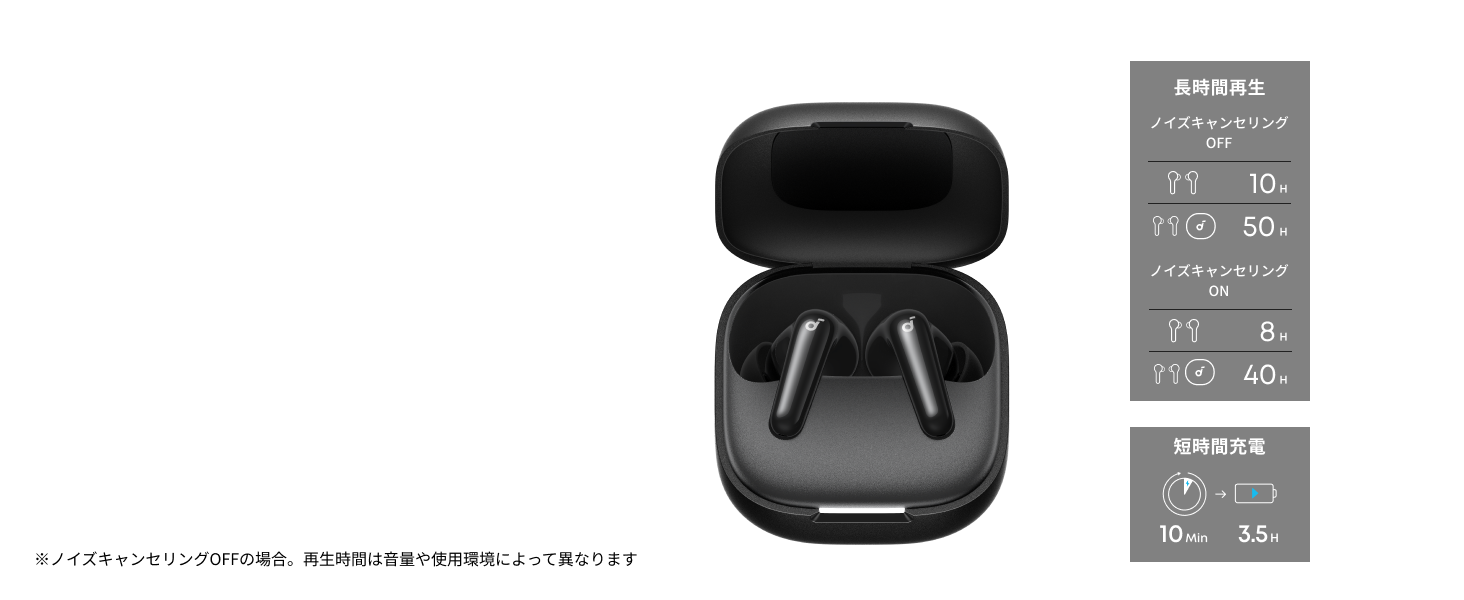
Diagram illustrating charging times and playback duration for Soundcore P31i earbuds.
バッテリー寿命:
- Up to 10 hours of playback on a single charge (earbuds only).
- 充電ケースを使用すると合計最大 50 時間の再生が可能です。
- 10 分間の急速充電で最大 3.5 時間の再生が可能です。
Note: Playback time varies depending on volume level and audio content.
イヤフォンを装着する
For optimal sound quality and comfort, it is important to wear your earbuds correctly.
- 適切なイヤーチップを選択してください: Select the ear tips that provide the best seal and comfort for your ears. Experiment with different sizes (XS, S, M, L) to find the perfect fit.
- イヤホンを挿入します: イヤホンを耳の穴にゆっくりと挿入します。
- ねじって固定する: Twist the earbuds slightly until they fit snugly and securely in your ears.

Image showing a person wearing the Soundcore P31i earbuds correctly.
Bluetoothペアリング
Follow these steps to pair your Soundcore P31i earbuds with your device:
- 初めてのペアリング:
- Open the charging case. The earbuds will automatically enter Bluetooth pairing mode. The indicator lights on the earbuds will flash white.
- デバイス(スマートフォン、タブレットなど)で、Bluetooth 設定に移動します。
- Select "Soundcore P31i" from the list of available devices.
- Once connected, the indicator lights on the earbuds will turn solid white for 1 second and then turn off.
- 別のデバイスとのペアリング:
- イヤホンを充電ケースに入れて、蓋を開けたままにします。
- Press and hold the button on the charging case for 3 seconds until the earbud indicator lights flash white rapidly.
- 新しいデバイスで「初回のペアリング」の手順 2 と 3 を繰り返します。
コントロール
The Soundcore P31i earbuds feature touch controls for managing playback, calls, and other functions. Specific control configurations can often be customized via the Soundcore app.
General Touch Controls (Default):
- 再生/一時停止: どちらかのイヤフォンをXNUMX回タップします。
- 次のトラック: 右のイヤフォンをダブルタップします。
- 前のトラック: 左のイヤフォンをダブルタップします。
- 通話の応答/終了: どちらかのイヤフォンをXNUMX回タップします。
- 通話を拒否: どちらかのイヤフォンを2秒間押し続けます。
- 音声アシスタントを有効にする: Triple-tap either earbud (may vary).
- ANC/透明モードを切り替える: Press and hold the right earbud for 2 seconds (may vary).
For detailed and customizable controls, please refer to the Soundcore app or the included Quick Start Guide.
アクティブノイズキャンセリング(ANC)
The Soundcore P31i earbuds feature Active Noise Cancelling technology to minimize ambient noise, allowing for an immersive listening experience.

Illustration demonstrating the active noise cancelling feature of the Soundcore P31i earbuds.
ANC detects and reduces various types of noise, such as engine hum on trains or buses, and chatter in cafes. This allows you to enjoy your music or podcasts with greater clarity and fewer distractions.
To switch between ANC, Normal, and Transparency modes, use the touch controls on the earbuds or adjust settings within the Soundcore app.
音質
The Soundcore P31i earbuds are engineered to deliver a rich audio experience.

Diagram illustrating the 11mm dynamic driver responsible for the audio output.
- 11mmダイナミックドライバー: Equipped with large 11mm drivers, these earbuds produce a wide frequency range and detailed sound.
- BassUp™テクノロジー: Anker's proprietary BassUp™ technology enhances low frequencies, delivering powerful and impactful bass.
You can further customize the sound profile using the equalizer settings within the Soundcore app.
通話品質
The Soundcore P31i earbuds ensure clear voice calls and web 会議。

Illustration depicting AI noise reduction technology for clear voice calls.
AIノイズ低減: Integrated AI noise reduction technology effectively filters out background noise, ensuring your voice is transmitted clearly to the person on the other end of the call, even in noisy environments.
マルチポイント接続
The Soundcore P31i supports multi-point connection, allowing you to connect to two Bluetooth devices simultaneously.

Illustration showing the Soundcore P31i connected to multiple devices simultaneously.
This feature enables seamless switching between devices. For example, you can listen to music on your laptop and instantly switch to answer a call on your phone without manually re-pairing.
To enable multi-point connection, ensure both devices are paired with your earbuds. The earbuds will automatically connect to the last two paired devices when powered on.
Soundcoreアプリ
Download the Soundcore app to enhance your experience with the P31i earbuds. The app offers various features and customization options.

Screenshots of the Soundcore app interface, highlighting customization features.
App Features include:
- カスタマイズ可能なコントロール: Personalize touch controls for playback, calls, and voice assistant.
- イコライザー設定: オーディオプロを調整するfiles to your preference or choose from preset EQs.
- ANC/透明モードの切り替え: Easily toggle between noise cancelling and transparency modes.
- ファームウェアの更新: 最新の機能と改良点を適用して、イヤホンを常に最新の状態に保ってください。
- AI翻訳機能: (Available from Spring 2026, requires Soundcore app ver 4.0.0 or higher).
The Soundcore app is available for download on both iOS and Android devices.
製品終了view ビデオ
公式製品ビデオショーasing the key features and design of the Soundcore P31i True Wireless Earbuds, including active noise cancellation, powerful bass, long battery life, and multi-point connectivity.
メンテナンスとケア
Proper maintenance ensures the longevity and performance of your Soundcore P31i earbuds.
- クリーニング: イヤホンと充電ケースは、柔らかく乾いた糸くずの出ない布で定期的に拭いてください。刺激の強い化学薬品や研磨剤は使用しないでください。
- イヤーチップ: Remove the ear tips and clean them with water and mild soap if necessary. Ensure they are completely dry before reattaching.
- 充電接点: 適切に充電するために、イヤホンとケースの両方の充電接点を清潔で乾燥した状態に保ってください。
- ストレージ: 使用しないときは、ほこりや損傷から保護するために、イヤホンを充電ケースに保管してください。
- 耐水性: The earbuds are rated IP55 for dust and water resistance. This means they can withstand sweat and light rain, but are not designed for submersion in water. Ensure the earbuds are dry before placing them back in the charging case.

Image showing Soundcore P31i earbuds with water droplets, highlighting their IP55 water resistance.
トラブルシューティング
If you encounter any issues with your Soundcore P31i earbuds, refer to the following common solutions:
- イヤホンがペアリングされない:
- 両方のイヤホンが完全に充電されていることを確認してください。
- イヤホンをケースに入れて蓋を閉め、再度開けてペアリングモードに再度入ります。
- Forget "Soundcore P31i" from your device's Bluetooth list and try pairing again.
- Reset the earbuds (refer to the Quick Start Guide for specific reset instructions).
- Only One Earbud Playing Audio:
- Place both earbuds back into the charging case and close the lid for 5 seconds, then open it again.
- 両方のイヤホンに十分なバッテリーがあることを確認してください。
- イヤホンをリセットします。
- 音質が悪い:
- イヤーチップが耳の穴にしっかりとフィットすることを確認してください。様々なサイズを試してみてください。
- イヤホンのノズルからゴミを取り除きます。
- 干渉を避けるため、接続されたデバイスに近づいてください。
- 充電の問題:
- 充電ケーブルとアダプターに損傷がないか確認してください。
- イヤホンとケースの充電接点が清潔であることを確認してください。
- 別の充電ケーブルまたは電源を試してください。
仕様
| 特徴 | 詳細 |
|---|---|
| ブランド | サウンドコア |
| モデル名 | P31i |
| モデル番号 | D1202 |
| 色 | Black (This specific variant) |
| フォームファクター | インイヤー |
| 接続技術 | ワイヤレス(Bluetooth 6.1) |
| 騒音制御 | アクティブノイズキャンセリング |
| ドライバーサイズ | 11mmダイナミックドライバー |
| 再生時間(イヤホン) | 最大10時間 |
| 合計再生時間(ケース付き) | 最大50時間 |
| 急速充電 | 10分の充電で3.5時間再生可能 |
| 充電時間(フル充電) | 約3時間 |
| 耐水性 | IP55 |
| マルチポイント接続 | サポート |
| 欧州連合 | 194644251543 |
| 原産国 | 中国 |
保証とカスタマーサポート
Soundcore provides a comprehensive warranty for your P31i earbuds.

Image detailing the warranty period and extension for Soundcore P31i.
- 標準保証: An 18-month warranty is provided for products purchased from authorized retailer AnkerDirect.
- 延長保証: Anker members can extend their warranty up to a maximum of 24 months.
- 重要な注意: Purchases from unauthorized sellers may not be covered under warranty.
For product inquiries, delivery questions, or technical support, please contact Soundcore customer support. Contact details can typically be found on the official Soundcore webサイトまたはクイック スタート ガイドをご覧ください。
安全情報
デバイスの損傷や怪我を防ぐために、以下の安全ガイドラインを読んで従ってください。
- イヤホンや充電ケースを分解したり改造したりしないでください。
- デバイスを極端な温度、直射日光、火気に近づけないでください。
- Avoid exposing the device to excessive moisture or liquids, beyond its IP55 rating.
- Do not use the device at high volume levels for extended periods to prevent hearing damage.
- お子様やペットの手の届かない場所に保管してください。
- 製品は地域の規制に従って責任を持って廃棄してください。