
1. はじめに
ご購入ありがとうございますasing the Shark EVOPOWER SYSTEM BOOST+ Cordless Stick Vacuum Cleaner. This manual provides essential information for the safe and efficient operation, maintenance, and troubleshooting of your new vacuum cleaner. Please read these instructions thoroughly before first use and keep them for future reference.

Figure 1: Shark EVOPOWER SYSTEM BOOST+ Cordless Stick Vacuum Cleaner with Automatic Dust Collection Dock.
2. 安全情報
火災、感電、または怪我のリスクを軽減するため、電気製品を使用する際は、必ず基本的な安全上の注意事項に従ってください。この製品は家庭用です。
- 屋外や濡れた地面では使用しないでください。
- おもちゃとして使用しないでください。子供が使用する場合や子供の近くで使用する場合は細心の注意が必要です。
- このマニュアルに記載されているとおりにのみ使用してください。製造元が推奨するアタッチメントのみを使用してください。
- 濡れた手でプラグや器具を扱わないでください。
- 開口部に物を入れないでください。開口部を塞いだ状態で使用しないでください。ほこり、糸くず、髪の毛、空気の流れを妨げるものなどを入れないでください。
- 髪の毛、ゆったりとした衣服、指、および体のすべての部分を開口部や可動部分から遠ざけてください。
- プラグを抜く前にすべてのコントロールをオフにしてください。
3. パッケージ内容
パッケージにすべてのコンポーネントが含まれていることを確認します。
- メイン掃除機ユニット(ハンドヘルド)
- エクステンションワンド
- Floor Nozzle with 360 Intelligent Nozzle
- 自動集塵ドック
- 充電ケーブル
- Mini Motorhead
- Brush Crevice Tool
- マルチノズル
- Multi-Cloth (Amazon.co.jp exclusive model)
- ユーザーマニュアル
4. 組み立てとセットアップ
4.1 掃除機の組み立て
- 延長棒を、カチッと音がするまで掃除機本体に挿入します。
- Attach the floor nozzle to the other end of the extension wand, ensuring it clicks into place.
4.2 Setting up the Automatic Dust Collection Dock
Place the automatic dust collection dock on a flat, stable surface near a power outlet. Connect the charging cable to the dock and plug it into the outlet. The vacuum will automatically charge and empty its dust cup when placed on the dock.
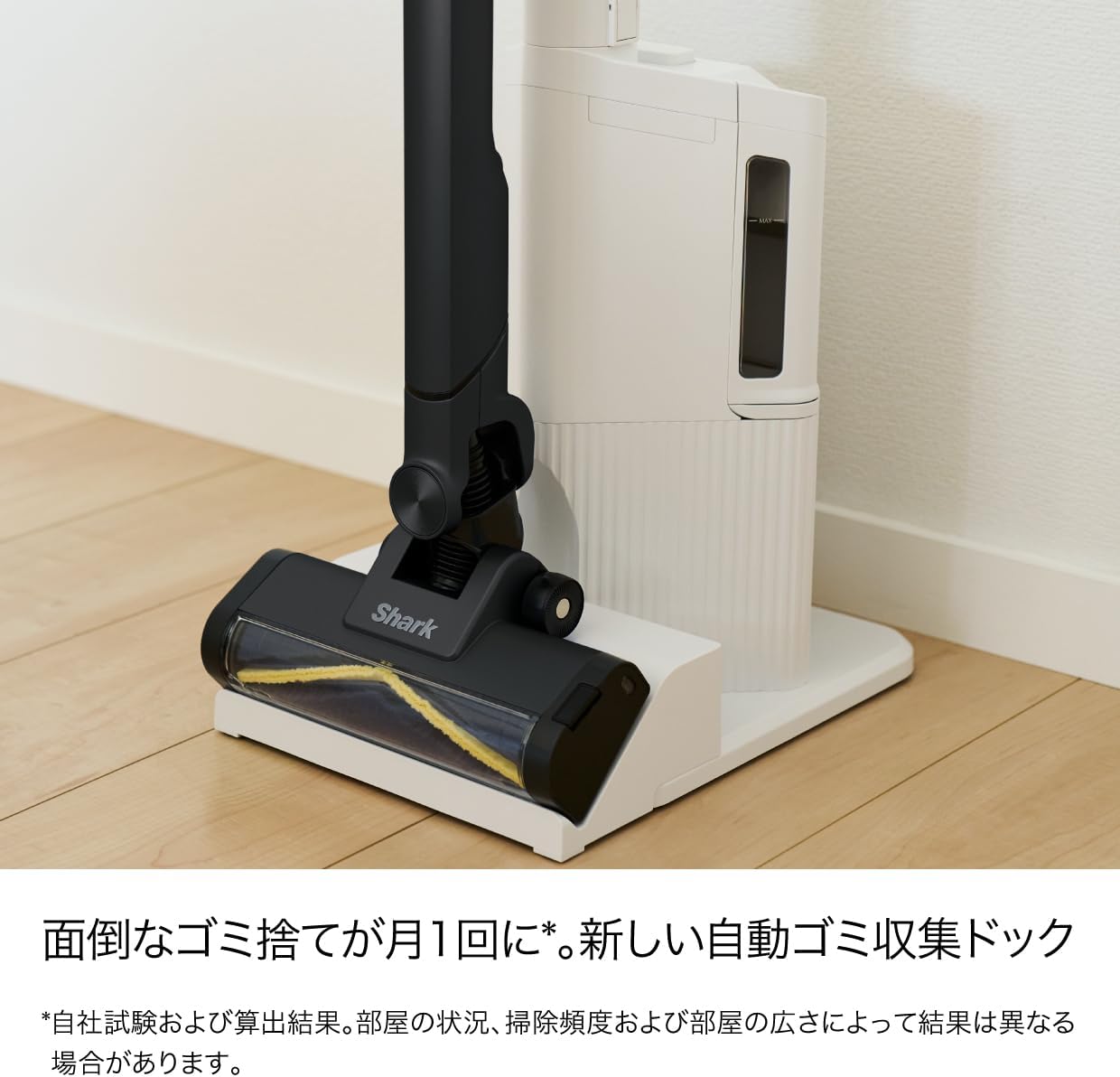
Figure 2: Vacuum cleaner docked in the automatic dust collection station.
5. 操作手順
5.1 電源のオン/オフ
Press the power button on the handle to turn the vacuum on or off. The vacuum will start in its default cleaning mode.
5.2 360 Intelligent Nozzle for All-Direction Cleaning
The unique 360 Intelligent Nozzle is designed to capture debris from all directions – front, back, left, and right. This reduces cleaning time and ensures thorough dirt removal.

Figure 3: The 360 Intelligent Nozzle effectively cleans from multiple directions.
5.3 Smart iQ Technology (iQ, Floor, and Edge Sensors)
The vacuum features Smart iQ Technology, which uses three sensors to optimize cleaning performance:
- iQ Sensor: Detects the amount of debris and automatically adjusts suction power. The iQ indicator lights on the handheld unit change color (green for low, yellow for medium, red for high) to visualize debris levels.
- フロアセンサー: Detects the floor type (e.g., hard floor, carpet) and automatically adjusts the brush roll speed for optimal cleaning.
- Edge Sensor: Detects walls and edges, increasing suction power by up to 2.5 times to thoroughly clean along baseboards and in corners.

Figure 4: iQ Sensor and indicator lights.

Figure 5: Floor Sensor adjusting to carpet.

Figure 6: Edge Sensor in action.
5.4 Using Handheld Mode and Attachments
The main vacuum unit can be detached from the extension wand to function as a powerful handheld cleaner. Simply press the release button to detach. Attach the desired accessory for specific cleaning tasks:
- ミニモーターヘッド: Ideal for cleaning upholstery, pet hair, and small carpets.
- Brush Crevice Tool: Perfect for tight spaces, corners, and dusting delicate surfaces.
- マルチノズル: Versatile tool for various surfaces and quick clean-ups.

Figure 7: Handheld mode and included accessories.
5.5 Blue LED Headlight
The floor nozzle is equipped with a blue LED headlight that illuminates dust and debris on the floor, making it easier to spot and clean even in dimly lit areas.
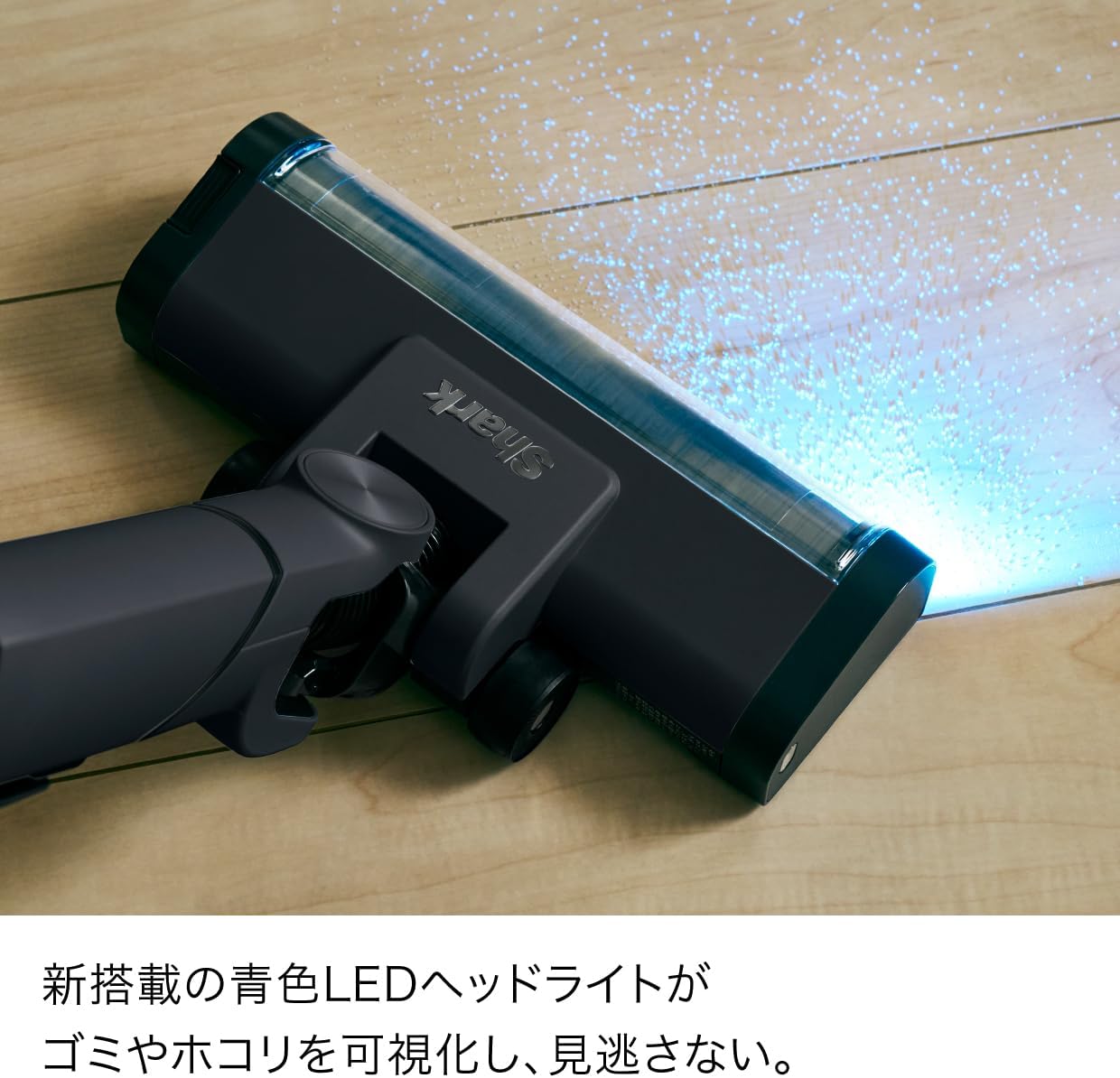
Figure 8: Blue LED Headlight illuminating debris.
6. メンテナンス
6.1 自動集塵
When the vacuum is placed on the automatic dust collection dock, it will automatically transfer collected debris from the vacuum's dust cup to the dock's larger dust bag. This reduces the frequency of manual dust disposal to approximately once a month, depending on usage and environment.

Figure 9: Automatic dust collection mechanism.
6.2 Emptying the Handheld Dust Cup (Manual)
If not using the automatic dock, or for quick emptying of the handheld unit, press the dust cup release button to open the bottom flap and empty debris directly into a trash bin.

Figure 10: One-touch manual dust disposal.
6.3 Cleaning the Brush Roll and Dust Cup
Both the brush roll and the dust cup are easily removable and washable. Regularly clean these components to maintain optimal suction and performance.
- To remove the brush roll, locate the release tab on the side of the floor nozzle and slide it to unlock. Lift out the brush roll.
- To remove the dust cup, press the release button on the main unit and detach it.
- Rinse the brush roll and dust cup with water. Ensure they are completely dry before reassembling.

Figure 11: Washable dust cup and brush roll for easy maintenance.
6.4 Hair Tangle-Free Technology
The brush roll is designed with hair tangle-free technology to prevent hair from wrapping around it, simplifying maintenance.

Figure 12: Hair tangle-free brush roll.
7。 トラブルシューティング
| 問題 | 考えられる原因 | 解決 |
|---|---|---|
| バキュームがオンにならない | バッテリーが充電されていません。 | バッテリーを完全に充電してください。 |
| 吸引力の低下 | ダストカップがいっぱいか、フィルターが詰まっています。 | ダストカップを空にしてフィルターを掃除してください。 |
| ブラシロールが回転しない | ブラシロール内の障害物。 | ブラシロールに絡まった髪の毛やゴミを取り除きます。 |
| 自動集塵機が作動しない | Dock dust bag is full or vacuum not properly seated. | Replace the dock dust bag. Ensure the vacuum is correctly placed on the dock. |
8. 仕様
| 特徴 | 詳細 |
|---|---|
| ブランド | サメ |
| モデル番号 | LC701JBKNC |
| 色 | Warm Black |
| フォームファクター | 直立 |
| 製品寸法(長さ x 幅 x 高さ) | 28 x 26.2 x 106 cm |
| 充電時間 | 3.5時間 |
| 原産国 | 中国 |
| メーカー | シャークニンジャ |
9. 保証とサポート
For warranty information and customer support, please refer to the warranty card included in your product packaging or visit the official Shark webサイトでご確認ください。購入証明として購入レシートを保管してください。