
1. はじめに
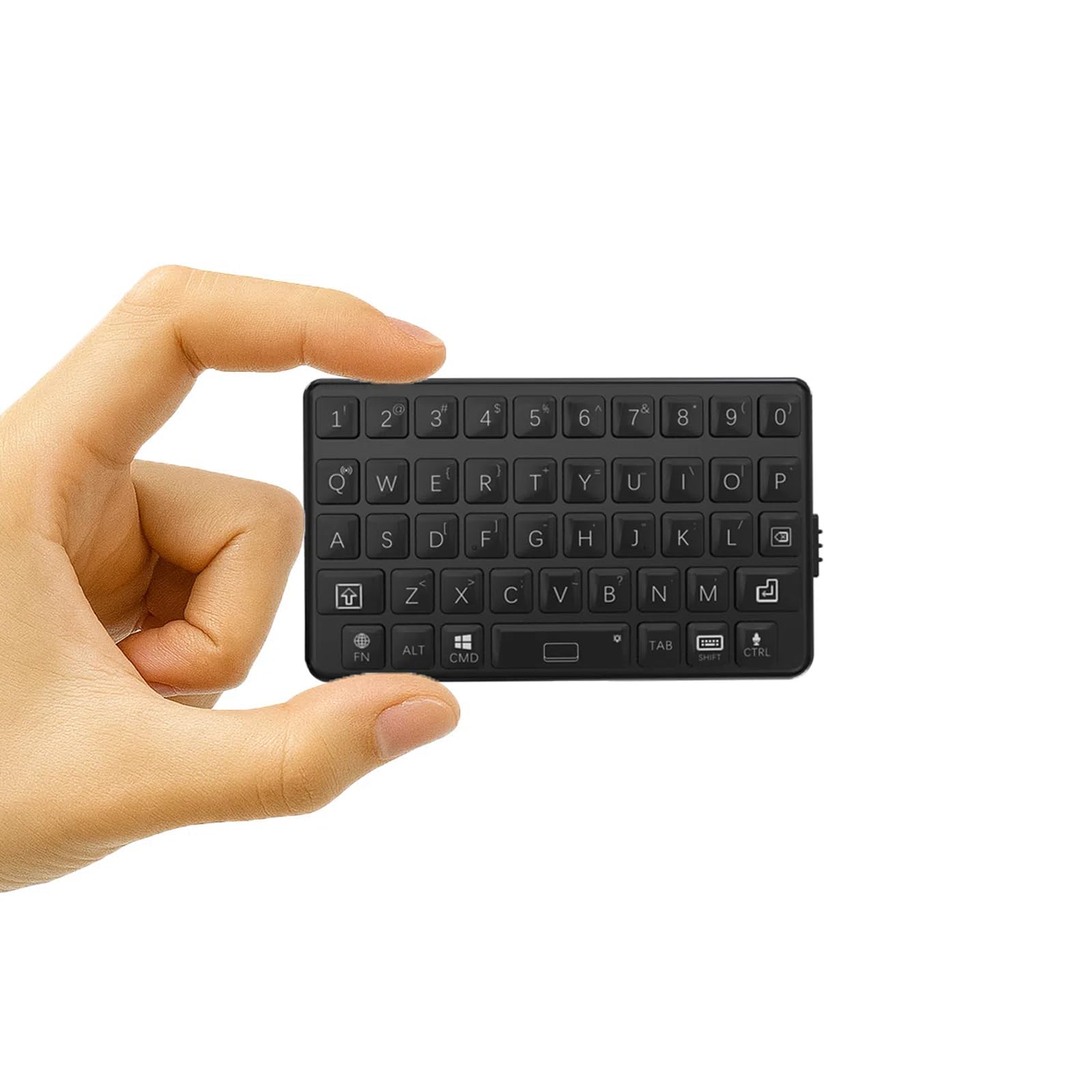
ご購入ありがとうございますasing the DarkWalker M4 Mini Bluetooth Keyboard. This ultra-portable wireless keyboard is designed for seamless compatibility with a wide range of devices, including smartphones, tablets, iPads, iPhones, Macs, Android devices, and Windows PCs. Its compact design and tactile keys provide an efficient and comfortable typing experience, making it ideal for mobile professionals and everyday use.
2. セットアップ
2.1 キーボードの充電
初めてご使用になる前に、キーボードを完全に充電してください。付属のUSB充電ケーブルをキーボードの充電ポートとUSB電源(例:パソコン、壁のアダプター)に接続してください。充電中は充電インジケーターライトが点灯し、完全に充電されると消灯します。
2.2Bluetoothペアリング
- 電源オン: キーボードの側面にある電源スイッチを見つけて、「オン」の位置にスライドします。
- ペアリングモードに入る: を押し続けます Fn キーと Bluetoothアイコンキー (usually located on one of the number keys or a dedicated key) simultaneously for a few seconds until the Bluetooth indicator light starts blinking. This indicates the keyboard is in pairing mode.
- デバイスで Bluetooth を有効にします。 スマートフォン、タブレット、またはコンピューターで Bluetooth 設定に移動します。
- キーボードを選択: In the list of available Bluetooth devices, select "DarkWalker M4" or a similar name.
- ペアリングの確認: Follow any on-screen prompts to complete the pairing process. The Bluetooth indicator light on the keyboard will stop blinking and remain solid (or turn off) once successfully paired.
2.3 Multi-OS Automatic Recognition
The DarkWalker M4 keyboard features multi-OS automatic recognition. Upon powering on, it will automatically detect and configure itself for iOS, Mac, Android, or Windows operating systems, ensuring optimal key functionality without manual switching.

3. 操作手順
3.1 基本的なタイピング
The keyboard features a standard QWERTY layout. Simply type as you would on a full-sized keyboard. The tactile switches provide precise feedback for comfortable and efficient typing.
3.2 特殊機能(Fnキーの組み合わせ)
の Fn key allows access to secondary functions printed on certain keys. Press and hold the Fn キーを押し、目的の機能キーを押します。
- 矢印キー: To use arrow keys (Up, Down, Left, Right), press and hold Fn and then press the keys corresponding to 7 (Up), 8 (Down), 9 (Left), and 0 (Right).
- その他の機能: Refer to the keycaps for additional functions accessible via the Fn key, such as multimedia controls or system shortcuts.

3.3 電源管理
- 自動スリープモード: The keyboard will enter sleep mode after a period of inactivity to conserve battery. Press any key to wake it up.
- バッテリー寿命: The keyboard provides up to 12 hours of continuous operation on a full charge.
4. メンテナンス
4.1 クリーニング
To clean the keyboard, power it off and gently wipe the surface with a soft, damp cloth. Avoid using harsh chemicals or abrasive materials. Do not immerse the keyboard in water.
4.2 ストレージ
When not in use for extended periods, store the keyboard in a cool, dry place. Ensure it is powered off to prevent battery drain.
5。 トラブルシューティング
5.1 キーボードが接続/ペアリングされない
- キーボードの電源がオンになっていて、完全に充電されていることを確認します。
- デバイスで Bluetooth が有効になっていることを確認してください。
- Place the keyboard within close proximity to your device.
- デバイスの Bluetooth 設定からキーボードのペアリングを解除し、再度ペアリングしてみてください。
- キーボード(電源オフ/オン)とデバイスの両方を再起動します。
5.2 キーが反応しない
- キーボードが Bluetooth 経由で正しく接続されているかどうかを確認します。
- キーボードのバッテリーが消耗していないことを確認してください。
- Clean any debris around the keys.
5.3 入力遅延または切断
- 干渉を減らすには、デバイスに近づいてください。
- 他のデバイスが Bluetooth 干渉を引き起こしていないことを確認します。
- キーボードを充電します。
6. 仕様
| ブランド | ダークウォーカー |
| モデル番号 | M4 |
| 接続技術 | ブルートゥース5.0 |
| 対応デバイス | Android, iOS, iPad, iPhone, Mac, PC, Windows |
| キーボードレイアウト | QWERTY |
| スイッチタイプ | 触覚 |
| 製品寸法(長さ x 幅 x 高さ) | 7.5 x 4.5 x 1.2 cm |
| 重さ | 40グラム |
| 連続運転時間 | 最大12時間 |
| 原産国 | 中国 |
| 欧州連合 | 739608135400 |
| ASIN | B0FNK4BWM2 |
7.保証とサポート
7.1 保証情報
This DarkWalker M4 Mini Bluetooth Keyboard comes with a 1年間保証 ご購入日から1年間有効です。本保証は、通常の使用における製造上の欠陥および故障を対象としています。誤用、事故、不正な改造、または通常の摩耗や損耗による損傷は保証の対象外となります。
7.2 カスタマーサポート
For technical assistance, troubleshooting, or warranty claims, please contact DarkWalker customer support. Refer to the product packaging or the official DarkWalker web最新の連絡先情報については、サイトをご覧ください。