
1. はじめに
Thank you for choosing the Antec VCX300 ARGB ATX/M-ATX PC Case. This manual provides detailed instructions for the installation, operation, and maintenance of your new computer chassis. Please read this manual thoroughly before installation to ensure proper setup and optimal performance.
2. 安全情報
- コンポーネントを取り付けたり取り外したりする前に、必ず電源を切ってください。
- Handle components with care to avoid damage from electrostatic discharge. Use an anti-static wrist strap if available.
- Keep the case away from water, moisture, and direct heat sources.
- 過熱を防ぐために、ケースの周囲に適切な換気を確保してください。
- Do not attempt to open or repair the power supply unit inside the case. Refer to qualified service personnel.
3. パッケージ内容
パッケージにすべてのアイテムが含まれていることを確認してください。
- Antec VCX300 ARGB ATX/M-ATX PC Case
- Accessory Box (Screws, standoffs, cable ties)
- ユーザーマニュアル(このドキュメント)
4.製品オーバーview
Familiarize yourself with the various parts of your Antec VCX300 ARGB PC Case.
4.1 フロントパネル I/O
- 電源ボタン
- リセットボタン
- USB 3.0 ポート
- USB 2.0 ポート
- オーディオジャック(ヘッドフォン/マイク)
- LEDコントロールボタン(ARGB照明用)
4.2 内部レイアウト
The VCX300ARGB case supports ATX and Micro-ATX motherboards. It features multiple drive bays for storage and amp冷却ソリューションのためのスペースが十分にあります。
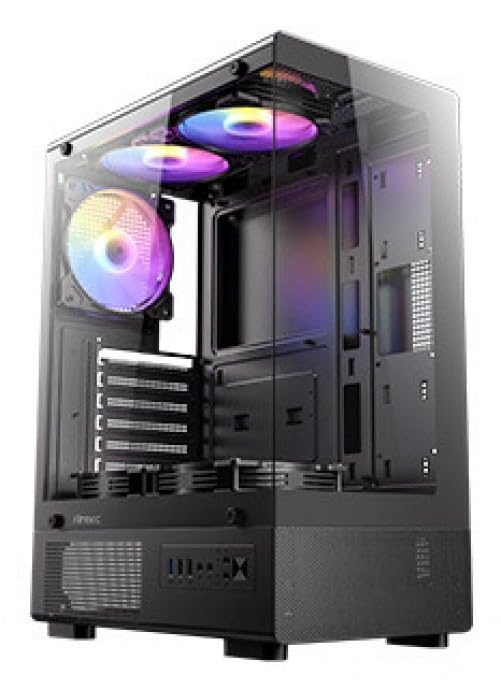
図1: 前面 view of the Antec VCX300 ARGB PC Case, showcasing the ARGB lighting elements and front panel I/O ports.
5. セットアップとインストール
Follow these steps to install your components into the Antec VCX300 ARGB PC Case.
5.1 ケースの準備
- ケースを平らで安定した面に置きます。
- ケース背面の蝶ネジを外し、パネルを後方にスライドさせてサイドパネルを取り外します。
5.2マザーボードの取り付け
- I/O シールドをケースの背面開口部に取り付けます。
- Align the motherboard with the pre-installed standoffs. Ensure the screw holes on the motherboard match the standoffs.
- アクセサリボックスに付属のネジを使用してマザーボードを固定します。
5.3 電源の設置
- Position the power supply unit (PSU) in the designated compartment at the bottom rear of the case.
- ケースの外側背面からネジを使用して PSU を固定します。
5.4 ストレージドライブのインストール (HDD/SSD)
- Locate the drive bays. The VCX300ARGB typically features dedicated bays for 3.5" HDDs and 2.5" SSDs.
- For 3.5" HDDs, slide the drive into the bay and secure it with screws or tool-less clips if available.
- For 2.5" SSDs, mount the drive onto the designated brackets or trays and secure with screws.
5.5 Expansion Card Installation (GPU, etc.)
- ケースの背面から必要な拡張スロット カバーを取り外します。
- Insert the expansion card (e.g., graphics card) into the appropriate PCIe slot on the motherboard.
- カードをネジで固定します。
5.6 ケーブル管理
マザーボードトレイ背面のケーブル配線用カットアウトと結束ポイントを活用してケーブルを整理しましょう。これにより、エアフローと美観が向上します。
- Connect all power cables from the PSU to the motherboard and components.
- Connect front panel I/O cables (USB, audio, power/reset switches, LED) to the corresponding headers on the motherboard.
- Connect ARGB cables from the case fans/strips to the motherboard's ARGB header or the integrated ARGB controller.
6. 操作
6.1電源オン
- Ensure all components are correctly installed and cables are connected.
- Close and secure the side panels.
- 電源ケーブルを PSU と壁のコンセントに接続します。
- PSU の電源スイッチを「オン」の位置に切り替えます。
- Press the Power Button on the front panel of the case.
6.2 ARGB照明制御
The Antec VCX300 ARGB case features customizable ARGB lighting. You can control the lighting effects in two ways:
- LEDコントロールボタン: Press the dedicated LED control button on the front panel to cycle through various pre-set ARGB lighting modes and colors. Hold the button for a few seconds to turn off/on the lighting.
- マザーボードソフトウェア: If the ARGB cables are connected to a compatible motherboard ARGB header, you can synchronize and customize lighting effects using your motherboard's proprietary software (e.g., ASUS Aura Sync, MSI Mystic Light Sync, Gigabyte RGB Fusion, ASRock Polychrome Sync). Refer to your motherboard manual for specific instructions.
7. メンテナンス
定期的なメンテナンスは、PC コンポーネントの最適なパフォーマンスと寿命の延長に役立ちます。
- ダストフィルター: The VCX300ARGB includes dust filters. Regularly remove and clean these filters to prevent dust buildup inside the case, which can impede airflow and cooling performance. Use compressed air or a soft brush.
- 内部クリーニング: Periodically open the case and use compressed air to remove dust from fans, heatsinks, and other components. Ensure the system is powered off and unplugged before cleaning.
- 外装清掃: ケースの外側を柔らかくて乾いた布で拭いてください。amp 布で拭いてください。刺激の強い化学薬品や研磨剤は使用しないでください。
8。 トラブルシューティング
| 問題 | 考えられる原因 | 解決 |
|---|---|---|
| PCの電源が入りません。 | Power cable disconnected, PSU switch off, front panel power button not connected, faulty PSU. | Check power cable connections. Ensure PSU switch is ON. Verify front panel power button cable is correctly connected to motherboard. Test PSU if possible. |
| ARGB 照明が機能しません。 | ARGB cables disconnected, incompatible motherboard header, LED control button issue. | Ensure ARGB cables are securely connected to the motherboard or controller. Try cycling modes with the LED control button. Verify motherboard ARGB header compatibility. |
| Poor airflow/overheating. | Dust buildup, incorrect fan orientation, obstructed vents. | Clean dust filters and internal components. Ensure fans are oriented correctly for optimal airflow (intake/exhaust). Check for any obstructions. |
9. 仕様
| 特徴 | 詳細 |
|---|---|
| モデル名 | VCX300ARGB |
| ケースタイプ | ミッドタワー |
| マザーボードのサポート | ATX、マイクロATX |
| 寸法(D x W x H) | 奥行き14.57インチ x 幅8.07インチ x 高さ17.72インチ(約370mm x 205mm x 450mm) |
| アイテム重量 | 3.6キログラム |
| 内部ドライブベイ | 5 (combination of 3.5" HDD and 2.5" SSD) |
| フロントI / Oポート | USB 3.0, USB 2.0, Audio In/Out, Power, Reset, LED Control Button |
| 特集 | Built-In Fan, Dust Filter, LED Control Button, Noise Reduction Technology, Partition Plate Cooling Technology, ARGB Lighting |
| 色 | 黒 |
10. 保証とサポート
Antec products come with a limited warranty. Please refer to the official Antec web製品に適用される具体的な保証条件については、当社の Web サイトまたは地域の販売代理店にお問い合わせください。
For technical support, product registration, or further inquiries, please visit the official Antec support page: www.antec.com/support
輸入業者連絡先情報: Ariisto House, 5th Floor, Junction of N.S.Phadke Road, Telli Gali, Andheri (E), Mumbai- 400 069 Maharashtra, India