
1. はじめに
This manual provides instructions for the safe and effective use of your VATOS Electronic Scoring Soccer Toy Game Set. Please read all instructions carefully before assembly and operation.
含まれるもの
- Electronic Scoring Soccer Target x 1
- Fabric Ball x 1
- Adhesive Ball x 1
- Sticky Hook x 4

Image 1: Components included in the VATOS Electronic Scoring Soccer Game Set, detailing the electronic target, two types of balls, and mounting hooks.
2. 安全ガイドライン
Always use this product under adult supervision. Ensure the play area is clear of obstacles to prevent accidents. The soccer balls and target are made of soft, skin-friendly fabric to minimize injury risk. Do not modify the product or use it for purposes other than intended.
3. セットアップ手順
バッテリーの取り付け
- Locate the battery compartment on the back of the electronic scoring soccer target.
- 電池コンパートメント カバーのネジを外します。
- 単三電池 3 本 (別売) を挿入し、極性 (+/-) が正しいことを確認します。
- 電池カバーを取り付けて、ネジで固定します。
Mounting the Target
- Choose a suitable flat surface, such as a wall, for mounting the target.
- Clean the surface thoroughly to ensure the sticky hooks adhere properly.
- Peel off the protective film from the back of each sticky hook.
- Press the sticky hooks firmly onto the desired locations on the wall, ensuring they are spaced appropriately to support the target.
- Attach the loops on the electronic scoring soccer target to the hooks.

Image 2: Illustration of sticky hook installation for mounting the soccer target.
Video 1: Official product video demonstrating the setup process, including battery installation and mounting the target, as well as showcasing game modes and scoring.
4. 操作手順
電源オン/オフ
To power on the electronic scoring target, slide the ON/OFF switch to the 'ON' position. To power off, slide the switch to the 'OFF' position.
ゲームモード
The soccer toy features two distinct game modes:
- Single-Player Training Mode: Challenge yourself with timed missions (1, 2, or 3 minutes) to achieve the highest score, up to 99 points.
- Two-Player Competition Mode: Engage in alternating shooting competitions with another player. This mode is suitable for interactive play between children or with adults.
Use the 'SELECT' button to switch between modes and confirm your selection. Refer to Video 1 for a visual demonstration of mode selection.
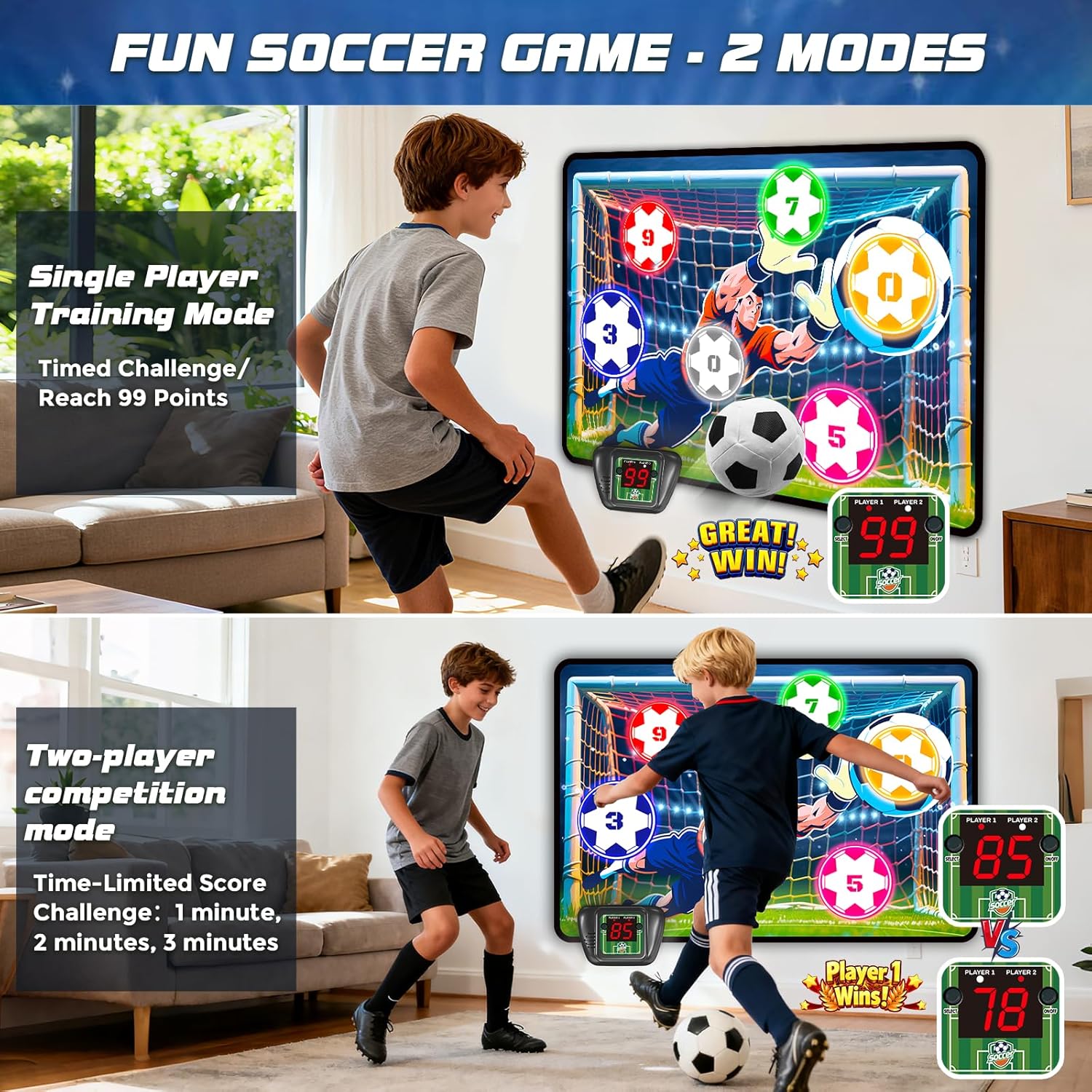
Image 3: The two game modes of the electronic scoring soccer toy: single-player training and two-player competition.
スコアリングシステム
The target area includes clearly marked colored zones for 0, 3, 5, 7, and 9 points. When a ball hits a scoring zone, the intelligent sensor module automatically records the score. Real-time scores are displayed on the electronic unit, accompanied by sound effects.
ミュート機能
To mute the sound effects, long-press the 'SELECT' button on the electronic unit. Repeat the action to unmute.

画像4: 詳細 view of the electronic scoring unit, highlighting the display, select button, and ON/OFF switch.
5. お手入れとメンテナンス
- Wipe the fabric target and balls with a damp cloth to clean. Do not immerse the electronic unit in water.
- Store the game set in a dry place away from direct sunlight when not in use.
- 長期間使用しない場合は、液漏れを防ぐため電池を取り外してください。
6。 トラブルシューティング
| 問題 | 考えられる原因 | 解決 |
|---|---|---|
| No power/display not working | 電池が切れているか、正しく挿入されていません。 | Check battery polarity and replace with new AA batteries. Ensure the ON/OFF switch is in the 'ON' position. |
| Scoring is inconsistent or not registering | Ball not hitting the sensor area directly or with enough force. | Ensure the ball makes direct contact with the colored scoring zones. Check if the target is securely mounted and not moving excessively. |
| 音が出ない | ミュート機能が有効になっています。 | Long-press the 'SELECT' button to unmute the sound. |
7. 製品仕様
| 特徴 | 詳細 |
|---|---|
| ブランド | バトス |
| モデル番号 | KB220937 |
| Target Dimensions | 43.3インチ x 29.5インチ (110cm x 75cm) |
| ボールサイズ | 5.9インチ(15cm) |
| 材料 | 布地、プラスチック |
| 電源 | 単三電池3本(別売) |
| プレイヤー数 | 1-2 |
| 推奨年齢 | 3歳以上 |
| 使用法 | 屋内、屋外 |
8. 保証と顧客サポート
For warranty information or customer support, please refer to the contact details provided on the product packaging or visit the official VATOS webサイトをご覧ください。保証請求に備えて購入レシートを保管してください。