
ZEAPON EVO D60
ZEAPON EVO D60 電動カメラスライダー ユーザーマニュアル
Model: EVO D60 | Brand: ZEAPON
1. はじめに
Thank you for choosing the ZEAPON EVO D60 Motorized Camera Slider. This manual provides detailed instructions for the proper setup, operation, and maintenance of your device. Please read this manual thoroughly before use to ensure optimal performance and longevity of your slider.

Image 1.1: The ZEAPON EVO D60 Motorized Camera Slider, showcasinコンパクトなデザイン。
2. 箱の中身
- ZEAPON EVO D60 Motorized Camera Slider Unit
- USB-C充電ケーブル
- Compact Travel Case
- ユーザーマニュアル
3. セットアップ
3.1 Mounting the Slider
The EVO D60 can be mounted on a tripod or placed on a flat surface. Ensure the mounting surface is stable and level to prevent movement during operation.

Image 3.1: The EVO D60 slider mounted on a tripod, ready for camera attachment.
3.2 カメラの取り付け
Secure your camera to the slider's mounting plate. Ensure the camera is firmly attached and balanced. The slider supports both horizontal and vertical loads within specified limits.

Image 3.2: Illustration of the horizontal load capacity, not exceeding 5kg.

Image 3.3: Illustration of the vertical load capacity, not exceeding 2.5kg.
3.3 デバイスへの電源供給
Connect the USB-C cable to the slider for power. The side-mounted battery design ensures that the camera body does not interfere with control interfaces, eliminating the need for a ball head to elevate the camera and reducing instability risks.
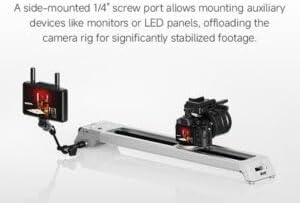
Image 3.4: Detail of the side-mounted battery compartment, designed for convenience and stability.
4. 操作手順
4.1 Basic Movement and Speed Control
The EVO D60 features an ultra-quiet brushless motor for precise and silent operation. Adjust the speed using the dedicated control knob, ranging from 0.5mm/s to 57mm/s for smooth transitions.

Image 4.1: The control panel with speed dial and A/B point setup buttons.
4.2 Setting Waypoints (A/B Points)
You can set specific start (A) and end (B) points for automated movements. Use the dedicated buttons on the slider or the Zeapon Lab app to define these points. The slider also supports manual point selection.
4.3 Focus-Locked Orbital Shots and Panorama
Achieve mechanically stabilized orbital shots with up to 125° pan. The system keeps your subject centered, eliminating the need for post-production adjustments. The slider also supports precise panoramic movements.

Image 4.2: Close-up of the slider's mechanism for marking and returning to precise positions.

Image 4.3: The magnetic center return feature ensures consistent starting points.
4.4 アプリコントロール
Utilize the Zeapon Lab app for advanced control, including setting waypoints, loop modes, and customizing shooting parameters. The app provides an intuitive interface for precise adjustments.
5. 仕様
| 特徴 | 仕様 |
|---|---|
| モデル | EVO D60 |
| 長さ | 670mm |
| Lens Center Point Travel | 440mm |
| 水平耐荷重 | ≤5kg |
| 垂直耐荷重 | ≤2.5kg |
| 最低速度 | 0.5mm/秒 |
| 最高速度 | 57mm/秒 |
| Maximum Panning Angle | 55° |
| Maximum Panoramic Angle | 125° |
| 正味重量 | 1.7kg |
| 動作電力 | 15W |
| 入力ボリュームtage | USB-C: 5~12V / Battery: 7.2V~8.4V |
6. メンテナンス
To ensure the longevity and optimal performance of your EVO D60 slider, follow these maintenance guidelines:
- クリーニング: Regularly wipe the slider rails and body with a soft, dry cloth to remove dust and debris. Avoid using harsh chemicals or abrasive materials.
- ストレージ: Store the slider in its compact travel case in a dry, cool environment when not in use.
- バッテリーのケア: If using an external battery, ensure it is charged regularly, even during periods of non-use, to maintain battery health.
- 検査: すべてのネジと接続が確実に固定されているか定期的に確認してください。
7。 トラブルシューティング
If you encounter issues with your EVO D60 slider, refer to the following common troubleshooting steps:
- スライダーが動かない:
- Ensure the slider is properly powered and the power button is engaged.
- Check for any obstructions on the slider rails.
- Verify that the load on the slider does not exceed the specified capacity.
- アプリ接続の問題:
- スマートフォンでBluetoothが有効になっていることを確認します。
- Restart the Zeapon Lab app and the slider.
- アプリのアップデートを確認してください。
- 異常なノイズ:
- Inspect the rails for any foreign particles.
- Ensure the camera and any accessories are securely mounted and not causing imbalance.
If problems persist, please contact ZEAPON customer support for further assistance.
8. 保証とサポート
ZEAPON products are designed for reliability and performance. For warranty information and customer support, please refer to the official ZEAPON webご購入の際は、サイトをご覧いただくか、お近くの販売店にお問い合わせください。保証請求の際は、購入証明としてレシートを保管してください。
For technical support or inquiries, visit the ZEAPON Store on Amazon or the official ZEAPON webサイト。