
導入
Thank you for choosing the SuperRC M23 Mini RC Drone. This manual provides essential information for the safe operation, setup, maintenance, and troubleshooting of your drone. Please read this manual thoroughly before operating the drone to ensure proper function and to avoid damage or injury. This drone is designed for adult beginners and features a lightweight, portable design with an HD camera and intelligent flight functions.
箱の中身
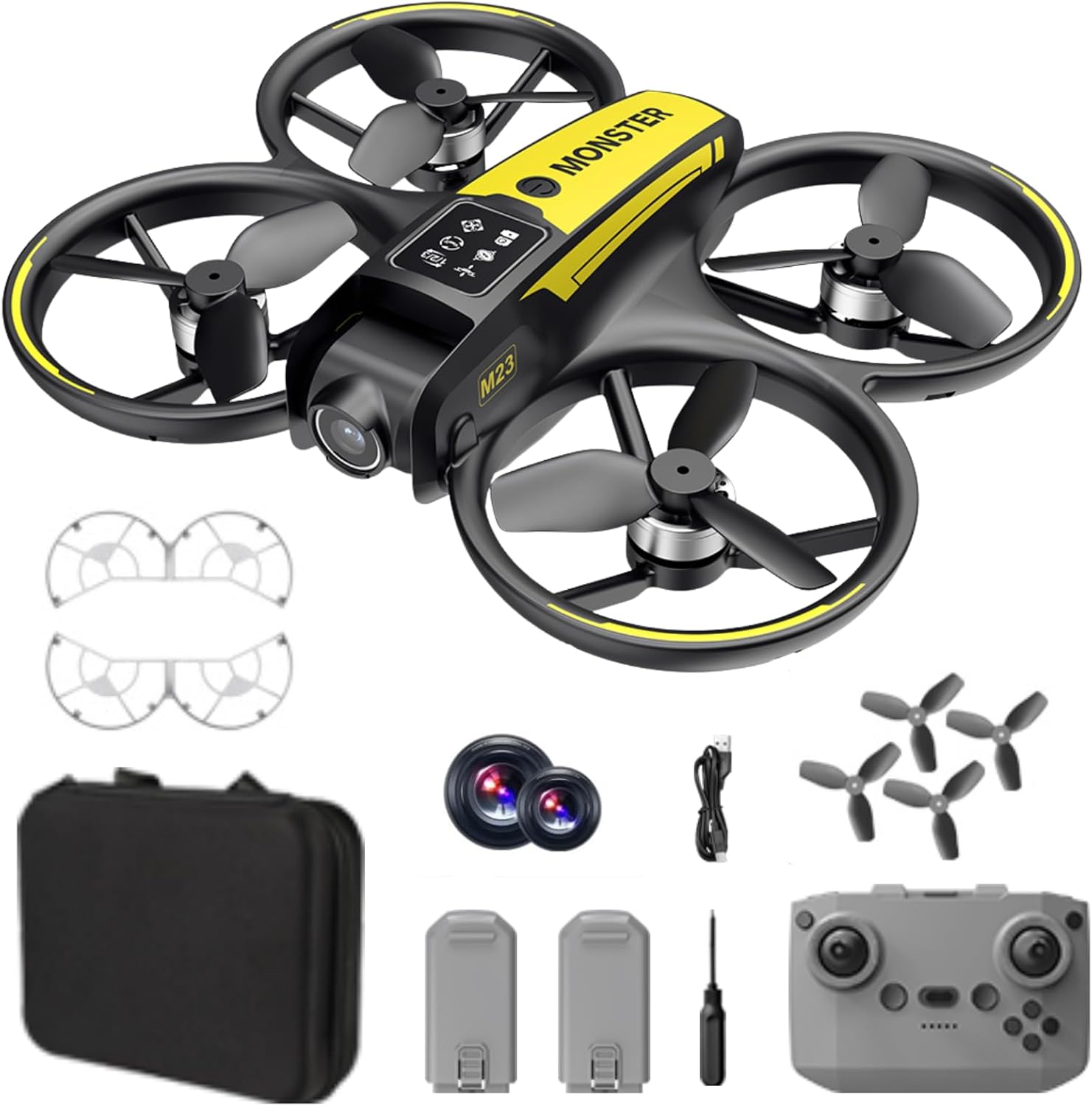
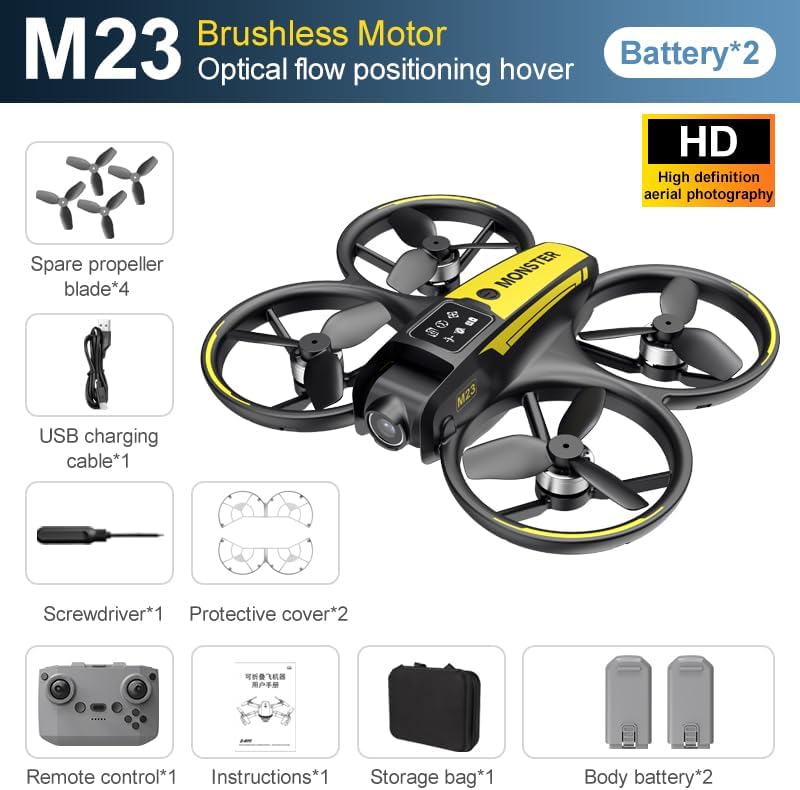
The SuperRC M23 drone package includes the following components:
- M23ドローン
- リモートコントローラー
- 3.7V 1050mAh充電式バッテリー2個
- 予備プロペラ4個
- 2 xプロペラガード
- メモリーカード
- カードリーダー
- ドライバー
- USB充電ケーブル
- 収納バッグ
- ユーザーマニュアル(このドキュメント)

製品終了view
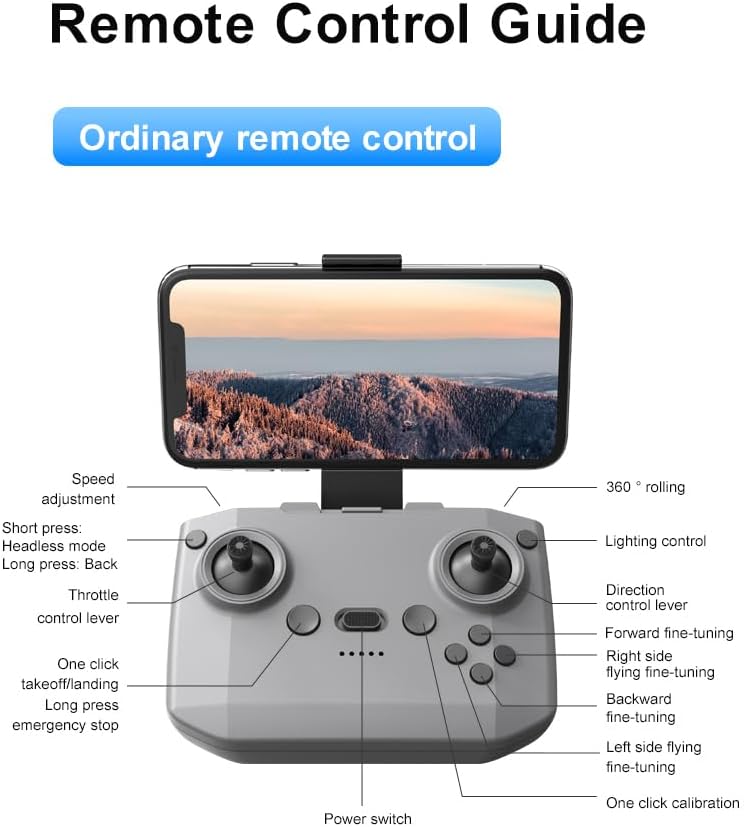
リモコンレイアウト
Familiarize yourself with the remote control buttons and their functions before flight.
設定
1. バッテリーの取り付け
- ドローンとリモート コントロールの電源がオフになっていることを確認します。
- ドローンのバッテリー収納部を見つけます。
- Insert a charged 3.7V 1050mAh battery into the compartment until it clicks securely into place.
- For the remote control, open the battery cover and insert the required batteries (not specified in product data, assume standard AA/AAA, user should refer to physical manual for exact type).
2. プロペラの取り付け
ドローンにはプロペラがあらかじめ取り付けられています。交換が必要な場合は、以下の手順に従ってください。
- プロペラと対応するモーター アームの「A」と「B」のマークを識別します。
- Attach 'A' propellers to 'A' motor shafts and 'B' propellers to 'B' motor shafts. Ensure they are firmly secured.
3. プロペラガードの取り付け
For added safety, attach the propeller guards:
- Align each propeller guard with the designated slots on the drone's motor arms.
- Gently push until they snap into place.
4. 充電
Charge the drone batteries using the provided USB charging cable.
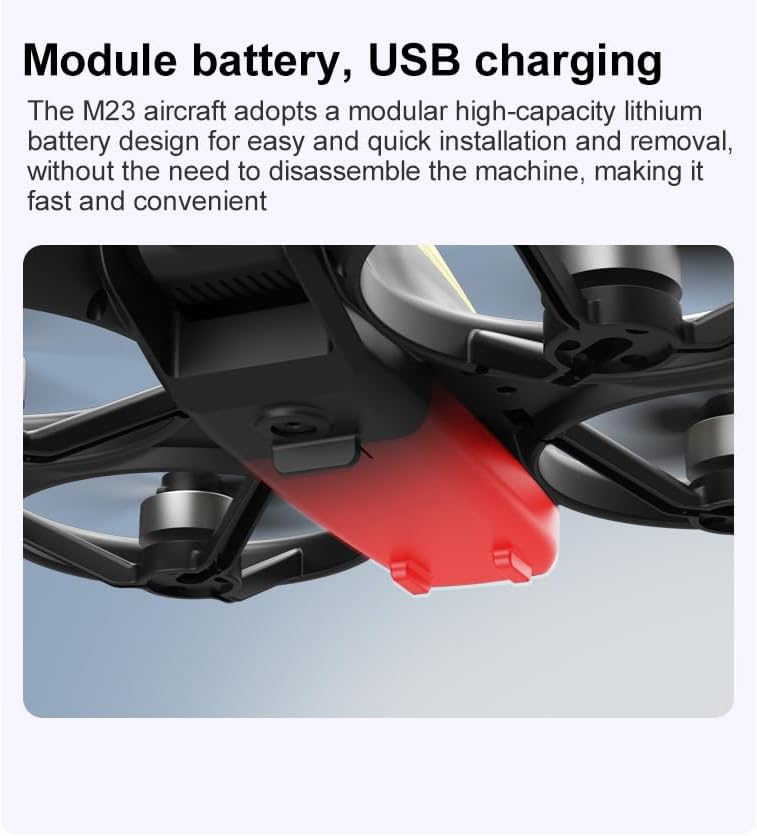
- USB充電ケーブルをドローンのバッテリーに接続します。
- Plug the other end into a USB power source (e.g., computer, USB wall adapter).
- The indicator light on the cable will show charging status (refer to physical manual for specific light indications).
- フル充電には約60〜90分かかります。
操作手順
飛行前チェックリスト
- ドローンとリモコンのバッテリーが完全に充電されていることを確認してください。
- プロペラは正しく取り付けられ、安全です。
- Propeller guards are attached (recommended for beginners).
- Choose an open, clear area free from obstacles, people, and animals.
- 飛行する前に、現地のドローン規制を確認してください。
基本的な飛行操作
The following video demonstrates key flight features including one-key takeoff, optical flow positioning, 360-degree roll, and speed switching.
ワンキー離着陸
- 脱ぐ: Place the drone on a flat surface. Press the One-Key Takeoff button on the remote control. The drone will automatically ascend and hover at a stable altitude.
- 着陸: Press the One-Key Landing button. The drone will slowly descend and land automatically.
飛行モードと機能
- ヘッドレスモード: Press the Headless Mode button. In this mode, the drone's orientation is relative to the pilot, making it easier to control without worrying about the drone's front direction.
- 速度調整: Use the speed adjustment button (or switch) on the remote control to cycle through low, medium, and high speeds. This allows for adaptable flight control based on skill level and environment.
- 360°ロール: Press the 360° Roll button and then move the right joystick in any direction to perform an aerial flip. Ensure sufficient altitude before attempting.
- オプティカルフローポジショニング: The drone utilizes a bottom camera for optical flow positioning, which helps maintain stable hovering, especially indoors or in areas with good ground texture. This feature assists in precise altitude hold.
- 弾道飛行: Through the mobile application, you can draw a desired flight path on your screen. The drone will then follow this trajectory automatically.

カメラ操作
The M23 drone is equipped with an HD camera with a 90-degree adjustable lens for capturing photos and videos.

- 写真/ビデオ録画: Use the dedicated buttons on the remote control or the mobile app to start/stop video recording or take photos.
- リアルタイム画像伝送: スマートフォンをドローンのWi-Fiネットワークに接続して view リアルタイムフーtage from the drone's camera on your device.
メンテナンス
クリーニング
- ドローン本体は定期的に柔らかく乾いた布で清掃してください。
- Ensure propellers are free from dust, dirt, or debris.
- Clean the camera lens gently with a microfiber cloth to maintain image quality.
ストレージ
- Store the drone and its components in the provided storage bag to protect them from dust and physical damage.
- ドローンは直射日光や極端な温度を避け、涼しく乾燥した場所に保管してください。
バッテリーケア
- バッテリーを過充電または過放電しないでください。
- 長期間保管する場合は、バッテリーを約 50 ~ 60% の容量まで充電してください。
- Avoid exposing batteries to high temperatures or direct sunlight.
トラブルシューティング
If you encounter issues with your SuperRC M23 drone, refer to the following common problems and solutions:
| 問題 | 考えられる原因 | 解決 |
|---|---|---|
| ドローンがリモコンに反応しない | Low battery on drone or remote; Not paired correctly; Interference | Charge batteries; Re-pair drone and remote (refer to physical manual for pairing steps); Move to an area with less interference |
| 飛行中にドローンが漂う | Not calibrated; Wind interference; Damaged propeller | Perform calibration (refer to physical manual); Fly in calm conditions; Replace damaged propellers |
| カメラの画質が悪い | Dirty lens; Low light conditions; Wi-Fi interference | Clean camera lens; Fly in well-lit areas; Ensure strong Wi-Fi connection |
| 飛行時間が短い | バッテリーが完全に充電されていない、バッテリーが古い、飛行が激しい | Ensure battery is fully charged; Consider replacing old batteries; Practice smoother flight maneuvers |
仕様
Key technical specifications for the SuperRC M23 Mini RC Drone:
| 特徴 | 詳細 |
|---|---|
| モデル名 | M23-Drone |
| ブランド | スーパーRC |
| アイテム重量 | 0.2 Kilograms (Under 250g) |
| 商品の寸法 (長さ x 幅 x 高さ) | 長さ7インチ x 幅6インチ x 高さ2インチ (約18 x 15 x 5 cm) |
| 材料 | プラスチック |
| スキルレベル | 初心者 |
| 年齢範囲(説明) | アダルト |
| カメラ | HD Camera with 90° Adjustable Lens |
| ビデオキャプチャ解像度 | 720p |
| ビデオ出力解像度 | 720ピクセル |
| ビデオキャプチャフォーマット | MP4 |
| サポートされている画像形式 | JPEG |
| 光センサー技術 | シーモス |
| 接続技術 | Wi-Fi、RF |
| コントロールタイプ | リモートコントロール |
| バッテリー容量 | 1050mAh(バッテリー1個あたり) |
| バッテリーセルの構成 | リチウムイオン |
| 特集 | Adjustable, One Button Return, One Key Rotation, Rechargeable, Speed Adjustment, Headless Mode, Optical Flow Positioning |
保証とサポート
SuperRC provides a standard warranty for the M23 Mini RC Drone against manufacturing defects. Please retain your proof of purchase for warranty claims.
保証情報
- The warranty period typically covers defects in materials and workmanship under normal use.
- Damage resulting from misuse, accidents, unauthorized modifications, or improper maintenance is not covered.
- For specific warranty terms and conditions, please refer to the warranty card included in your product packaging or contact SuperRC customer service.
カスタマーサポート
If you require further assistance, have questions, or need to report an issue, please contact SuperRC customer support through the following channels:
- オンラインサポート: Visit the official SuperRC webFAQ、サポート リソース、お問い合わせフォームのサイト。
- メールサポート: Refer to your product packaging or the SuperRC webカスタマー サービス メール アドレスのサイト。
- 小売業者サポート: 小売店から購入された場合は、その小売店のカスタマー サービスに問い合わせてサポートを受けることもできます。
サポートにお問い合わせの際は、製品モデル (M23) と問題の詳細な説明をお知らせください。