
1. はじめに
The M-Vave SMK-37 Pro is a versatile musical instrument that combines the functionality of a modern MIDI controller with the sound capabilities of a classic FM synthesizer. Designed for both studio and mobile musicians, this device features 37 velocity-sensitive keys and a comprehensive set of controls, offering flexibility through wireless or USB connectivity.
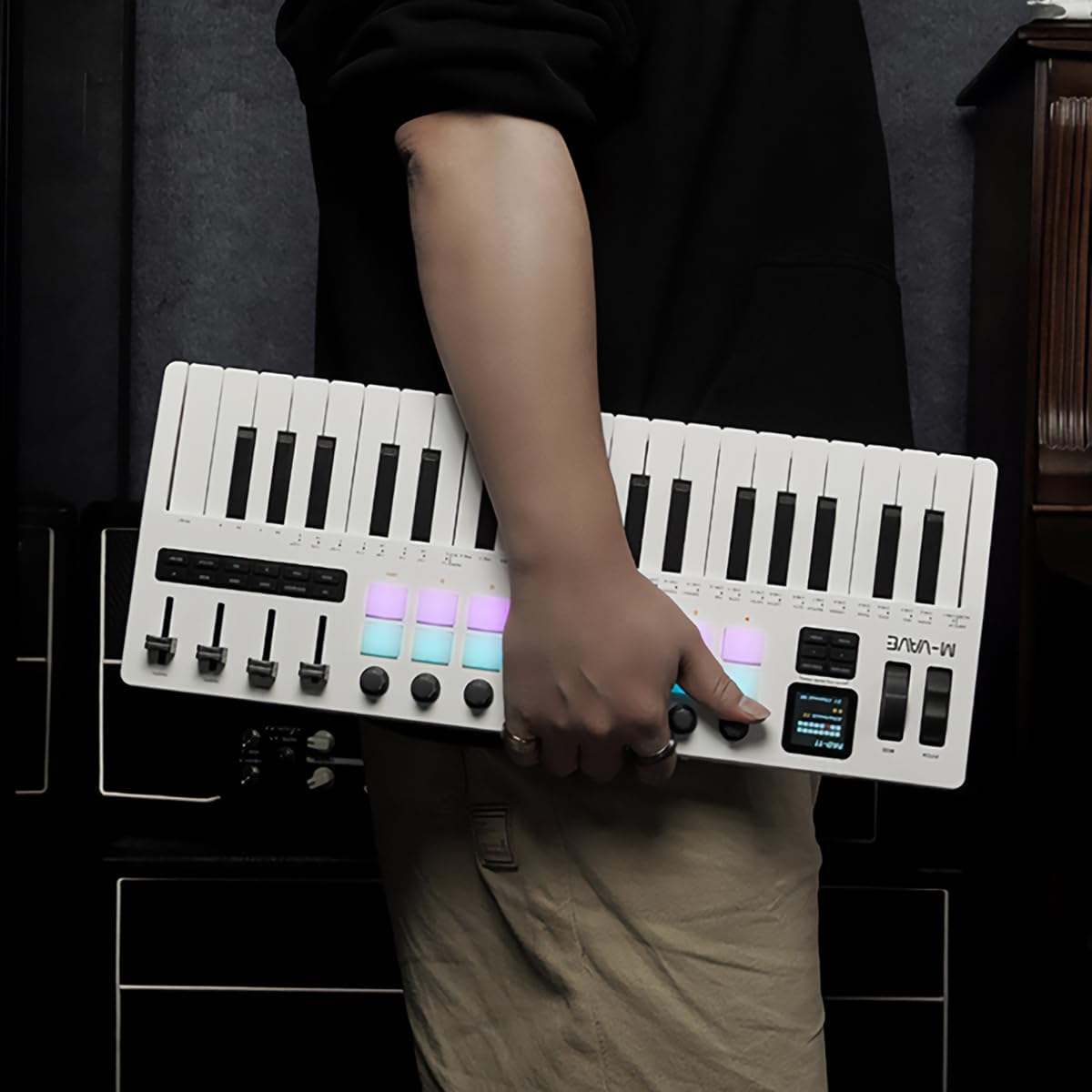
Figure 1.1: The M-Vave SMK-37 Pro is designed for portability, allowing musicians to create on the go.
2.製品オーバーview
The SMK-37 Pro is engineered to provide extensive control and sound generation capabilities. Below is an overview 主な機能とコンポーネントについて説明します。
2.1 主な特徴
- 37 velocity-sensitive keys (3 octaves) for expressive play.
- Built-in FM synthesizer engine, inspired by the Yamaha DX7.
- 16 RGB illuminated drum pads for beat making and sample トリガー。
- 8 assignable rotary knobs and 4 assignable faders for real-time control.
- USB-C connectivity for power and data, alongside Bluetooth 5.0 and 2.4G wireless MIDI.
- Integrated 2000mAh rechargeable battery for up to 8 hours of portable use.
- 1.54-inch color display for clear parameter feedback.
- Pitch bend and modulation wheels for dynamic performance.
- Octave transform and Smart Chord functions.
2.2 コンポーネントの識別

図2.1: 前面 view of the SMK-37 Pro, highlighting the keyboard, pads, and control surface.
- キーボード: 37 velocity-sensitive keys.
- パッド: 16 RGB illuminated drum pads.
- ノブ: 8 assignable rotary encoders.
- フェーダー: 4 assignable faders.
- 画面: 1.54-inch color screen for parameter visualization.
- Pitch/Mod Wheels: For expressive control.

Figure 2.2: Rear panel of the SMK-37 Pro, showing connectivity options.
- USB-Cポート: For charging and USB MIDI connection.
- 電源ボタン: デバイスの電源をオン/オフにします。
- オーディオ出力: For monitoring the built-in FM synthesizer.
3. セットアップ
Follow these steps to set up your M-Vave SMK-37 Pro.
3.1デバイスの充電
- Connect the included USB-C cable to the USB-C port on the rear of the SMK-37 Pro.
- USB-C ケーブルのもう一方の端を、互換性のある USB 電源アダプター (別売) またはコンピューターの USB ポートに接続します。
- The device will begin charging. A full charge provides up to 8 hours of operation.
3.2 電源のオン/オフ
- To power on, press and hold the Power button on the rear panel until the display illuminates.
- 電源を切るには、ディスプレイが消えるまで電源ボタンを押し続けます。
3.3 接続オプション
The SMK-37 Pro offers multiple ways to connect to your devices.
3.3.1 USB MIDI接続
- Connect the SMK-37 Pro to your computer using the USB-C cable.
- The device will be recognized as a standard MIDI input/output device by your operating system (Windows, macOS, iOS, Android).
- For Windows users, ensure you have Bluetooth 5.0 and an appropriate BLE MIDI driver installed for wireless functionality.
3.3.2 Wireless MIDI Connection (Bluetooth 5.0 / 2.4G)

Figure 3.1: Wireless connection guide for the SMK-37 Pro.
- Ensure the SMK-37 Pro is powered on.
- Activate Bluetooth on your Windows, macOS, iOS, or Android device.
- 検索する available Bluetooth devices and select "SMK-37 Pro" from the list.
- For 2.4G wireless MIDI, a compatible 2.4G receiver (sold separately) may be required. Refer to the receiver's instructions for pairing.
4. 操作手順
This section details how to use the M-Vave SMK-37 Pro as both a MIDI controller and a standalone FM synthesizer.

Figure 4.1: The SMK-37 Pro in use, showcasing its interactive controls.
4.1 MIDI Controller Mode
The SMK-37 Pro functions as a universal MIDI controller, compatible with various Digital Audio Workstations (DAWs) and software instruments.
- Connecting to DAWs: Once connected via USB or wirelessly, select "SMK-37 Pro" as a MIDI input device in your DAW's preferences (e.g., Ableton Live, FL Studio, Logic Pro, GarageBand).
- Assigning Controls: The 16 RGB pads, 8 knobs, and 4 faders can be assigned to control parameters within your DAW or VST instruments. Refer to your DAW's manual for MIDI mapping instructions.
- Keys and Wheels: The 37 velocity-sensitive keys, pitch bend, and modulation wheels transmit standard MIDI messages for expressive performance.
4.2 Built-in FM Synthesizer Mode
The SMK-37 Pro features an integrated FM synthesizer engine, allowing you to create and play sounds directly from the device without external software.

Figure 4.2: The SMK-37 Pro's internal sound source can be monitored via headphones or external speakers.
- Sound Generation: The FM synth engine is inspired by the legendary Yamaha DX7, supporting DX7 patches.
- パラメータ制御: Use the onboard knobs and faders to edit synthesizer parameters such as algorithms, filters, envelopes, and effects. The 1.54-inch color display provides visual feedback on parameter values.
- パッチ管理 Sounds can be played, edited, and stored directly on the device. Consult the on-screen menu for patch selection and saving procedures.
- オーディオ出力: Connect headphones or external speakers to the audio output jack on the rear panel to monitor the synthesizer's sound.
4.3 表示とナビゲーション

Figure 4.3: The 1.54-inch display provides clear feedback on settings and parameters.
The 1.54-inch color display is your primary interface for navigating menus, adjusting parameters, and viewing patch information. Use the dedicated navigation buttons and rotary encoders near the display to browse options and confirm selections.
4.4 特殊関数
- Octave Transform: Use the dedicated octave buttons to shift the keyboard's range up or down.
- スマートコード機能: This feature assists in playing chords with single key presses. Refer to the on-screen menu for activation and configuration.
- アルペジエーター: The built-in arpeggiator can generate rhythmic patterns from held notes. Settings for mode, octave, swing, tempo, and latch can be adjusted via the display.
5. メンテナンス
Proper care will ensure the longevity and optimal performance of your SMK-37 Pro.
- クリーニング: 柔らかく乾いた布でデバイスの表面を拭いてください。頑固な汚れには、軽く湿らせた布で拭いてください。amp 布で拭いた後、乾いた布で拭いてください。研磨剤入りの洗剤や溶剤は使用しないでください。
- ストレージ: デバイスは、直射日光、極端な温度、高湿度を避け、涼しく乾燥した場所に保管してください。
- 取り扱い: デバイスを落としたり、強い衝撃を与えたりしないでください。デバイスの上に重い物を置かないでください。
- バッテリーのケア: バッテリーを最適に長持ちさせるには、バッテリーを頻繁に完全に放電させないでください。長期間保管する場合は、数ヶ月ごとに約50%まで充電してください。
6。 トラブルシューティング
If you encounter issues with your M-Vave SMK-37 Pro, refer to the following common solutions.
| 問題 | 考えられる原因 | 解決 |
|---|---|---|
| デバイスの電源が入りません。 | Low battery or power cable not connected. | Charge the device using the USB-C cable. Ensure the power button is pressed and held correctly. |
| No sound from the built-in synth. | Volume too low, headphones/speakers not connected, or incorrect patch selected. | Check the volume level on the device and connected audio equipment. Ensure headphones or speakers are properly connected to the audio output. Select a different patch. |
| MIDI がコンピューター/DAW で認識されません。 | Incorrect connection, driver issues (Windows), or DAW settings. | Ensure USB-C cable is securely connected or Bluetooth is paired. For Windows, verify Bluetooth 5.0 and BLE MIDI driver installation. Check your DAW's MIDI input settings to ensure SMK-37 Pro is enabled. |
| ワイヤレス接続が不安定です。 | 干渉、距離、またはバッテリー残量不足。 | Move the device closer to your host device. Ensure no other wireless devices are causing interference. Charge the SMK-37 Pro. |
| Pads or keys are unresponsive. | Software issue or device malfunction. | Restart the device. If the issue persists, perform a factory reset (refer to advanced settings in the display menu). Contact support if the problem continues. |
7. 仕様
Detailed technical specifications for the M-Vave SMK-37 Pro.
- モデル名: M-Vave SMK-37 Midikeyboard w/built-in Synth
- モデル番号: MVA-SMK37 Pro
- キー: 37 velocity-sensitive keys (3 octaves)
- パッド: 16 RGB illuminated drum pads
- コントロール: 8 rotary knobs, 4 faders, Pitch bend, Modulation wheel
- 画面: 1.54インチカラーディスプレイ
- 接続性: USB-C, Bluetooth 5.0, 2.4G wireless MIDI
- バッテリー: 2000mAh充電式バッテリー内蔵
- バッテリー寿命: 最大8時間(目安)
- シンセサイザー: Built-in FM synthesizer (DX7-based)
- 互換性: Windows、macOS、iOS、Android
- サポートされているソフトウェア: Ableton Live, FL Studio, Logic Pro, GarageBand, Carl Martin Studio (and other DAWs)
- 含まれるコンポーネント: USBケーブル
- 商品の重量: 1キログラム
8. 保証とサポート
For warranty information and technical support, please contact M-VAVE customer service through their official webご購入の際は、サイトまたは販売店にお問い合わせください。購入証明書として購入レシートを保管してください。
- オンラインサポート: Visit the M-VAVE official webFAQ、ドライバーのダウンロード、連絡先情報が記載されたサイトです。
- 製品登録: 製品をオンラインで登録して、アップデートとサポートを受けてください。