
1. はじめに
This manual provides detailed instructions for the installation, operation, and maintenance of your new XTRONS Android 14 Qualcomm 665 Car Stereo. Please read this manual thoroughly before using the product to ensure proper functionality and safety.
1.1 対象モデルと年式
This car stereo is compatible with the following vehicle models and years:
- BMWの場合: E46 4-door Sedan (1998-2005), E46 2-door Coupe (1999-2006), E46 2-door Convertible (1999-2006), E46 5-door Touring (1999-2005), E46 3-door Hatchback (2000-2004), E46 M3 (2000-2006)
- For Rover: ローバー 75 (1999-2005)
- For MG: ZT (2001-2005)

Figure 1: Applicable Models & Years
1.2 重要な互換性に関する注意事項
Before installation, please check your car's center console and air-conditioning cover for compatibility. If necessary, remove the air-conditioning cover to fit the unit perfectly. Additional cables may be required depending on your vehicle's original setup.

Figure 2: Important Notes on Compatibility and Required Cables
2. 主な特徴
- 9インチQLED IPSスクリーン: 1280*800 high-definition QLED display with a capacitive touchscreen, 178° wide viewing angle, powered by Adreno 610 GPU for ultra-smooth 4K entertainment.
- 高性能CPU: Qualcomm Snapdragon 665 Octa-Core processor with 8GB RAM and 256GB ROM storage, running Android 14 for responsive performance.
- スマートフォン接続: Built-in Wireless Car Auto Play, Built-in Wireless & Wired Android Auto, and Bluetooth 5.0 for calls and voice control.
- 内蔵DSP: デジタル Amplifier Processing (TDA7808) and DTS Digital Sound (Si47925) for enhanced audio fidelity and interference immunity.
- 最適化されたCANbusデコード: Seamless integration with vehicle features like steering wheel control, ACC control, reversing control, and door status.
- 分割画面とピクチャーインピクチャー: Run two applications side-by-side or watch videos while multitasking.
- デュアルバンドWi-Fi: Supports both 2.4GHz and 5GHz bands for faster and more stable internet connectivity.
2.1 視覚的特徴

Figure 3: 9-inch QLED IPS Screen
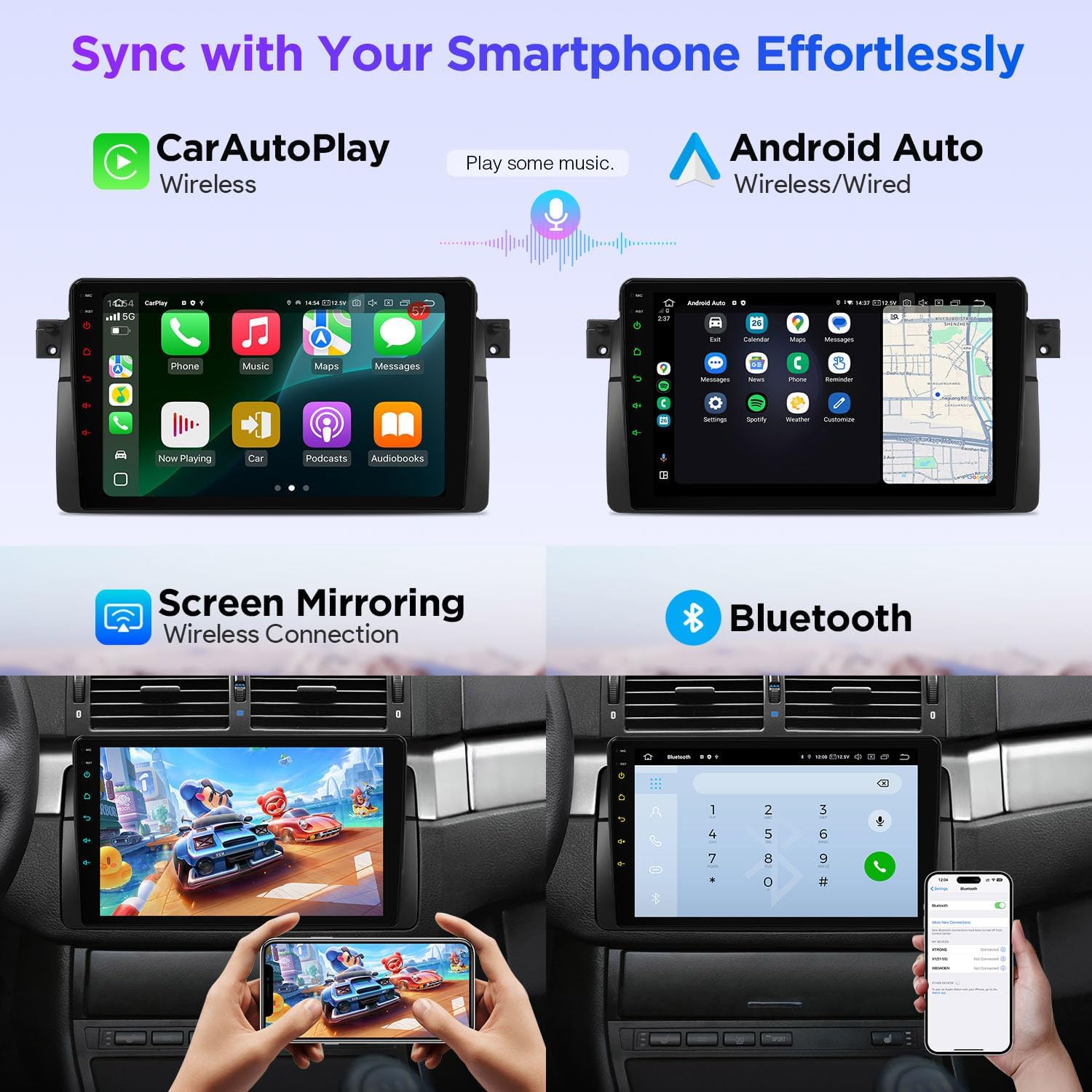
Figure 4: Smartphone Connectivity (CarPlay & Android Auto)

Figure 5: Smart and Intuitive UI with Day/Night Mode
2.2 オーディオ機能

Figure 6: DTS Digital Sound and DSP Controls
2.3 車両統合
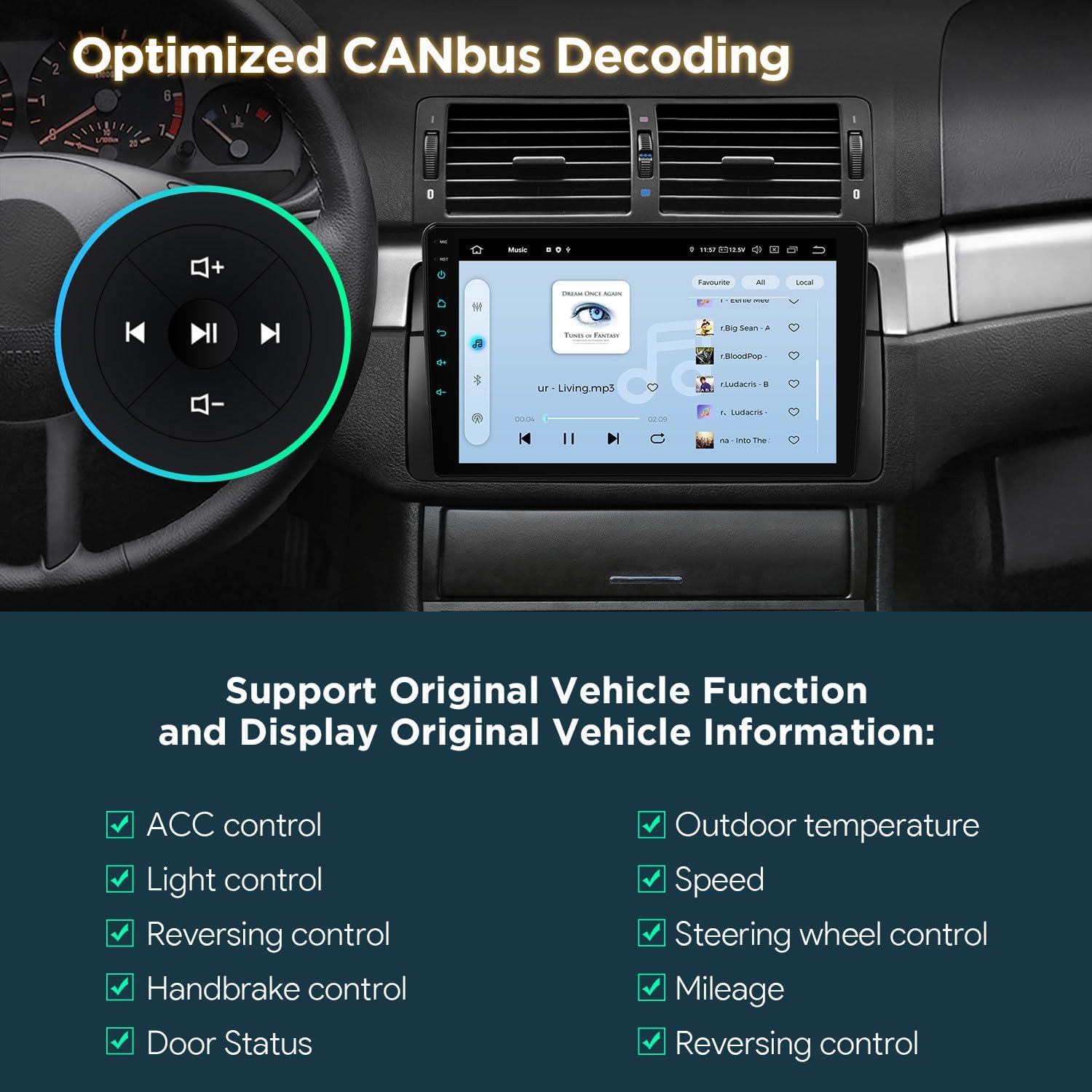
Figure 7: Optimized CANbus Decoding
3. セットアップとインストール
このセクションでは、一般的な概要を説明しますview of the installation process. For detailed, step-by-step instructions, please refer to the included English Manual and German Manual.
3.1 開梱とコンポーネント

Figure 8: Package Content and Accessories
3.2 インストールプロセス終了view
Installation typically involves removing the existing car stereo, connecting the provided wiring harness and accessories, and securing the new head unit. Ensure all connections are secure before reassembling the dashboard.
Video 1: XTRONS 9 Inch Qualcomm Car Stereo for BMW E46 M3 Rover 75 MG ZT - Product Overview and Features. This video provides a visual overview of the product's features and how it integrates into the car environment.
Video 2: Eonon Car Stereo for E46X6S - Installation Guide. This video demonstrates the installation process for a car stereo in a BMW E46, which is highly relevant for this product.
4. 操作手順
4.1 ユーザーインターフェース(UI)ナビゲーション
The unit features a smart and intuitive UI with customizable day/night modes and quick access toggles for your favorite applications. Navigate through menus by swiping and tapping the QLED touchscreen.
4.2 スマートフォン統合(CarPlayとAndroid Auto)
Connect your smartphone wirelessly via Bluetooth for Wireless Car Auto Play (iPhone) or Wireless & Wired Android Auto (Android phones). This allows access to navigation, calls, music, and voice assistants (Siri/Google Assistant) directly from the head unit.
4.3 ブルートゥース 5.0
Utilize Bluetooth 5.0 for hands-free calling and audio streaming. Pair your device through the Bluetooth settings menu on the head unit.
4.4 Built-in DSP Audio Control
Access the built-in Digital Sound Processor (DSP) to fine-tune your audio experience. Adjust equalizer settings, sound field, and other audio parameters to your preference.
4.5 分割画面とピクチャーインピクチャー
To activate split-screen mode, long-press an app icon and drag it to one side of the screen. For Picture-in-Picture, start a video and then navigate to another app; the video will continue playing in a small, movable window.
4.6GPSナビゲーション
The unit supports various GPS navigation applications. Download your preferred navigation app from the Play Store and follow its instructions for route planning and guidance.
4.7 AHD Camera Input
Connect an AHD (Analog High Definition) camera for clear rearview またはフロントview display. The system automatically switches to the camera view 後進時。
4.8 デュアルバンドWi-Fi
Connect to available Wi-Fi networks (2.4GHz or 5GHz) to access online features, download apps, and browse the internet.
5. メンテナンス
XTRONS カーステレオの寿命を延ばし、最適なパフォーマンスを確保するには、次のメンテナンス ガイドラインに従ってください。
- 画面のクリーニング: 柔らかく糸くずの出ない布でQLEDタッチスクリーンを優しく拭いてください。頑固な汚れには、軽く拭いてください。ampen the cloth with a screen cleaner designed for electronics. Avoid harsh chemicals or abrasive materials.
- ソフトウェアアップデート: Periodically check for software updates through the unit's settings menu to ensure you have the latest features and performance enhancements.
- 温度制御: ユニットを長時間極端な温度にさらさないでください。
- 接続チェック: 定期的にすべての配線接続を点検し、安全で腐食がないことを確認してください。
6。 トラブルシューティング
カーステレオで問題が発生した場合は、次の一般的なトラブルシューティング手順を参照してください。
- 電源なし: すべての電源接続を確認し、車両のイグニッションがオンになっていることを確認してください。ヒューズが破損していないことを確認してください。
- 音が出ない: Check speaker connections, volume levels, and audio settings (including DSP). Ensure the correct audio source is selected.
- タッチスクリーンが反応しない: 本体を再起動してください。問題が解決しない場合は、工場出荷時設定にリセットしてください(注:これによりすべてのユーザーデータが消去されます)。
- GPS信号が失われました: GPSアンテナが正しく取り付けられ、クリアな視界があることを確認してください。 view 空の。
- Bluetooth/Wi-Fi 接続の問題: Ensure Bluetooth/Wi-Fi is enabled on both the head unit and your device. Try re-pairing or reconnecting.
- CANbus Functions Not Working: Verify the CANbus box and cable are correctly installed and configured.
For more detailed troubleshooting or persistent issues, please consult the full English Manual or contact XTRONS customer support.
7. 仕様
| 特徴 | 説明 |
|---|---|
| ブランド | エクストロン |
| モデル | B0FMJSN8NP |
| オペレーティング·システム | アンドロイド14 |
| CPU | Qualcomm Snapdragon 665 オクタコア |
| ラム | 8GB |
| メモリストレージ容量 | 256ギガバイト |
| 画面サイズ | 9インチ |
| 表示タイプ | QLED、IPSパネル |
| 解決 | 1280*800 |
| 接続技術 | Bluetooth 5.0, USB, Dual Band Wi-Fi (2.4GHz & 5GHz) |
| 特集 | Bluetooth, Touchscreen, Built-in DSP, Wireless CarPlay, Android Auto, Optimized CANbus Decoding, Split Screen, Picture-in-Picture |
| サポートされている衛星ナビゲーションシステム | GPS |
| 制御方法 | タッチ、ボイス |
8. 箱の中身
The following components are included with your XTRONS Car Stereo:
- ISO配線ハーネス×1
- RCAケーブル1本
- ラジオアンテナケーブル×1
- 1 × 4G +Antenna (4G Function not supported in USA)
- 1 × 4G -Antenna
- GPSアンテナ×1
- 2×USBケーブル
- CANbusボックス×1
- カメラケーブル1本
- CANbusケーブル×1
- 英語マニュアル1冊
- 1 × German Manual
9.保証とサポート
9.1 保証情報
この製品には、 1年間のメーカー保証保証請求のために購入証明書を保管してください。
9.2 カスタマーサポート
技術サポート、トラブルシューティング、保証に関するお問い合わせは、XTRONSの公式カスタマーサポートまでお問い合わせください。 webサイトまたは製品パッケージに記載されている連絡先情報を参照してください。