
1. はじめに
This manual provides detailed instructions for the installation, operation, and maintenance of your Aninerel 3600W Hybrid Solar Inverter Charger, Model SPI4836M80-300P. This advanced inverter is designed to efficiently convert 48Vdc solar power to 110Vac for various applications, featuring a built-in 80A MPPT controller and pure sine wave output. It supports both battery-less operation and compatibility with AGM and Lithium battery systems.
2 製品の特徴
The Aninerel 3600W Hybrid Solar Inverter Charger offers a range of features for optimal performance and flexibility:
- ハイパワー出力: 連続出力3600W。
- 巻tage 変換: Converts 48Vdc to 110Vac.
- 高度なMPPTコントローラー: Integrated 80A MPPT (Maximum Power Point Tracking) solar charge controller for efficient solar energy harvesting, supporting up to 500Vdc maximum PV input.
- 純正正弦波出力: Ensures compatibility and safe operation for all types of home appliances.
- バッテリー互換性: Supports battery-less operation or connection with AGM, Lithium, and Flooded batteries. Includes Lithium Battery Communication (BMS).
- グリッド接続: Designed for grid-tied systems with no feedback to the grid.
- Scalable Power: Capable of connecting up to six units in parallel for a total output of 21.6kW.
- 用途の広いデザイン: Supports 120V/240V split-phase and 208V 3-phase configurations for various residential and commercial applications.
- 柔軟な設定: Customizable charging profiles, alarms, and cut-off parameters.
- ワイヤレスモニタリング: Built-in Wi-Fi for remote monitoring of your system via a smartphone application.
- 発電機接続: Allows for integration with a generator for additional power input.
- 通信ポート Includes RS485 for communication.

図1:以上view of Aninerel 3600W Hybrid Inverter features, including battery compatibility, grid connection, scalable power, versatile design, flexible settings, and wireless communication.
3.製品オーバーview およびコンポーネント
Familiarize yourself with the main components and connection ports of the inverter:

Figure 2: Detailed diagram showing the various components and ports of the Aninerel Hybrid Solar Inverter.
- インジケーターライト: ステータス表示を提供します。
- LCDスクリーン: Displays operational data and settings.
- キーパッド: Buttons for navigation and setting adjustments.
- オーバーロードプロテクター: Safety mechanism against excessive current.
- Grounding Screw Hold: Point for system grounding.
- AC出力ポート: 家庭の負荷に接続します。
- WiFi Port (Optional): For wireless monitoring module connection.
- AC入力ポート: Connects to grid or generator AC power.
- RS485-2 Communication Port: For external communication.
- RS485-1 Communication Port: For external communication.
- USB通信ポート: For data transfer or firmware updates.
- 冷却ファン: 動作中に熱を放散します。
- オン/オフロッカースイッチ: インバーターの主電源スイッチ。
- ドライコンタクトポート: 外部制御信号用。
- Current Sharing Port (Parallel Module Only): 並列運転用。
- Parallel Communication Port (Parallel Module Only): 並列運転用。
- バッテリーポート: バッテリーバンクに接続します。
- PV ポート: Connects to solar panel arrays.
4. セットアップとインストール
インバーターを安全かつ効率的に動作させるには、適切な設置が不可欠です。以下の手順を注意深くお守りください。
4.1. 配線ガイド
This video demonstrates the basic wiring procedure for the inverter, including connecting AC output and battery terminals.
Video 1: This video demonstrates general wiring steps for an Aninerel Solar Inverter, including connecting AC output and battery terminals. While the video features a 3KW 24V model, the wiring principles are similar for the 3600W 48Vdc inverter.
- Remove Port Cover: Carefully remove the bottom port cover of the inverter to access the wiring terminals.
- AC出力を接続: Connect the Live (L) and Neutral (N) wires of your main AC output to the designated terminals.
- バッテリーを接続します: Connect the positive and negative terminals of your battery bank to the corresponding battery ports on the inverter. Ensure correct polarity.
- Reinstall Port Cover: Once all connections are secure, reinstall the port cover.
重要: Always ensure the inverter is powered off before making any electrical connections. Consult a qualified electrician if you are unsure about any wiring procedures.
4.2. バッテリーの互換性
The inverter is compatible with various battery types, including Lead-Acid (AGM, GEL, Flooded) and Lithium batteries. For Lithium batteries, the inverter supports communication with Battery Management Systems (BMS) for optimized charging and discharge.

Figure 3: Illustration showing the inverter's compatibility with various 48V battery types, including GEL, FLD (Flooded), LI (Lithium), and SLD (Sealed Lead-Acid).
4.3. 並列接続
For increased power output, multiple inverters can be connected in parallel. The system supports up to six units for a maximum of 21.6kW power delivery in 120V residential systems. It also supports split-phase and 3-phase configurations.
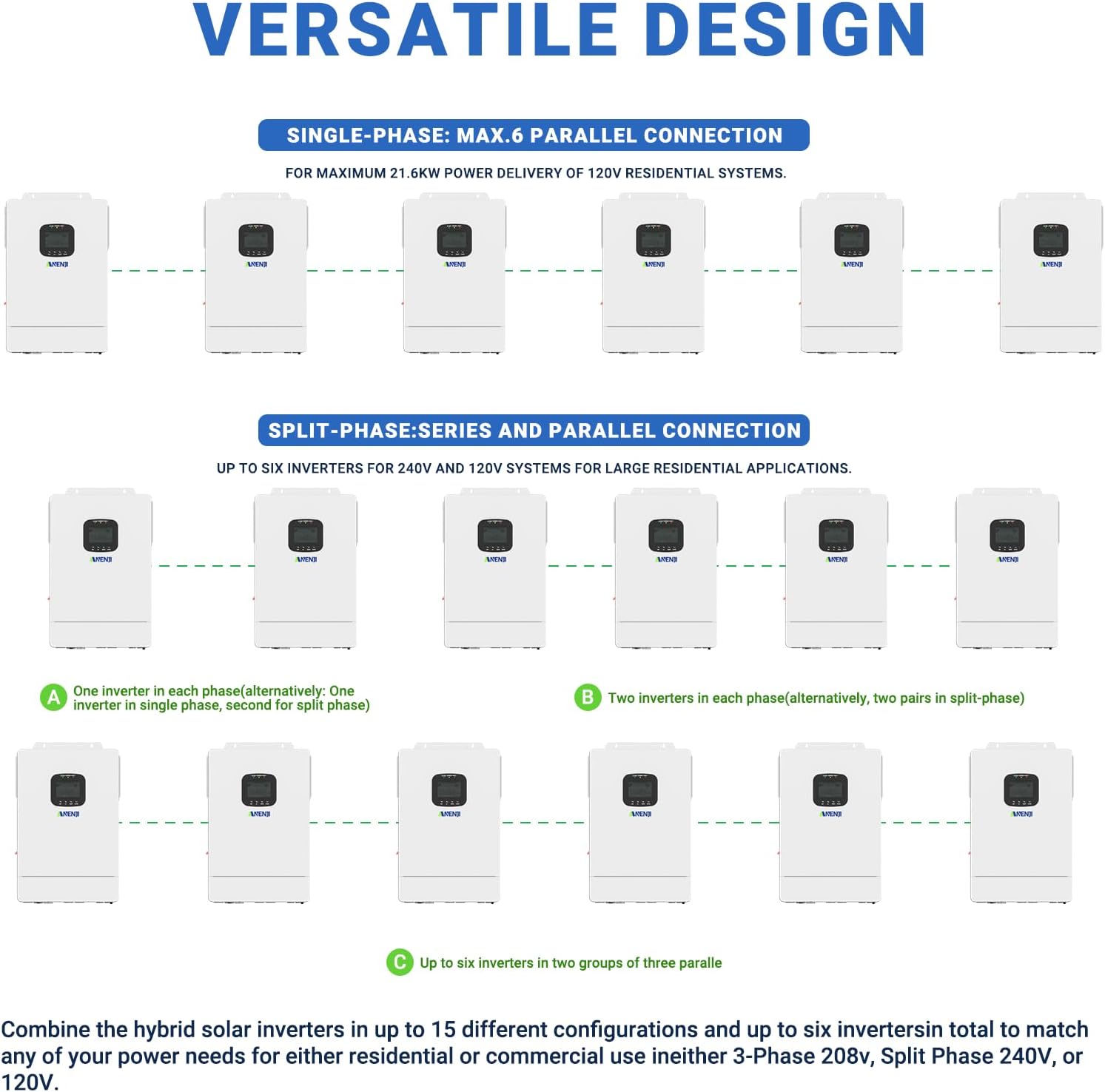
Figure 4: Diagrams illustrating single-phase and split-phase parallel connection options for the Aninerel Hybrid Inverter, showing how to combine multiple units for higher power output.
5. 操作手順
5.1. Charging Priority Settings
The inverter allows you to configure how the battery bank is charged from different power sources. You can select from the following priorities:
- 太陽光の優先順位: The inverter prioritizes solar power for charging. AC input will only charge the battery when solar power is no longer available.
- 太陽光およびAC入力: The inverter charges the battery bank from both solar and AC power simultaneously.
- 太陽光発電のみ: The inverter will only charge the battery bank from available solar power.
5.2. Load Priority Settings
Control how your appliances are powered to ensure continuous operation. Options include:
- 太陽光の優先順位: The inverter uses solar power first. If solar is insufficient, it will compensate with AC input.
- AC 優先度: The inverter uses AC input to power all loads. DC input is used only if AC input is unavailable.
- DC 優先度: The inverter prioritizes inverting from solar first. If solar is not enough, it will convert from battery power and will only power loads from AC input once the low battery warning triggers.

Figure 5: Visual guide to setting charging and load priorities on the Aninerel Hybrid Inverter, explaining Solar Priority, Solar and AC Input, Solar Only, AC Priority, and DC Priority modes.
5.3. Wi-Fiモニタリング
The inverter includes a built-in Wi-Fi module, allowing you to monitor its status and performance remotely via a smartphone application. Registration may be required to use the monitoring features.
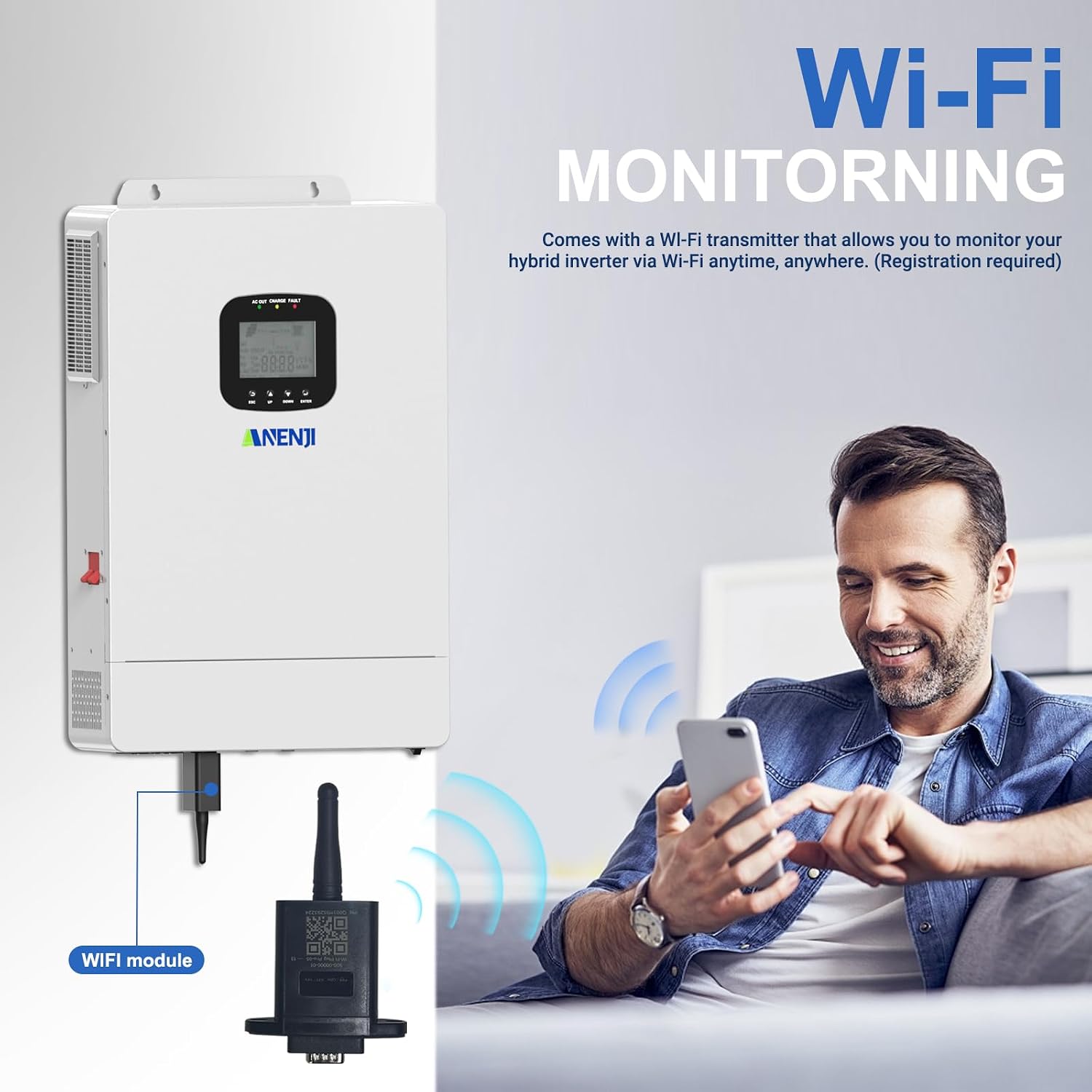
Figure 6: Diagram illustrating the Wi-Fi module connection and remote monitoring capabilities of the Aninerel Hybrid Inverter via a smartphone app.
6. メンテナンス
Regular maintenance ensures the longevity and optimal performance of your Aninerel Hybrid Solar Inverter. Always disconnect all power sources (solar, battery, AC input) before performing any maintenance.
- クリーニング: インバーターの外装は清潔に保ち、ほこりやゴミを取り除いてください。乾いた柔らかい布を使用してください。液体洗剤は使用しないでください。
- 換気: Ensure that the cooling fans and ventilation openings are not blocked. Proper airflow is essential to prevent overheating.
- 接続: Periodically check all electrical connections for tightness and signs of corrosion. Loose connections can lead to poor performance or safety hazards.
- バッテリーの検査: If using batteries, regularly inspect them for any signs of damage, leakage, or swelling. Ensure battery terminals are clean and secure.
- ファームウェアの更新: メーカーの webインバーターに最新の機能とバグ修正が適用されていることを確認するには、サイトまたは監視アプリで利用可能なファームウェア アップデートを確認してください。
7。 トラブルシューティング
This section provides solutions to common issues you might encounter with your inverter. For problems not listed here, please contact customer support.
| 問題 | 考えられる原因 | 解決 |
|---|---|---|
| インバータがオンにならない | No DC input from battery/solar; Main switch off; Loose connections. | バッテリー容量を確認するtage and solar input. Ensure the ON/OFF switch is in the 'ON' position. Verify all wiring connections are secure. |
| AC出力なし | 過負荷、短絡、インバーター障害、AC 出力ブレーカーがトリップしました。 | Reduce load. Check for short circuits in the AC wiring. Reset AC output breaker. Check LCD for error codes. |
| バッテリー残量低下tageアラーム | Insufficient charging; Excessive load; Battery degradation. | Check solar panel output and connections. Reduce load. Consider battery health and replacement if necessary. Adjust charging priority. |
| 過熱警報 | 換気が妨げられている、周囲温度が高い、負荷がかかりすぎている。 | Ensure clear airflow around the inverter. Reduce ambient temperature if possible. Decrease the connected load. |
| Wi-Fi monitoring not working | Wi-Fi module not connected; Network issues; App not configured. | Ensure the Wi-Fi module is securely connected. Check your local Wi-Fi network. Reconfigure the monitoring app settings. |
8. 仕様
Key technical specifications for the Aninerel 3600W Hybrid Solar Inverter Charger:
| 属性 | 価値 |
|---|---|
| モデル番号 | SPI4836M80-300P |
| ブランド | アニネレル |
| ワットtage | 3600ワット |
| 巻tage | 48ボルト(DC入力) |
| AC出力Voltage | 110 Vac |
| MPPTコントローラ電流 | 80A(内蔵) |
| 最大PV入力ボリュームtage | 500 Vdc |
| 電源 | 太陽光とバッテリー駆動 |
| 製品寸法(長さ x 幅 x 高さ) | 長さ29.5cm x 幅10cm x 高さ38.5cm (29.49cm x 10.01cm x 38.51cm) |
| アイテム重量 | 9.18キロ |
| メーカー | 深セン安縁吉エネルギーテクノロジー株式会社 |
| ASIN | B0FLX9RHDG |
| UPC/GTIN | 757577193368 |
9.製品付属品
The following accessories are typically included with your Aninerel 3600W Hybrid Solar Inverter Charger:
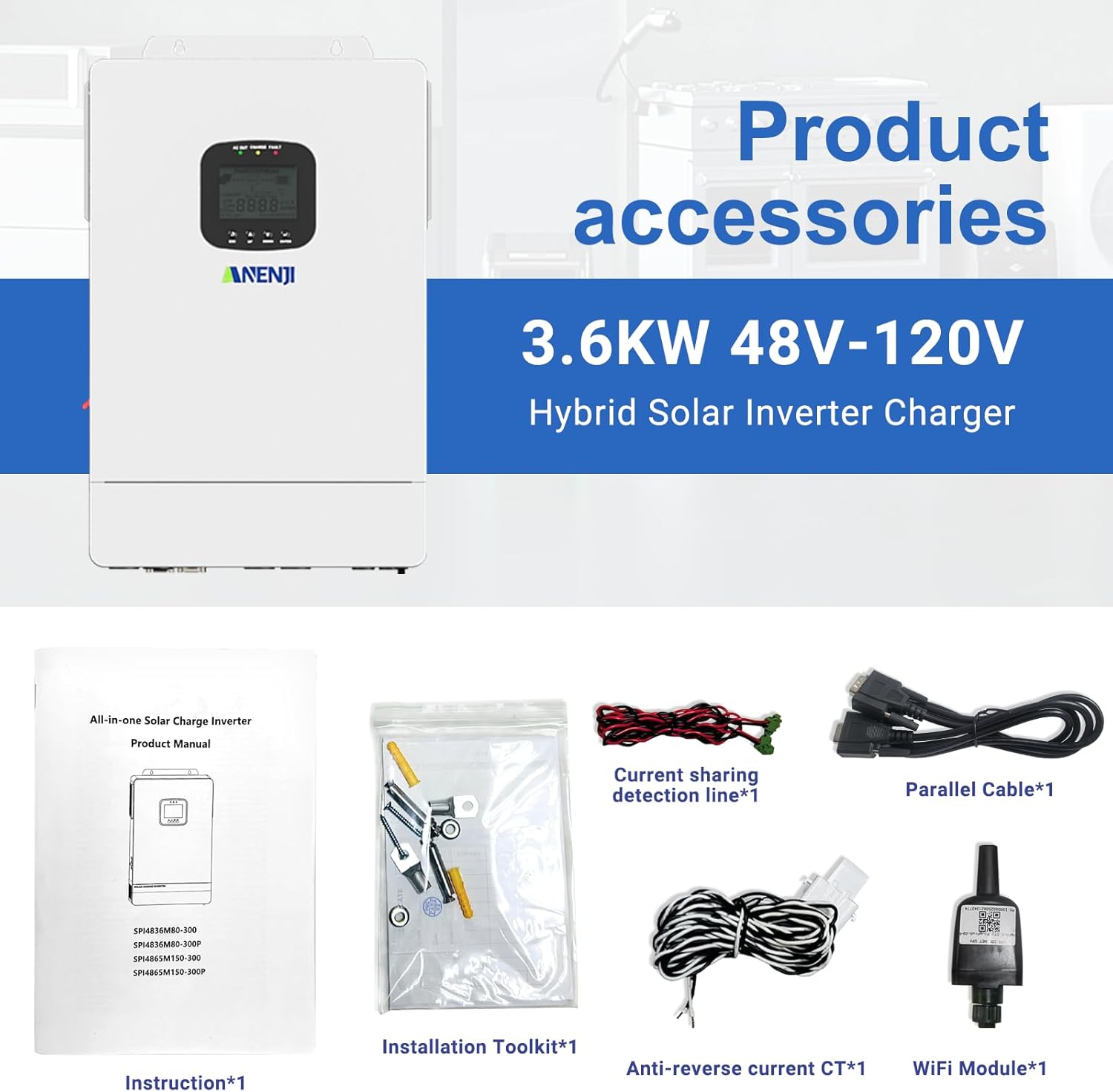
Figure 7: Image displaying the standard accessories included with the inverter, such as the instruction manual, installation toolkit, current sharing detection line, parallel cable, anti-reverse current CT, and WiFi module.
- 取扱説明書 (x1)
- Installation Toolkit (x1)
- Current Sharing Detection Line (x1)
- Parallel Cable (x1)
- Anti-reverse Current CT (x1)
- WiFi Module (x1)
10. Product Application Scenarios
The Aninerel 3600W Hybrid Solar Inverter is versatile and suitable for a wide range of applications, including:

図8:例amples of where the Aninerel Hybrid Inverter can be used, such as Solar Home Systems, Solar RV Systems, Solar Street Light Systems, Solar Power Plant Systems, Solar Vessels (Boat) Systems, and Hybrid Energy Systems.
- ソーラーホームシステム
- Solar RV Systems
- Solar Street Light Systems
- Solar Power Plant Systems
- Solar Vessels (Boat) Systems
- Hybrid Energy Systems
11. 保証とサポート
For warranty information, technical support, or service inquiries, please refer to the contact details provided with your purchase documentation or visit the official Aninerel webサイトでご確認ください。保証請求の際は購入証明として領収書を保管してください。