
製品終了view
The HP OmniDesk Desktop PC M02-0127c is a high-performance computer designed for everyday computing and productivity. It features an AMD Ryzen 7 8700G processor, 32GB DDR5 memory, and a 1TB NVMe SSD, along with integrated AMD Radeon 780M Graphics. This manual provides essential information for setting up, operating, maintaining, and troubleshooting your device.

右前 view of the HP OmniDesk Desktop PC, showcasing its minimalist black design with a wood-inspired front panel.
1.セットアップガイド
1.1 開梱と最初の配置
Carefully remove all components from the packaging. Ensure the desktop tower, wireless keyboard, and wireless mouse are present. Place the desktop on a stable, flat surface with adequate ventilation.
1.2 周辺機器の接続
Connect your monitor, keyboard, mouse, and power cable to the appropriate ports on the desktop.
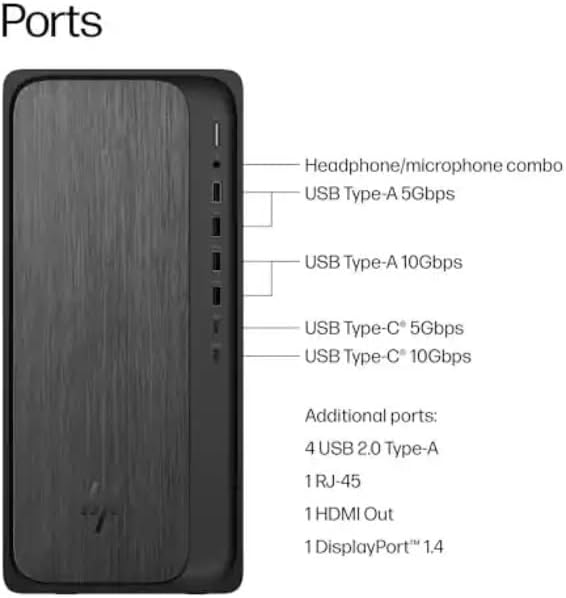
Diagram illustrating the various ports on the front and rear of the HP OmniDesk Desktop PC, including USB Type-A, USB Type-C, HDMI Out, RJ-45, and headphone/microphone combo.
- 電源接続: Connect the power cable to the power input on the rear of the desktop and then to a wall outlet.
- モニター接続: Use an HDMI cable to connect your monitor to the HDMI Out port on the rear of the desktop. The system also supports DisplayPort 1.4.
- キーボードとマウス: The included HP black wireless keyboard and mouse combo connect wirelessly. Insert the USB receiver into an available USB port on the desktop. Ensure batteries are installed in the keyboard and mouse.
1.3 最初の起動とWindows 11のセットアップ
Press the power button on the front of the desktop. The system will boot into the Windows 11 Home setup process. Follow the on-screen instructions to configure your operating system, including language, region, network connection, and user account.
2. 操作手順
2.1 電源オン/オフとスリープモード
- 電源オン: デスクトップの前面にある電源ボタンを押します。
- シャットダウン: [スタート] ボタンをクリックし、[電源] をクリックして、[シャットダウン] を選択します。
- 再起動: [スタート] ボタンをクリックし、[電源] をクリックして、[再起動] を選択します。
- 寝る: Click the Start button, then Power, and select "Sleep". The system will enter a low-power state, allowing for quick resume.
2.2 ネットワークへの接続
- Wi-Fi: Click the network icon in the taskbar, select your Wi-Fi network, enter the password, and click "Connect". The system supports Wi-Fi 6 (802.11ax).
- イーサネット: Connect an Ethernet cable from your router or modem to the RJ-45 port on the rear of the desktop for a wired network connection.
2.3 Bluetoothデバイスの使用
Bluetoothデバイスを接続するには、 設定 > Bluetoothとデバイス. Ensure Bluetooth is turned on, then click "Add device" and follow the pairing instructions for your device. The system supports Bluetooth 5.4.
2.4 Utilizing the Copilot Key
The included keyboard features a dedicated Copilot key. Press this key to instantly access your AI Assistant for enhanced productivity and quick task management within Windows 11.
3. メンテナンス
3.1 デスクトップの掃除
Regularly clean the exterior of your desktop with a soft, dry, lint-free cloth. For dust accumulation in vents, use compressed air. Ensure the system is powered off and unplugged before cleaning.
3.2ソフトウェアアップデート
Keep your Windows operating system and drivers updated to ensure optimal performance and security. Go to 設定 > Windows Update 利用可能なアップデートを確認してインストールします。
3.3 ストレージ管理
The 1TB NVMe SSD provides fast storage. Regularly manage your files and uninstall unused applications to maintain free space and system performance.
3.4 環境への配慮
The HP OmniDesk PC is designed with recycled materials and is EPEAT Gold Climate+ Registered and ENERGY STAR certified. Ensure proper disposal of electronic waste according to local regulations.
4。 トラブルシューティング
4.1 電源なし
症状: 電源ボタンを押してもデスクトップの電源が入りません。
解決:
- Verify the power cable is securely connected to both the desktop and a working wall outlet.
- 別のデバイスを使用して壁のコンセントをテストし、電力が供給されていることを確認します。
- Ensure the power supply unit (PSU) switch (if present) is in the ON position.
4.2 表示なし
症状: The desktop powers on, but nothing appears on the monitor.
解決:
- Check that the monitor is powered on and the video cable (HDMI) is securely connected to both the desktop and the monitor.
- モニターで正しい入力ソースが選択されていることを確認してください。
- 可能であれば、別のモニターまたはビデオ ケーブルでテストしてください。
4.3 System Not Booting (Advanced)
症状: The system powers on but fails to load the operating system, or displays error messages.
解決:
- Attempt to access the BIOS/UEFI settings (usually by pressing F10 or Delete during startup) to check boot order or run diagnostics.
- If installing a new operating system like Linux, ensure any existing drive encryption is disabled and consider updating the BIOS first, as noted by some users.
- If the issue persists, contact HP Support.
4.4 接続の問題
症状: Unable to connect to Wi-Fi, Bluetooth, or wired network.
解決:
- Wi-Fi/Bluetooth: Ensure wireless adapters are enabled in Windows settings. Restart your router/modem.
- イーサネット: Check cable connections. Verify router/modem status.
- 必要に応じてネットワーク ドライバーを更新します。
5. 技術仕様
| 特徴 | 詳細 |
|---|---|
| モデル名 | OmniDesk |
| モデル番号 | M02-0127c |
| プロセッサ | AMD Ryzen 7 8700G (4.2GHz base, up to 5.1GHz max boost) with AMD Ryzen AI (16 NPU TOPS) |
| オペレーティング·システム | Microsoft Windows 11 Home (64 ビット) |
| メモリ | 32 GB DDR5-5200 MT/s (Max 64 GB) |
| ストレージ | 1 TB PCIe Gen4 NVMe M.2 Solid State Drive |
| グラフィックス | AMD Radeon 780M グラフィックス (統合) |
| ワイヤレス接続 | Wi-Fi 6 (2x2) 802.11ax, Bluetooth 5.4 |
| 有線接続 | 統合された 10/100/1000 GbE LAN |
| ポート(前面) | ヘッドホン/マイクコンボ、USB Type-A 5Gbps、USB Type-A 10Gbps、USB Type-C 5Gbps、USB Type-C 10Gbps |
| ポート(背面) | USB 2.0 Type-A x 4、RJ-45 x 1、HDMI 出力 x 1、DisplayPort 1.4 x 1 |
| 寸法(長さ×幅×高さ) | 12.40インチ x 6.10インチ x 13.27インチ (31.5 cm x 15.5 cm x 33.7 cm) |
| 重さ | 12.7ポンド(5.76kg) |
| 付属周辺機器 | HP black wireless keyboard and mouse combo |
6. 保証情報
This HP OmniDesk Desktop PC M02-0127c comes with a 1年間の限定保証 from the date of purchase. This warranty covers defects in materials and workmanship under normal use. For specific terms and conditions, please refer to the warranty documentation included with your product or visit the official HP support webサイト。
保証請求のために購入証明書を保管してください。
7. カスタマーサポート
For technical assistance, troubleshooting beyond this manual, or warranty service, please contact HP Customer Support.
- オンラインサポート: 公式HPサポートにアクセスしてください webドライバー、マニュアル、トラブルシューティング ガイドのサイト。 サポート
- 電話サポート: Refer to the contact information provided in your product documentation for regional phone support numbers.
When contacting support, please have your product model number (M02-0127c) and serial number ready.