
1. はじめに
This manual provides essential information for the safe and efficient operation of your Tornado 65UA5300E 65-inch 4K Frameless Android Smart TV. Please read it thoroughly before using the product and retain it for future reference.

画像1.1:正面 view of the Tornado 65UA5300E Smart TV, showcasing its frameless design and included stand.
2. 安全情報
火災、感電、けがのリスクを軽減するために、このテレビを使用するときは常に基本的な安全上の注意事項に従ってください。
- テレビを雨や湿気にさらさないでください。
- 適切な換気を確保し、換気口を塞がないようにしてください。
- 不安定なカート、スタンド、三脚、ブラケット、またはテーブルの上にテレビを置かないでください。
- 雷雨のときや長期間使用しない場合は、テレビの電源プラグを抜いてください。
- すべてのメンテナンスは資格のあるサービス担当者に依頼してください。
3. パッケージ内容
パッケージにすべてのアイテムが揃っていることを確認します。
- Tornado 65UA5300E 65-inch 4K Frameless Android Smart TV
- リモートコントロール
- 電源ケーブル
- テレビ台(2台)
- スタンド組み立て用ネジ
- ユーザーマニュアル(このドキュメント)
4. セットアップ
4.1 開梱
テレビを梱包から慎重に取り出してください。将来の輸送や修理に備えて、元の梱包は保管しておくことをお勧めします。
4.2 スタンドの取り付け
If you are not wall-mounting the TV, attach the included stand pieces. Place the TV face down on a soft, flat surface to prevent screen damage. Align each stand piece with the corresponding slots on the bottom of the TV and secure them with the provided screws.
画像4.1: 下部 view of the TV, illustrating the designated areas for stand attachment.
4.3 壁面への取り付け
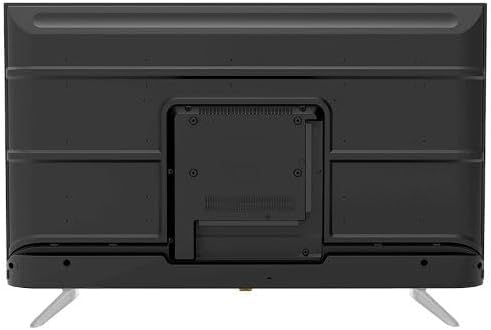
For wall mounting, remove the stand (if attached). Use a VESA-compatible wall mount (not included) that supports the TV's weight and dimensions. Consult a professional for wall mounting to ensure safety and proper installation.

画像4.2:リア view of the TV, highlighting the VESA mounting pattern and various input/output ports.
4.4 周辺機器の接続
適切なポートを使用して外部デバイスをテレビに接続します。
- HDMI: For high-definition devices like Blu-ray players, gaming consoles, or set-top boxes. The TV has 3 HDMI ports, one with ARC support.
- USB: For connecting USB storage devices to play media (video, photos, music). The TV has 2 USB ports.
- LAN: 有線インターネット接続用。
- RF入力: For connecting an antenna or satellite dish for the built-in digital receiver.
- デジタルオーディオ出力 (光): 外部オーディオシステムに接続します。
- ヘッドホンジャック(3.5mm): ヘッドホン接続用。

画像4.3: 側面 view of the TV, illustrating the accessible side input ports.
4.5 初回電源投入とセットアップウィザード
After connecting the power cable, press the power button on the remote control or TV. The TV will guide you through an initial setup wizard, including language selection, network connection (Wi-Fi or LAN), channel scanning, and Google account setup for Android TV features.
5. テレビの操作
5.1 リモートコントロールオーバーview
The included remote control allows you to navigate the TV's functions. It features dedicated buttons for power, volume, channel, input selection, smart TV apps (Netflix, YouTube, Prime Video, Disney+), Google Assistant voice search, and menu navigation.
5.2 基本機能
- 電源オン/オフ: 電源ボタンを押します。
- 音量コントロール: 音量アップ/ダウンボタンを使用します。
- チャンネル選択: Use the Channel Up/Down buttons or numeric keypad.
- 入力ソース: Press the 'Input' button to select between HDMI, AV, TV, etc.
5.3 スマートテレビの機能(Android 11)
Your TV runs on Android 11, providing access to a wide range of smart features:
- 用途: Access pre-installed apps like Netflix, YouTube, Prime Video, Disney+, Shahid VIP, and download more from the Google Play Store.
- Google アシスタント: 検索、制御、情報にはリモコン経由の音声コマンドを使用します。
- Chromecastビルトイン: スマートフォンやタブレットのコンテンツをテレビに直接キャストします。
- Web ブラウザ: テレビで直接インターネットを閲覧できます。
- Bluetooth 5.0: ワイヤレスヘッドフォン、スピーカー、またはその他の Bluetooth デバイスを接続します。
5.4 画像とサウンドの設定
カスタマイズ viewテレビの設定メニューから、視聴体験を調整できます。
- 画像モード: Select from Dynamic, Game, Sports, Cinema, or User-defined modes.
- 色温度: Adjust to Normal, Cool, or Warm.
- サウンドモード: Choose from Smart, User, Game, Movie, Music, or News.
- ドルビーデジタルプラス: Enhanced audio processing for compatible content.
6. メンテナンス
6.1 テレビの掃除
- 画面: 柔らかく糸くずの出ない布で画面を優しく拭いてください。頑固な汚れには、テレビ専用のクリーナーを布に含ませて使用してください。画面に直接拭き取るのではなく、布に含ませてください。
- 体: テレビのフレームと背面パネルは、柔らかく乾いた布で拭いてください。研磨剤入りの洗剤や溶剤は使用しないでください。
6.2ソフトウェアアップデート
Ensure your TV's software is up to date for optimal performance and security. Connect the TV to the internet and check for updates periodically through the settings menu.
7。 トラブルシューティング
問題が発生した場合は、次の一般的な解決策を参照してください。
| 問題 | 考えられる解決策 |
|---|---|
| 電源なし | Check if the power cable is securely plugged into the TV and the wall outlet. Ensure the outlet is functional. |
| 映像はないが、音声はある | 入力ソースを確認してください。外部デバイスの電源がオンになっており、正しく接続されていることを確認してください。 |
| 音はないが、映像は表示される | Check the volume level and mute status. Verify audio settings and external audio connections. |
| リモコンが動作しない | 電池を交換してください。リモコンとテレビの赤外線センサーの間に障害物がないことを確認してください。 |
| Wi-Fiに接続できません | ルーターとモデムを確認してください。Wi-Fiパスワードを再度入力してください。テレビとルーターを再起動してみてください。 |
問題が解決しない場合は、カスタマー サポートにお問い合わせください。
8. 仕様
| 特徴 | 詳細 |
|---|---|
| モデル番号 | 65UA5300E |
| 画面サイズ | 65インチ |
| ディスプレイ技術 | 導かれた |
| 解決 | 4K UHD(3840 x 2160) |
| アスペクト比 | 16:9 |
| View角度 | 178度 |
| 輝度 | 250 cd/m² |
| リフレッシュレート | 50/60Hz |
| HDR サポート | HDR10、HLG |
| オーディオ技術 | Dolby Digital Plus, Surround Sound |
| オーディオ出力 | 10W×2 |
| オペレーティング·システム | アンドロイド11 |
| 内部メモリ | 16ギガバイト |
| 接続性 | Wi-Fi、Bluetooth 5.0、LAN |
| 入力 | RF Input (Digital) x1, Video Input x1, HDMI x3 (ARC), USB x2, LAN x1 |
| 出力 | Digital Audio Output (Optical) x1, Headphone Jack (3.5mm) x1 |
| 電源 | AC90~240V/50Hz |
| スタンバイ電力 | 0.5W |
| 寸法(幅×高さ×奥行き)スタンドなし | 1446 x 832 x 84 ミリメートル |
| 寸法(幅×高さ×奥行き)スタンド付き | 1446 x 892 x 305 ミリメートル |
| 正味重量 | 15.32キロ |
| 総重量 | 21.32キロ |
| 原産国 | エジプト |
9. 保証
This Tornado TV comes with a 3年間の完全無料保証. Please retain your proof of purchase for warranty claims. For specific terms and conditions, refer to the warranty card included with your product or contact Tornado customer service.
10. サポート
For further assistance, technical support, or service inquiries, please contact Tornado customer service. Contact details can typically be found on the manufacturer's official webサイトまたは保証書に記載されています。