
導入
This manual provides detailed instructions for the assembly, operation, and maintenance of your Cooler Master Elite 502 White ATX High Airflow Minimalist PC Case. Please read this manual thoroughly before beginning installation to ensure proper setup and optimal performance.
製品終了view
The Cooler Master Elite 502 is an ATX mid-tower PC case designed for high airflow and compatibility with modern components. It features a high-performance mesh front panel and supports a wide range of hardware configurations.
主な特徴:
- マザーボードの互換性: ATX および Micro-ATX マザーボードをサポートします。
- GPU クリアランス: 最大長さ 410mm のグラフィック カードに対応します。
- 冷却サポート: Supports up to a 360mm liquid cooler and seven fans for efficient thermal management.
- コンポーネントクリアランス: CPU coolers up to 170mm height, PSUs up to 170mm length.
- エアフロー設計: Large, unrestricted intake grill for superior airflow.
- フロントI / O: Integrated USB Type-C port.

図 1: マザーボードの互換性。 This image illustrates the dimensions for ATX (12.0 in x 9.6 in) and Micro-ATX (9.6 in x 9.6 in) motherboards, demonstrating the case's support for both form factors.

Figure 2: GPU Clearance. 内部の view of the case showing the maximum GPU length of 410mm, indicating ample space for high-performance graphics cards.

Figure 3: Cooling Support. This image highlights the areas within the case that support liquid coolers up to 360mm and multiple cooling fans for optimal thermal efficiency.
セットアップとインストール
Follow these steps for proper assembly of your PC components within the Elite 502 case.
- ケースを準備する:
Carefully remove the side panels. The tempered glass side panel is typically secured with thumb screws at the rear. The opposite side panel may also use thumb screws or a latch mechanism. Place the case on a stable, flat surface.

Figure 4: Case Interior. An unobstructed view of the case's interior, showing the motherboard tray, drive bays, and cable management cutouts, ready for component installation.
- Install the Power Supply Unit (PSU):
Mount the PSU into its designated compartment at the bottom rear of the case. Secure it with screws. Ensure proper cable routing through the PSU shroud cutouts.

Figure 5: PSU Shroud. This image displays the ventilated PSU cover, designed to efficiently cool the power supply unit regardless of its orientation.
- マザーボードをインストールします。
Align your ATX or Micro-ATX motherboard with the standoffs inside the case. Secure the motherboard with screws. Connect the front panel headers (power, reset, USB, audio) to the motherboard. The case includes a USB Type-C port on the front I/O panel.

Figure 6: Front I/O Panel. 詳細な view of the integrated USB Type-C port and other front panel connectors, facilitating modern connectivity.
- ストレージドライブをインストールします。
Install 2.5-inch SSDs or 3.5-inch HDDs into the designated drive bays. Refer to the case's internal layout for specific mounting points, often located behind the motherboard tray or within the PSU shroud area.
- グラフィック カード (GPU) をインストールします。
Insert your graphics card into the appropriate PCIe slot on the motherboard. Secure it with the retention clip and a screw to the case's expansion slots. Ensure the GPU length does not exceed 410mm.
- 冷却コンポーネントをインストールします。
Install CPU cooler (up to 170mm height) and any additional case fans or liquid cooling radiators. The case supports up to a 360mm liquid cooler. Ensure fans are oriented for optimal airflow (intake at front/bottom, exhaust at rear/top).

Figure 7: Unrestricted Airflow. This image demonstrates the effective airflow through the front mesh panel, highlighting the case's design for optimal cooling performance.

Figure 8: Large Intake Grill. 詳細な view of the front panel's large intake grill, designed to maximize air intake for efficient cooling.
- ケーブル管理
Route all cables neatly behind the motherboard tray using the provided cutouts and tie-down points. This improves airflow and aesthetics.
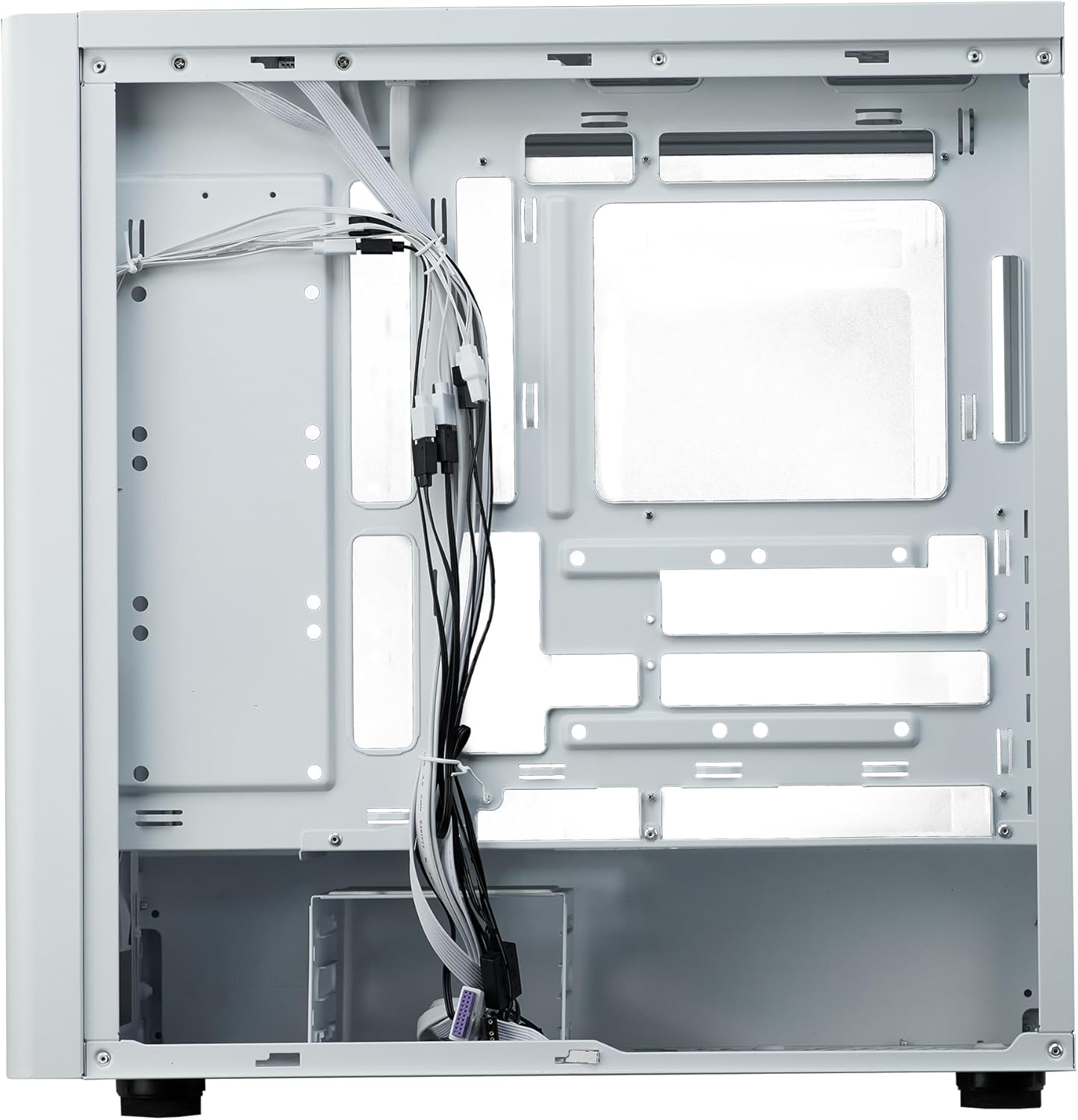
図 9: ケーブル管理。 内部の view from the rear side of the case, illustrating the space and tie-down points available for organized cable routing.
- ケースを閉じる:
Once all components are installed and cables are managed, reattach the side panels. Ensure they are securely fastened.
操作手順
The Cooler Master Elite 502 is designed for continuous operation once components are properly installed. Ensure adequate ventilation around the case to maintain optimal temperatures.
- 電源オン: Press the power button located on the front I/O panel to start your system.
- 気流: The case's design prioritizes high airflow. Ensure the front mesh panel and any top/rear fan exhausts are not obstructed.
- 接続性: Utilize the front panel USB ports, including the USB Type-C, for convenient peripheral connections.
メンテナンス
定期的なメンテナンスは、PC ケースとコンポーネントの寿命とパフォーマンスの維持に役立ちます。
- ダストクリーニング: Periodically clean dust filters (front, top, bottom) to maintain optimal airflow. The front mesh panel is removable for easy cleaning.
- インテリアクリーニング: 圧縮空気を使用して、内部部品やファンブレードの埃を除去します。清掃前に、システムの電源をオフにし、プラグを抜いてください。
- ケーブル管理チェック: Occasionally verify that internal cables remain neatly routed and do not obstruct airflow or fan operation.
トラブルシューティング
問題が発生した場合は、次の一般的なトラブルシューティング手順を検討してください。
- 電源なし:
Check all power connections, including the PSU to the wall outlet, PSU to motherboard, and front panel power switch header to the motherboard. Ensure the PSU switch is in the 'ON' position.
- 過熱:
Verify all case fans and CPU cooler fans are spinning correctly. Clean any dust filters or internal components that may be obstructing airflow. Ensure proper fan orientation (intake/exhaust).
- フロントパネルのUSB/オーディオが機能しない:
Confirm that the front panel USB and audio headers are correctly connected to the motherboard. Check motherboard manual for correct pin assignments.
- ルーズコンポーネント:
If experiencing intermittent issues, power down the system and check that all components (GPU, RAM, storage drives) are securely seated in their slots and properly fastened.
仕様
| 特徴 | 詳細 |
|---|---|
| ブランド | クーラーマスター |
| モデル名 | Elite 502 White |
| 商品型番 | E502-WGNN-SAZ |
| ケースタイプ | ミッドタワー |
| マザーボードの互換性 | ATX、マイクロATX |
| GPU クリアランス | 最大410mm |
| CPUクーラーの高さ | 最大170mm |
| PSUの長さ | 最大170mm |
| 液体冷却サポート | Up to 360mm radiator |
| ファンサポート | 最大7人のファン |
| フロントI / Oポート | USB 3.0 x 1、USB Type-C x 1 |
| 材料 | 合金鋼、強化ガラス |
| 色 | 白 |
| アイテム重量 | 17.73ポンド(8.04kg) |
| 製品寸法(長さx幅x高さ) | 18.66 x 18.94 x 9.06 インチ (47.4 x 48.1 x 23.0 cm) |

図10: 製品の寸法 An illustration detailing the length, width, and height of the Cooler Master Elite 502 case.
保証とサポート
保証情報およびテクニカルサポートについては、Cooler Masterの公式ウェブサイトをご覧ください。 web購入サイトをご覧いただくか、カスタマーサービスに直接お問い合わせください。保証請求のために購入証明書を保管してください。
- 正式 Webサイト: www.coolermaster.com
- カスタマーサポート: 公式のサポートセクションを参照してください web連絡先の詳細と FAQ については、こちらのサイトをご覧ください。