
導入
Welcome to the world of robotics with your new Xtrem Bots Bionic Robot! This interactive robot is designed to provide an engaging and educational experience, allowing users to explore basic programming concepts and remote control operation. With its versatile movement modes, LED lights, and robotic sounds, the Bionic Robot offers hours of interactive fun.

Image: The Xtrem Bots Bionic Robot in white and green, standing next to its white remote control.
パッケージ内容
- 1 x Xtrem Bots Bionic Robot (Model XT3803418)
- リモコン x 1
- 取扱説明書(本書)
設定
1. バッテリーの取り付け
The Xtrem Bots Bionic Robot requires 2 AA batteries (included) for operation.
- Locate the battery compartment on the back of the robot.
- 小さなドライバー(付属していません)を使用して、電池ボックスのカバーを開きます。
- 正しい極性 (+/-) を確認して、単三電池 2 本を挿入します。
- 電池カバーを取り付けて、ネジで固定します。
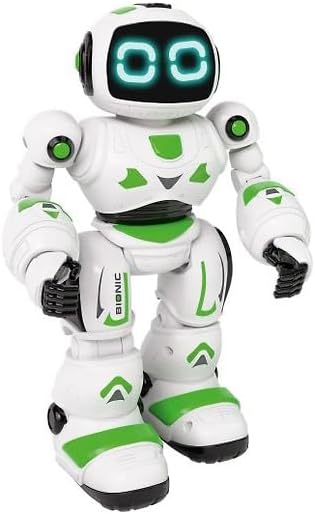
画像: 正面 view of the Xtrem Bots Bionic Robot, showing its design.
2. 電源のオン/オフ
- To power on the robot, locate the power switch on its back and slide it to the "ON" position.
- To power off the robot, slide the power switch to the "OFF" position.
- Ensure the remote control also has batteries installed and is powered on to establish a connection.
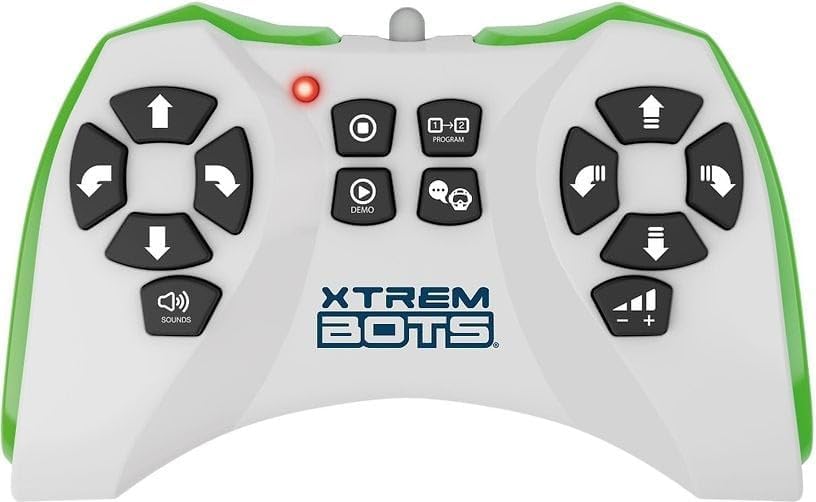
Image: The remote control for the Xtrem Bots Bionic Robot, showing various buttons for movement and functions.
操作手順
リモートコントロール機能
The remote control allows you to command your Bionic Robot with various actions. Familiarize yourself with the buttons and their corresponding functions:
- 移動コントロール: Use the directional buttons to make the robot move forward, backward, turn left, and turn right.
- スライドモード: The robot can perform sliding movements.
- 歩行モード: The robot can perform walking movements.
- プログラミング: Utilize the programming function to create sequences of up to 20 different actions.
- LEDライト: The robot's eyes feature LED lights that illuminate during operation.
- Robotic Sound: The robot produces various robotic sounds.
プログラミング関数
To program a sequence of actions:
- Press the "Program" button on the remote control.
- Input your desired sequence of movements and actions (up to 20 steps).
- Press the "Program" button again to execute the programmed sequence.
Video: Demonstration of a remote control robot's programmable functions, including movement, sounds, and gesture sensing.
メンテナンス
- クリーニング: Wipe the robot and remote control with a dry, soft cloth. Do not use water or cleaning solutions.
- ストレージ: Store the robot and remote control in a cool, dry place away from direct sunlight when not in use. Remove batteries if storing for extended periods.
- バッテリーのケア: 必ず推奨されている種類の新しい電池を使用してください。古い電池と新しい電池、または異なる種類の電池を混ぜて使用しないでください。
トラブルシューティング
| 問題 | 考えられる原因 | 解決 |
|---|---|---|
| Robot does not respond. | Batteries are low or incorrectly installed. Remote control is off or out of range. | Check and replace batteries in both robot and remote. Ensure remote is within operating range. Power cycle both devices. |
| ロボットが不規則に動きます。 | Interference from other electronic devices. Low battery power. | Move to an area with less electronic interference. Replace batteries. |
| Programming sequence is incorrect. | Incorrect button presses during programming. | Clear the current program and re-enter the sequence carefully. |
仕様
| 特徴 | 詳細 |
|---|---|
| モデル番号 | XT1 |
| ブランド | エクストリームボット |
| 寸法 | 30 x 20 x 15 cm |
| 重さ | 500グラム |
| 材料 | プラスチック |
| 色 | 緑 |
| 電池のタイプ | 単三電池2本(付属) |
| 組み立てが必要 | いいえ |
| 特集 | LED Lights, Robotic Sound, Programmable (up to 20 functions), Walk and Slide Movement Modes |
| 教育目標 | Introduce children to programming concepts and provide an educational, fun experience. |
安全情報
- 部品が小さいため、3歳未満のお子様には適していません。
- 遊ぶ際は大人の監督のもとで行ってください。
- Do not operate near stairs, water, or other hazards.
- Do not attempt to modify or disassemble the robot or remote control.
- 電池は地域の規制に従って責任を持って廃棄してください。
保証とサポート
For warranty information or technical support, please refer to the contact details provided on the product packaging or visit the official Xtrem Bots webサイト。