
1. はじめに
ご購入ありがとうございますasing the Surge Wireless Pro Controller. This controller is designed for multi-platform compatibility, offering an enhanced gaming experience across various devices. Please read this manual carefully before use to ensure proper operation and to maximize your gaming enjoyment.
主な特徴:
- Multi-Platform Compatibility: Nintendo Switch/Switch 2 (Note: No C Button/Audio Port support for Switch 2), Windows PC, Steam Deck, Android, and iOS devices.
- Hall Effect Thumb Sticks & Triggers: Provides precise control and reduces the likelihood of stick drift.
- Turbo Functionality: Offers three adjustable turbo levels for rapid-fire control.
- Vibration Feedback: Four adjustable vibration levels for customizable haptic feedback.
- Motion Controls: Supports motion sensing in compatible games.
- Console Wake Up: Ability to wake the Nintendo Switch console from sleep mode (Nintendo Switch only).
- Rechargeable Battery: Built-in 600mAh Li-polymer battery provides up to 10 hours of play.
- USB-C Charging: Includes a 1-meter USB-C charging cable.
2. パッケージ内容
- 1 x Surge Wireless Pro Controller
- USB-C充電ケーブル(1メートル)×1
- 取扱説明書 x 1
3. コントローラーのレイアウト
Familiarize yourself with the buttons and features of your Surge Wireless Pro Controller.
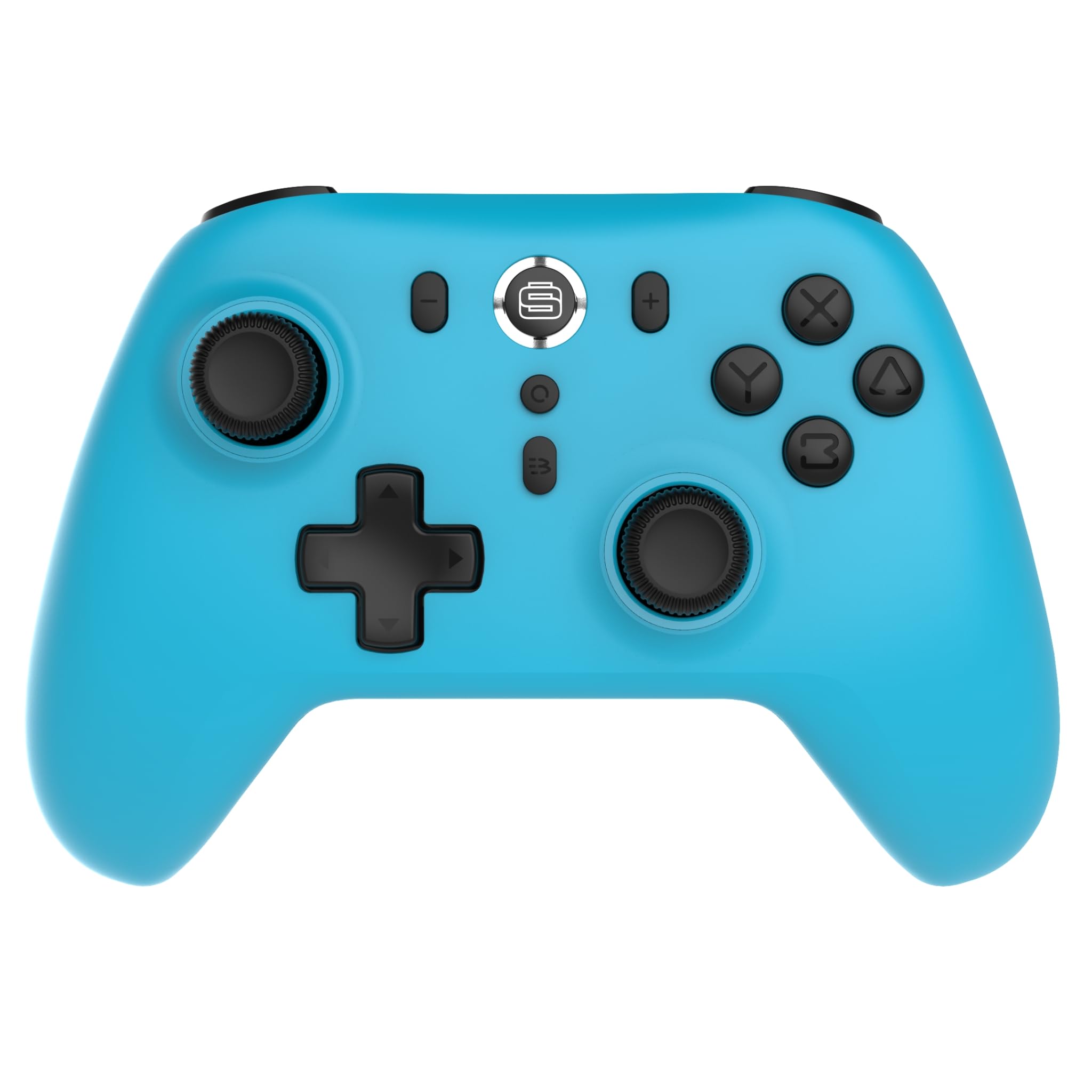
フロント view of the Surge Wireless Pro Controller, showing the D-pad, left and right analog sticks, A/B/X/Y buttons, Home button, Capture button, Plus and Minus buttons, and the Surge logo button.

戻る view of the Surge Wireless Pro Controller, showing the textured grips and the charging port.
4. セットアップとペアリング
The Surge Wireless Pro Controller supports multiple connection methods depending on your device.

This image displays the various platforms compatible with the Surge Wireless Pro Controller, including Nintendo Switch, Nintendo Switch 2, Windows PC, Android, and iOS.
4.1. Pairing with Nintendo Switch / Switch 2
- ホームメニューから、 コントローラー > グリップ/順序の変更.
- コントローラーで、 ホームボタン for 3-5 seconds until the indicator lights begin to flash rapidly.
- ペアリングされると、コントローラーのインジケーター ライトが点灯したままになります。
- To wake the console from sleep mode, press the ホームボタン コントローラーで。
4.2. Pairing with Windows PC
- PC で Bluetooth が有効になっていることを確認してください。
- へ移動 Bluetoothとその他のデバイスの設定 PC上で。
- 選択 Bluetoothまたはその他のデバイスを追加する > ブルートゥース.
- コントローラーで、 ホームボタン for 3-5 seconds until the indicator lights begin to flash rapidly.
- PC で使用可能なデバイスのリストからコントローラーを選択します。
- ペアリングされると、コントローラーのインジケーター ライトが点灯したままになります。
4.3. Pairing with Android / iOS Devices
- Android または iOS デバイスで Bluetooth を有効にします。
- デバイスの Bluetooth 設定メニューに移動します。
- コントローラーで、 ホームボタン for 3-5 seconds until the indicator lights begin to flash rapidly.
- 利用可能なデバイスのリストからコントローラーを選択します。
- ペアリングされると、コントローラーのインジケーター ライトが点灯したままになります。
5. 操作機能
5.1. Hall Effect Thumb Sticks & Triggers
The controller is equipped with Hall Effect technology for its thumb sticks and triggers. This technology uses magnets and electrical conductors to detect position, providing enhanced precision and significantly reducing the risk of stick drift over time compared to traditional potentiometers.

This image highlights the Hall Effect thumbsticks and triggers, emphasizing their role in providing precise inputs and preventing stick drift.
5.2. ターボ機能
The Turbo function allows for rapid, repeated input of a button press. This controller features 3 adjustable turbo levels.
- Turbo を有効にするには: を押し続けます ターボボタン, then press the desired action button (A/B/X/Y, L1/R1, L2/R2, D-pad directions). The button will now rapidly repeat its input when held.
- ターボ速度を調整するには: With Turbo active on a button, press and hold the ターボボタン そして、 右アナログスティックの上または下 to cycle through the 3 speed levels.
- Turboを無効にするには: を押し続けます ターボボタン、同じアクションボタンをもう一度押します。
5.3. 振動フィードバック
The controller provides haptic feedback through vibration. You can choose from 4 vibration levels.
- To adjust Vibration level: を押し続けます バイブレーションボタン (if present, or a designated button combination, refer to specific button mapping if available) and move the 左アナログスティックの上または下 to cycle through the 4 levels (Off, Low, Medium, High).
5.4. モーションコントロール
The controller supports motion controls for compatible games, particularly on Nintendo Switch/Switch 2. This allows for intuitive gameplay where physical movement of the controller translates into in-game actions.

This image visually represents the controller's advanced features, including Turbo Function, Motion Controls, and Rumble Vibration, enhancing the gaming experience.
6. 充電
The controller is equipped with a built-in 600mAh Li-polymer battery, providing up to 10 hours of gameplay on a single charge.

This image shows the controller being held, emphasizing its internal rechargeable battery for extended play sessions.
- Connect the included USB-C charging cable to the controller's USB-C port.
- Connect the other end of the cable to a USB power source (e.g., console, PC, USB wall adapter).
- The indicator lights on the controller will show charging status (e.g., blinking while charging, solid when fully charged).
- フル充電には通常約2〜3時間かかります。
7. メンテナンス
コントローラーの寿命を延ばし、最適なパフォーマンスを確保するには、次のメンテナンス ガイドラインに従ってください。
- クリーニング: コントローラーは柔らかく乾いた布で拭いてください。頑固な汚れには、軽くamp布を水で拭いてください。刺激の強い化学薬品や研磨剤入りの洗剤の使用は避けてください。
- ストレージ: コントローラーは、直射日光や極端な温度を避け、涼しく乾燥した場所に保管してください。
- ドロップを避ける: 内部コンポーネントを損傷する可能性のある落下や衝撃からコントローラーを保護します。
- 液体への暴露: コントローラーを水やその他の液体にさらさないでください。
8。 トラブルシューティング
If you encounter issues with your Surge Wireless Pro Controller, please refer to the following common solutions:
| 問題 | 解決 |
|---|---|
| コントローラーがオンになりません。 | コントローラーが充電されていることを確認してください。USB-Cケーブルを使用して電源に接続してください。 |
| コントローラーがペアリングされません。 | Ensure the controller is in pairing mode (indicator lights flashing rapidly). Check that Bluetooth is enabled on your device. Try restarting both the controller and the device. |
| 入力の遅れや切断。 | Ensure the controller is within range of the device. Reduce interference from other wireless devices. Ensure the controller is fully charged. |
| ボタンやスティックが反応しません。 | Try resetting the controller (if a reset button is available, typically a small pinhole on the back). Ensure no debris is obstructing the buttons. |
| 振動が機能しません。 | Check the vibration settings on the controller and in the game. Ensure the vibration level is not set to 'Off'. |
9. 仕様
| 特徴 | 詳細 |
|---|---|
| モデル番号 | SG60095 |
| 電池のタイプ | 1 Nonstandard Battery (Li-polymer, 600mAh) |
| バッテリー寿命 | 最大10時間(約) |
| 充電ポート | USB-C |
| 寸法 | 20.5 x 14 x 6.6 cm |
| 重さ | 320グラム |
| 原産国 | 中国 |
10. 保証とサポート
For warranty information and customer support, please refer to the documentation included with your purchase or visit the official Surge webサイトでご確認ください。保証請求に備えて購入証明書を保管してください。