
Surge SG60094
Surge Wireless Pro Controller User Manual
モデル: SG60094
導入
This manual provides instructions for the Surge Wireless Pro Controller, Model SG60094. It covers setup, operation, maintenance, troubleshooting, and specifications. Please read this manual thoroughly before using the controller.
The Surge Wireless Pro Controller is designed for multi-platform compatibility, featuring Hall Effect thumb sticks and triggers for precision control.
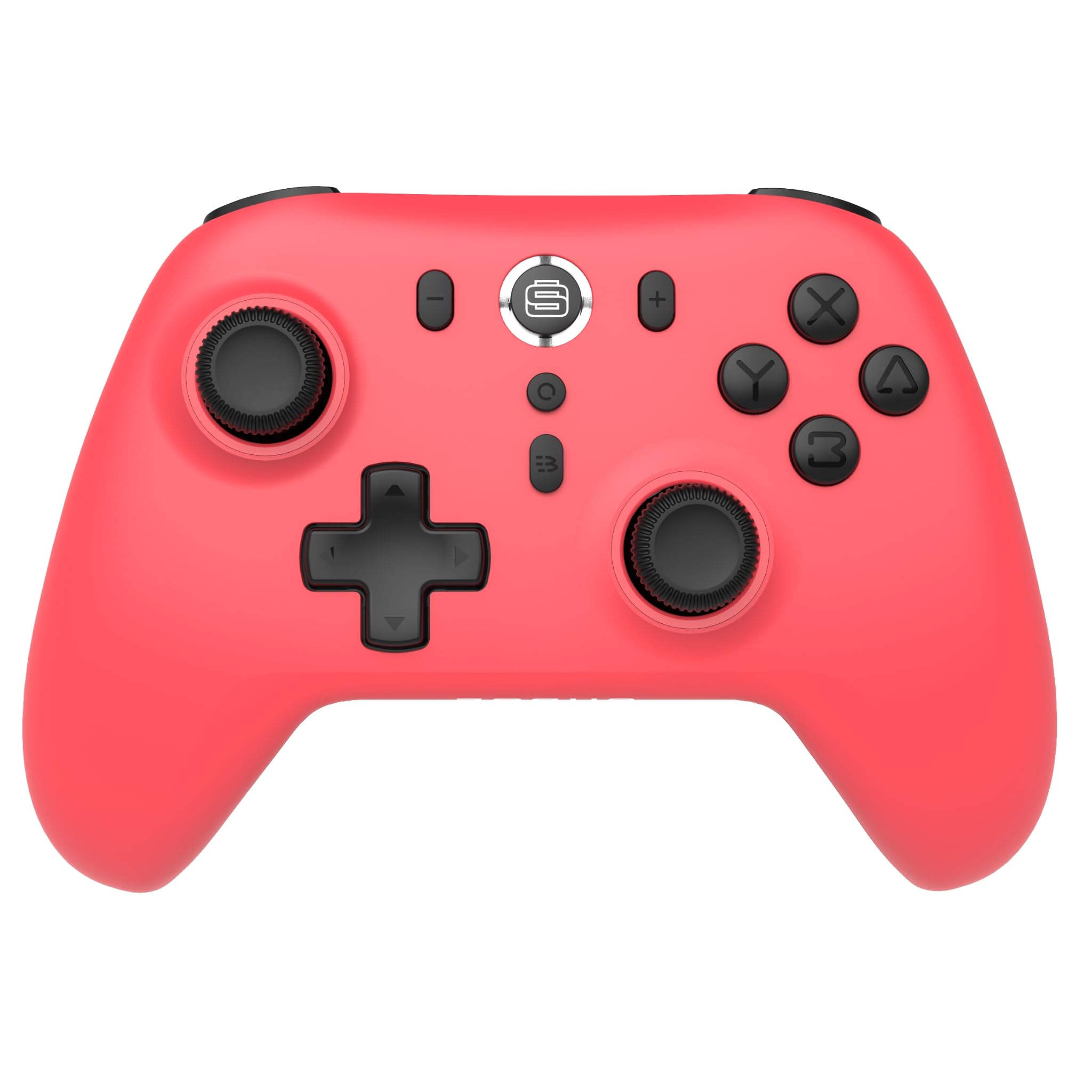
画像: 正面 view of the Surge Wireless Pro Controller in Neon Red.
主な特徴
- マルチプラットフォーム互換性: Supports Nintendo Switch/Switch 2 (Note: No C Button/Audio Port on Switch 2), Windows PC, Steam Deck, Android, and iOS devices.
- Hall Effect Thumb Sticks & Triggers: Engineered for precise control and to prevent stick drift.
- ターボ機能: Offers 3 adjustable turbo levels for rapid-fire actions.
- 振動フィードバック: Features 4 customizable vibration levels for enhanced haptic feedback.
- モーションコントロール: Compatible with games that utilize motion sensing.
- Console Wake Up: Ability to wake the Nintendo Switch console from sleep mode (Nintendo Switch only).
- 充電式バッテリー: Built-in 600mAh Li-polymer battery provides up to 10 hours of gameplay per charge.
- USB-C充電: Includes a 1-meter USB-C charging cable.
セットアップ手順
1. 初期充電
Before first use, fully charge the controller. Connect the included USB-C cable to the controller's charging port and the other end to a USB power source (e.g., console, PC, USB wall adapter). The charging indicator will show status.

Image: The controller connected to a USB-C charging cable.
2. Nintendo Switchとのペアリング
- Nintendo Switch 本体で、HOME メニューに移動します。
- 選択 コントローラー、 それから グリップ/順序の変更.
- を押し続けます ペアリングボタン on the top of the Surge Wireless Pro Controller until the player indicator lights begin to flash.
- Once paired, the player indicator light(s) will remain solid.
- To wake the console from sleep mode, press the Home button on the controller.
3. Pairing with PC, Android, or iOS
The pairing process may vary slightly depending on your device's operating system. Generally, you will need to enable Bluetooth on your device and search for new devices.
- PC、Android、またはiOSデバイスでBluetoothが有効になっていることを確認してください。
- On the Surge Wireless Pro Controller, press and hold the ペアリングボタン インジケーターライトが点滅するまで。
- On your device, select "Surge Pro Controller" from the list of available Bluetooth devices.
- 画面上の指示に従ってペアリングを完了します。
ビデオ: オーバーview of the 8Bitdo Ultimate 2 Wireless Controller, demonstrating general wireless controller setup principles.
操作手順
ボタンのレイアウト

Image: Diagram showing the button layout of the Surge Wireless Pro Controller.
- 左/右アナログスティック: For movement and camera control. Features Hall Effect technology for enhanced durability and precision.
- 十字キー: 方向入力用。
- A/B/X/Y ボタン: 標準のアクション ボタン。
- L/Rボタン: 肩ボタン。
- ZL/ZR トリガー: ホール効果センサーを備えたアナログトリガー。
- ホームボタン: Returns to the console's home menu.
- スクリーンショットボタン: スクリーンショットをキャプチャします。
- プラス(+)/マイナス(-)ボタン: ゲーム内のメニューナビゲーション用。
- ターボボタン: ターボ機能を有効/無効にします。
- ペアリングボタン: Bluetoothペアリングに使用されます。
ターボ機能
To activate turbo for a button, press and hold the ターボボタン, then press the desired action button (A, B, X, Y, L, R, ZL, ZR). Repeat the process to deactivate. There are 3 adjustable turbo levels; refer to the full product manual for detailed adjustment instructions.
振動調整
The controller offers 4 levels of vibration intensity. Specific button combinations or software may be required to adjust these levels. Consult the full product manual or manufacturer's web正確な手順については、こちらのサイトをご覧ください。
メンテナンス
- クリーニング: コントローラーの清掃には、柔らかく乾いた布をご使用ください。刺激の強い化学薬品や研磨剤の使用は避けてください。
- ストレージ: コントローラーは、直射日光や極端な温度を避け、涼しく乾燥した場所に保管してください。
- バッテリーのケア: バッテリーの寿命を延ばすには、バッテリーを頻繁に完全に放電させないでください。長期間使用しない場合でも、コントローラーは定期的に充電してください。
- ケーブルのお手入れ: Handle the USB-C charging cable carefully. Avoid bending or twisting it excessively.
トラブルシューティング
| 問題 | 解決 |
|---|---|
| コントローラの電源が入らない。 | コントローラーが完全に充電されていることを確認してください。USB-Cケーブルを使用して電源に接続してください。 |
| デバイスとペアリングできません。 | Make sure Bluetooth is enabled on your device. Press and hold the pairing button on the controller until lights flash. Ensure the controller is not already paired with another device. Try restarting both the controller and the device. |
| Stick drift or inaccurate input. | The controller features Hall Effect sticks to minimize drift. If issues persist, ensure the controller's firmware is up to date. Contact customer support if the problem continues. |
| 振動が機能しません。 | Check in-game settings to ensure vibration is enabled. Verify the vibration intensity level on the controller. |
| Console Wake Up not functioning. | This feature is only supported on Nintendo Switch. Ensure the controller is properly paired with the Switch. |
仕様
- モデル番号: SG60094
- バッテリー: 1 Nonstandard Battery (600mAh Li-polymer, included)
- バッテリー寿命: 最大10時間(目安)
- 充電ポート: USB-C
- 接続性: Bluetoothワイヤレス
- 寸法: 20.1 x 14 x 6.6 cm(おおよそ)
- 重さ: 310g(概算)
- 原産国: 中国
保証とサポート
For warranty information and customer support, please refer to the official Surge website or contact support directly at support@surgegaming.com.
製品には通常、材料および製造上の欠陥をカバーするメーカー保証が付いています。保証請求のために購入証明書を保管してください。
Ask a question about this manual
Ask about setup, troubleshooting, compatibility, parts, safety, or missing instructions. Manuals+ will review the question and use this page’s manual context to help answer it.