
1. はじめに
This manual provides comprehensive instructions for the safe and efficient operation, maintenance, and troubleshooting of your Cecotec FastTacker 4000 4V 1500mAh cordless stapler and nailer. This 2-in-1 tool is designed for various fastening tasks using both staples and nails, offering cordless convenience and durable results.
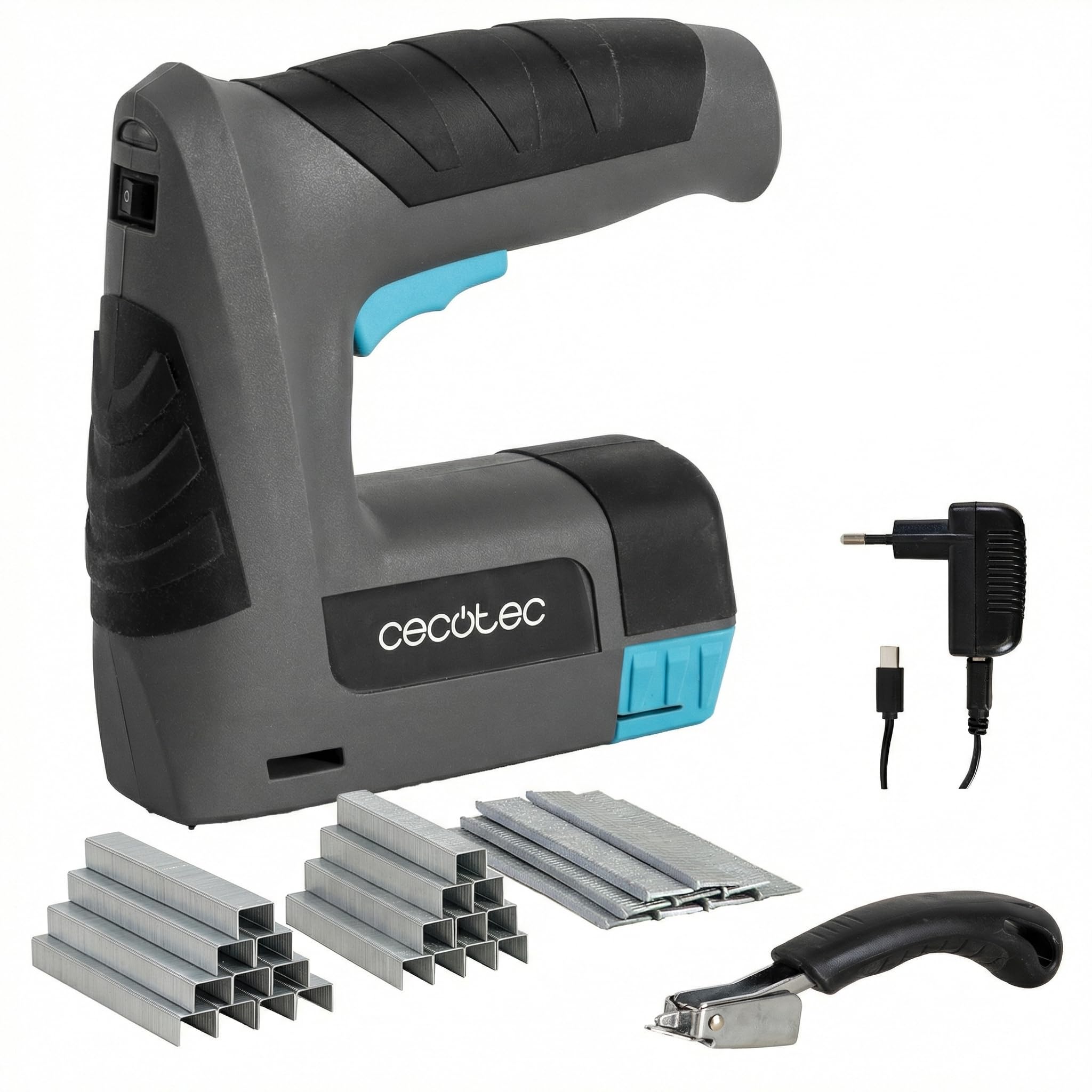
Image 1.1: The Cecotec FastTacker 4000 cordless stapler and nailer, a versatile 2-in-1 tool for various fastening applications.
2. 安全に関する注意事項
WARNING: Read all safety warnings and instructions before using this power tool. Failure to follow the warnings and instructions may result in electric shock, fire, and/or serious injury.
- ツールを操作するときは必ず目の保護具を着用してください。
- 作業エリアを清潔に保ち、明るくしてください。雑然とした場所や暗い場所は事故を招きます。
- 可燃性の液体、ガス、粉塵などが存在する爆発性雰囲気内で電動工具を操作しないでください。
- 電動工具を操作するときは、子供や傍観者を近づけないでください。注意散漫になると制御不能になる可能性があります。
- 誤って始動しないようにしてください。バッテリーパックに接続する前、工具を持ち上げる前、持ち運ぶ前に、スイッチがオフになっていることを確認してください。
- 手を伸ばしすぎないでください。常に適切な足場とバランスを保ってください。これにより、予期しない状況でも電動工具をより適切に制御できます。
- Always disconnect the battery pack before making any adjustments, changing accessories, or storing power tools.
- 作業条件や作業内容を考慮し、動力工具、付属品、工具ビット等をこれらの指示に従って使用してください。
- ツールを自分自身や他人に向けないでください。
- Ensure the workpiece is stable before fastening.
3. パッケージ内容
開梱時にすべてのアイテムが揃っていて良好な状態であることを確認します。
- Cecotec FastTacker 4000 4V 1500mAh Cordless Stapler and Nailer
- Integrated Staple Remover
- Assortment of 9000 Staples and Nails
- 充電ケーブル
4 製品の特徴
- コードレス操作: Powered by a 4V 1500mAh battery for complete freedom of movement.
- 2-in-1 機能: Compatible with both staples and nails, offering versatility for various projects.
- Deep Fastening: Capable of driving fasteners up to 10 mm (0.39 inches) deep for secure and durable fixings.
- Integrated Staple Remover: Includes a built-in staple remover for easy correction of misplaced or old fasteners.
- 人間工学に基づいた軽量設計: Designed for comfortable handling and reduced fatigue during extended use.
- 安全機構: Features a safety system that prevents accidental firing unless the tool is properly positioned against a surface.
5. セットアップ
5.1 バッテリーの充電
Before initial use, fully charge the tool's integrated 4V 1500mAh battery. A full charge typically takes 3 to 5 hours.
- ツール上の充電ポートを見つけます。
- Connect the charging cable to the tool and then to a suitable power source.
- The charging indicator light will show the charging status (refer to the tool's specific indicator behavior, usually red for charging, green for charged).
- 完全に充電されたら、充電ケーブルを取り外します。

Image 5.1: Connecting the charging cable to the tool. Ensure the battery is fully charged before use.
5.2 ステープルまたは釘の装填
The FastTacker 4000 is compatible with both staples and nails. Ensure you use the correct type and size for your project.
- Ensure the tool is switched off and the safety mechanism is engaged.
- Locate the magazine release mechanism, typically at the bottom or rear of the tool.
- Open the magazine.
- ステープルまたは釘のストリップをマガジンに挿入し、正しい方向(先端が前を向いている)であることを確認します。
- カチッと音がするまでマガジンをしっかりと閉じます。

Image 5.2: Loading staples into the tool's magazine. Always ensure correct orientation and secure closure.
6. 操作手順
Follow these steps for safe and effective operation of your stapler/nailer:
- ワークピースの準備: Ensure the material you are fastening is clean, dry, and free of obstructions.
- ツールを配置します: Place the nose of the tool firmly and squarely against the surface where you intend to fasten. The tool features a safety mechanism that prevents firing if not properly positioned.
- Activate Fastening: Press the trigger to drive the staple or nail into the material.
- 締め付けを確認してください: After each fastening, inspect the staple or nail to ensure it is properly seated.
- 継続使用: For multiple fastenings, reposition the tool and repeat the process.
- 電源を切る: When finished or taking a break, always switch off the tool and engage any safety locks.
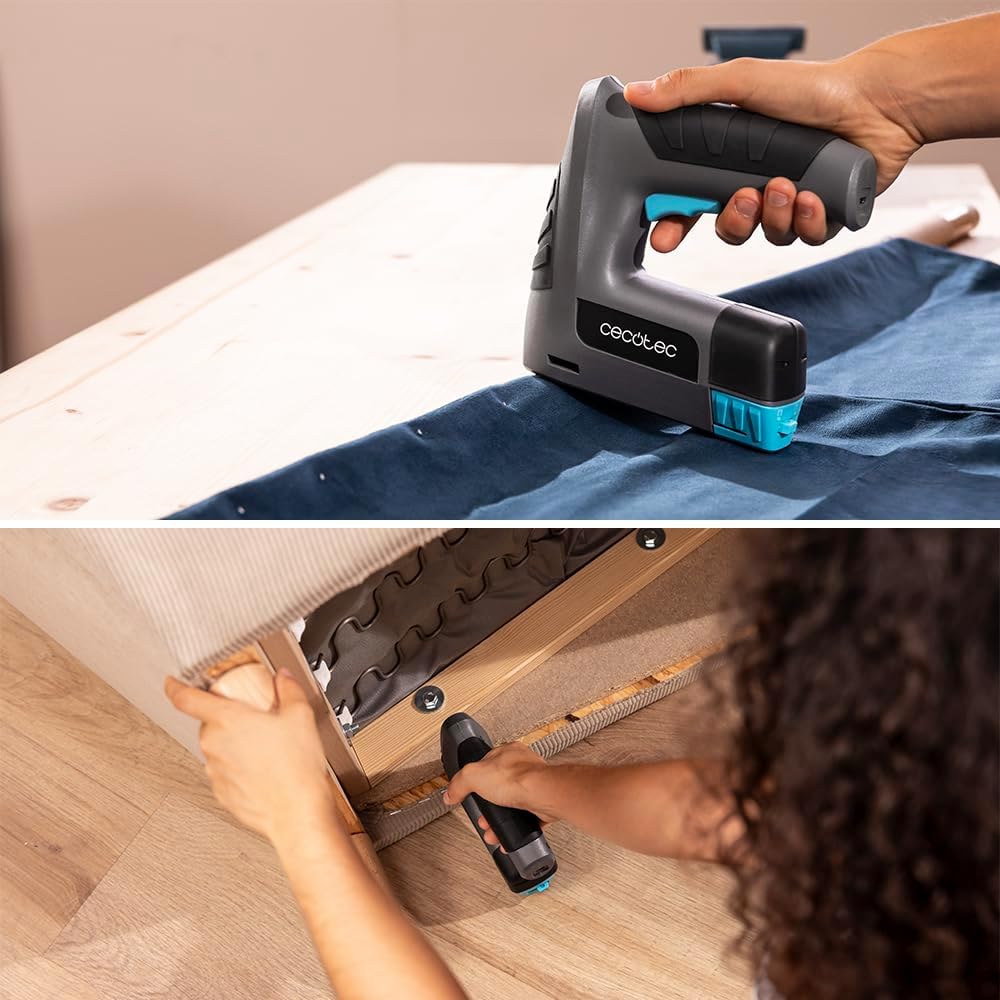
Image 6.1: Demonstrating the use of the stapler for upholstery and the integrated staple remover for corrections.

Image 6.2: Using the tool to fasten canvas to a wooden frame, showcasing its application in crafting and DIY projects.
7. メンテナンス
Regular maintenance ensures the longevity and optimal performance of your FastTacker 4000.
- クリーニング: After each use, wipe down the tool with a clean, dry cloth. Do not use harsh chemicals or abrasive cleaners.
- Magazine Inspection: Periodically check the staple/nail magazine for any debris or bent fasteners that could cause jams.
- バッテリーのケア: Store the tool with a partially charged battery in a cool, dry place. Avoid fully discharging the battery for extended periods.
- ストレージ: Store the tool in a secure location, out of reach of children, and away from moisture and extreme temperatures.
8。 トラブルシューティング
If you encounter issues with your FastTacker 4000, refer to the following common problems and solutions:
| 問題 | 考えられる原因 | 解決 |
|---|---|---|
| Tool does not fire or fires inconsistently. |
|
|
| Fasteners are not driven deep enough. |
|
|
| 留め具が頻繁に詰まります。 |
|
|
8.1 Clearing a Fastener Jam
- 電源を切る: Always ensure the tool is switched off and the battery is removed (if removable, otherwise ensure it's off).
- オープンマガジン: Open the fastener magazine and remove any remaining staples or nails.
- Access Jam: Carefully inspect the firing area and the magazine track for jammed fasteners. Use pliers or tweezers to gently remove any bent or stuck fasteners. Do not force them.
- Inspect and Close: Ensure the path is clear, then close the magazine and reload with new, undamaged fasteners.
9. 仕様
| ブランド | セコテック |
| モデル番号 | A01_EU01_107954 |
| 電池のタイプ | 4V 1500mAh (Integrated) |
| 材料 | プラスチック |
| 色 | 黒 |
| 製品寸法(長さ×幅) | 16L x 5l cm (approximately 6.3 x 2 inches) |
| Max. Fastening Depth | 10ミリメートル(0.39インチ) |
| ハンドル材質 | プラスチック |
| 特集 | 人間工学に基づいた軽量設計 |
| Ambidextrous Use | はい |
10. 保証とサポート
Cecotec provides a commitment to product quality and customer satisfaction.
- スペアパーツの入手可能性: Spare parts for this product are available for a period of 10 years within the EU.
- カスタマーサポート: For any questions, technical assistance, or warranty claims, please contact Cecotec customer service. Refer to the official Cecotec web連絡先の詳細については、サイトまたは製品パッケージをご覧ください。

Image 10.1: Cecotec's commitment to customer service, indicating support is available for product inquiries.
