
boAt Rockerz Trinity Gen 2
boAt Rockerz Trinity Gen 2 Bluetooth Neckband Earphones User Manual
Model: Rockerz Trinity Gen 2
導入
Thank you for choosing the boAt Rockerz Trinity Gen 2 Bluetooth Neckband Earphones. This manual provides essential information for setting up, operating, and maintaining your earphones. Please read it carefully to ensure proper use and to maximize your listening experience. These earphones are designed for extended audio playback, high-resolution sound, and clear communication.
箱の中身
- boAt Rockerz Trinity Gen 2 Earphones
- 充電ケーブル
- ユーザーマニュアル
The package includes the boAt Rockerz Trinity Gen 2 Earphones, a charging cable, and this user manual.
製品終了view
The boAt Rockerz Trinity Gen 2 features a flexible neckband design with in-ear earbuds. It includes integrated controls for media playback, call management, and voice assistant activation. The neckband houses the battery and main electronics.
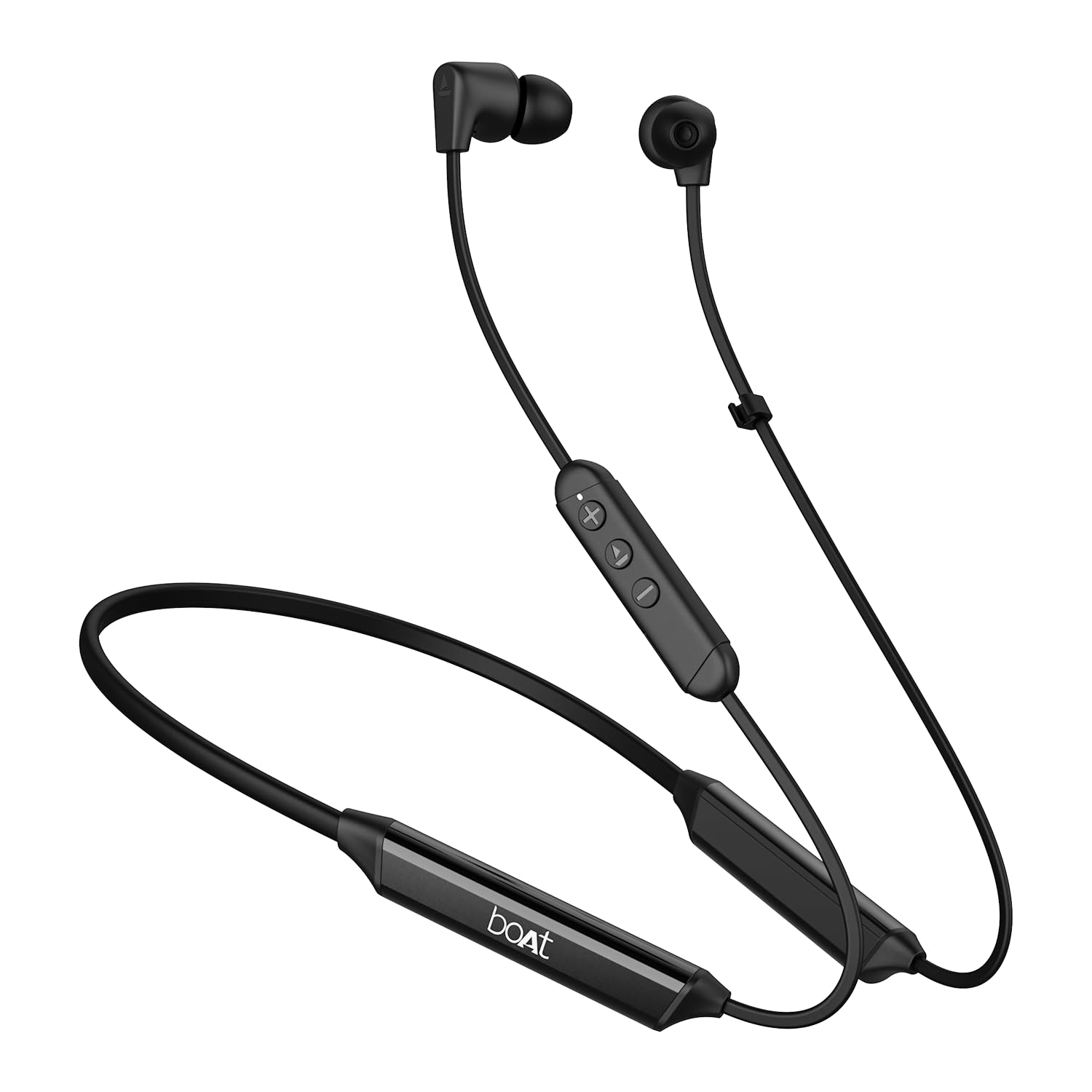
Image: The boAt Rockerz Trinity Gen 2 neckband earphones, highlighting the flexible neckband and in-ear design.

画像: 詳細な view of the boAt Rockerz Trinity Gen 2 earbuds and the inline control panel, showing buttons for volume and playback.
設定
1. イヤホンの充電
Before first use, fully charge your earphones. Connect the provided charging cable to the charging port on the neckband and to a USB power source. The LED indicator will show charging status. A full charge provides up to 150 hours of playback. With ASAP Charge, 10 minutes of charging provides up to 24 hours of playback.
Image: The boAt Rockerz Trinity Gen 2 neckband, illustrating its long battery life with "150 HOURS PLAYBACK" text.
2.電源のオン/オフ
- 電源を入れるには: Press and hold the Multi-function button (usually the center button on the inline control) for approximately 3 seconds until the LED indicator flashes blue and you hear a power-on prompt.
- 電源を切るには: Press and hold the Multi-function button for approximately 5 seconds until the LED indicator flashes red and you hear a power-off prompt.
3.Bluetoothペアリング
- イヤホンの電源がオフになっていることを確認してください。
- Press and hold the Multi-function button for about 5-7 seconds until the LED indicator flashes red and blue alternately, indicating pairing mode.
- デバイス(スマートフォン、ラップトップ)で Bluetooth を有効にし、利用可能なデバイスを検索します。
- Select "boAt Rockerz Trinity Gen 2" from the list of found devices.
- 接続されると、LED インジケーターが青色でゆっくり点滅し、確認音が聞こえます。

Image: The boAt Rockerz Trinity Gen 2 earphones connected to both a smartphone and a tablet, illustrating the dual pairing feature.
4. Dual Pairing (Multipoint)
The Rockerz Trinity Gen 2 supports dual pairing, allowing connection to two devices simultaneously. After pairing with the first device, disable Bluetooth on that device. Put the earphones back into pairing mode and connect to the second device. Once connected to the second device, re-enable Bluetooth on the first device. The earphones will automatically connect to both devices, allowing seamless switching between them for calls and media.
操作手順
基本操作
- 再生/一時停止: 多機能ボタンをXNUMX回押します。
- ボリュームアップ: 「+」ボタンを押します。
- ボリュームダウン: 「-」ボタンを押します。
- 次のトラック: 「+」ボタンを長押しします。
- 前のトラック: 「-」ボタンを長押しします。
- 通話の応答/終了: 多機能ボタンをXNUMX回押します。
- 通話を拒否: 多機能ボタンを 2 秒間押し続けます。
- 音声アシスタントを有効にする: 多機能ボタンをXNUMX回押します。
LDACによるハイレゾオーディオ
The Rockerz Trinity Gen 2 supports Hi-Res Audio with LDAC codec, providing superior sound quality. Ensure your connected device also supports LDAC for the best audio experience. This feature allows for high-resolution audio transmission over Bluetooth, preserving more detail from your music.

Image: The boAt Rockerz Trinity Gen 2 earphones displaying the "Hi-Res Audio Wireless" and "LDAC" logos, indicating high-resolution audio support.
デュアルEQモード
Switch between different equalizer modes to customize your audio experience. Refer to the product's quick start guide or experiment with button combinations (often a triple-press of the Multi-function button or a combination with volume buttons) to cycle through available EQ presets. This allows you to adjust the sound profile あなたの好みに合わせて。

Image: A close-up of the boAt Rockerz Trinity Gen 2 earbuds, highlighting the availability of dual EQ modes for sound customization.
AI-ENx™ Technology for Clear Calls
The earphones feature AI-ENx™ technology, which enhances call clarity by eliminating background noise. This ensures your voice is heard clearly during calls, even in noisy environments.

Image: A close-up of a boAt Rockerz Trinity Gen 2 earbud, emphasizing the AI-ENx™ technology for clear voice calls.
BEAST™ Mode (Low Latency)
Activate BEAST™ Mode for a low-latency gaming experience (65ms). This mode synchronizes audio with visuals, providing a more immersive gaming session. To activate/deactivate BEAST™ Mode, refer to the specific instructions in your quick start guide, usually involving a dedicated button press or a combination.

Image: The boAt Rockerz Trinity Gen 2 earphones with "BEAST™ MODE 65ms Low Latency" text, depicted alongside gaming characters to illustrate its use for gaming.
メンテナンス
クリーニング
- 柔らかく乾いた糸くずの出ない布でイヤホンを拭いてください。
- 過酷な化学薬品、洗浄溶剤、または強力な洗剤は使用しないでください。
- Regularly clean the ear tips to prevent wax buildup, which can affect sound quality.
防水性能(IPX5)
The earphones are IPX5 rated, meaning they are resistant to sweat and light splashes of water. They are not designed for submersion in water. Avoid exposing them to heavy rain or direct water jets. Ensure the charging port cover is securely closed when not charging to maintain water resistance.

Image: The boAt Rockerz Trinity Gen 2 earbuds with water droplets on them, illustrating their IPX5 water resistance rating.
ストレージ
Store the earphones in a cool, dry place away from direct sunlight and extreme temperatures. Avoid storing them with sharp objects that could damage the cables or earbuds.
トラブルシューティング
電源なし
- イヤホンが完全に充電されていることを確認してください。
- Press and hold the Multi-function button for 3-5 seconds to power on.
デバイスとペアリングできません
- イヤホンがペアリングモードになっていることを確認します(LED が赤と青に交互に点滅します)。
- デバイスで Bluetooth が有効になっており、範囲内(通常は 10 メートル)にあることを確認します。
- Forget "boAt Rockerz Trinity Gen 2" from your device's Bluetooth list and try pairing again.
- デバイスとイヤホンの両方を再起動します。
Low or Distorted Sound
- イヤホンと接続されたデバイスの両方の音量を調整します。
- Ensure the ear tips are clean and properly seated in your ears.
- 密閉性を高めるために、さまざまなサイズのイヤーチップを試してください。
- 干渉を避けるため、接続されたデバイスに近づいてください。
マイクが機能しない
- イヤホンがデバイスに正しく接続されていることを確認してください。
- Check your device's audio settings to ensure the earphones are selected as the input device.
- Clean the microphone opening if it appears obstructed.
仕様
| ブランド | ボート |
| モデル名 | Rockerz Trinity Gen 2 |
| 耳の位置 | 耳に装着 |
| フォームファクター | 耳に装着 |
| 騒音制御 | AI-ENx™ Technology (for calls) |
| 接続技術 | ブルートゥース |
| バッテリーの平均寿命 | 150時間 |
| バッテリー充電時間 | 10 Minutes (for 24 hours playback via ASAP Charge) |
| オーディオドライバータイプ | Dynamic Driver (10mm, inferred from description) |
| 周波数範囲 | 20 Hz - 40,000 Hz |
| 耐水性 | IPX5 |
| 特集 | Hi-Res Audio with LDAC, Dual EQ Modes, AI-ENx™ Technology, Dual Pairing, BEAST™ Mode (65ms Low Latency), ASAP Charge |
| 制御方法 | 音声、ボタン |
| アイテム重量 | 60グラム |
保証とサポート
保証情報
The boAt Rockerz Trinity Gen 2 earphones come with a 1年間保証 from the date of purchase. This warranty covers manufacturing defects. Please retain your purchase receipt for warranty claims. The warranty does not cover damage caused by misuse, accidents, unauthorized modifications, or normal wear and tear.
カスタマーサポート
For technical assistance, warranty claims, or any other inquiries, please contact boAt customer support:
- メールアドレス: info@imaginemarketingindia.com
- メーカー: イマジンマーケティング株式会社
公式ボートをご覧ください web最新のサポート情報と連絡先の詳細については、こちらのサイトをご覧ください。
Ask a question about this manual
Ask about setup, troubleshooting, compatibility, parts, safety, or missing instructions. Manuals+ will review the question and use this page’s manual context to help answer it.