
1. はじめに
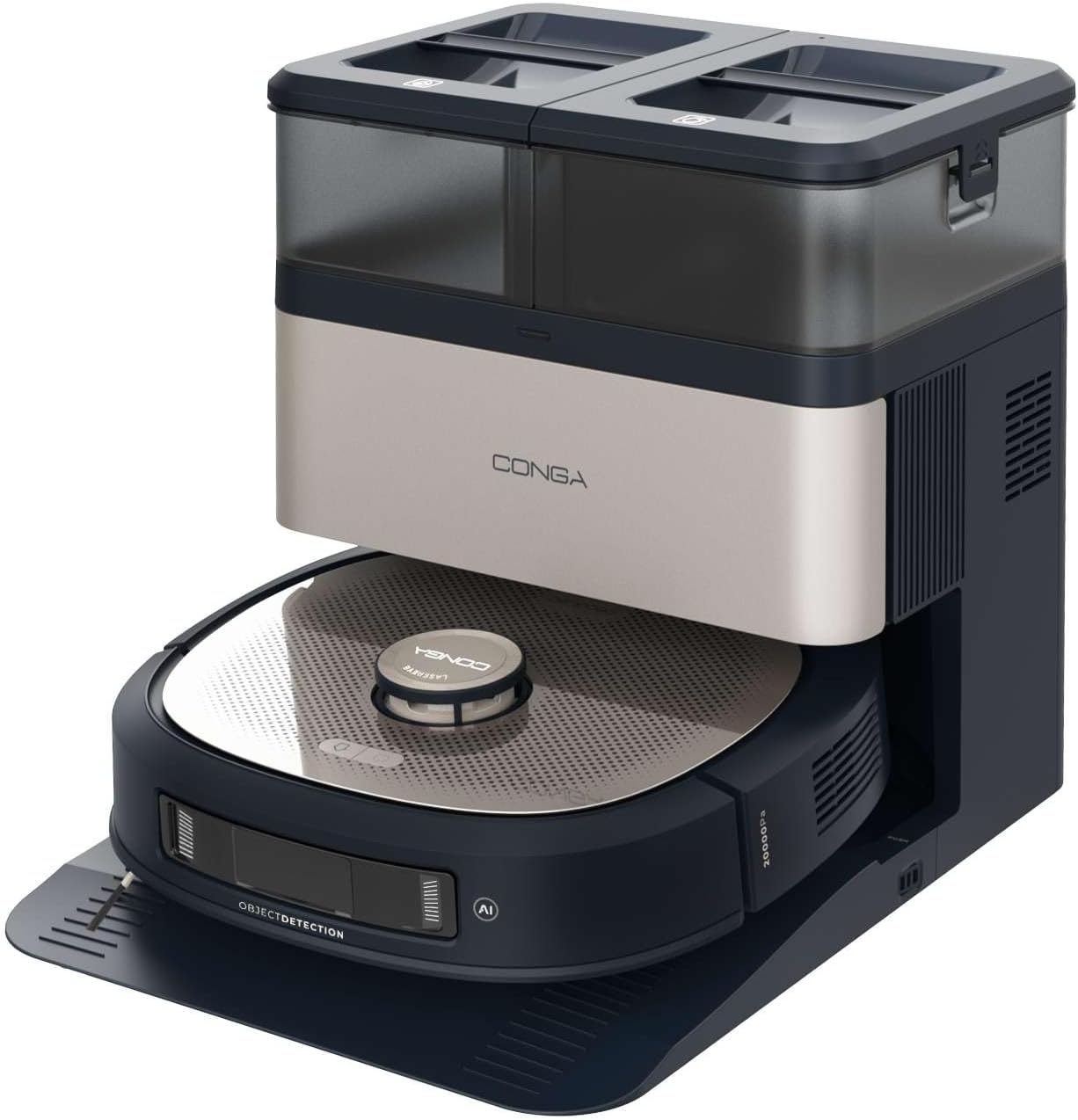
This manual provides essential instructions for the safe and efficient operation, maintenance, and troubleshooting of your Cecotec Conga Z100 X-Treme Robot Vacuum and Mop. This advanced cleaning device combines powerful vacuuming with professional mopping, intelligent navigation, and a convenient self-emptying and mop-cleaning station.
製品を使用する前にこのマニュアルをよくお読みになり、今後の参考のために保管してください。
2.製品コンポーネント
The Cecotec Conga Z100 X-Treme package includes the following items:
- ロボット掃除機とモップユニット
- Self-Emptying and Mop Cleaning Station
- 電源アダプター
- サイドブラシ(2個)
- Main Brush (silicone)
- Bimaterial Mop Pad
- Disposable Dust Bag (pre-installed in station)
- Clean Water Tank (in station)
- Dirty Water Tank (in station)
- ユーザーマニュアル(このドキュメント)
3. セットアップ
3.1 開梱と準備
- パッケージからすべてのコンポーネントを慎重に取り出します。
- Remove any protective films, stickers, or foam inserts from the robot and the station.
- セクション 2 に記載されているすべてのコンポーネントが存在し、損傷がないことを確認します。
3.2 Placing the Self-Emptying and Mop Cleaning Station
- ステーションを壁に沿った硬くて平らな面に設置します。
- Ensure there is at least 1 meter (3 feet) of clear space in front of the station and 0.5 meters (1.5 feet) on either side to allow the robot to dock properly.
- Keep the station away from direct sunlight, heat sources, and areas with high humidity.
- 電源アダプターをステーションに差し込み、次に壁のコンセントに差し込みます。
3.3 浄水タンクへの給水
- Open the lid of the clean water tank on the station.
- Fill the tank with clean tap water up to the MAX line. Do not use detergents or cleaning solutions not approved by Cecotec.
- Close the tank lid securely.
3.4 サイドブラシの取り付け
- ロボットを逆さまにします。
- Align the side brushes with the corresponding posts (L for left, R for right) and press them down until they click into place.
3.5 初期充電
- Place the robot onto the charging contacts of the station. Ensure the charging contacts on both the robot and the station are aligned.
- ロボットは自動的に充電を開始します。初めて使用する前に、完全に充電してください(約4~6時間)。
3.6 Mobile Application Connection
- Download the official Cecotec Conga app from your smartphone's app store.
- Follow the in-app instructions to register an account and connect your Conga Z100 X-Treme robot. This typically involves connecting to the robot's Wi-Fi network during the setup process.

4. 操作手順
4.1 電源のオン/オフ
- 電源オン: Press and hold the power button on the robot until the indicator lights illuminate.
- 電源を切る: インジケータライトが消えるまで電源ボタンを押し続けます。
4.2 クリーニングサイクルの開始
- Ensure the robot is fully charged and the clean water tank is filled (for mopping).
- Press the clean button on the robot or use the mobile app to start a cleaning cycle. The robot will automatically leave the station and begin cleaning.
- To pause cleaning, press the clean button once. Press again to resume.
- To send the robot back to the station, press the home button on the robot or use the app.
4.3つのクリーニングモード
The robot offers various cleaning modes accessible via the mobile application:
- 自動モード: ロボットはマップされたエリア全体をインテリジェントに掃除します。
- スポットモード: 特定の小さな領域を集中的に掃除します。
- エッジ モード: 壁や家具の端に沿って掃除します。
- ゾーンクリーニング: マップ上の特定のエリアを清掃対象として定義できます。
4.4 AI Navigation and Obstacle Avoidance
The Conga Z100 X-Treme utilizes AI with LaserEye technology for precise navigation. It identifies small objects, different floor types, and dirt levels, adapting its cleaning strategy accordingly. This allows it to navigate complex environments and avoid obstacles effectively.

4.5 AquaCycle Professional Mopping
The AquaCycle system ensures continuous mopping with clean water. The robot wets the bimaterial mop with clean water and wrings out dirty water into a separate tank, providing efficient and hygienic floor cleaning.

4.6 Wet&Protect Technology
The robot's intelligent mopping adapts to different surfaces. Its bimaterial mop provides deep cleaning with a super-absorbent side. When a carpet is detected, the robot activates CarpetCare mode and uses the smooth side of the mop to protect the carpet from moisture.

4.7 吸引力
With an Ungravity motor providing 20000 Pa of suction power, the robot effectively cleans hidden dirt, even from high-pile carpets and deep tile grout.

5. メンテナンス
定期的なメンテナンスにより、ロボット掃除機とモップの最適なパフォーマンスが確保され、寿命が延びます。
5.1 Self-Emptying Station Maintenance
- ダストバッグの交換: The station automatically empties the robot's dust bin into a disposable dust bag. Replace the dust bag when the indicator light on the station signals it is full (approximately every 12 weeks, depending on usage).
- 浄水タンク: Refill with clean water before each mopping cycle.
- 汚れた水タンク: Empty and rinse the dirty water tank after each mopping cycle to prevent odors and bacterial growth.
- モップ乾燥: The station dries the mop with hot air after cleaning. Ensure the mop is properly positioned for effective drying.

5.2 ロボット部品の洗浄
- メインブラシ: Regularly remove hair and debris from the main silicone brush. Use the cleaning tool provided.
- サイドブラシ: Check for tangled hair or debris and clean as needed. Replace if worn or damaged.
- Bimaterial Mop Pad: Remove the mop pad after each mopping cycle and wash it thoroughly. It can be hand-washed or machine-washed (follow care instructions).
- センサー: 適切に機能することを確認するために、崖センサー、壁センサー、充電接点を清潔で乾いた布で拭いてください。
- ホイール: ロボットの車輪に付着した髪の毛やゴミを取り除きます。

6。 トラブルシューティング
If you encounter issues with your Conga Z100 X-Treme, refer to the following common problems and solutions:
| 問題 | 考えられる原因 | 解決 |
|---|---|---|
| ロボットが起動しません。 | 電池残量が少ない。電源ボタンが正しく押されていない。 | Place robot on charging station; press and hold power button for 3 seconds. |
| ロボットは充電ステーションを見つけることができません。 | Station obstructed; robot too far from station. | Ensure clear space around station; manually place robot closer to station. |
| 洗浄性能が悪い。 | Brushes or filters dirty/worn; dust bin full. | Clean/replace brushes and filters; empty dust bin. |
| ロボットが頻繁に動けなくなります。 | 障害物(ケーブル、小さな物体)、凹凸のある表面。 | Clear the cleaning area of obstacles; use virtual walls/no-go zones in app. |
| アプリの接続の問題。 | Incorrect Wi-Fi password; router too far; app outdated. | Verify Wi-Fi credentials; move robot closer to router; update app; reset robot's Wi-Fi. |
| モップがけをすると、縞模様が残ったり、効果がないことがあります。 | Mop pad dirty/worn; clean water tank empty; dirty water tank full. | Clean/replace mop pad; refill clean water tank; empty dirty water tank. |
| ウォーターポンプエラー。 | Pump malfunction; blockage in water lines. | Check for blockages; contact customer support if issue persists. |
For persistent issues not covered here, please refer to the official Cecotec support channels.
7. 仕様
| 特徴 | 詳細 |
|---|---|
| ブランド | セコテック |
| モデル名 | Conga Z100 X-Treme |
| モデル番号 | A01_EU01_119672 |
| 吸引力 | 20000パ |
| バッテリー容量 | 5200mAh |
| ナビゲーション技術 | AI with LaserEye |
| モップシステム | AquaCycle Professional Mopping, Wet&Protect Technology, Bimaterial XXL Mop |
| 自動排出ステーション | Yes, with hot air mop drying |
| ダストバッグ容量 | 3リットル |
| 浄水タンク容量 | 3リットル |
| 汚水タンク容量 | 3リットル |
| ロボットの寸法(長さ x 幅 x 高さ) | 35.2 x 35.2 x 10.5 cm |
| ロボットの重量 | 4.92キロ |
| 巻tage | 240ボルト |
| コントロールタイプ | アプリコントロール |
8. 保証とサポート
Your Cecotec Conga Z100 X-Treme Robot Vacuum and Mop is covered by a manufacturer's warranty. Please refer to the warranty card included in your product packaging for specific terms and conditions, including the warranty period and coverage details.
For technical support, service, or to inquire about replacement parts and consumables, please contact Cecotec customer service through their official webサイトまたは保証書に記載されている連絡先情報を参照してください。
Always ensure you have your product model number (A01_EU01_119672) and proof of purchase available when contacting support.