
1. はじめに
Thank you for choosing the COTOE G7 Bluetooth Headset. This manual provides detailed instructions for setting up, operating, and maintaining your headset. Please read this manual carefully before use to ensure optimal performance and longevity of your device.
The COTOE G7 is a wireless Bluetooth headset designed for clear communication and audio playback. It features an LED digital display for battery status, extended standby time, and Active Noise Cancellation (ANC) for an enhanced audio experience.
2. パッケージ内容
パッケージに以下の項目が含まれているか確認してください。
- COTOE G7 Bluetooth Headset (Gray)
- 充電ケース
- USB充電ケーブル
- イヤーチップ(各種サイズ)
- ユーザーマニュアル
3.製品オーバーview
Familiarize yourself with the components of your COTOE G7 Bluetooth Headset.
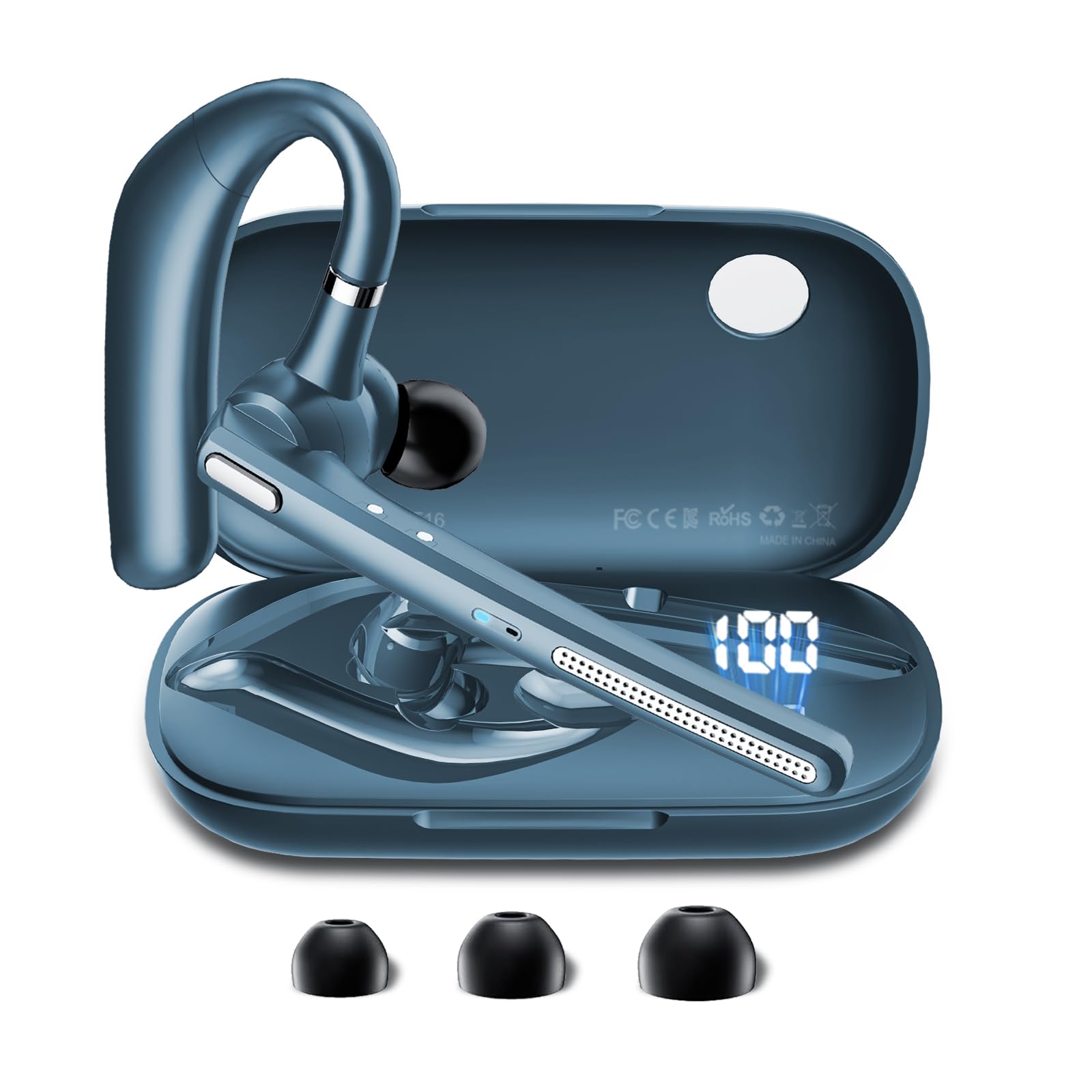
Image: The COTOE G7 Bluetooth Headset (gray) shown with its charging case. The headset features an ergonomic in-ear design, and the charging case is compact.
主要コンポーネント:
- イヤピース: The main unit worn in the ear, containing the speaker, microphone, and control buttons.
- 充電ケース: Used to store and charge the headset. Features an LED digital display.
- LEDデジタルディスプレイ: Located on the charging case, indicates the charging status of the headset and the power level of the case.
4. セットアップ
4.1 ヘッドセットとケースの充電
- USB 充電ケーブルをケースの充電ポートと電源 (USB 壁アダプター、コンピューターの USB ポートなど) に接続します。
- The LED digital display on the charging case will show the current battery level and charging status.
- Place the headset into the charging case. Ensure proper alignment for charging. The headset's indicator light will show charging status.
- A full charge typically takes approximately 1-2 hours for the headset and 2-3 hours for the charging case.
注記: The headset offers up to 12 hours of music playback and the charging case provides 120 hours of standby time.
4.2 Bluetoothデバイスとのペアリング
- ヘッドセットが充電されていることを確認してください。
- Take the headset out of the charging case. It will automatically enter pairing mode, indicated by a flashing LED light (usually blue and red).
- 携帯電話またはその他の Bluetooth 対応デバイスで、Bluetooth 設定に移動します。
- 検索する available devices. You should see "COTOE G7" in the list.
- Select "COTOE G7" to connect. Once connected, the headset's LED light will stop flashing and may turn solid blue or turn off.
- パスワードの入力を求められた場合は、「0000」(ゼロ 4 つ)を入力します。
- The headset will automatically reconnect to the last paired device when powered on and within range.
5. 操作手順
5.1 電源オン/オフ
- 電源オン: Take the headset out of the charging case, or press and hold the Multi-function Button for approximately 3 seconds.
- 電源を切る: Place the headset back into the charging case, or press and hold the Multi-function Button for approximately 5 seconds.
5.2 通話管理
- 通話に応答: マルチファンクションボタンを1回押します。
- 通話終了: 通話中にマルチファンクションボタンを1回押します。
- 通話を拒否: マルチファンクションボタンを約2秒間押し続けます。
- 最後の番号にリダイヤル: マルチファンクションボタンを2回押します。
5.3音楽の再生
- 再生/一時停止: マルチファンクションボタンを1回押します。
- 次のトラック: 音量アップボタンを長押しします。
- 前のトラック: 音量ダウンボタンを押し続けます。
5.4 ボリュームコントロール
- 音量を上げる: 音量アップボタンを押します。
- 音量を下げる: 音量ダウンボタンを押します。
5.5 アクティブノイズキャンセレーション(ANC)
The COTOE G7 features Active Noise Cancellation to reduce ambient noise. To activate or deactivate ANC, locate the dedicated ANC button (if present) or refer to the specific button combination in your quick start guide. Typically, a long press on a designated button toggles ANC.
6. メンテナンス
- クリーニング: Use a soft, dry, lint-free cloth to clean the headset and charging case. Do not use harsh chemicals or abrasive materials.
- ストレージ: Store the headset in its charging case when not in use to protect it from dust and damage. Avoid extreme temperatures.
- バッテリーのケア: バッテリー寿命を延ばすには、ヘッドセットを頻繁に完全に放電させないでください。長期間使用しない場合でも、定期的に充電してください。
- 耐水性: The headset is not waterproof. Avoid exposure to liquids and moisture.
7。 トラブルシューティング
| 問題 | 解決 |
|---|---|
| ヘッドセットの電源が入りません。 | Ensure the headset is charged. Place it in the charging case to confirm charging. |
| デバイスとペアリングできません。 | Make sure Bluetooth is enabled on your device. Ensure the headset is in pairing mode. Try restarting both the headset and your device. Clear previous Bluetooth connections on your device. |
| 音が出ない、または音量が低い。 | Check the volume levels on both the headset and your connected device. Ensure the headset is properly connected. Try playing different audio sources. |
| 接続が断続的です。 | Ensure the headset is within the effective range of your Bluetooth device (typically 10 meters/33 feet). Avoid obstacles between the headset and device. |
8. 仕様
- ブランド: COTOE
- モデル: G7
- 色: グレー
- 耳の配置: 耳に装着
- フォームファクター: 耳に装着
- 騒音制御: アクティブノイズキャンセリング
- 待機時間: 最大120時間(充電ケース付き)
- 音楽再生時間: 最大12時間(充電ケース付き)
9. 保証とサポート
The COTOE G7 Bluetooth Headset comes with a standard manufacturer's warranty. Please refer to the warranty card included in your package for specific terms and conditions.
For technical support, troubleshooting assistance, or warranty claims, please contact COTOE customer service through the retailer where you purchased the product or visit the official COTOE web連絡先情報のサイト。