
導入
The VANPO 1/2-Inch Digital Torque Wrench provides precise torque control for various mechanical applications. This manual outlines the proper setup, operation, maintenance, and troubleshooting to ensure optimal performance and longevity of your tool.
主な特徴:
- Precise Accuracy: Delivers reliable torque control with ±2% accuracy, reducing over-tightening and fastener damage.
- Clear Torque Feedback: Features a large backlit LCD display, audible alerts, LED indicators, and vibration feedback for clear confirmation when preset torque is reached.
- Durable & Bidirectional: Built for repeated use in automotive environments, supporting both clockwise and counterclockwise operation.
- Easy & Efficient Operation: Supports Peak and Track modes, with preset torque values, and a tool-free, quick-access battery compartment.
- 幅広い用途: Suitable for vehicle maintenance, home repair, workshop projects, and industrial machinery.
設定
1. バッテリーの取り付け
The torque wrench requires two AA batteries (included). To install:
- Unscrew the battery cap at the end of the handle.
- Insert two AA batteries, ensuring correct polarity (negative side down, positive side up).
- 電池キャップを元に戻し、しっかりと締めます。
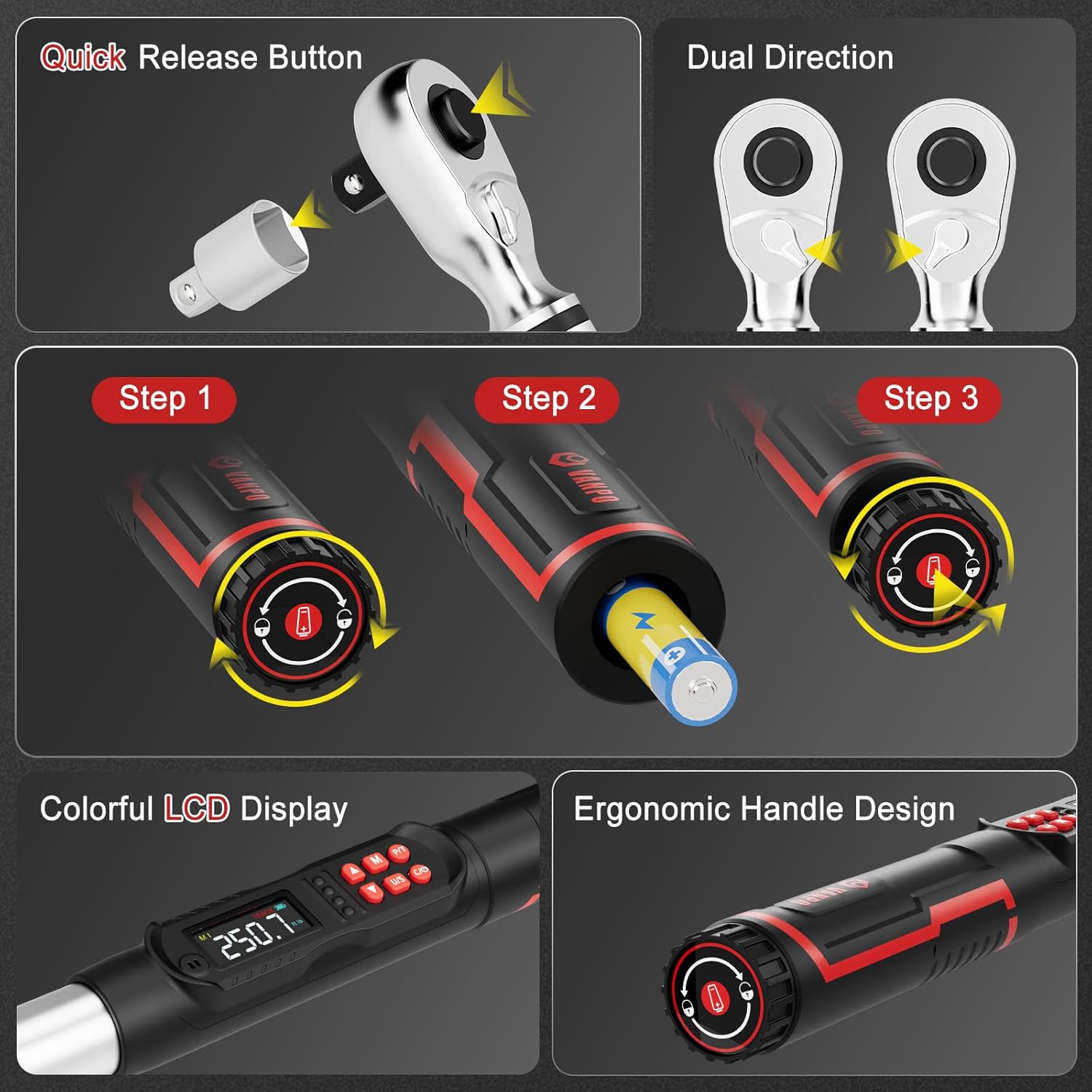
Figure 1: Battery installation and ergonomic handle design.
2. アクセサリの取り付け
The wrench comes with a 125mm extension bar and a 1/2" to 3/8" adapter.
- To attach an extension or adapter, press the quick-release button on the ratchet head and insert the accessory.
- Ensure the accessory is securely locked in place before use.
Figure 2: Quick-release button for attaching sockets and accessories.
操作手順
1. 電源のオン/オフとユニットの選択
- を押す オン/オフ レンチの電源を入れるボタン。
- を押す 私たち button to cycle through measurement units: ft-lb, in-lb, Nm, kg-cm.

Figure 3: LCD display showing selectable measurement units.
2. 目標トルク値の設定
- 使用 Up そして 下 矢印ボタンを使用して目標トルク値を調整します。
- The LCD will display the current setting.
3. Operating Modes (Peak & Track)
を押す P / T button to switch between Peak and Track modes.
- トラックモード: Displays real-time torque values as force is applied.
- ピークモード: Captures and displays the maximum torque value achieved during the tightening process.

Figure 4: Explanation of Track Mode and Peak Mode.
4. トルクの適用
Apply force to the wrench. As you approach the preset torque value, the wrench will provide triple feedback:
- 可聴アラート: A buzzer will sound.
- LEDインジケーター: Lights on the handle will illuminate (green for 85-90% of target, red for 100%).
- 振動フィードバック: The handle will vibrate.

Figure 5: Triple feedback system for reaching target torque.
5.メモリ機能
The wrench can store multiple preset torque values. Use the M button to access and save memory settings.
6. 画面ロック機能
長押し M button for 3 seconds to lock the screen and buttons, preventing accidental changes during operation. Long press M もう一度タップしてロックを解除します。
メンテナンス
- クリーニング: Wipe the wrench with a clean, dry cloth after each use. Do not use abrasive cleaners or solvents.
- ストレージ: Store the torque wrench in its protective case in a dry, cool place away from direct sunlight and extreme temperatures.
- バッテリー交換: LCD に電池残量低下インジケーターが表示されたら、電池を交換してください。
- 較正: For optimal accuracy, it is recommended to have the torque wrench calibrated periodically by a certified service center.
トラブルシューティング
| 問題 | 考えられる原因 | 解決 |
|---|---|---|
| レンチの電源が入りません。 | 電池が切れているか、正しく取り付けられていない。 | 電池の極性を確認するか、新しい単三電池と交換してください。 |
| 不正確なトルクの読み取り。 | Wrench needs calibration or improper usage. | Ensure proper technique. Consider professional recalibration. |
| No audible/vibration feedback. | Feedback settings disabled or malfunction. | Check user manual for enabling feedback. Contact support if issue persists. |
仕様
| 特徴 | 詳細 |
|---|---|
| モデル番号 | VP18-340-01 |
| ドライブサイズ | 1/2インチ |
| トルク範囲 | 12.5–250.8 ft-lb / 17–340 Nm |
| 正確さ | ±2% |
| 測定単位 | ft-lb, in-lb, Nm, kg-cm |
| フィードバック | Audible, LED, Vibration |
| 操作モード | ピーク、トラック |
| 電源 | 単三電池2本(付属) |
| 材料 | 40 CR, Chrome Molybdenum Steel, Chrome Vanadium Steel |
| アイテム重量 | 5.29ポンド |
| 含まれるコンポーネント | 1* digital torque wrench, 1*1/2 to 3/8" Adapter, 1*1/2'' 125mm Extension Bar |
保証とサポート
This VANPO Digital Torque Wrench is backed by a 36-month manufacturer warranty. For warranty claims, technical support, or service inquiries, please refer to the contact information provided with your product packaging or visit the official VANPO webサイト。
A Certificate of Calibration Report is included with your product, detailing the device's accuracy at the time of manufacture.
製品ビデオ
主な特徴view
ビデオ: オーバーview of the key features and functionalities of the VANPO Digital Torque Wrench.
Detailed Features Demonstration
Video: A demonstration of the various features of the VANPO Digital Torque Wrench, including display and controls.